2. Operating System and Programming Theory
Is programming required for penetration testing?
This is a common question asked by newcomers to the security community. Our opinion is that a formal programming education is not required, but a broad knowledge of programming languages is extremely helpful. Armed with this broad knowledge, we better understand software vulnerabilities and general operating system concepts.
This module will provide a theoretical approach to programming and Windows operating system concepts. It does not contain any exercises but does provide fundamental knowledge that we will rely on through this course.
2.1. Programming Theory
In the next few sections, we'll present a high-level overview of programming and introduce important terms.
2.1.1. Programming Language Level
Programming encompasses many concepts, categorizations and hierarchies. In this section we'll provide a general overview well-suited to penetration testing.
All programming languages are either compiled or interpreted. When using a compiled language, code must be converted to binary (compiled) before it can be executed. On the other hand, when using an interpreted language, code files (scripts) are parsed and converted into the required binary format one line at a time when executed.
Note
The description above is not 100% accurate in relation to concepts as just-in-time compilation and optimization but that is normally not relevant for us as penetration testers.
To describe the hierarchy of programming languages we'll focus on compiled languages and begin with a discussion of the lowest-level languages.
Low-level programming languages are difficult for humans to understand and are specifically tied to the hardware and contain a limited number of features. On the other hand, high-level languages are easier for programmers to read and write, are more portable and provide access to greater complexity through the paradigm of object-oriented programming.
At the very core, the CPU performs actions based on the opcodes stemming from the compiled code. An opcode is a binary value which the CPU maps to a specific action. The set of opcodes can be translated to the low level assembly programming language for better human readability.
When we deal with Windows or Linux computers, we typically concern ourselves with the x86 architecture. The architecture defines which opcodes are valid and what functionality they map to in assembly. The same thing applies to other CPU architectures like ARM which is used with most smartphones and tablets.
Applications that require low overhead and high efficiency such as the core components of an operating system or a browser typically have elements written in assembly. Although we will not often write assembly code as penetration testers, it can be helpful to understand it in order to perform various bypasses of security products or perform more advanced attacks.
When we consider a language such as C, we are using a more human-readable syntax, even though C is still considered a relatively low-level language. By contrast, C++ can be considered as both high and low-level. It still provides access to all the features of C and accepts directly embedded assembly code through inline assembly instructions. C++ also provides access to high-level features like classes and objects making it an object-oriented programming language.
Most scripting languages like Python, JavaScript or PowerShell are high-level languages and make use of the object-oriented programming model as well.
Note
Code from lower-level languages like C and C++ is converted to opcodes through the compilation process and executed directly by the CPU. Applications written in low-level languages must perform their own memory management, this is also referred to as unmanaged code.
Languages like Java and C# are also object-oriented programming languages but are vastly different in how they are compiled and execute.
Code from Java and C# is compiled into bytecode which is then processed by an installed virtual machine. Java uses the Java Virtual Machine (JVM) which is part of the Java Runtime Environment (JRE). C# uses the Common Language Runtime (CLR), which is part of the .NET framework.
Web browsers typically execute code from scripting languages like JavaScript through a virtual machine as well. But when repetitive tasks are encountered a technique called just-in-time (JIT) compilation is employed where the script is compiled directly into native code.
Java's popularity largely stems from its operating system-independence, while C# has been primarily constrained to the Windows platform. With the relatively recent release of .NET Core C# is also available on Linux or macOS.
When the bytecode is executed, the virtual machine compiles it into opcodes which the CPU executes.
Info
When dealing with high-level languages, any code compiled into opcodes is often referred to as native code. Code produced by high-level languages that uses a virtual machine for execution is known as managed code.
In this scenario, a virtual machine will often provide memory management support that can help prevent security vulnerabilities such as buffer overflows.
Although it's not critical to be able to program in each of these languages, as penetration testers we should at least understand their differences and limitations.
2.1.2. Programming Concepts
In this section we'll discuss some basic concepts and terminology used in high-level language programming.
A key component of object-oriented programming is a class which acts as a template for creating objects. Most classes contain a number of variables to store associated data and methods that can perform actions on the variables.
In the Object-oriented paradigm, an object is instantiated from its class through a special method called constructor. Typically, the constructor is named after its class, and it's mostly used to setup and initialize the instance variables of a class.
For example, in the listing below, when a MyClass object is instantiated, the MyClass constructor will setup and initialize the myNumber class variable to the value passed as a parameter to the constructor.
public class MyClass
{
    private int myNumber;

    // constructor
    public MyClass(int aNumber)
    {
        this.myNumber = aNumber;
    }

    public getNumber()
    {
      return myNumber;
    }
}
Listing 1 - Class and constructor
As noted in Listing 1, the name of class, method and variables are pre-pended by an access modifier. The two most common are public and private. The public modifier allows both code outside the class and inside the class to reference and use it, while private only allows code inside the class to access it. The same concept applies for methods.
In Listing 1, all code can call the constructor MyClass, but only the instantiated object can reference the variable myNumber directly. Code outside the object must call the public method getNumber to evaluate myNumber.
As we begin developing attack techniques and begin to write custom code, these concepts and terms will become increasingly more important. In addition, we'll rely on these concepts as we investigate and reverse-engineer high-level code.
2.2. Windows Concepts
Windows servers and workstations are ubiquitous in modern network environments. Let's take some time to discuss some basic Windows-specific concepts and terminology that we will use throughout multiple modules in this course.
2.2.1. Windows On Windows
Most Windows-based machines use the 64-bit version of the Windows operating system. However, many applications are still 32-bit.
To facilitate this, Microsoft introduced the concept of Windows On Windows 64-bit (WOW64) which allows a 64-bit version of Windows to execute 32-bit applications with almost no loss of efficiency.
Caution
Note that 64-bit Linux installations do not natively support 32-bit application execution.
WOW64 utilizes four 64-bit libraries (Ntdll.dll, Wow64.dll, Wow64Win.dll and Wow64Cpu.dll) to emulate the execution of 32-bit code and perform translations between the application and the kernel.
On 32-bit versions of Windows, most native Windows applications and libraries are stored in C:\Windows\System32. On 64-bit versions of Windows, 64-bit native programs and DLLs are stored in C:\Windows\System32 and 32-bit versions are stored in C:\Windows\SysWOW64.
As penetration testers, we must remain aware of the architecture or bitness of our targets, since this dictates the type of shellcode and other compiled code that we can use.
2.2.2. Win32 APIs
The Windows operating system, and its various applications are written in a variety of programming languages ranging from assembly to C# but many of those make use of the Windows-provided built-in application programming interfaces (or APIs).
These interfaces, known as the Win32 API, offer developers pre-built functionality. The APIs themselves are designed to be invoked from C and are documented with C-style data types but as we will discover throughout this course, they can be used with multiple other languages.
Many of the Win32 APIs are documented by Microsoft. One simple example is the GetUserNameA API exported by Advapi32.dll which retrieves the name of the user executing the function.
The syntax section of the documentation shows the function prototype that details the number and type of arguments along with the return type:
Listing 2 - Function prototype for GetUserNameA
In this example, the API requires two arguments. The first is an output buffer of type LPSTR which is the Microsoft term for a character array. The second argument is a pointer to a DWORD which is a 32-bit unsigned integer. The return value from the API is a boolean.
We will make extensive use of various Win32 APIs and their associated Microsoft data types throughout this course. As we use these APIs we must keep in mind two details. First, we must determine if the process is 32-bit or 64-bit since some arguments and their size depend on the bitness. Second, we must distinguish between the use of ASCII and Unicode (which Microsoft sometimes refers to as UTF-16). Since ASCII characters use one byte and Unicode uses at least two, many of the Win32 APIs are available in two distinct versions.
Listing 2 above shows the prototype for GetUserNameA, where the suffix "A" indicates the ASCII version of the API. Listing 3 below shows the prototype for GetUserNameW, in which the "W" suffix (for "wide char") indicates Unicode:
Listing 3 - Function prototype
The first argument type is now of type LPWSTR which is a UNICODE character array.
We will be using the Win32 APIs extensively in this course.
2.2.3. Windows Registry
Many programming languages support the concept of local and global variables, where local variables are limited in scope and global variables are usable anywhere in the code. An operating system needs global variables in much the same manner. Windows uses the registry to store many of these.
In this section, we'll discuss the registry since it contains important information that can be abused during attacks, and some modifications may allow us to bypass specific defenses.
The registry is effectively a database that consists of a massive number of keys with associated values. These keys are sorted hierarchically using subkeys.
At the root, multiple registry hives contain logical divisions of registry keys. Information related to the current user is stored in the HKEY_CURRENT_USER (HKCU) hive, while information related to the operating system itself is stored in the HKEY_LOCAL_MACHINE (HKLM) hive.
Note
The HKEY_CURRENT_USER hive is writable by the current user while modification of the HKEY_LOCAL_MACHINE hive requires administrative privileges.
We can interface with the registry both programmatically through the Win32 APIs as well as through the GUI with tools like the Registry Editor (regedit) shown in Figure 1.
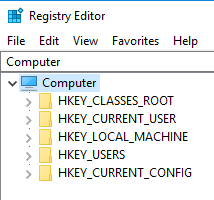
Figure 1: Registry editor in Windows
Figure 1 shows additional registry hives some of which we will explore in later modules.
Since a 64-bit version of Windows can execute 32-bit applications each registry hive contains a duplicate section called Wow6432Node which stores the appropriate 32-bit settings.
The registry is used extensively by the operating system and a variety of applications. As penetration testers, we can obtain various reconnaissance information from it or modify it to improve attacks or perform evasion.
2.3. Wrapping Up
This module provided a brief introduction to programming and a high-level overview of some important aspects of the Windows operating system. This extremely brief overview serves to prepare us for the techniques we will use and develop in this course.