2. Wi-Fi Encryption
Wi-Fi works over radio waves, which means it is subject to eavesdropping and therefore, encryption has to be used to protect the transmitted data.
Wired Equivalent Privacy (WEP) was created when the 802.11 standard was released to provide privacy features similar to those found in wired networks.
As soon as flaws were discovered in WEP (WEP can be cracked in under a minute), the IEEE created a new group called 802.11i aimed at improving Wi-Fi security. Wi-Fi Protected Access (WPA) superseded WEP in 2003, followed by WPA2 in 2004 (802.11i standard).
Soon after, technologies from various vendors allowed users to securely share the passphrases on devices to be added on the network without having to type it. Wi-Fi Protected Setup (WPS) was released in 2006 to standardize it.
WPA3 was first announced by the Wi-Fi Alliance in January 2018 and released in June the same year. It isn't meant to replace any existing security solutions but aims to solve a few key problems with the following:
- Forward secrecy, using a Dragonfly handshake, with SAE
- Simplify process of configuring devices with no display (such as IoT)
- A new 192-bit mode for enterprise networks with stronger cipher suites
- Mandatory use of Protected Management Frames (PMF), from 802.11w
Opportunistic Wireless Encryption (OWE), also known as "Enhanced Opened", adds encryption to public Wi-Fi networks.
2.1. Open Wireless Networks
Open networks do not involve any encryption so anyone running a wireless sniffer can see the traffic "as is". Public hotspots and older mesh networks are good examples of open networks. The process of connecting to an open network is shown in 1 below.
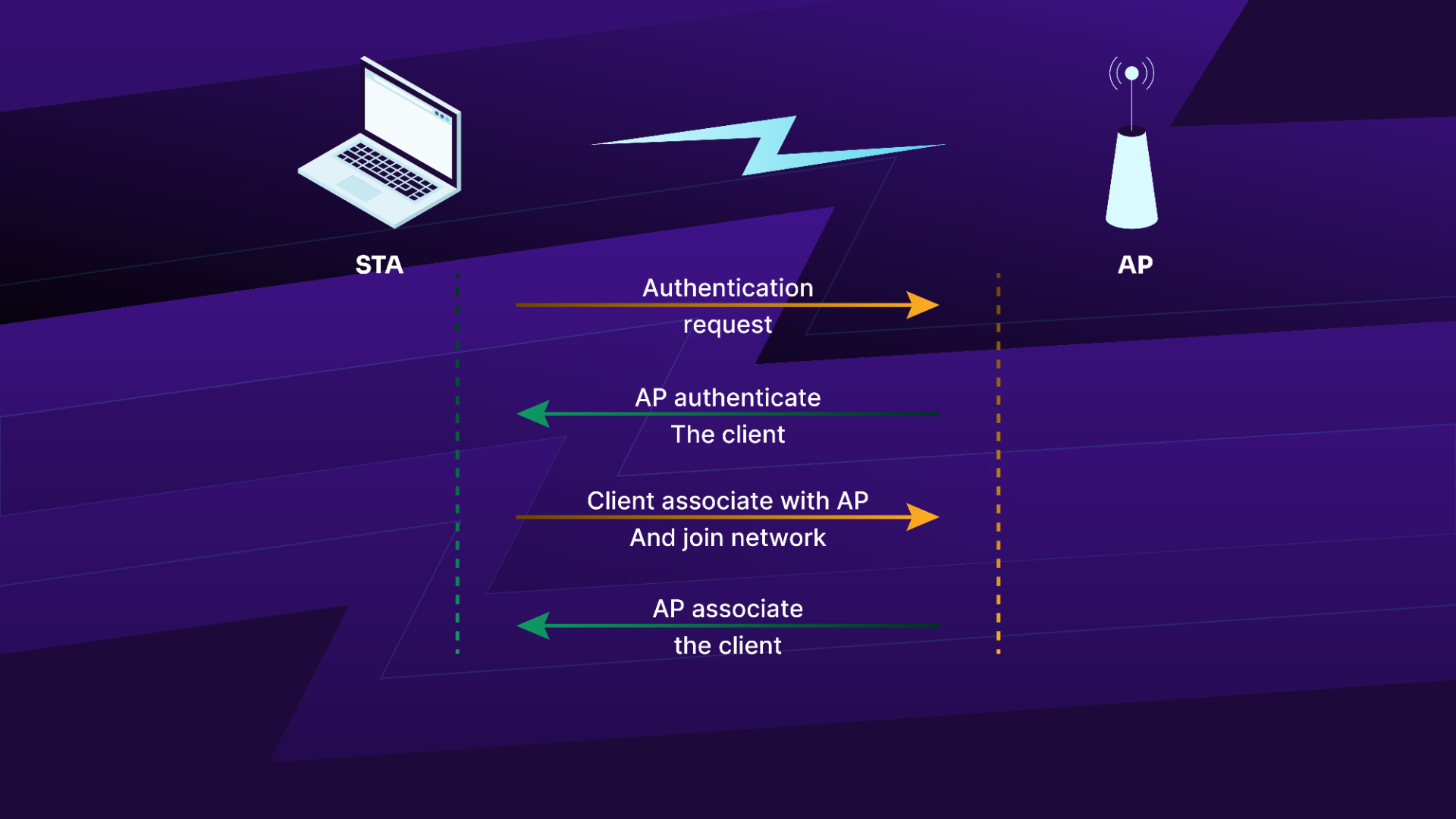
Figure 1: The Process of connecting to open networks
This process of connecting to the network is as follows:
- The client sends an authentication request to the AP
- The AP sends an authentication response of "successful"
- The STA sends an association request to the access point
- The AP sends an association response if the capability of the clients meets that of the AP
2.2. Wired Equivalent Privacy
Open networks are susceptible to eavesdropping, as the traffic on them is not encrypted. WEP aims at providing some degree of privacy to data exchanged on the wireless network. It is part of the IEEE 802.11 standard and is a scheme used to secure wireless networks using Rivest Cipher 4 (RC4) to encrypt traffic and performs CRC32 checksums for message integrity.
WEP encryption only uses a 24-bit initialization vector (IV) as when the WEP standard was being drafted, the key size was limited due to US government export restrictions on cryptographic technologies. A 64-bit key was permitted, of which, 24 bits are used for IVs, thus reducing the real key size to 40 bits. Once the export restrictions were lifted, 128-bit WEP (using the same 24-bit IV) was implemented.
2.2.1. RC4
RC4 was designed by Ron Rivest from RSA Security and was chosen for wireless encryption due to its simplicity and impressive speed.
RC4 is a symmetric cipher, meaning that the same key is used to both encrypt and decrypt the data. It creates a stream of bits that are XOR'd with plain text to get the encrypted data. To decrypt it, we can simply XOR the encrypted text with the key stream to recover the plain text.
RC4 consists of two key elements:
- Key Scheduling Algorithm (KSA): Initializes the state table with the IV and WEP key
- Pseudo-Random Generation Algorithm (PRGA): Creates the keystream
Figure 2 illustrates the encryption and decryption of plain text data using the keystream generated above.
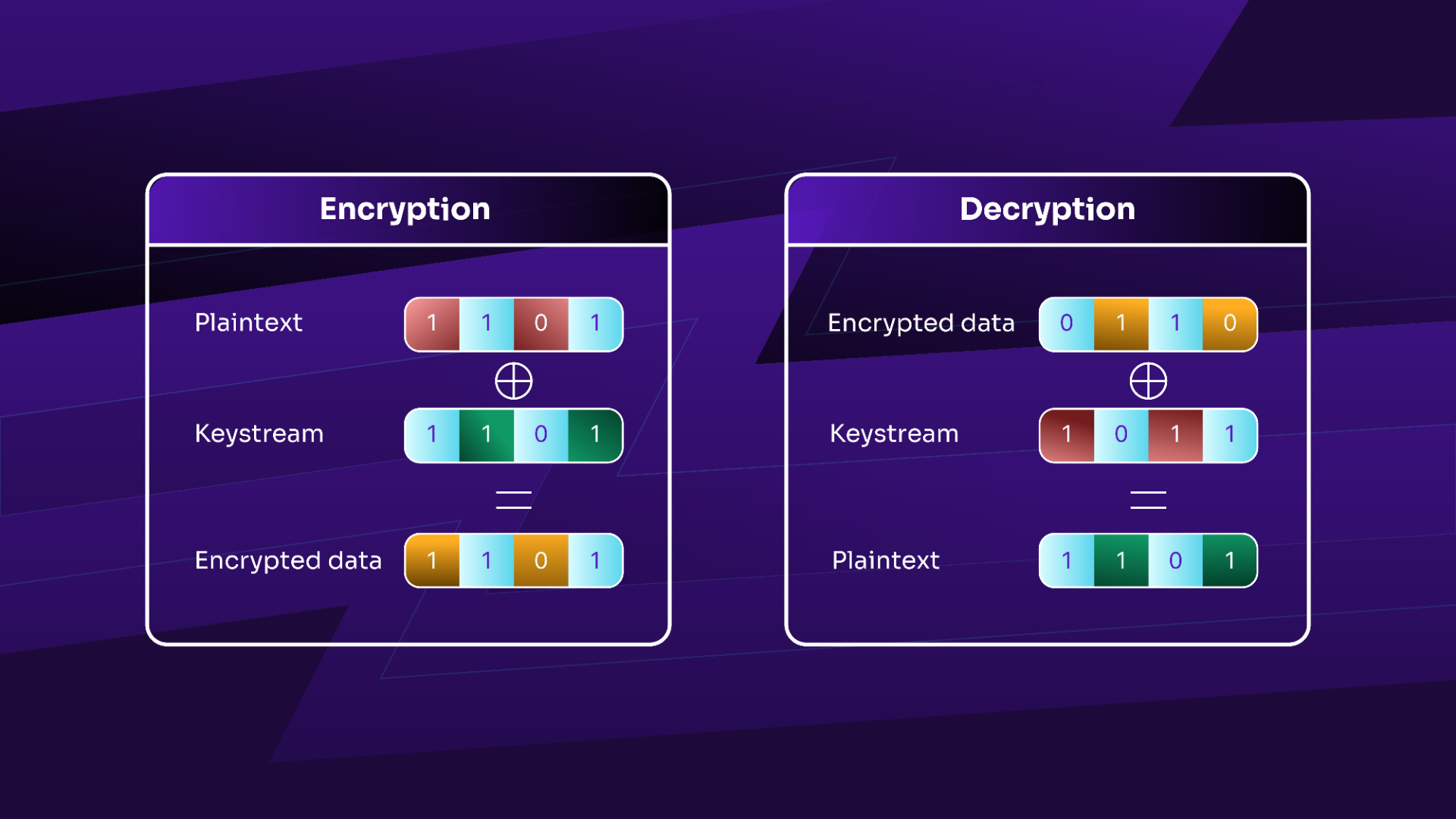
Figure 2: RC4 encryption/decryption overview
Below, in Figure 3, we have a diagram outlining the WEP encryption process.
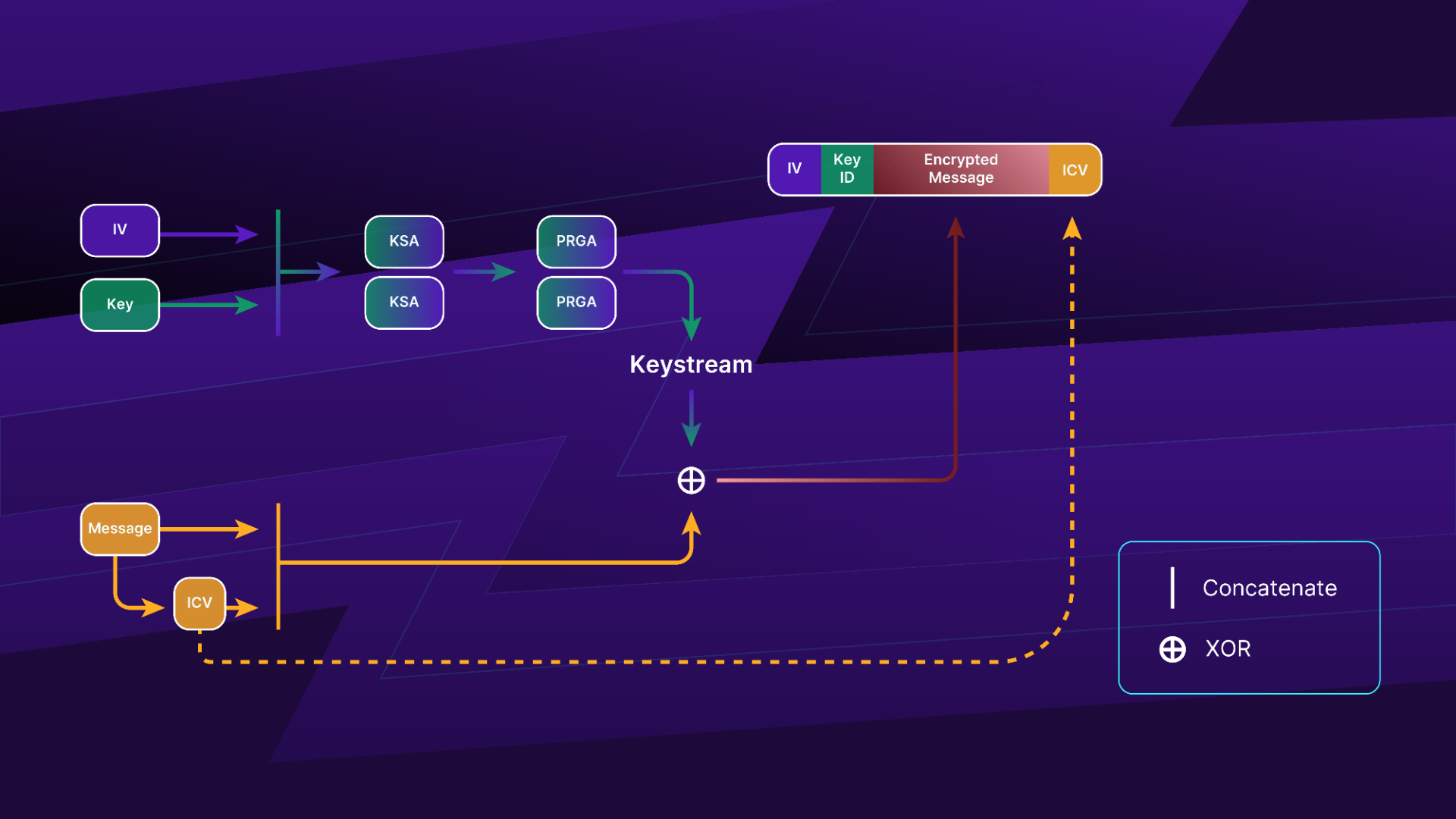
Figure 3: The WEP encryption process
A brief outline of the steps involved in WEP encryption is:
-
Concatenate the IV and WEP key, then run KSA and PRGA to get the keystream.
-
Create the Integrity Check Value (ICV) of the message, then concatenate it to the message.
-
XOR the plain text message plus the CRC32 and the keystream to obtain the encrypted text.
-
The packet then contains the following elements:
- IV (Used Previously)
- Key ID
- Encrypted Text
- ICV that is the CRC32 of the plain text
The WEP decryption process flows according to Figure 4 as shown below.
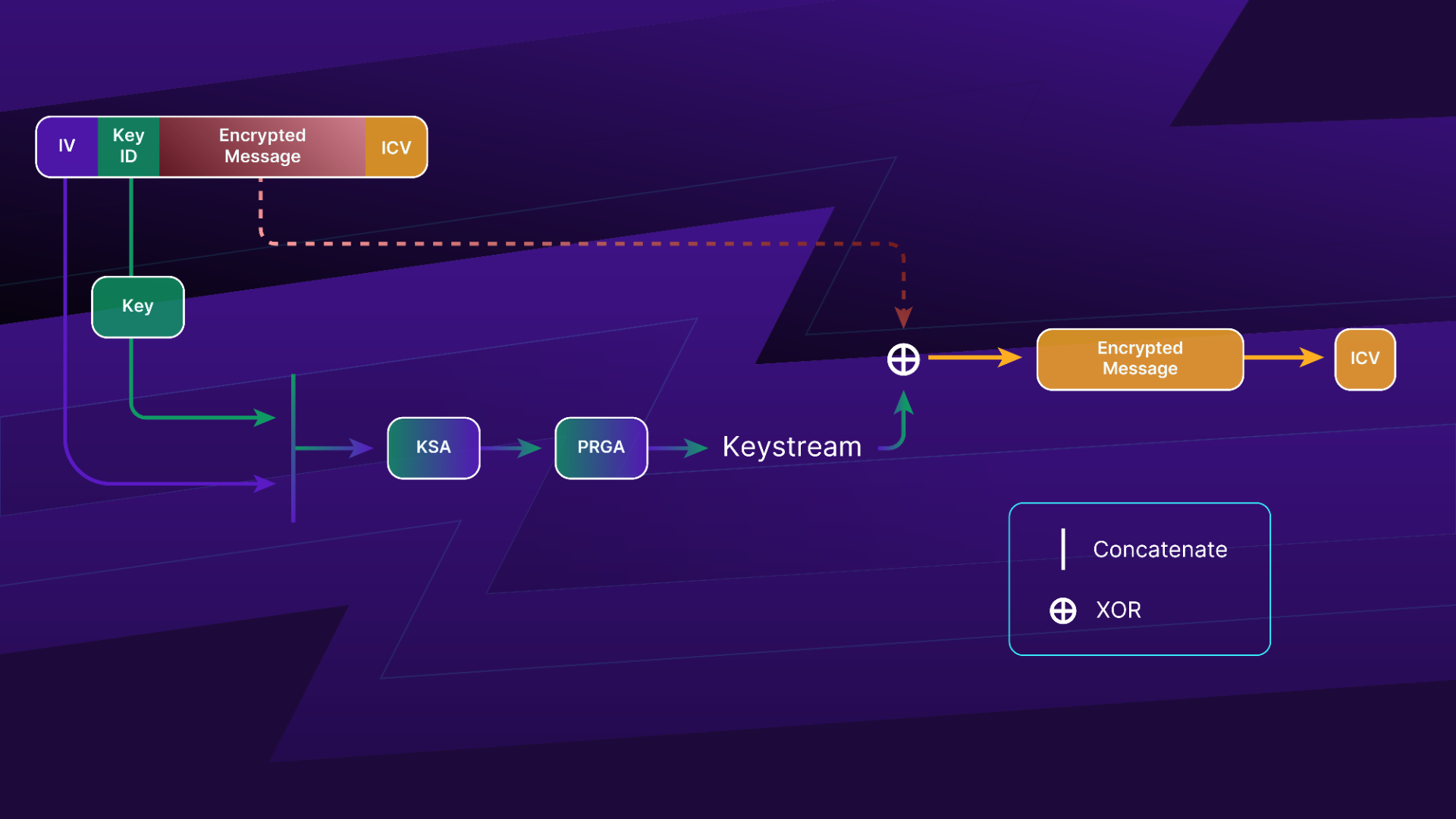
Figure 4: The WEP decryption process
The steps that take place during the decryption process are as follows:
- Concatenate the IV and the key corresponding to the key ID, then run KSA and PRGA to obtain the keystream.
- XOR the encrypted message and the keystream, resulting in the message + ICV.
- Compare the decrypted ICV with the one received with the packet. If they are the same, the frame is intact and accepted, otherwise, discard the frame, as the packet is fake or corrupted.
2.2.2. WEP Authentication
WEP can make use of two authentication systems: Open or Shared authentication. Open authentication is trivial and commonly used. Shared authentication, on the other hand, is fairly uncommon and clients will often struggle trying open authentication before switching to shared authentication.
Open Authentication
In open authentication, a client does not provide any credentials when authenticating to the Access Point. However, once associated, it must possess the correct key to encrypt and decrypt data frames.
Shared Authentication
During authentication, a challenge text is sent to the client. The challenge text must be encrypted with the WEP key by the client and sent back to the AP for verification, which allows the client to prove knowledge of the key. Once the encrypted challenge text is received, the AP attempts to decrypt it. If it is successful and matches the clear text version of the challenge text, the client is allowed to proceed to associate to the access point.
2.3. Wi-Fi Protected Access
The IEEE 802.11i group, aimed at improving wireless security, proceeded to develop two new link layer encryption protocols: Temporal Key Integrity Protocol (TKIP) and Counter Mode with CBC-MAC (CCMP).
CCMP was designed from the ground up and took much more time to complete in comparison to TKIP. TKIP ended up with the commercial name WPA1 while WPA2 was given to CCMP.
WPA encryption comes in two flavors:
- WPA Personal: Makes use of pre-shared key authentication (WPA-PSK), a passphrase shared by all peers of the network.
- WPA Enterprise: Uses 802.1X and a Radius server for Authentication, Authorization, and Accounting (AAA).
In Figure 5 below, we have an illustration of the setup to create the WPA secure communication channel.
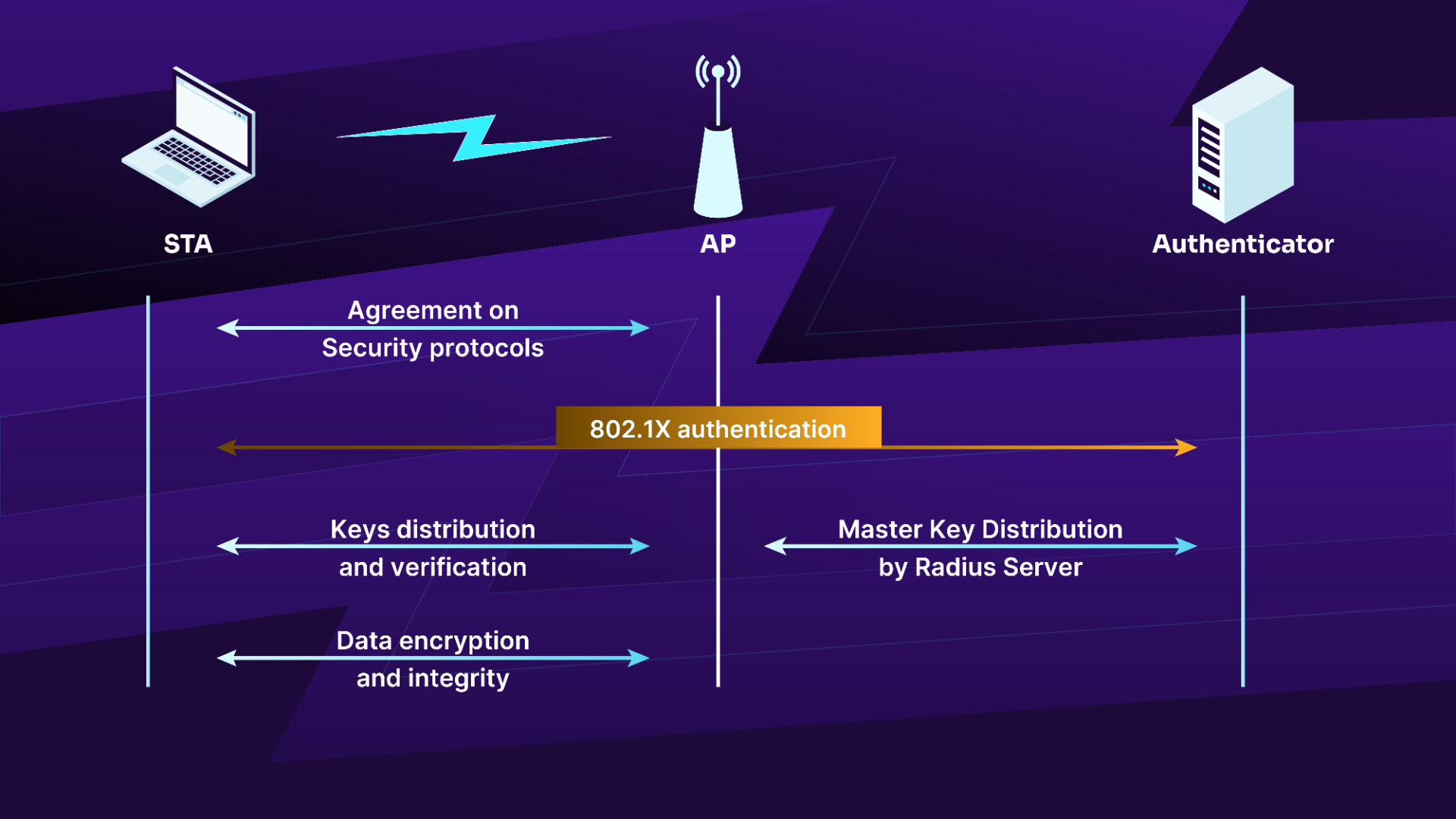
Figure 5: The WPA connection process
2.3.1. WPA Ciphers
Two ciphers are available, TKIP, for legacy hardware that can only handle WEP, and CCMP, that is based on Advanced Encryption Standard (AES).
TKIP
TKIP is based on the third draft of 802.11i. It was designed to be backward compatible with legacy hardware and still uses WEP as the encryption algorithm although it addresses the flaws found in WEP with the following elements:
- Per packet key mixing
- IV sequencing to avoid replay attacks
- New Message Integrity Check (MIC), using the Michael algorithm and countermeasures on MIC failures
- Key distribution and rekeying mechanism
CCMP
CCMP is the implementation of the final version of 802.11i and is also called Robust Security Network (RSN). It makes use of a new AES-based algorithm. It was designed from the ground up and is not compatible with older hardware.
2.3.2. WPA Network Connection
The secure communication channel is set up in four steps:
- Agreement on security protocols
- Authentication
- Key distribution and verification
- Data encryption and integrity
In Figure 6 below, we have an illustration of the setup to create the WPA Enterprise secure communication channel.
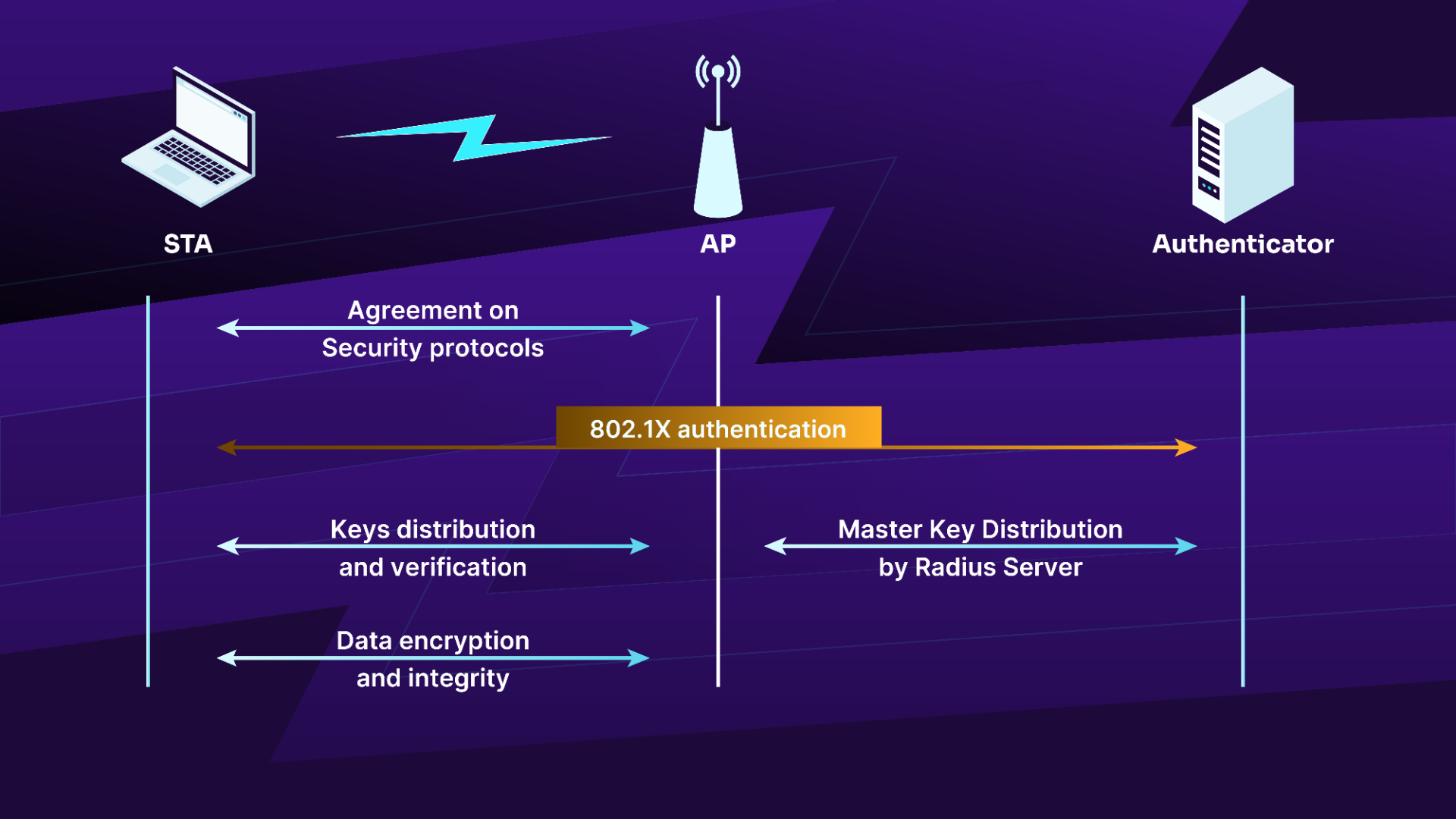
Figure 6: The WPA Enterprise connection process
In WPA-PSK systems, the process is slightly simplified, as only 3 steps are required. The authentication step is removed as illustrated below.
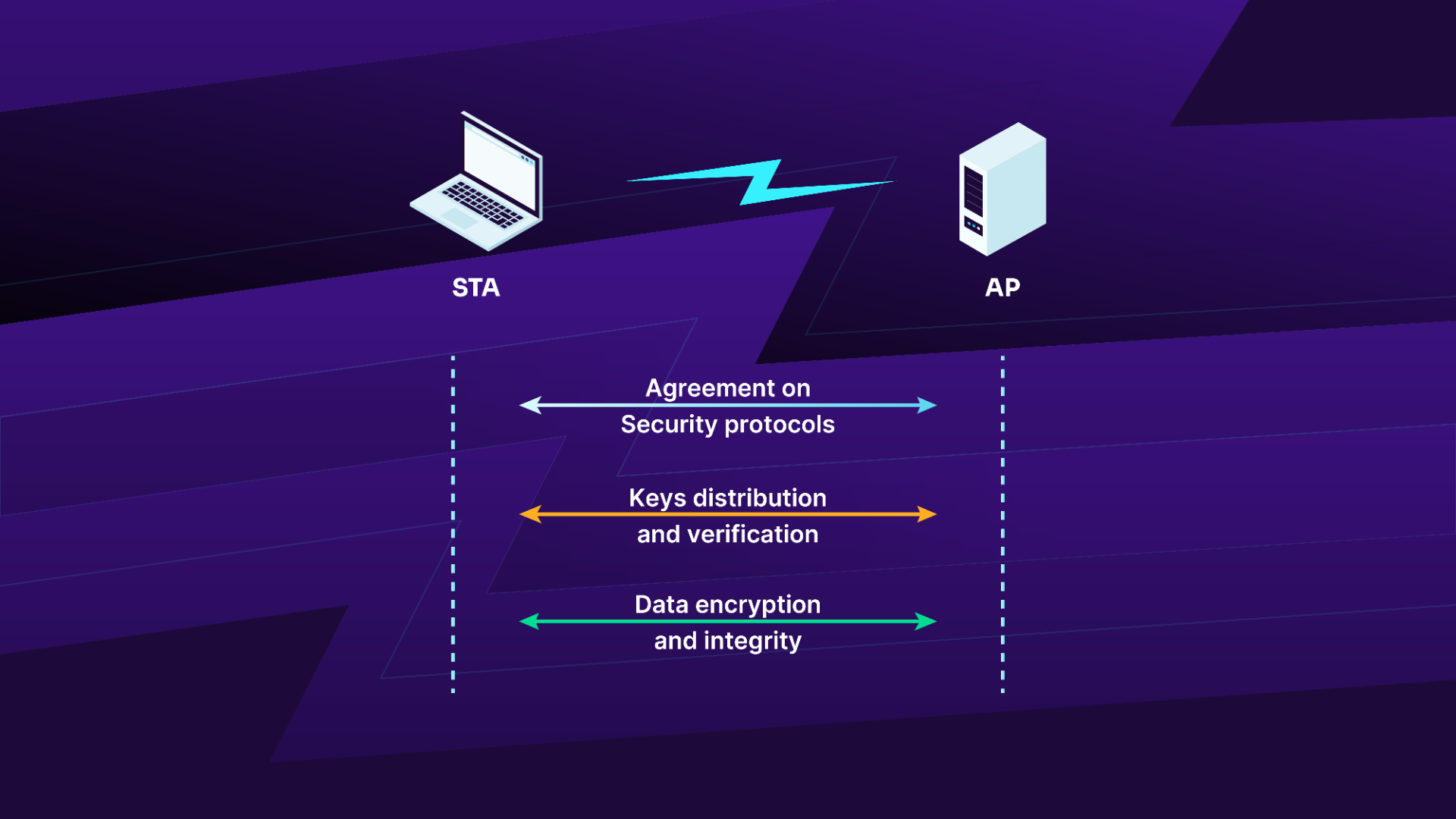
Figure 7: The WPA-PSK connection process
Agreement on Security Protocols
The different security protocols allowed by the AP are provided in its beacons:
- Authentication means, either by PSK or by 802.1X using a AAA server
- Unicast and multicast/broadcast traffic encryption suite: TKIP, CCMP
The STA first sends a probe request to receive network information (i.e. rates, encryption, channel, etc.) and will join the network by using open authentication followed by association where it indicates which ciphers will be used.
2.3.3. WPA Authentication
The authentication step is only done in WPA Enterprise configurations. It is based on the Extensible Authentication Protocol (EAP) and can be done with the following:
- EAP-TLS with client and server certificates
- EAP-TTLS
- PEAP for hybrid authentication where only the server certificate is required
This authentication is started when the client selects the authentication mode to use. Several EAP messages, depending on the authentication mode, will be exchanged between the authenticator and the supplicant to generate a Master Key (MK).
At the end of the procedure, if successful, a "Radius Accept" message is sent to the AP containing the MK and another message, an EAP message sent to the client to indicate success.
Key Distribution and Verification
The third phase focuses on the exchange of the different keys used for authentication, message integrity, and message encryption. This is done via the 4-way handshake to exchange the Pairwise Transient Key (PTK) and the current Group Temporal Key (GTK), respectively the keys used for unicast and multicast/broadcast, and then the Group Key handshake to renew the GTK.
This part allows:
- Confirmation of the cipher suite used
- Confirmation of the PMK knowledge by the client
- Installation of the integrity and encryption keys
- Send GTK securely
An illustration of the key distribution and verification phases is shown in Figure 8.
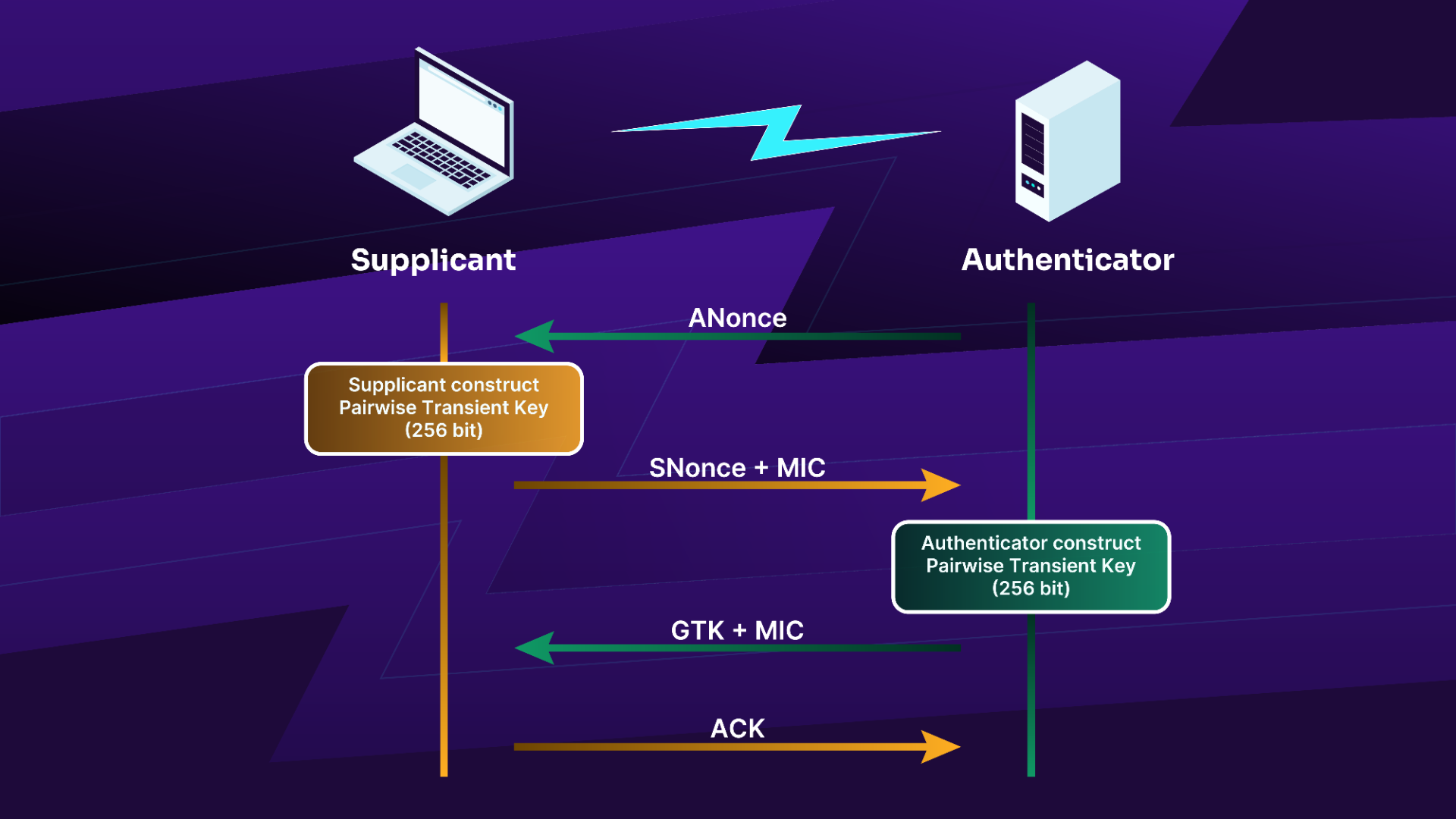
Figure 8: The key distribution and verification phase
Note: The authenticator is the AP and the supplicant is the STA.
- The authenticator sends a nonce to the supplicant, called ANonce.
- The supplicant creates the PTK and sends its nonce, SNonce, with the MIC. After the construction of the PTK, it will check if the supplicant has the right PMK. If the MIC check fails, the supplicant has the wrong PMK.
- The message from the authenticator to the supplicant will contain, when WPA2/3 is used, the current GTK. This key is used to decrypt multicast/broadcast traffic. If that messages fails to be received, it is re-sent. If 802.11w is negotiated, IGTK is included. With WPA1, GTK will be sent in a later exchange.
- Finally, the supplicant sends an acknowledgement to the authenticator. The supplicant installs the keys and starts encryption.
The group key handshake is much simpler than pairwise keys because it is done after the 4-way handshake (after installing keys) and thus we now have a secure link. It is also done via Extensible Authentication Protocol over LAN (EAPoL) messages but this time, the messages are encrypted. The diagram below illustrates this process.
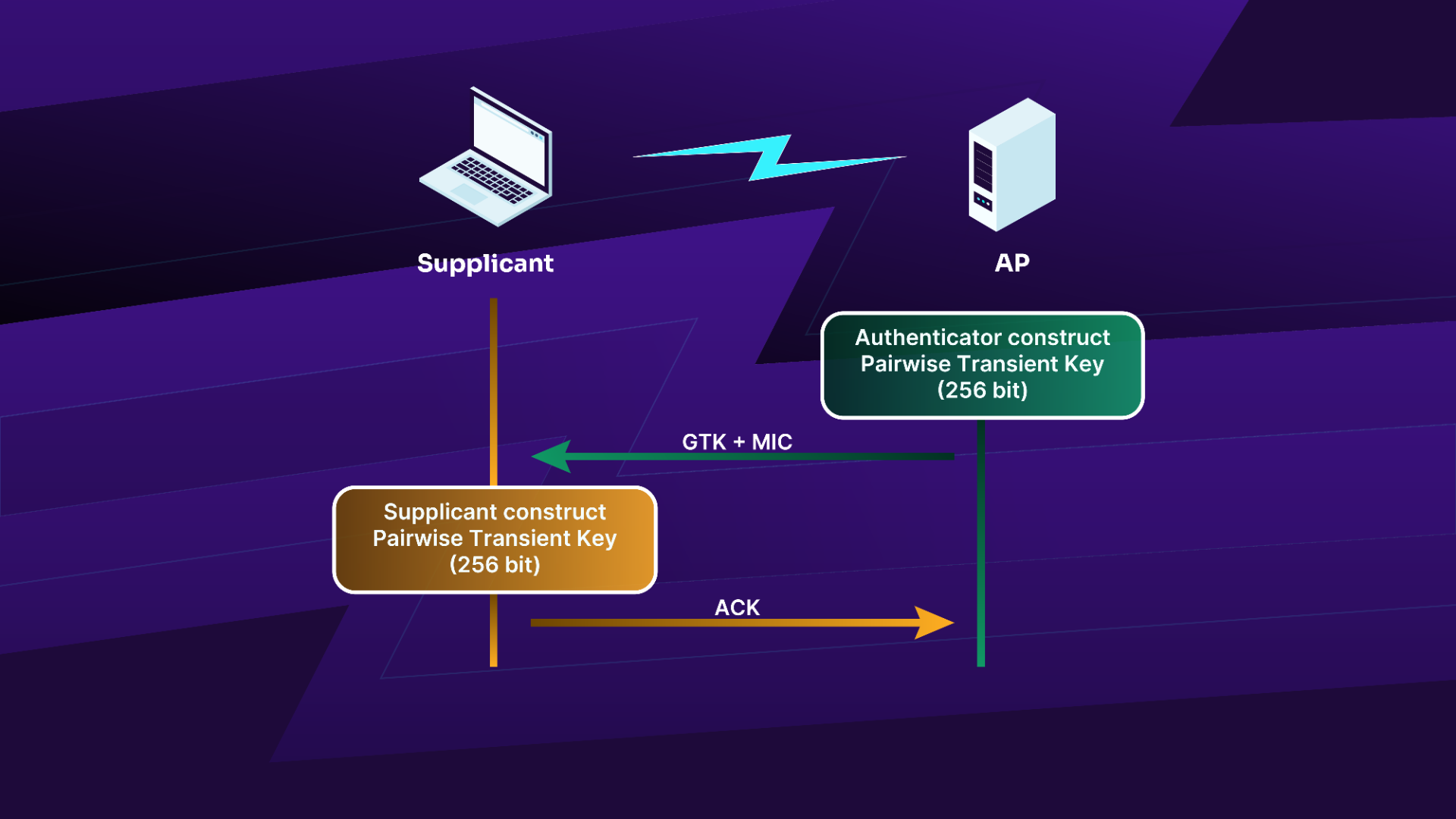
Figure 9: The group key handshake process
If 802.11w is negotiated, an IGTK is sent along the GTK. The MIC is verified by the STA and acknolwedged in message 2.
This update process happens for the following reasons:
- WPA1, after the 4-way handshake
- A station joins the network
- A station leaves the network
- When a timer expires (controlled by the authenticator, the AP)
- A station can request it by sending an unsolicited confirmation message
- A station can request it by sending an EAPOL-Key frame with both Request and Group Key bits set
Pairwise Transient Key
In Figure 10, we have the process to generate the Pairwise Transient Key (PTK), derived from the Pairwise Master Key (PMK).
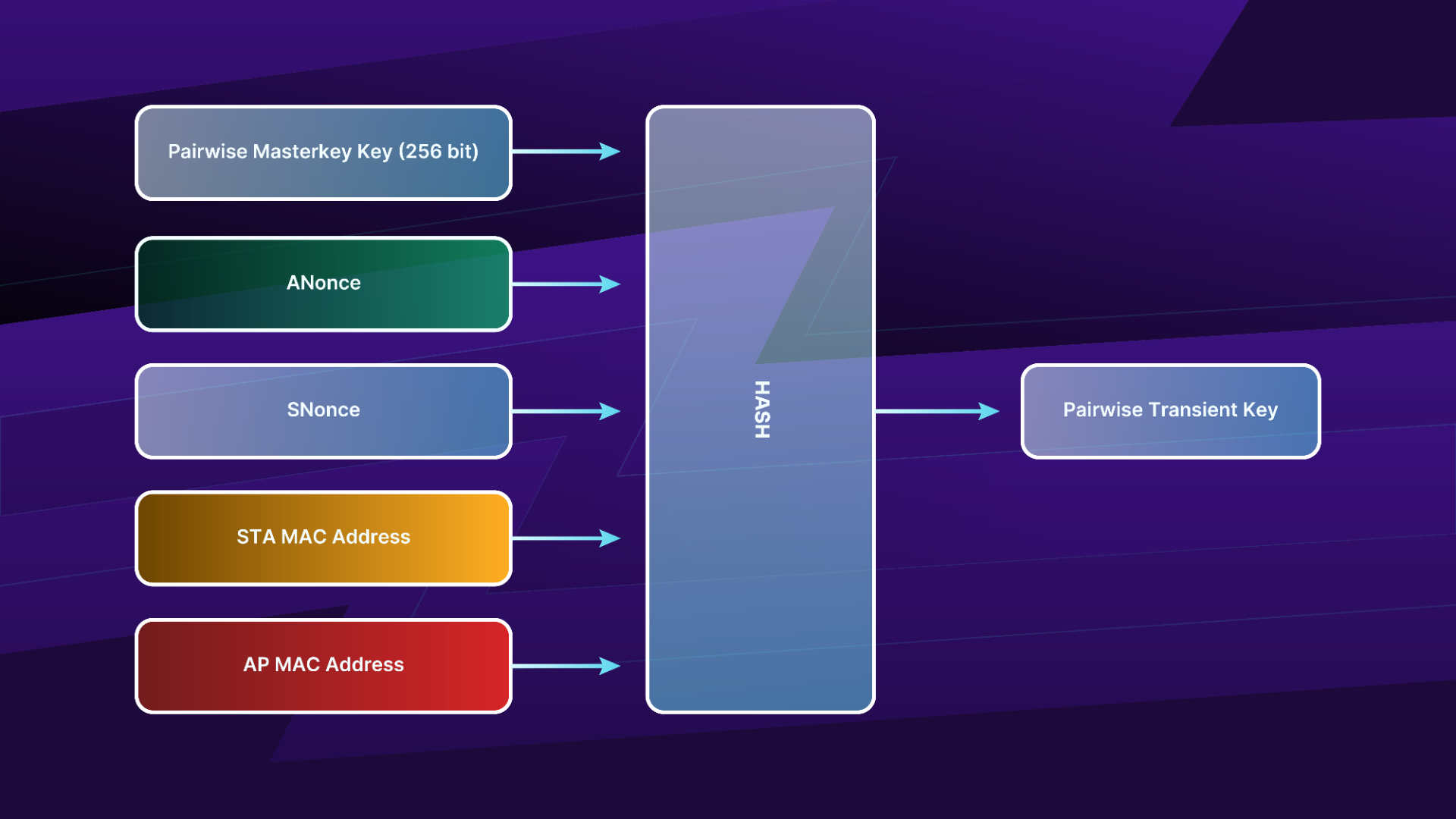
Figure 10: The Pairwise Transient Key generation process
Input
As input, it takes both nonce values, both MAC addresses (supplicant and authenticator), and the PMK. The PMK calculation works as follows:
If the system is WPA Personal, it uses the PBKDF2 function with the following values to generate the PSK (the PSK is then used as the PMK):
- Password, the passphrase
- SSID (and its length)
- The number of iterations, 4096
- The length of the result key, 256 bits
For WPA Enterprise using a Radius server, the PMK is generated from the Master Key (obtained during the exchange with the server) via the TLS-PRF function.
Hash Algorithm
PRF-X using HMAC-SHA1, X being 128, 192, 256, 384, 512 or 704, which indicates the size of the output in bits.
Output
The PTK is then divided in different keys. Below are the common parts from TKIP and CCMP:
- Key Encryption Key (KEK) (128-bit; bits 0-127): used by the AP to encrypt additional data sent to the STA, for example, the RSN IE or the GTK
- Key Confirmation Key (KCK) (128-bit; bits 128-255): used to compute the MIC on WPA EAPOL Key messages
- Temporal Key (TK) (128-bit or 256-bit; bits 256-383 or 256-511): used to encrypt/decrypt unicast data packets
The CCMP PTK size is 384 bits, comprised of the three keys shown above. TKIP requires two more keys for message integrity, thus increasing the PTK size to 512 bits:
- MIC TX Key (64-bit; bits 384-447): used to compute MIC on unicast data packets sent by the AP
- MIC RX Key (64-bit; bits 448-511): used to compute MIC on unicast data packets sent by the STA
TK is 128-bit unless the following cipher suites are used:
- WEP-40 (40 bits)
- WEP-104 (104 bits)
- GCMP-256 (256-bits)
- CCMP-256 (256-bits)
- BIP-GMAC-256 (256-bits)
- BIP-CMAC-256 (256-bits)
Group Temporal Key
The GTK is used to encrypt and decrypt multicast/broadcast traffic. Its construction takes place according to the following illustration. Note that the GTK is just a random number, which means any pseudorandom function can be used to generate it.
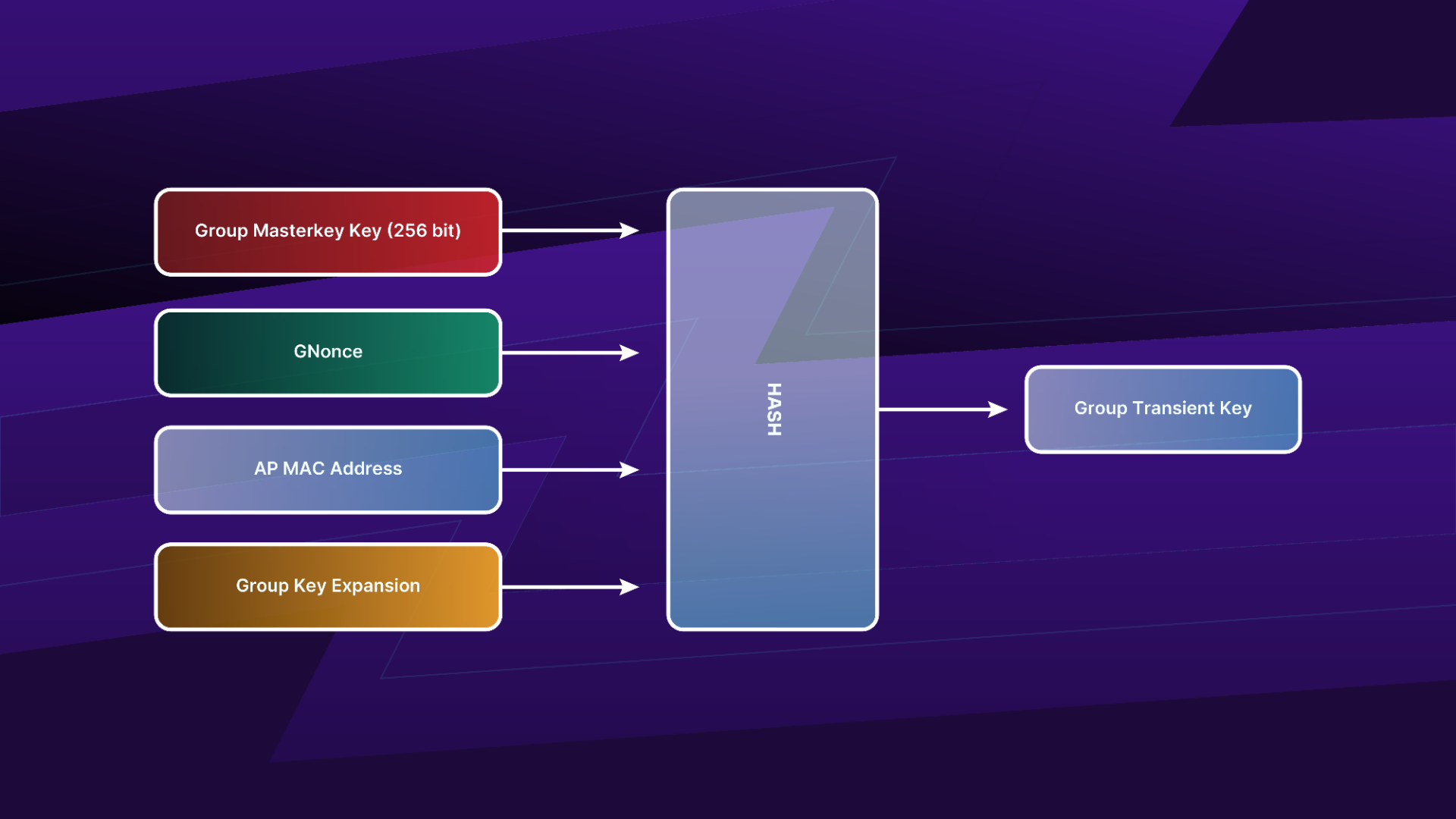
Figure 11: The GTK construction process
Data Encryption and Integrity
There are three different algorithms that can be used for data encryption and integrity:
- Temporal Key Integrity Protocol (TKIP)
- Counter Mode with CBC-MAC (CCMP)
- Wireless Robust Authenticated Protocol (WRAP)
These algorithms are far more complex than WEP and will not be detailed here.
Temporal Key Integrity Protocol
The following diagram shows the different fields in a TKIP encrypted frame:
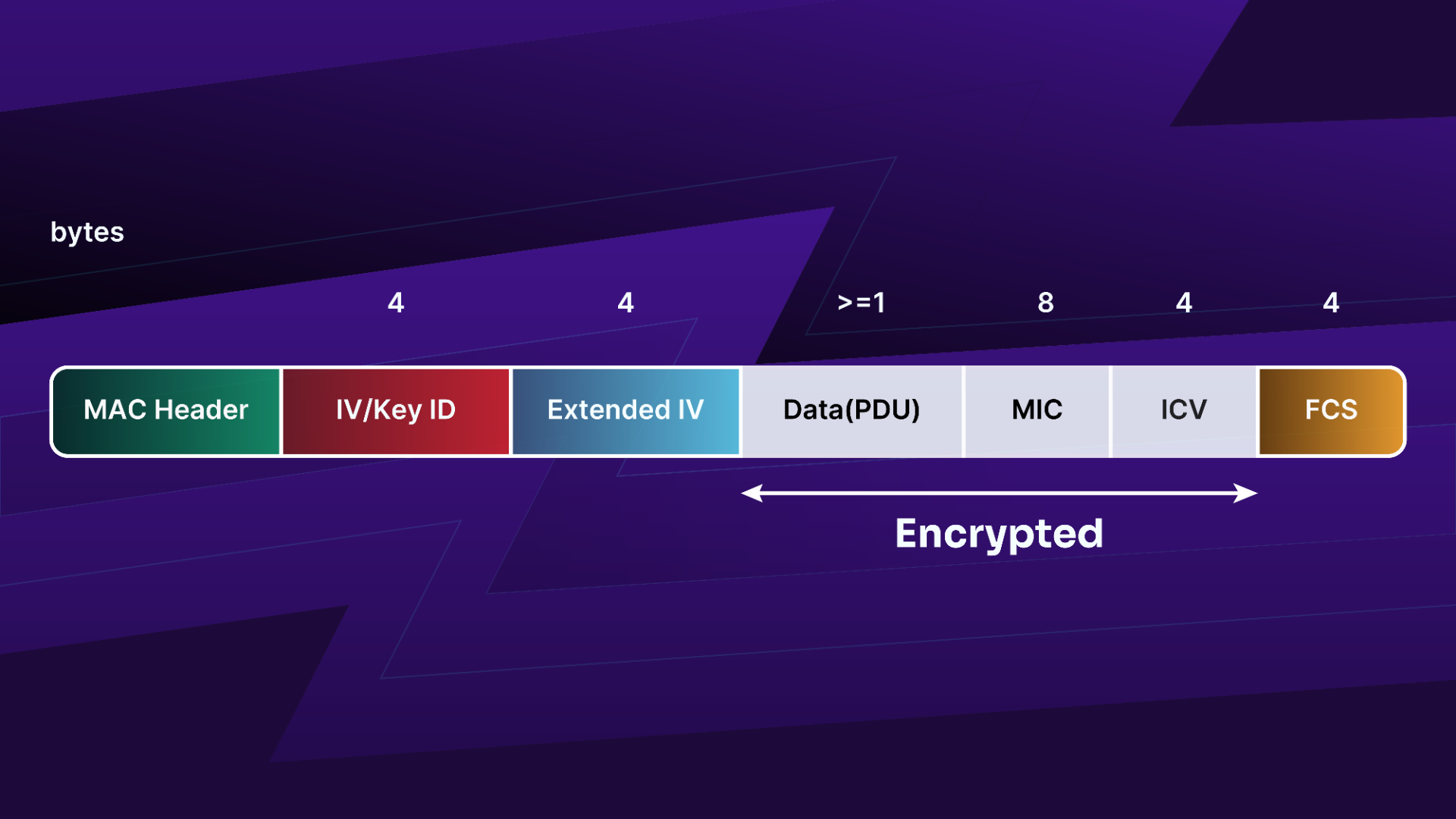
Figure 12: A TKIP encrypted frame
Counter Mode with CBC-MAC
13 below shows the different fields in a CCMP encrypted frame:
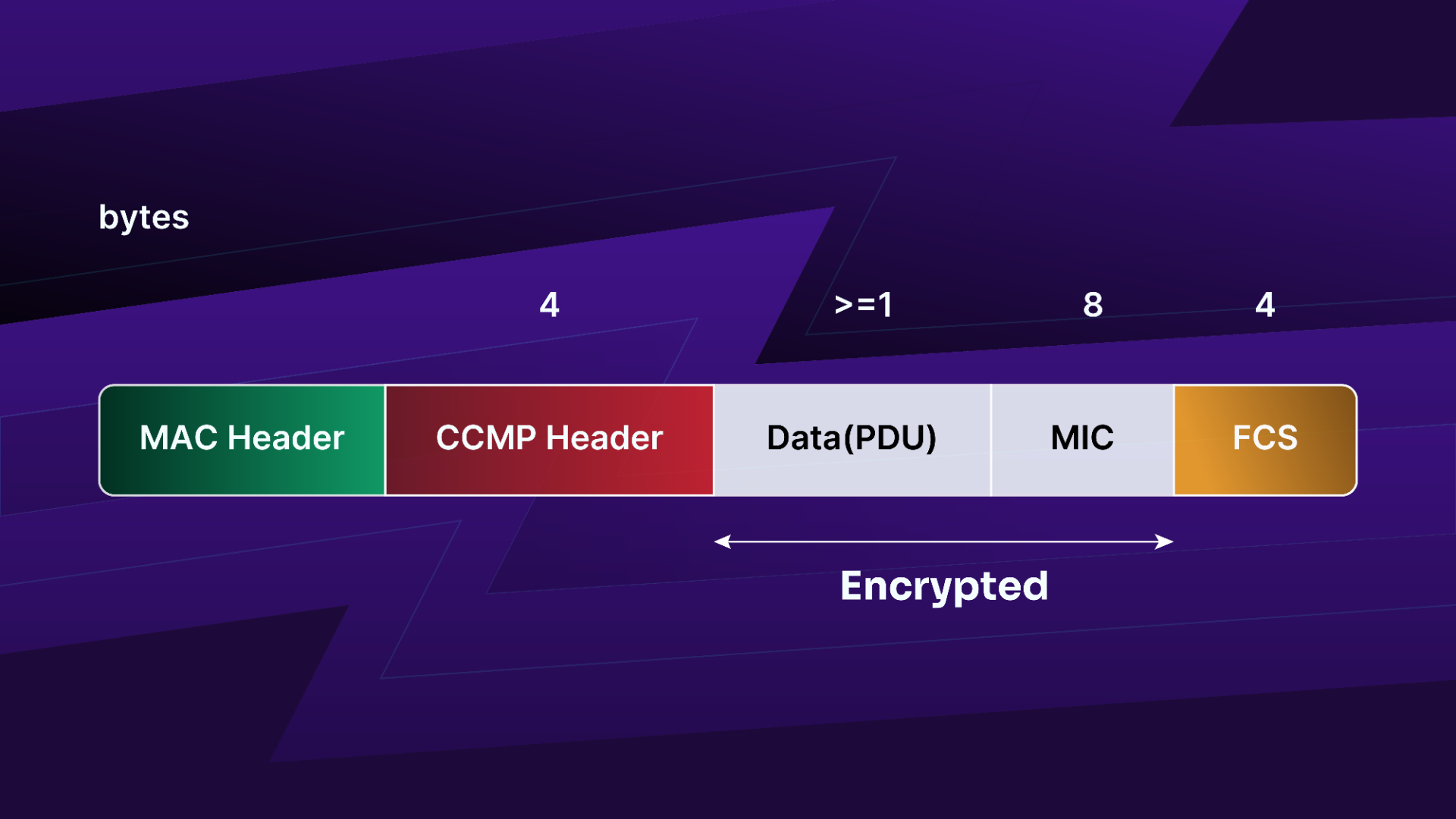
Figure 13: A CCMP encrypted frame
Wireless Robust Authenticated Protocol
WRAP is based on AES but uses the Offset Codebook Mode (OCB) cipher and authentication scheme. It was the first to be selected by the 802.11i working group but was abandoned due to intellectual property reasons.
2.4. Wi-Fi Protected Access 3
Simultaneous Authentication of Equals (SAE) replaces PSK in WPA personal, which is the same encryption used in mesh networks (802.11s). It is a variant of Dragonfly. In WPA3-only mode, PMF is mandatory. In transition mode, mixed WPA2 and WPA3, PMF is optional in WPA2 and mandatory when establishing a connection in WPA3.
WPA Enterprise gets a 192-bit mode with stronger security protocols. Authentication and encryption will use GCMP-256. Key derivation and confirmation use HMAC-SHA384. Key establishment and authentication use ECDHE and ECDSA using a 384-bit elliptic curve.
WPA3 doesn't use any newer encryption algorithm, but now AES is the only cipher allowed.
Where WPA/WPA2 (as well as Open networks and WEP) has a simple authentication and association phase, before the 4-way handshake, the authentication phase is reworked and this is where the Dragonfly handshake happens.
There are two phases, or exchanges in the authentication phase. First, a commit exchange followed by a confirm exchange.
In the commit exchange, both sides commit to a shared secret. In the confirm exchange, they confirm they both share the same password and then derive a PMK that will be then used in the 4-way exchange.
SAE offers a better way to establish a secure connection by using a Diffie-Hellman (DH) key exchange with an Elliptic Curve or a Prime Modulus.
The following is the list of the different groups for the Diffie-Hellman Exchange:
| Number | Name |
|---|---|
| 0 | NONE |
| 1 | 768-bit MODP Group |
| 2 | 1024-bit MODP Group |
| 3-4 | Reserved |
| 5 | 1536-bit MODP Group |
| 6-13 | Unassigned |
| 14 | 2048-bit MODP Group |
| 15 | 3072-bit MODP Group |
| 16 | 4096-bit MODP Group |
| 17 | 6144-bit MODP Group |
| 18 | 8192-bit MODP Group |
| 19 | 256-bit random ECP group |
| 20 | 384-bit random ECP group |
| 21 | 521-bit random ECP group |
| 22 | 1024-bit MODP Group with 160-bit Prime Order Subgroup |
| 23 | 2048-bit MODP Group with 224-bit Prime Order Subgroup |
| 24 | 2048-bit MODP Group with 256-bit Prime Order Subgroup |
| 25 | 192-bit Random ECP Group |
| 26 | 224-bit Random ECP Group |
| 27 | brainpoolP224r1 |
| 28 | brainpoolP256r1 |
| 29 | brainpoolP384r1 |
| 30 | brainpoolP512r1 |
| 31 | Curve25519 |
| 32 | Curve448 |
| 33-1023 | Unassigned |
| 1024-65535 | Reserved for Private Use |
The bare minimum requires all implementations to support group 19.
While all of them could be used, only the groups 15 to 21 are suitable for production due to security reasons. These groups have a prime with 3072 bits and above for FFC and a 256 bits prime and above when it is ECC.
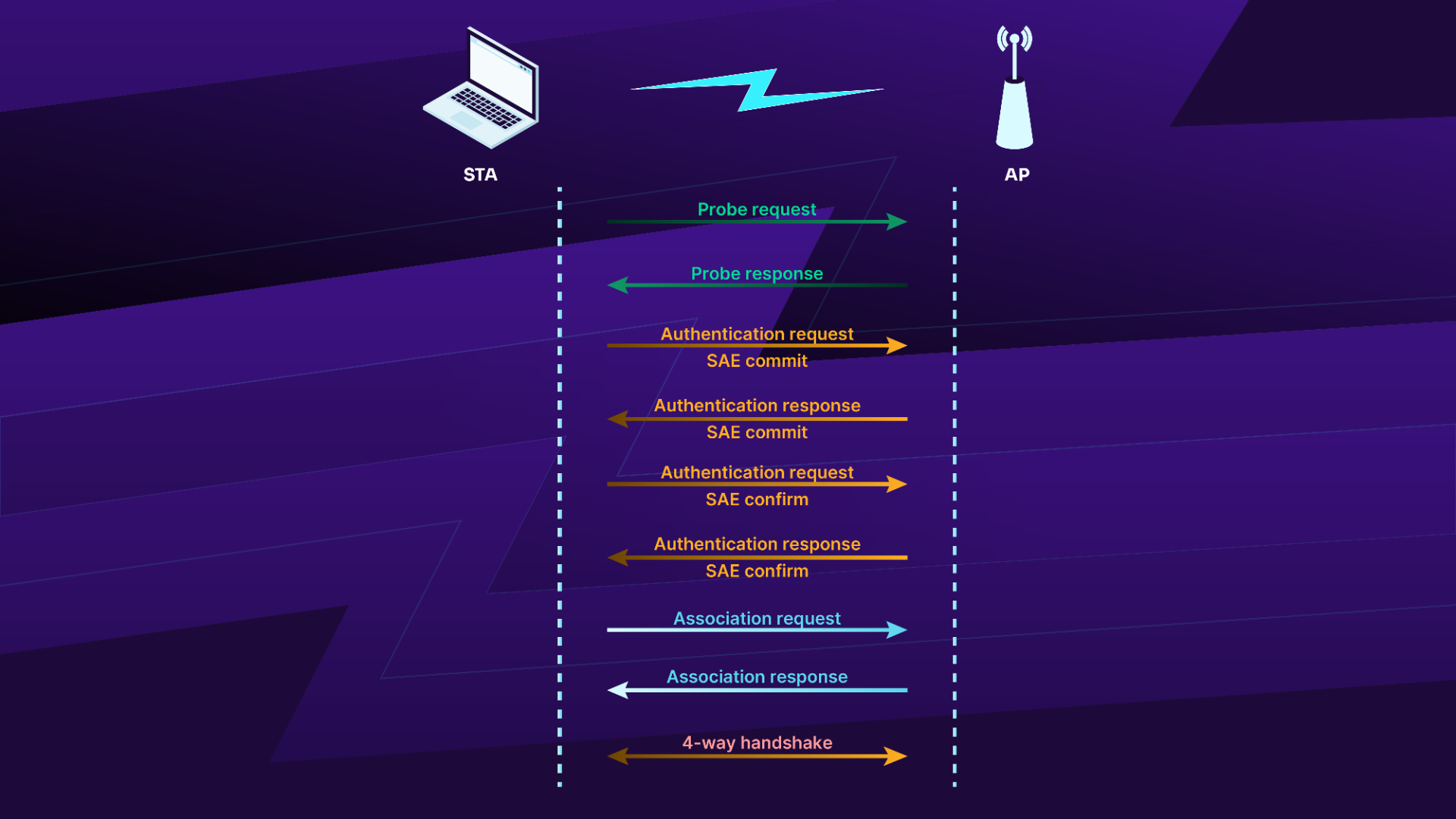
Figure 14: WPA3 authentication
2.5. Opportunistic Wireless Encryption
Marketed as Enhanced Open by the Wi-Fi Alliance, OWE allows for the mitigation of attacks and eavesdropping on open networks by encrypting the connections.
As mentioned above, in an Open network situation, the authentication and association is a straightforward process, which leads to network access immediately. There is no authentication or encryption.
With OWE, a Diffie-Hellman exchange is done during the association phase and the result is then used as the secret to do a 4-way handshake. The client, upon noticing the access point supports OWE, will add his public key to the Association request which will be followed by the access point's public key in the Association response.
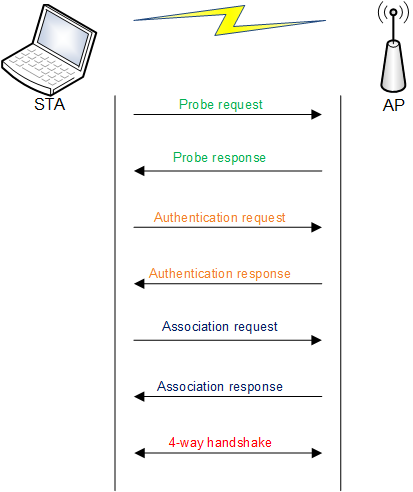
Figure 14: Opportunistic Wireless encryption connection
Diffie-Hellman Exchange may sound similar to public key encryption (such as RSA). It is asymmetric/public key technology but it differs in the fact that it isn't an encryption algorithm, it is aimed to generate and exchange a key which is then used for symmetric encryption. In this case, for the 4-way handshake.
Like WPA3, it also depends upon PMF and it must set as 'required' on the AP for OWE to be available (as opposed to 'optional'). When available, it will be indicated in the Beacon and Probe responses. Specifically, in the Authentication and Key Management (AKM) suite list in the RSN IE.
APs will likely support Transition mode, which allows Open networks and OWE at the same time, so legacy devices can still connect. Transition mode APs may have a separate BSSID/ESSID to handle both types of clients.
The hash algorithm will depend on the size of the key, which is linked to the DH group used. For Elliptic Curve Cryptography (ECC), with keys up to 256bits, SHA-256 is used. Until 384 bits, SHA-384 and for anything above, SHA-512. Using Finite Field Cryptography (FFC), up to 2048bits, SHA-256 will be used. Until 3072 bits, SHA-384 and for anything above, SHA-512.
While the Diffie-Hellman groups referenced are the sames as in WPA3, it is believed that only group 19, 20 and 21, which are ECC, will be used in OWE.
When connecting to the Access Point, two specific Information Elements (IE) must present in the association request sent by the client:
- The RSN IE must indicate OWE AKM
-
An IE (ID 255) containing the public key and the group. Its content will be as follows:
-
Element ID extension, which is a one octet and has the value of 32
- Element-specific data, subdivided in two parts, a two-octet field (in little endian), indicating the group used, followed by the public key
The public key encoding depends on its type. If it is FFC, then it must be encoded based on the integer-to-octet-string conversion of RFC6090. ECC is a bit more complex, as it depends on the curve used, which is defined in RFC6090 or RFC7748. On top of it, compact representation must be used if the curve is from RFC6090.
Additional checks must be performed by the receiver of the frames to ensure the validity of the public key and the group before generating the PMK.
Each party needs to perform the following:
- Diffie-Hellman on one's private key and the other peer's public key
- Feed the result to a element-to-scalar mapping function. We'll call the result z
- Concatenate one's public key, the other party's public key, the Diffie-Hellman group as octets. This will be used as the salt in HKDF-extract along with the key, 'z'. It will generate a pseudo-random key called 'prk'. As mentioned above, the HMAC function used will depend on the key size (HMAC-SHA256, HMAC-SHA384 or HMAC-SHA512)
- Generate the PMK to be used in the 4-way handshake with HKDF-expand. The parameters will be the pseudorandom key, the string "OWE Key Generation" as the context and the length in bits of the hashing algorithm used (256, 384 or 512)
A PMKID will be generated as well, by hashing the concatenation of both party's public keys using SHA256/384 or 512 (depending on the Diffie-Hellman used) and keeping the leftmost 128 bits. The client may choose to do PMK caching to avoid redoing the expensive authentication and indicate the PMKID in its association request. Both client and AP can cache the keys for a certain amount of time. If the access points accepts the PMKID, it will indicate it in the association response. Otherwise, the normal OWE association process will start.
2.6. Wireless Protected Setup
Also known as Wi-Fi Simple Configuration, this protocol allows users to pair devices to a network without having to enter the ESSID and/or its (sometimes complex) passphrase.
In the past, different vendors provided various solutions to this problem but they were incompatible between each other. The Wi-Fi alliance launched WPS in 2006 with the aim of standardizing the solutions.
WPS currently supports Open or WPA2 networks (with CCMP or GCMP) as well as WPA2 Enterprise networks. WPA (TKIP) has been deprecated in the current version of the specification.
Enrollment can be done in various ways such as using a push button on the access point, entering a PIN from a label, via a display on the Access Point, from its web interface (static or dynamic PIN), or using Near Field Communications (NFC) with tap to connect.
2.6.1. WPS Architecture
WPS defines three components:
- Enrollee: a device seeking to join a WLAN
- Access point
- Registrar: an entity with the authority to issue or revoke credentials for a WLAN
There are three interfaces:
- E: logically located between the Enrollee and the Registrar. The purpose is for the Registrar to issue credentials to an Enrollee
- M: the interface between the Registrar and the Access Point. It manages and configures the access point
- A: enables the discovery of WPS access points (via IE in beacons) and for external registrars, enables communications between the enrollees and the registrars
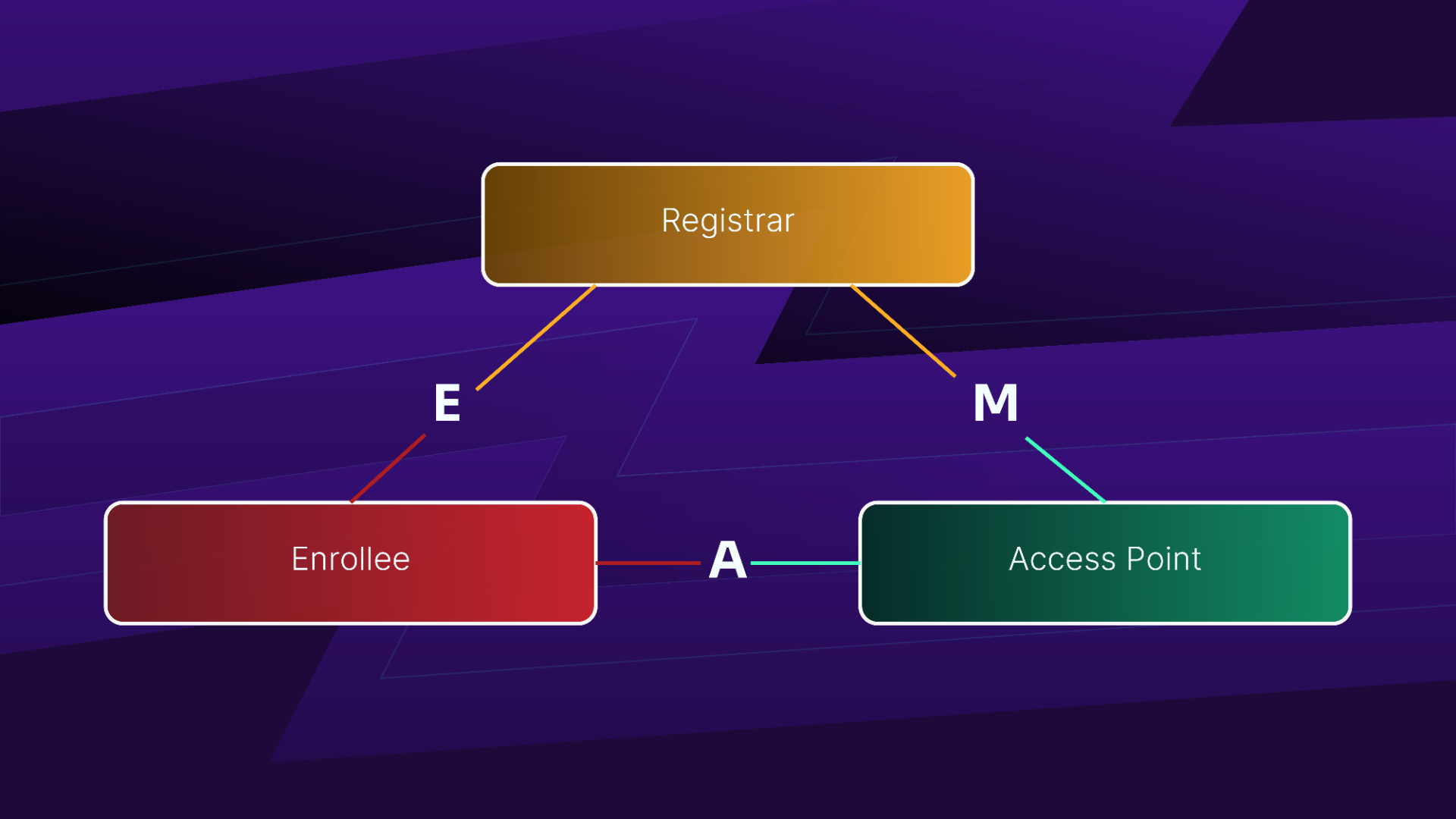
Figure 15: WPS components and interfaces
Although the Registrar often runs on the access point (known as "standalone AP" or "internal registrar"), the Registrar and AP can be distinct systems, such as a mobile device used to configure the Enrollee. The Registrar can also be located on a centralized management interface.
Even though WPS is thought to be WPA-PSK only, it can technically also be used in some cases for WPA Enterprise. In the case of a WPA-PSK network, it is possible to have one client become a registrar and configure new clients.
2.6.2. WPS Configuration Methods
A device supporting Wi-Fi Simple Configuration should always have a default PIN available (aka device password), printed on the AP or on a label affixed to it. However, it is recommended that the PIN be changeable by the end-user.
Two modes of operations are available: in-band configuration and out-of-band configuration. In-band is done via WLAN communication and out-of-band is done using any other communication channel or method, such as by using a NFC tag or USB thumbdrive.
Out-of-band can be unencrypted and has the advantage that it can be reused with multiple enrollees but if an attacker gets their hands on the media, they have the WLAN credentials. Out-of-band methods can also hold encrypted WLAN credentials. It uses the enrollee public key obtained over the WLAN channel. One last possibility is to do a Diffie-Hellman key exchange over NFC, then encrypt the credentials delivered to the NFC interface using AES.
In in-band, a Diffie-Hellman key exchange is done and authenticated using a shared secret (the device password) via manual entry or using NFC. In most cases, using a headless device, the PIN has to be 8-digit long (where the last digit is a checksum). If the device has a display, the PIN can be either 8 or 4 digits long but in this case, it has to be randomly generated.
2.6.3. WPS Protocol
The WPS protocol varies based on the different possible scenarios. We will only address the most common scenario where the enrollee uses WPS PIN on a standalone AP. Detailed protocols of other possible scenarios can be found in the Wi-Fi Simple Configuration technical specification.
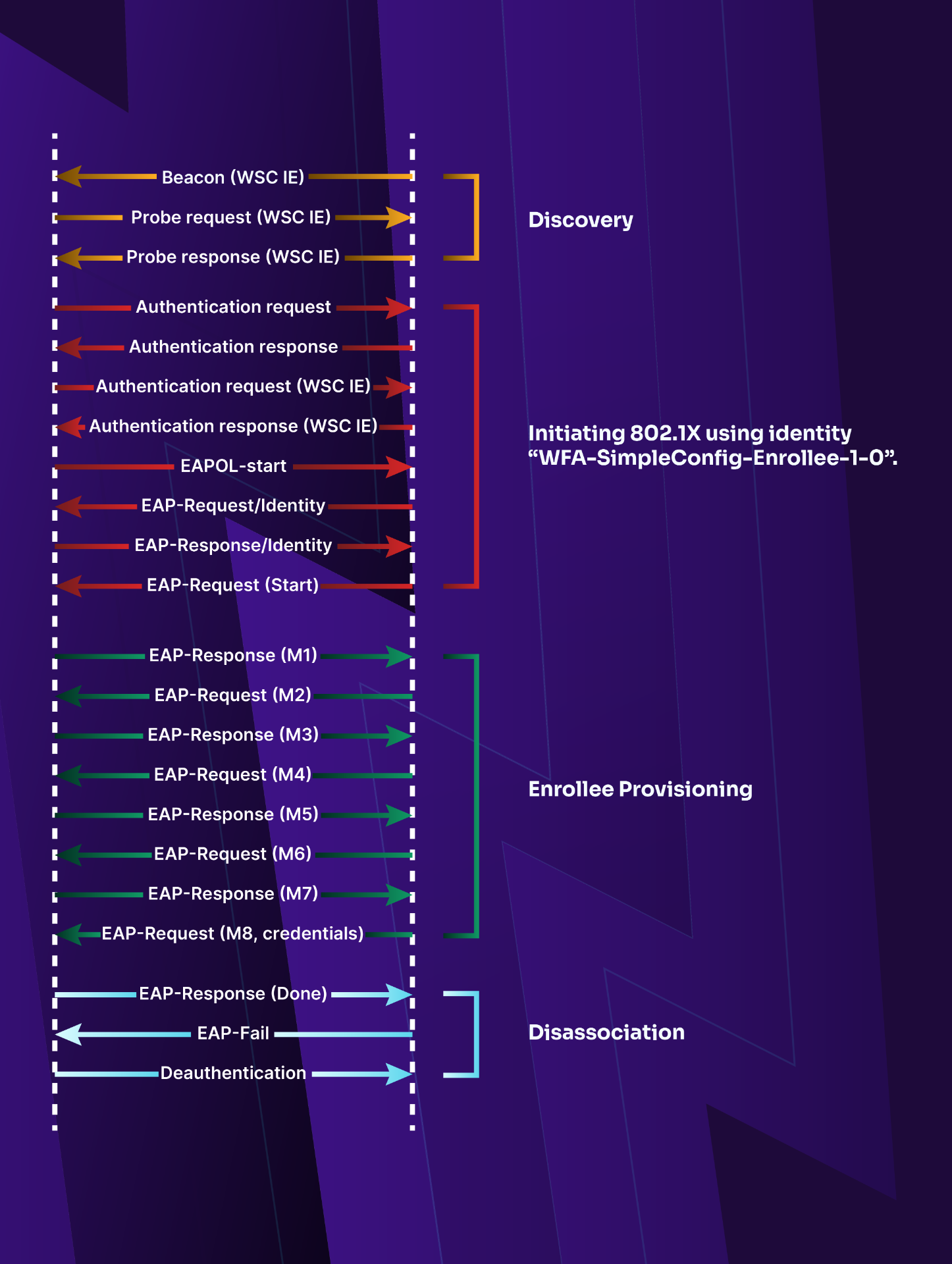
Figure 16: Setup using a standalone AP/Registrar
In Figure 16, the first step is the discovery where the enrollee queries the AP with a Wi-Fi Simple Configuration Information Element (IE) in the probe request. If it responds positively, the device will do the usual authentication and association process then proceed to initiate the 802.1X process and respond with a WFA-SimpleConfig-Enrollee-1-0 identity. The enrollee gets provisioned after the exchange of message M1 to M8. Finally, the device gets disconnected from the AP and reconnects with the credentials received earlier.
The M1 and M2 messages may be exchanged while waiting for the user to input the enrollee device password from the device in the AP interface.
When using an external registrar and/or push button, the communication between the enrollee and the AP is essentially the same as what was described above. Communication between the AP and registrar is what differs.
Once we reach M5, we know the first half of the PIN. If we receive a NACK after M6, the second half is incorrect.
2.6.4. WPS Registration Protocol Messages
The M1 to M8 EAP messages are specific to the WPS registration protocol and are created as follow:
- M1 = Version || N1 || Description || PKE
- M2 = Version || N1 || N2 || Description || PKR [ || ConfigData ] || HMACAuthKey( M1 || M2* )
- M3 = Version || N2 || E-Hash1 || E-Hash2 || HMACAuthKey( M2 || M3* )
- M4 = Version || N1 || R-Hash1 || R-Hash2 || ENCKeyWrapKey(R-S1) || HMACAuthKey( M3 || M4* )
- M5 = Version || N2 || ENCKeyWrapKey(E-S1) || HMACAuthKey( M4 || M5* )
- M6 = Version || N1 || ENCKeyWrapKey(R-S2) || HMACAuthKey( M5 || M6* )
- M7 = Version || N2|| ENCKeyWrapKey(E-S2 [||ConfigData]) || HMACAuthKey( M6 || M7* )
- M8 = Version || N1 || [ ENCKeyWrapKey(ConfigData) ] || HMACAuthKey( M7 || M8* )
The following explains the meaning of the different symbols and items used above:
- ||: concatenation of parameters to form a message
- Subscripts are used in the context of a cryptographic function such as HMACKey. In this case, it refers to the key used by that function (HMAC)
- When a message is followed by *, it is referring to the message minus its HMAC-SHA-256 value
- Version: identifies the type of Registration Protocol message
- N1 and N2: 128-bit nonces (random number generated once) generated by the Enrollee and the Registrar respectively
- Description: human-readable description of the sending device (UUID, manufacturer, model number, MAC address, etc.) and device capabilities such as supported algorithms, I/O channels, Registration Protocol role, etc. Description data is also included in 802.11 probe request and probe response messages
- PKE and PKR: Diffie-Hellman public keys of the Enrollee and Registrar, respectively. If support for other cipher suites (such as elliptic curve) is added in the future, a different protocol Version number will be used
- AuthKey: authentication key derived from the Diffie-Hellman secret gAB mod p, the nonces N1 and N2, and the Enrollee’s MAC address. If M1 and M2 are both transported over a channel that is not susceptible to man-in-the-middle attacks, the Enrollee’s device password may be omitted from the key derivation
- E-Hash1 and E-Hash2: pre-commitments made by the Enrollee to prove knowledge of the two halves of its own device password
- R-Hash1 and R-Hash2: pre-commitments made by the Registrar to prove knowledge of the two halves of the Enrollee’s device password
- ENCKeyWrapKey(...): indicates symmetric encryption of the values in parentheses using the key KeyWrapKey with the AES-CBC encryption algorithm per FIPS 197, with PKCS#5 v2.0 padding
- R-S1 and R-S2: secret 128-bit nonces that, together with R-Hash1 and R-Hash2, can be used by the Enrollee to confirm the Registrar’s knowledge of the first and second half of the Enrollee’s device password, respectively
- E-S1 and E-S2: secret 128-bit nonces that, together with E-Hash1 and E-Hash2, can be used by the Registrar to confirm the Enrollee’s knowledge of the first and second half of the Enrollee’s device password, respectively
- HMACAuthKey(...): indicates an Authenticator attribute that contains a HMAC keyed hash over the values in parentheses and using the key AuthKey. The keyed hash function is HMAC-SHA-256 per FIPS 180-2 and RFC-2104. To reduce message sizes, only 64 bits of the 256-bit HMAC output are included in the Authenticator attribute
- ConfigData: WLAN settings and credentials for the Enrollee. Additional settings for other networks and applications may also be included in ConfigData. Although it is shown here as always being encrypted, encryption is only mandatory for keys and key bindings and is optional for other configuration data. It is the sender’s decision whether or not to encrypt a given part of the ConfigData
2.7. 802.11w
While encryption protects data transmitted on the network, it is still vulnerable to Denial of Service through common attack using frames such as deauthentication or disassociation.
Also known as Protected Management Frames, 802.11w was released in July 2009. It aims to improve the Medium Access Control layer by adding integrity to some critical management frames on WPA (TKIP or CCMP) networks to prevent replay protection. It is a mandatory requirement for 802.11ac or Passpoint certification. It became part of the 802.11 standard in March 2012.
The following frames are protected:
- Disassociation
- Deauthentication
- Action frames: Block ACK (request and response), QoS Admission Control, Radio Measurement, Spectrum Management and Fast BSS Transition
- Channel switch announcement (when directed to a client)
- Security Association Query
- Protected Dual of Public Action frame
- Vendor-specific Protected
Some of the frames mentioned above are unicast, while others are multicast/broadcast. The encryption used for the unicast is the same PTK used for unicast data frames. For the multicast ones, a new Integrity Group Temporal Key (IGTK) is received during the 4-way handshake, at the same time as the GTK.
Without 802.11w, when sending a deauth, the AP or one or all clients blindly accepts it and disconnects. In most cases, the client will reconnect automatically without the user knowing, and doing a 4-way handshake. Access points do send deauthentication and disassociation from time to time as part of normal operations but these frames can also be used to attack clients.
The first scenario, it will force the client (or all clients) to disconnect and reconnect. A 4-way handshake will happen, which can later be cracked offline. It is also useful for attacks against WEP.
The second scenario is a denial of service, when the deauthentication is sustained, as it will prevent one or more clients to connect.
While most of the time, denial of service is manually done, Wireless Intrusion Prevention System sometimes have an option to "contain" an AP, for example, when the administrator has identified it as a rogue. It will automatically and immediately disconnect clients attempting to connect to the rogue. In some cases, this option can be misused.
2.7.1. Connection
PMF status is indicated in the beacon, in the RSN IE, and two bits show the settings, in the RSN capabilities.
First one, bit 6, is about PMF requirement. If set, if the client doesn't support PMF (either capable or required), it won't be able to connect.
Bit 7 indicates if the AP is PMF capable. It is automatically set when bit 6 is set. In this case, an AP will accept clients with and without PMF. Those with (capable or required), will benefit from the added protection while still allowing clients that cannot handle it as well.
When connecting, the client will have a RSN IE in its association request with its own settings for PMF.
The following table details the outcome of connection depending on the client and AP settings' for PMF:
| AP | Client | Connection | PMF |
|---|---|---|---|
| No | No | Yes | No |
| No | Capable | Yes | No |
| No | Required | No | |
| Capable | No | Yes | No |
| Capable | Capable | Yes | Yes |
| Capable | Required | Yes | Yes |
| Required | No | No | |
| Required | Capable | Yes | Yes |
| Required | Required | Yes | Yes |
In case a client or AP has invalid settings, no connection should occur. When a station does and tries to associate to an AP, association will be rejected.
2.7.2. Security Association Teardown Protection
This mechanism prevents attacks using unprotected association, disassociation or deauthentication frames from tearing down a connection.
A client who's lost the key will try to associate again, using an unprotected association frame. The AP seeing that, will decline the authentication asking the client to try again later, usually 10-20 seconds later. In the meantime, the AP will send a SA Query frame. Since the client doesn't have the key anymore, it isn't able to respond, and thus the AP will send a protected disassociation/deauthentication and clear the encryption keys. When it is time to associate again, it will work. In the event an attacker tries to associate, while the real client is still there, it will get that same "come back in XXX" association response. The real client, still having the encryption keys, is able to respond to the SA Query and thus nothing happens, it doesn't get disconnected.
On the other side, when the AP loses the keys, at some point, the associated client will send a encrypted data frame to the AP, since it has the encryption keys. The AP, not having the client in its list anymore (or just not the keys anymore), will send a deauthentication/disassociation frame to the client (most likely a frame with reason code 6 or 7: class 2 frame received from nonauthenticated STA or class 3 frame received from nonassociated STA). The client will then send a protected SA Query to the AP, to make sure it is the legitimate access point. Since the AP doesn't have the keys, it isn't able to answer within the alloted time. The connection will be torn down and it will have to reconnect. In the event it is a fake or rogue AP, since both have the keys, the real AP will answer the SA Query and the connection will remain.
There are a few scenarios where a client or an AP can lose the keys and they are handled with this mechanism. It can happen in the event of a hardware or software issue and the device/connection is reset. Such as a firmware issue where the device crashes and is reset, or power went down for a second, thus resetting the device.
Note: A device only transmits when it needs to, and there may be periods of time when there is no traffic whatsoever between the AP and a specific client.
2.8. Wrapping Up
In this module, we reviewed some basic details about the various Wi-Fi encryption methods that are available.